
initialcommit-com/git-dummy
initialcommit-com/git-dummy has 39 GitHub stars and 9 forks. GitHot measured 0 stars in 24 hours. Last checked 2026-11-15 05:09 UTC. Last push 2026-10-05.
Crecimiento de estrellas medido
- in 24h
- 0
- in 7 days
- Recopilando historial
- in 15 days
- Recopilando historial
- in 1 month
- Recopilando historial
Cambios netos en períodos que se solapan, no totales diarios. Los datos no disponibles se dejan en blanco. Las estrellas indican interés, no calidad.
Acerca de
Git repositories on demand: generate the exact commit history and working-tree state you need for tests, demos, tutorials, learning, and practice, without touching real data.
Herramientas de desarrolloREADME.md
Originalgit-dummy



Git repositories on demand: generate the exact history, remote, and working-tree state you need for tests, demos, tutorials, and practice, without touching real data.
- Build any repo shape in one command: linear, divergent, commits, branches, merges, tags, a stopped merge conflict, untracked files, modified files, staged files, stashes, a remote that is ahead or behind, a detached HEAD, worktrees, and submodules.
- Start from a named scenario for the situations people actually get into, like a conflicted merge, a diverged remote, rebase-ready, or a dirty working tree.
- Make it look real, and reproducible: real-looking files, commit messages, and authors, persistent object ID's by specifying a starting seed, and large histories fast through
git fast-import. - Use it anywhere: a one-liner in the terminal, a Python API that returns the paths, ids, and states it made, a recipe file, or a plain shell script of
gitcommands for machines without Python. - Agentic: your agents can use it as a part of their testing flows if they depend on Git repo structure / state.
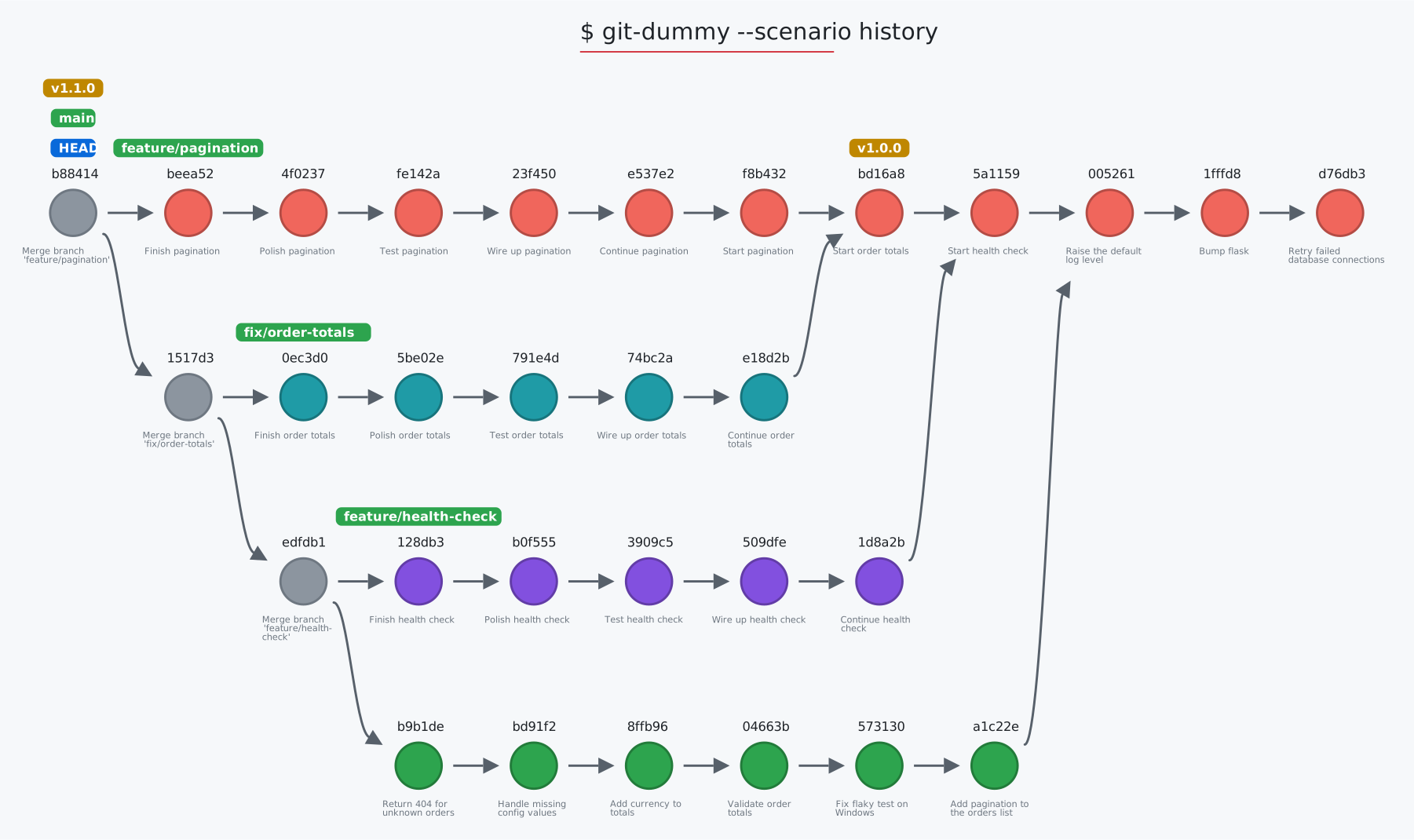
The graph above is the history scenario, drawn by git-sim.
Requirements
- Python 3.8 or later
- Git 2.28 or later on your PATH: git-dummy runs your own
git, and needs nothing else
Get started
1. Install git-dummy
$ pip install git-dummy
Or pipx install git-dummy, or uv tool install git-dummy.
2. Build a repo: in the folder you want it in, ask for the shape
$ git-dummy --commits=10 --branches=4 --merge=1
This creates a repo called dummy by default (override with --name=<name>), in the current folder, with 4 branches of up to 10 commits each, and branch1 merged back into main.
Run git-dummy -h to list all options.
3. Start from a scenario: the situation you want to practice, test, or demo
$ git-dummy --scenario merge-conflict       # a merge stopped on a conflict, markers in the file
$ git-dummy --scenario diverged-remote      # local and remote both moved on: push is rejected, pull merges
$ git-dummy --list-scenarios                # list all available scenarios
4. Make it look real: like a small web service with real-looking files, messages, and authors, consistent across generations via the same seed
$ git-dummy --style realistic --seed 42 --commits 8 --branches 2 --remote --behind 2 --ahead 1
5. Build one in a test: the Python API returns everything git-dummy made
from git_dummy import build

repo = build(scenario="rebase-ready", git_dir=tmp_path)
repo["branches"]["main"]   # the tip of main
6. See it: draw the repo with git-sim, and visually simulate Git commands on it
$ git-dummy --scenario orders
$ cd orders
$ git-sim log --all
Scenarios
git-dummy --scenario <name> starts from one of these, and specifying additional options (like --commits or --branches overrides the scenario's defaults. List all scenarios with git-dummy --list-scenarios
| Scenario | What you get |
|---|---|
clean |
A tidy linear history on main. |
history |
Twelve commits on main, three merged topic branches with their own commits, two tags: for log and graph demos. |
rebase-ready |
A feature branch diverged from main with commits on both, checked out on the feature. |
merge-conflict |
A merge stopped on a conflict, markers in the file. |
messy-worktree |
Staged, modified, and untracked files plus a stash. |
ahead-of-remote |
Two local commits not pushed yet. |
behind-remote |
Two commits on the remote not fetched yet. |
diverged-remote |
Both sides moved on: push rejected, pull merges, force-push overwrites. |
detached-head |
HEAD detached at an older commit. |
release |
Tagged releases on main and a hotfix branch off the last one. |
orphan |
A gh-pages branch with its own root. |
criss-cross |
Two branches that each merged the other. |
octopus |
Three topic branches merged into main in one commit. |
submodule |
A submodule pinned to a small library repo built beside the repo. |
worktree |
A linked worktree beside the repo, checked out on a branch. |
reflog |
A few HEAD moves so the reflog has entries. |
large |
Two thousand commits on five branches, through fast-import. |
orders |
The sample app git-sim's README draws: two topic branches, a tag, a remote, something in every working-tree zone, a stash, and a reflog. Build it, then run the README's git-sim commands inside it. |
orders-behind |
The same app with a remote two commits ahead, for fetch and pull. |
Python API
from git_dummy import build, Spec

r = build(commits=6, branches=2, style="realistic", seed=7, remote=True, behind=2, git_dir="/tmp")
r["path"]                  # where it is
r["branches"]["main"]      # tip ids
r["remote"]["path"]        # the bare remote beside it
r["worktree"]["staged"]    # what is staged, modified, untracked, in conflict
r["commits"]               # every commit: sha, parents, author, message

build(scenario="merge-conflict", git_dir="/tmp", name="cx")
build(Spec.from_recipe("repo.yaml"))
git_dummy.script(spec) returns the shell script, and git_dummy.clean(path) removes a repo git-dummy made. Use it to generate repos for functional tests of Git tools, with the exact shape a test needs.
Recipes, scripts, and cleanup
A recipe file holds the same options as the command line, in JSON or YAML. --print-script writes the plain git commands that would build the repo instead of actually doing it, for a machine without Python or a tutorial's appendix:
$ cat repo.json
{"scenario": "rebase-ready", "name": "practice", "commits": 8}
$ git-dummy --from repo.json
$ git-dummy --from repo.json --print-script > build-practice.sh
--json prints a description of what was built, and --clean removes a repo git-dummy made, and nothing else.
What gets created where
By default git-dummy creates a project folder called dummy and initializes the dummy Git repo with .git/ folder in there. Override that with by specifying --git-dir and/or --name, which will create the repo at <git-dir>/<name> (or put the .git/ folder in the current directory with --no-subdir). Everything else git-dummy makes sits beside it and is listed in the repo's .git/git-dummy.json, which is what --clean reads:
<name>.git: the bare remote (--remote)<name>-<branch>: a linked worktree (--worktree)<name>.lib: the library a submodule points at (--submodule)
Every repo has at least one branch, main. Other branches are named branch1, branch2, and so on (or given with --branch-names, or realistic names with --style realistic). Each branch diverges from main at --diverge-at if given, or else at a randomly chosen commit, and is at most --commits long. --merge=<x>,<y> picks which branches are merged back into main.
Options
$ git-dummy [options]
The ones you'll reach for most:
--name <name>, --git-dir <path>: what to call the repo, and where to put it--commits <number>, --branches <number>, --merge <x>,<y>: the shape of the history--scenario <name>: start from a named scenario--style realistic, --seed <number>: real-looking content, the same every time--remote, --ahead <number>, --behind <number>: a remote, and how far apart they are--modified, --staged, --untracked, --stashes, --conflict: something in the working tree
Every option can also be set with an environment variable named git_dummy_ plus the option, such as git_dummy_git_dir=~/Desktop or git_dummy_style=realistic. Specifying an option on the command line overrides the environment variable.
All options
--name: The name of the dummy Git repo, defaults to "dummy".--commits: The number of commits to populate in the dummy Git repo, defaults to 5.--branches: The number of branches to generate in the dummy Git repo, defaults to 1.--diverge-at: The commit number at which branches diverge from main.--merge: A comma separated list of branch postfix ids to merge back into main.--git-dir: The path at which to store the dummy Git repo, defaults to current directory.--no-subdir: Initialize the dummy Git repo in the current directory instead of in a subdirectory.--constant-sha: Use constant values for commit author, email, and commit date parameters to yield consistent sha1 values across git-dummy runs.--allow-nested: Allow dummy repo creation within an existing Git repo, as long as it's not at the level of an existing .git/ folder.--style: plain (the classic main.1 files and "Dummy commit #1" messages, the default) or realistic.--seed: Seed every random choice and fix the commit dates, so the same seed gives the same repository.--branch-names: Comma separated names for the branches other than main.--tags: Comma separated tags to place along main, the last on its tip.--files: Extra files added by every commit on main, for large trees.--octopus: Merge the unmerged branches into main in one octopus merge.--criss-cross: Make main and the first branch each merge the other.--orphan-branch: Add a branch with its own root and a single page.--fast / --no-fast: Write the history with git fast-import (default: only when it is large, above a few hundred commits).--remote: Create a bare remote beside the repo (<name>.git), add it as origin by the relative path ../<name>.git, push everything to it, and track it. Git writes the remote's URL into messages like "Merge branch 'main' of ../", so no path from your machine ends up in the history.--ahead: Commits on local main the remote does not have.--behind: Commits the remote gained since the last fetch.--modified, --staged, --untracked: Tracked files with uncommitted edits, edits staged for the next commit, and new files.--conflict: Leave a merge stopped on a conflict.--stashes: Entries on the stash.--reflog: Extra HEAD moves so the reflog has entries.--detached: Leave HEAD detached at the commit before the tip.--checkout: The branch to leave checked out.--worktree: Add a linked worktree beside the repo, checked out on this branch.--submodule: Add a submodule pinned to a small library repo built beside this one.--scenario, --list-scenarios: Start from a named scenario, or list them.--from: Read the options from a JSON or YAML recipe file (YAML needs pip install git-dummy[yaml]).--json: Print what was built as JSON.--print-script: Print the plain git commands that would build the repo, and build nothing.--clean: Remove the dummy repo at the target path and what git-dummy made beside it.
Installation
$ pip install git-dummy
Or pipx install git-dummy, or uv tool install git-dummy. YAML recipe files need PyYAML, which pip install "git-dummy[yaml]" adds. JSON recipes always work.
Learn more
Learn more on the git-dummy project page. git-dummy is what git-sim uses for its demos, its tests, and the graphs in its README, and git-dummy powers all Git simulations on the Initial Commit website including:
- The animated Git cheat sheet: pick the commands you use and print your own sheet, each with an animation of what it does to your repo
- The visual Git command reference: every command git-sim simulates, each drawn on a sample repo
- The Git command articles: one page per command, with interactive before-and-after simulations
Support git-dummy
git-dummy is free and open-source software. Your support helps me work on it, and other Git projects, full time:
Authors
Jacob Stopak - on behalf of Initial Commit