
freeok/so-novel
freeok/so-novel has 9,101 GitHub stars and 769 forks. GitHot measured +16 stars in 24 hours, +86 in 7 days, and +163 in 15 days. Last checked 2026-11-21 00:55 UTC. Last push 2026-10-26.
Crecimiento de estrellas medido
- in 24h
- +16
- in 7 days
- +86
- in 15 days
- +163
- in 1 month
- Recopilando historial
Cambios netos en períodos que se solapan, no totales diarios. Los datos no disponibles se dejan en blanco. Las estrellas indican interés, no calidad.
Acerca de
Descarga de novelas | Descarga de novelas web | Novelas en línea
Herramientas de desarrolloREADME.md
Original
So Novel


概述
So Novel 是一款通用的网页内容处理与导出工具,它致力于帮助用户高效地从网页中提取结构化信息,并将其灵活导出为 EPUB、TXT、PDF 等多种标准电子文档格式。适用于学习采集、格式转换、电子书制作等场景。
预览
点击查看图片
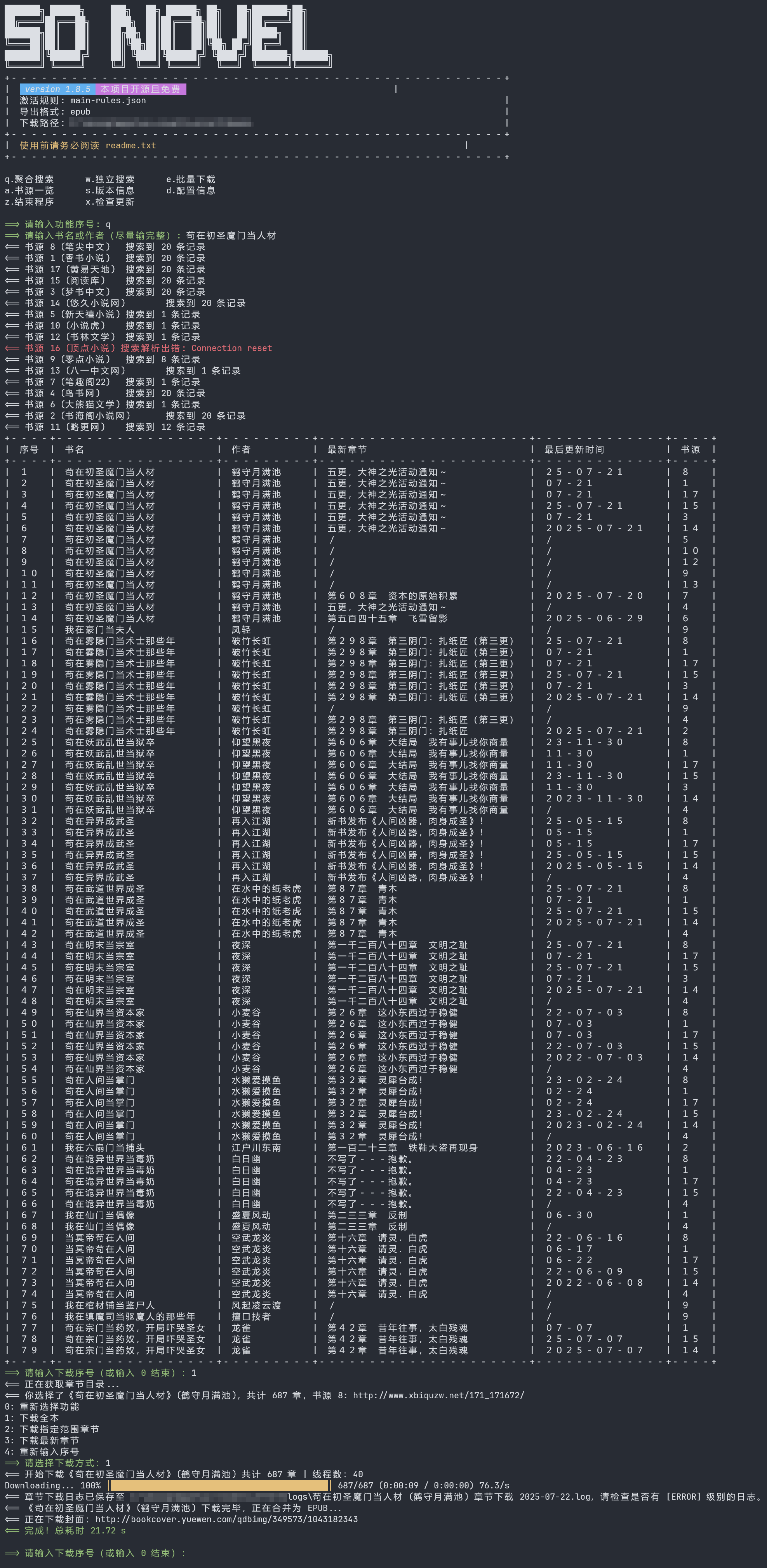
TUI 预览 (Text-based User Interface)
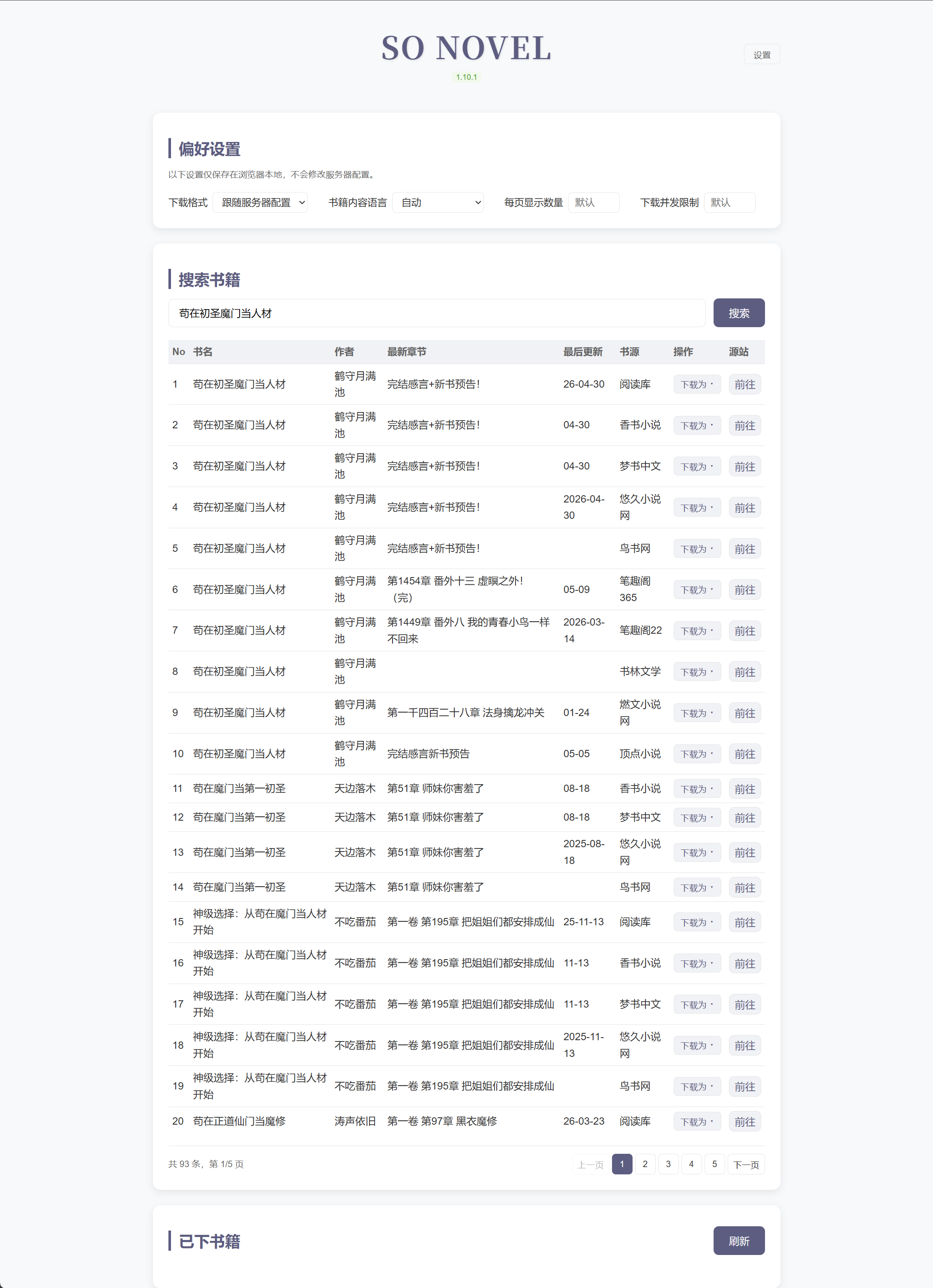
WebUI 预览 (网页版)
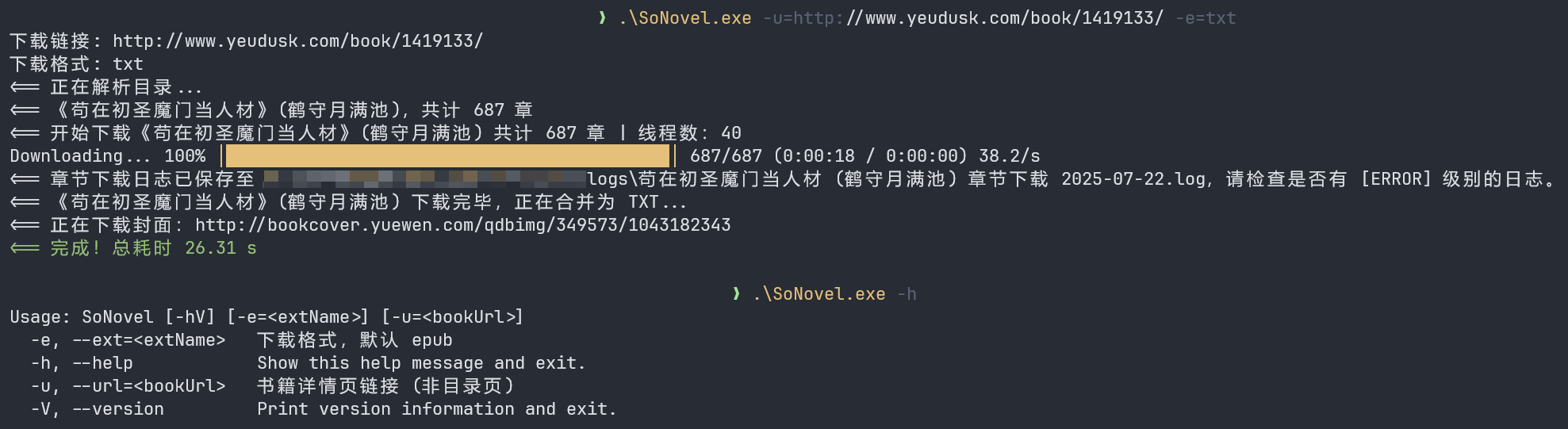
CLI 预览 (Command Line Interface)
安装
📦 手动下载压缩包
https://github.com/freeok/so-novel/releases
🪟 Windows
1. PowerShell
# powershell
irm https://raw.githubusercontent.com/freeok/so-novel/main/bin/windows-install.ps1 | iex
2. CMD (命令提示符)
powershell -NoProfile -ExecutionPolicy Bypass -Command "irm https://raw.githubusercontent.com/freeok/so-novel/main/bin/windows-install.ps1 | iex"
🐧 Linux
bash <(curl -sSL https://raw.githubusercontent.com/freeok/so-novel/main/bin/linux-install.sh)
🍺 Homebrew
brew tap ownia/homebrew-ownia
# https://docs.brew.sh/Tap-Trust#why-tap-trust-exists
brew trust --formula ownia/homebrew-ownia/so-novel
brew install so-novel
🍨 Scoop
scoop bucket add freeok https://github.com/freeok/scoop-bucket
scoop install freeok/so-novel
🐳 Docker
方式 1: 脚本一键安装
curl -sSL https://raw.githubusercontent.com/freeok/so-novel/main/bin/docker-install.sh | bash
方式 2: Docker Compose (NAS 首选)
services:
  sonovel:
    image: ghcr.io/freeok/sonovel:latest
    container_name: sonovel
    ports:
      - "7765:7765"
    environment:
      JAVA_OPTS: "-Dmode=web"
    volumes:
      - sonovel_data:/sonovel
    restart: unless-stopped

volumes:
  sonovel_data:
方式 3: Docker Run
# 如需挂载,请提前准备好 config.ini 文件、rules 目录
docker run -d \
  --name sonovel \
  -v /sonovel/config.ini:/sonovel/config.ini \
  -v /sonovel/rules:/sonovel/rules \
  -v /sonovel/downloads:/sonovel/downloads \
  -p 7765:7765 \
  -e JAVA_OPTS='-Dmode=web' \
  ghcr.io/freeok/sonovel:latest
从源码构建 Docker 镜像
# 确保已安装 git、jdk 21、maven
sudo apt update
sudo apt install -y git
sudo apt install -y openjdk-21-jdk
sudo apt install -y maven

# 验证安装
git -v
javac -version
mvn -v

# 构建项目
git clone https://github.com/freeok/so-novel.git && cd so-novel
# arch: [x64|arm64]
sh bin/release-linux.sh [arch]

# 构建 Docker 镜像
cp -r target/sonovel-linux_[arch]/{app.jar,config.ini,rules} .
docker build -t sonovel .
[!TIP]
为获得最佳阅读体验,建议使用以下电子书阅读器:
桌面端
移动端
如需转换为其它电子书格式,可使用:
修复 WPS、掌阅等软件无法打开 so-novel 下载的 EPUB:https://github.com/freeok/so-novel/discussions/199
自定义 JVM 系统属性
| 参数 | 说明 | 默认值 |
|---|---|---|
| -Dmode | 启动模式,可选值:tui|cli|web | tui |
| -Dconfig.file | 配置文件路径 | ./config.ini |
用法
[!NOTE]
Windows 修改 sonovel.l4j.ini
Linux 修改 run-linux.sh
macOS 修改 run-macos.sh
使用本地 JDK / JRE 启动
如果你不想使用内置 JRE(runtime 目录),可以通过本地 JDK / JRE 启动程序
Windows 使用脚本 start-custom-jre.cmd:
REM --------------------------------------------------
REM 高级用户使用自定义 JRE 启动程序
REM 将 "your_path\java.exe" 替换为你的 JRE 路径,例如:
REM "C:\Java\jdk-21\bin\java.exe"
REM --------------------------------------------------
@echo off
your_path\java.exe ^
  -XX:+UseZGC ^
  -XX:+ZGenerational ^
  -Dconfig.file=config.ini ^
  -Dmode=tui ^
  -Dfile.encoding=GBK|Big5 ^
  -jar app.jar
Linux / macOS:run-linux.sh / run-macos.sh 修改 java 路径
常见问题
https://github.com/freeok/so-novel/issues?q=label%3A%22usage%20question%22
讨论
https://github.com/freeok/so-novel/discussions?discussions_q=
支持 & 赞助
如果觉得有所帮助,欢迎扫码赞助☕、点击项目主页顶部的⭐Star 按钮支持!
🚀这将是我们持续更新的动力源泉!同时,你也能第一时间获取到最新的更新动态。💡❤️
| 支付宝赞助 | 微信赞助 |
|---|---|
 |
 |
免责声明
在使用本工具前,请务必仔细阅读我们的法律免责声明。使用本工具即表示您已阅读、理解并同意遵守所有条款。