
e-c-k-e-r/vall-e
e-c-k-e-r/vall-e has 88 GitHub stars and 6 forks. GitHot measured 0 stars in 24 hours and 0 in 7 days. Last checked 2026-11-22 09:11 UTC. Last push 2026-11-04.
Crecimiento de estrellas medido
- in 24h
- 0
- in 7 days
- 0
- in 15 days
- Recopilando historial
- in 1 month
- Recopilando historial
Cambios netos en períodos que se solapan, no totales diarios. Los datos no disponibles se dejan en blanco. Las estrellas indican interés, no calidad.
Acerca de
An unofficial PyTorch implementation of VALL-E
Aprendizaje automáticoREADME.md
Original
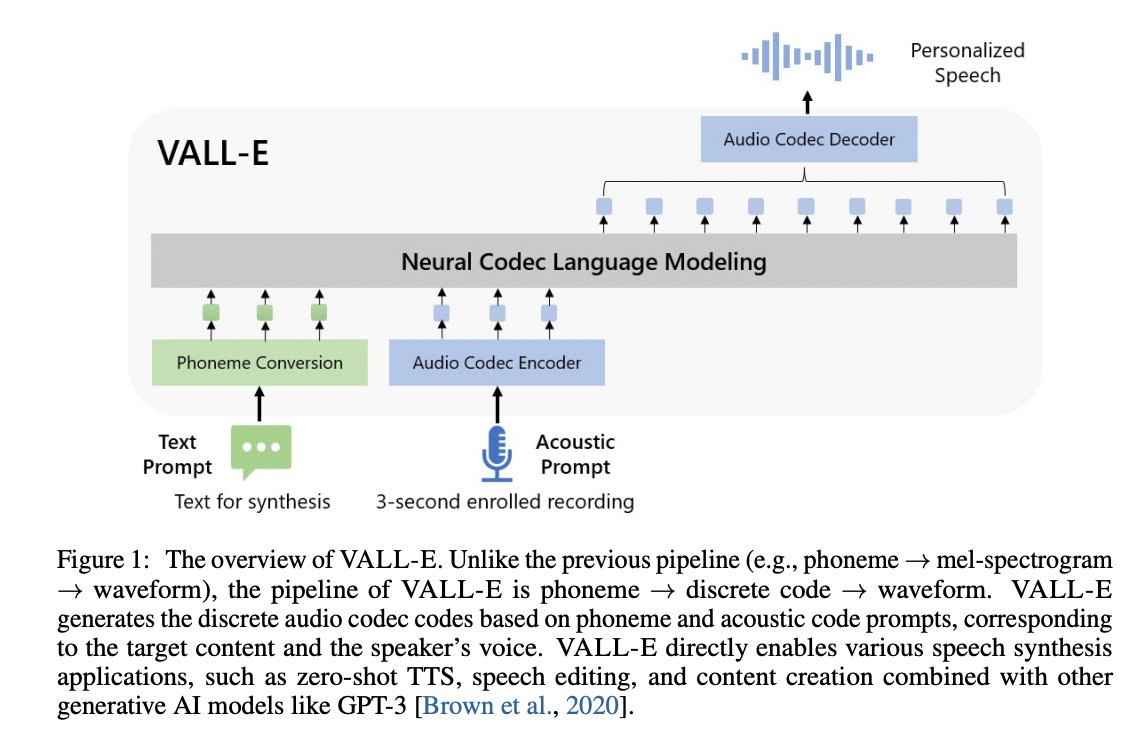
VALL'E
Zero-shot text-to-speech at 44.1 kHz: give it text and a few seconds of someone's voice, and it speaks the text in that voice. Multilingual (English, French, German, Japanese, Chinese, Korean).
This is the third design of the project ("v3"). Audio is NVIDIA's 44.1 kHz FSQ codec,
read and generated as continuous values rather than tokens: a transformer over [text][voice prompt][target] and a
flow-matching head that generates each position's audio values jointly, filling the target in by masked generation
(docs/model.md). The EnCodec models and the earlier architectures are in the v2-final tag.
Results
On a frozen 237-item evaluation set of unseen speakers (docs/eval.md):
| WER / CER | Speaker similarity | |
|---|---|---|
| real recordings (the ceiling) | 7.3% | 0.717 |
| v3 | 7.4% | 0.722 |
English: 3.9% WER, similarity 0.686. 225M parameters, trained on ~16k hours (docs/train.md).
Requirements
A PyTorch environment, and espeak-ng for phonemizing text (Linux: your
package manager; Windows: the installer, and possibly PHONEMIZER_ESPEAK_LIBRARY pointing at libespeak-ng.dll).
pip install -e . # [ja] for Japanese text, [eval] for number expansion when scoring
Use
python -m vall_e.tts --text "Hello there." --prompt voice.wav --out out.wav
from vall_e.tts import TTS
tts = TTS()   # the default model, downloaded to data/models/ on first use; or TTS("<checkpoint or export>")
wav = tts.generate("Hello there.", prompt="voice.wav", language="en")   # [1, samples] at 44.1 kHz
Or a web page (pip install -e .[webui]):
python -m vall_e.webui [--ckpt <checkpoint or export>] [--models training] [--listen 0.0.0.0] [--share]
TTS also has continue_speech(audio, said, new) (generate what follows a recording) and edit(audio, text, start, end)
(re-speak a stretch of it).
The length is predicted unless --duration is given; long texts are generated sentence by sentence; --prompt can be
left out for an unconditioned voice. Defaults: 25 steps, guidance 6.0, speaker guidance 2.0.
Layout
vall_e/model.py |
the model, the flow head, masked and AR generation |
vall_e/tts.py, vall_e/webui.py |
inference: text + prompt -> audio, and its web page |
vall_e/train.py, vall_e/data.py |
training, batching |
vall_e/store.py, vall_e/noisy.py |
the data store, and baked noisy prompts (docs/data.md) |
vall_e/evalset.py |
the evaluation set: WER / CER, speaker similarity, paired comparisons |
vall_e/fsq.py, vall_e/emb/ |
the codec's quantizer, the codec, phonemizer, ASR and speaker models |
vall_e/export.py |
release exports (fp16 safetensors, config in the metadata) and the default model download |
scripts/ |
recipe.sh (how the model was trained), train.sh, evaluate.sh, textuse-gate.sh |
Explorar proyectos relacionados
Cargando…