
drolosoft/cmux-resurrect
drolosoft/cmux-resurrect has 86 GitHub stars and 6 forks. Star changes are not measured yet. Last checked 2026-11-14 04:44 UTC. Last push 2026-11-12.
Crecimiento de estrellas medido
- in 24h
- Recopilando historial
- in 7 days
- Recopilando historial
- in 15 days
- Recopilando historial
- in 1 month
- Recopilando historial
Cambios netos en períodos que se solapan, no totales diarios. Los datos no disponibles se dejan en blanco. Las estrellas indican interés, no calidad.
Acerca de
🔄✨🖥️ Session persistence for cmux and Ghostty — save, restore, and manage your terminal workspaces. Never lose your layout again.
Herramientas de desarrolloREADME.md
Original
crex (cmux-resurrect)


Design, manage, and automate terminal workspaces — for cmux and Ghostty.
Save layouts by name. Restore them anytime. Switch between them in seconds. Resume AI coding sessions mid-conversation. Launch workspaces from Alfred. 🐦🔥

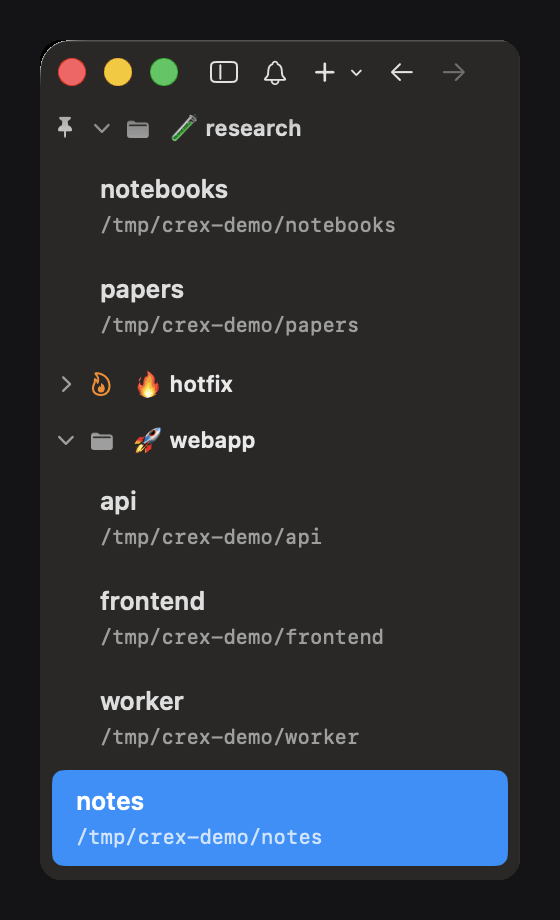
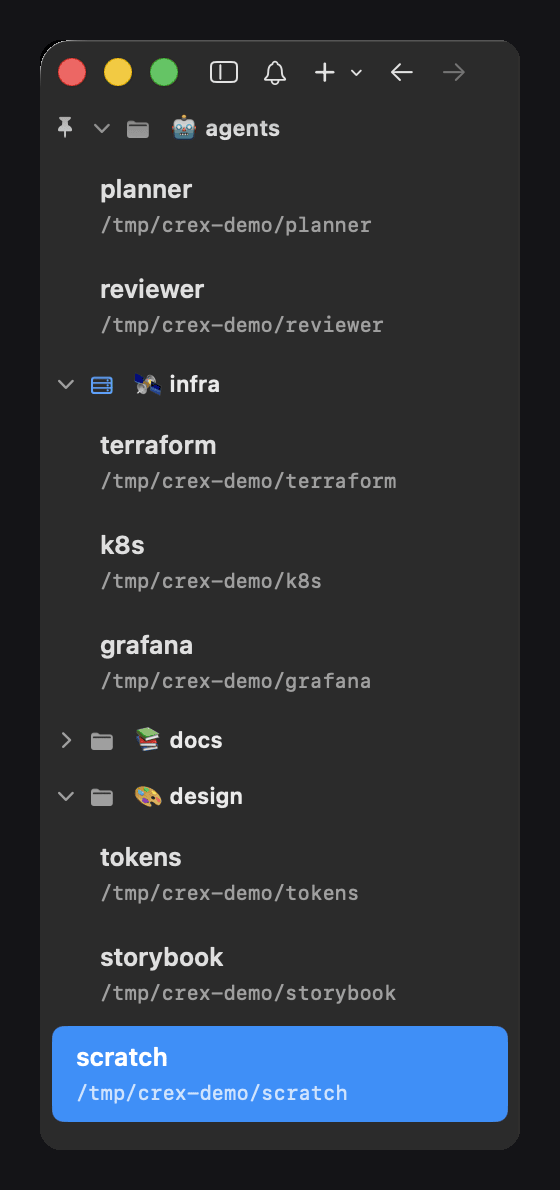
🗂️ Workspace Groups
On cmux, a restore brings the sidebar back exactly as it was: group names, emojis, order, and each group's state (collapsed, pinned, colour, icon). The layout format is in Workspace Groups: layout format.
Features
💾 Save & Restore 📦 16 Templates 📝 Markdown Blueprints |
🤖 AI Auto-Detection 🔍 Alfred Integration NEW ⚡ Auto-Accept NEW |
Quick Start
brew install drolosoft/tap/crex       # install
crex setup                            # first-run wizard (ships a demo layout)
crex restore demo                     # try the bundled example — safe anywhere
crex save my-day                      # snapshot your layout
crex restore my-day                   # bring it all back
crex pop                              # instant workspace picker (Ctrl+G)

Also available via
go install github.com/drolosoft/cmux-resurrect/cmd/crex@latest. See Building.
Instant Workspace Picker
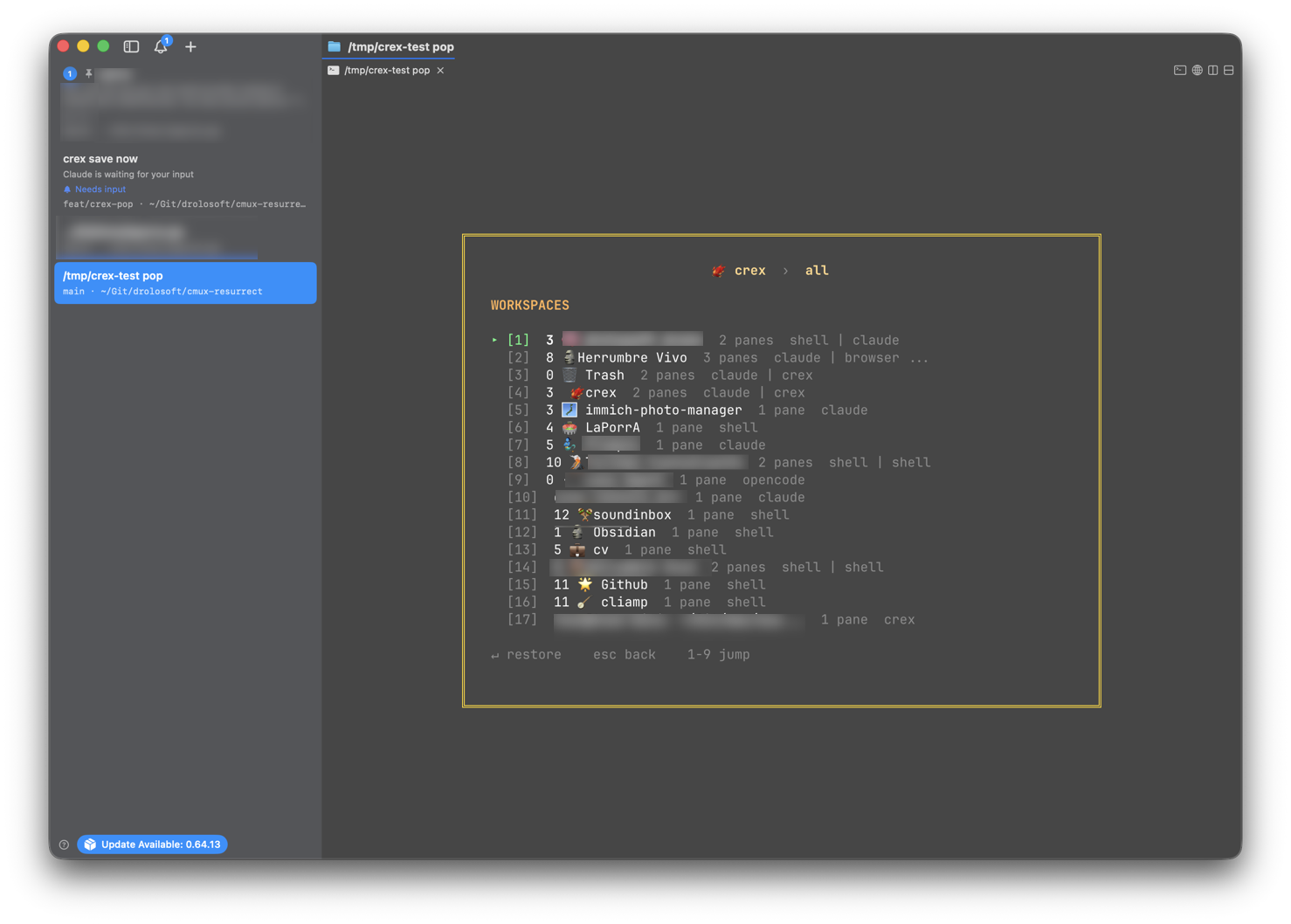
Type crex pop or hit Ctrl+G — a floating picker with fuzzy search across all layouts, templates, and individual workspaces.
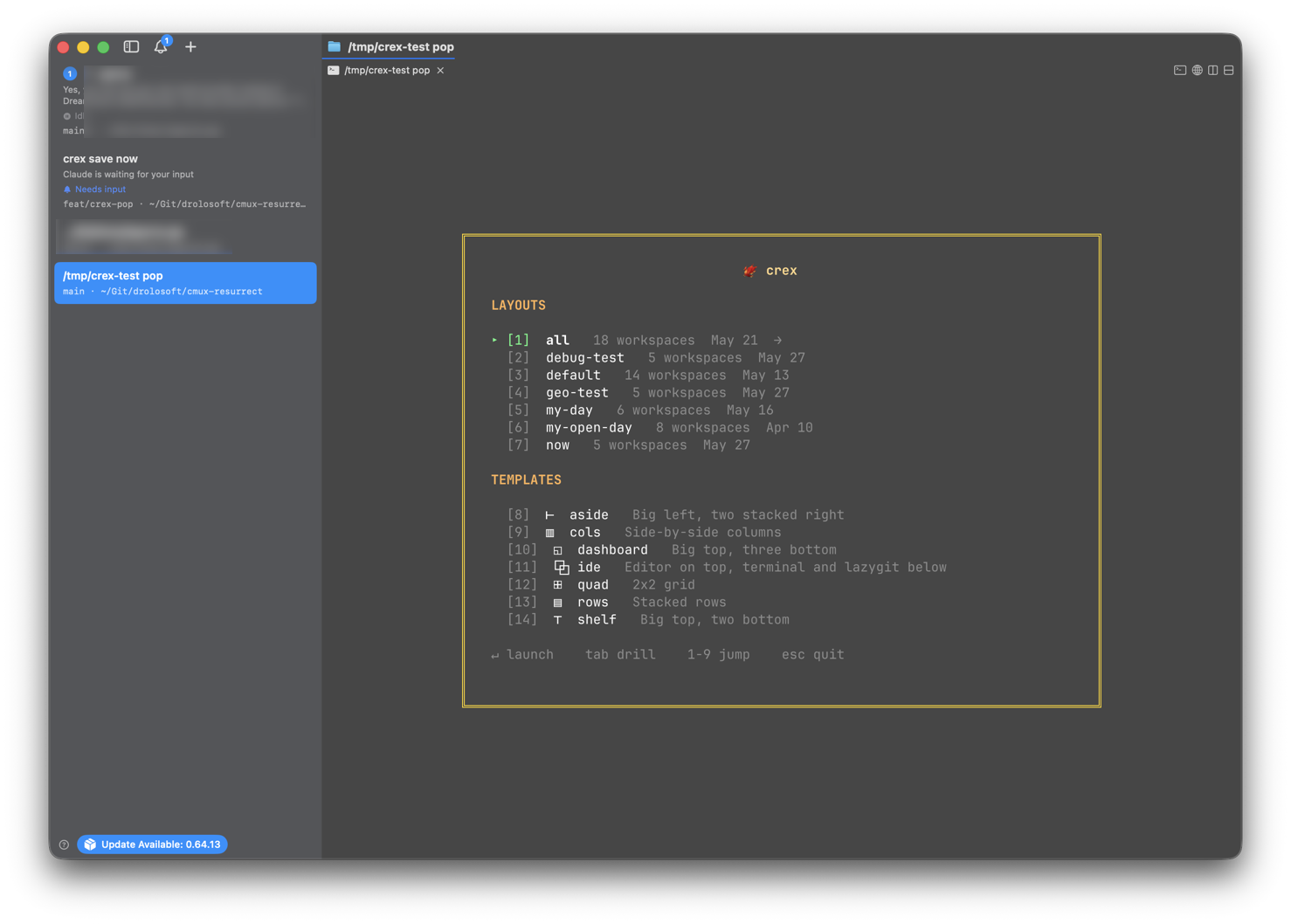
Tab into any layout to browse its workspaces:
Alfred Integration
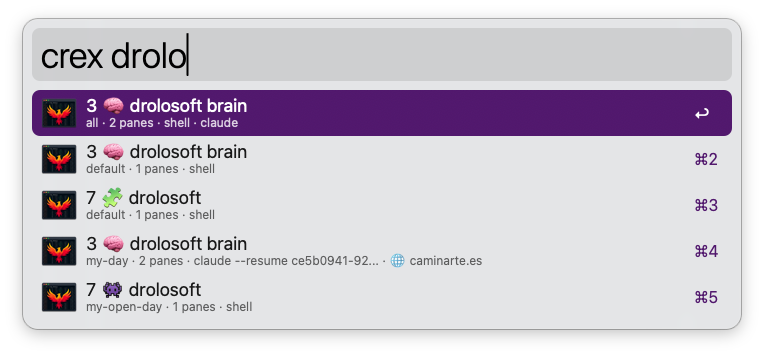
Search and restore workspaces directly from Alfred. Type crex + your query — every saved workspace is searchable by name.
| Key | Action |
|---|---|
| Enter | Restore workspace |
| Cmd+Enter | Restore full layout |
| Alt+Enter | Show layout details |
| Ctrl+Enter | Open TOML file |
Works with both cmux and Ghostty. See Alfred setup guide for installation.
One Command, Full IDE
crex template use ide

16 built-in templates — from simple splits to monitoring dashboards. See the Template Gallery.
AI Session Resume
crex save detects running AI sessions and captures their session IDs. On restore, each resumes exactly where you left off — per pane and per tab, so a workspace holding one tab per git worktree comes back with every tab on its own conversation.
crex❯ save my-day

📦 my-day
   7 🧩 drolosoft 📌
   ├── claude --resume 90d6d97b... ★
   └── →right 🌐 https://drolosoft.com/

   🚀 Homepage 📌
   ├── npm run dev
   ├── →right nvim CLAUDE.md ★
   └── →right 🌐 http://localhost:3000/
24 tools supported: Claude Code, OpenCode, Codex, Amp, Gemini CLI, Copilot, Grok, Cursor, Aider, and more. Any foreground process (npm, nvim, htop) is also detected and restored.
And it works both ways — crex skill install teaches Claude Code and Codex to drive crex themselves: snapshot before risky changes, restore layouts non-interactively, resume sessions. See crex skill.
Configure auto-accept to skip permission prompts on restore — agents start in autonomous mode automatically.
Interactive Shell
crex tui — a REPL with browse mode, numbered items, history, and tab completion.

Workspace Groups: layout format
On cmux, crex save also captures the sidebar groups: each group's name, its members in sidebar order, which workspace is the group header (the anchor), and whether the group is collapsed or pinned, with its colour and icon. crex restore rebuilds the groups and puts each workspace back in its own.
In the layout file (~/.config/crex/layouts/<name>.toml), each group is a [[group]] table and each member workspace names its group:
[[group]]
name = 'backend'
collapsed = false
pinned = true
color = '#FF9500'   # "#RRGGBB", omit for the cmux default
icon = 'flame'      # SF Symbol name, omit for no icon

[[workspace]]
title = 'api'
cwd = '~/src/api'
index = 0
group = 'backend'
group_anchor = true  # this workspace is the group header

[[workspace.pane]]
type = 'terminal'

[[workspace]]
title = 'worker'
cwd = '~/src/worker'
index = 1
group = 'backend'

[[workspace.pane]]
type = 'terminal'
A workspace without group stays outside any group. Layouts saved before groups existed restore as before, and older crex versions ignore these fields. Ghostty has no groups: the workspaces come back loose, with a warning.
Supported Backends
| Backend | Status | Detection |
|---|---|---|
| cmux | Full support | Auto-detected via CMUX_SOCKET_PATH, verified alive (falls back to a running Ghostty if the socket is dead) |
| Ghostty | Full support | Auto-detected when running |
macOS only. Both backends auto-detected — same commands, same templates, same Blueprints. Per-pane working directories work on both; exact split geometry is cmux-only for now (backend differences).
vs cmux native restore
| cmux native | crex | |
|---|---|---|
| 🔄 | Restores last session on relaunch | Named layout library — switch between saved layouts |
| 📐 | No templates | 16 built-in templates |
| 📝 | JSON snapshots | Markdown Blueprints — Obsidian-compatible |
| 🔍 | AI tools via hooks | Any foreground process — npm, vim, htop, all detected |
| ⚡ | Automatic on relaunch | On-demand — filter, dry-run, restore specific workspaces |
| ⏱️ | Saves on quit | Watch daemon — background auto-save |
Documentation
| Commands | Full command reference |
| Templates | 16 built-in templates with diagrams |
| Blueprints | Markdown workspace definitions |
| Alfred | Alfred workflow setup |
| AI Tools | Supported AI tools, their flags and how far each is tested |
| Configuration | config.toml, auto-accept, env vars |
| Auto-Save | Daemon, shell hooks, launchd |
| Shell Completion | bash, zsh, fish setup |
| Workflows | Save/Restore vs Import comparison |
| Building | Build from source |
Contributing
Contributions welcome — bug fixes, templates, feature ideas. Open an issue or PR.
If crex saves your sessions, a ⭐ helps others discover it.
Support

MIT License · Forged by Drolosoft · Tools we wish existed
Explorar proyectos relacionados
codecrafters-io/build-your-own-x
Domina la programación recreando desde cero tus tecnologías favoritas.
562,389 estrellaspublic-apis/public-apis
Una lista colectiva de API gratuitas
498,835 estrellasmorluto/rea
Ingeniería inversa de cualquier cosa con agentes, desde el comportamiento de la aplicación hasta los binarios nativos.
458,122 estrellasopenclaw/openclaw
La IA que de verdad hace las cosas. Cualquier sistema operativo y cualquier plataforma. Al estilo langosta. 🦞
394,411 estrellas