
cin12211/orca-q
cin12211/orca-q has 229 GitHub stars and 14 forks. GitHot measured 0 stars in 24 hours and +4 in 7 days. Last checked 2026-11-23 22:45 UTC. Last push 2026-11-08.
Crecimiento de estrellas medido
- in 24h
- 0
- in 7 days
- +4
- in 15 days
- Recopilando historial
- in 1 month
- Recopilando historial
Cambios netos en períodos que se solapan, no totales diarios. Los datos no disponibles se dejan en blanco. Las estrellas indican interés, no calidad.
Acerca de
The open source | Next Generation database editor
DatosREADME.md
Original
OrcaQ - Next Generation database editor.






Overview
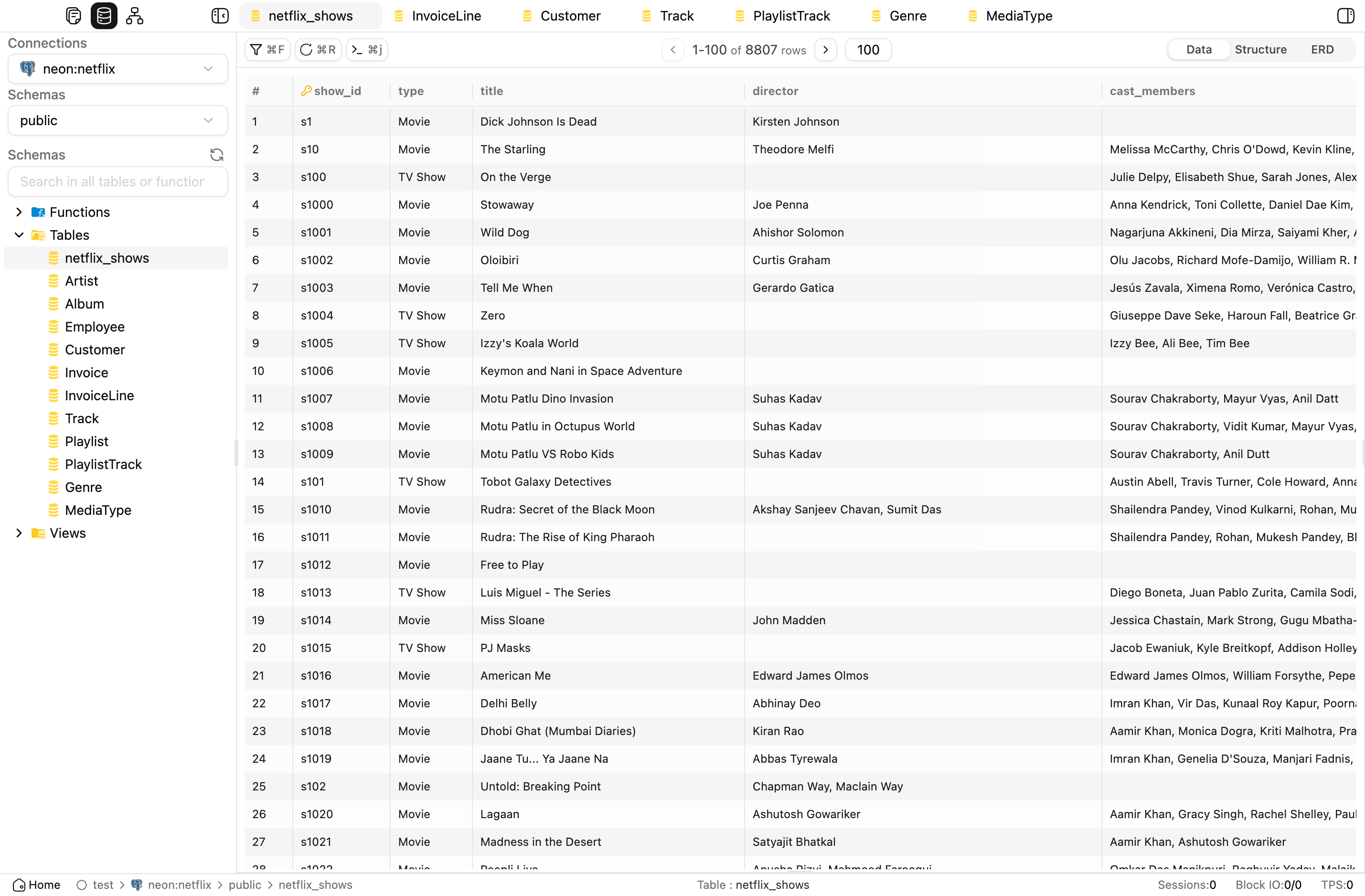
OrcaQ is a modern database editor for managing, querying, and exploring PostgreSQL, MySQL, MariaDB, Oracle, local and managed SQLite, and Redis data in a fast, intuitive, and secure way.
Installation
 Desktop App
The recommended to experience the full capabilities
Download the latest build from GitHub Releases.
Available for: macOS (.dmg, .zip) · Linux (.AppImage, .deb) · Windows comming soon.
 NPX
Best for a quick local run without cloning the repo.
npx orcaq
Requires Node.js >= 18. OrcaQ starts on http://localhost:9432.
npxdoes not support SQLite file connections. Use the desktop app for that workflow.
 Local Development
Best for contributing or running the source locally.
git clone https://github.com/cin12211/orca-q.git
cd orcaq
bun install
npm run nuxt:dev
 Docker
Best for a clean local deployment without installing Node.js tooling.
docker run -d \
  --name orcaq \
  --restart unless-stopped \
  -p 9432:9432 \
  cinny09/orcaq:latest
Open http://localhost:9432.
One-Click Deploy

 Supported Databases
| Database | Connection Methods | Core Workflows | Notes |
|---|---|---|---|
 PostgreSQL |
String, form | Connection test, raw query, schema browse, advanced admin tools | Broadest feature coverage |
 MySQL |
String, form | Connection test, raw query, minimum metadata and table browsing | Advanced roles, metrics, and instance insights remain unsupported |
 MariaDB |
String, form | Connection test, raw query, minimum metadata and table browsing | Uses a distinct persisted mariadb type |
 Oracle |
String, form | Connection test, raw query, minimum metadata and table browsing | Structured form uses serviceName |
 SQLite |
File (desktop only), managed | Connection test, raw query, metadata and table browsing | Local files stay desktop-only; Cloudflare D1 and Turso reuse the SQL family path |
 DuckDB (beta) |
File (desktop only) | Connection test, raw query, metadata, table and view browsing, schema diff, instance insights | Backup and AI agent are not available; MCP is read-only |
 SQL Server (beta) |
String, form | Connection test, raw query (GO batches), metadata, table browsing and editing, ERD, instance insights (view only) | SQL Server 2017+ and Azure SQL; MCP supported |
 CockroachDB (beta) |
String, form | Connection test, raw query, metadata, table browsing and editing, ERD, instance insights (view only) | v23.2+; MCP supported |
| Redis | String, form | Connection test, key browser, type-aware value inspection, workbench, analysis | SQL-only panels stay hidden for Redis sessions |
Advanced database-administration features are still intentionally PostgreSQL-first unless a database-specific adapter exists.
Features
 Workspace & Connection Management
- Workspaces: Organize related database connections into named workspaces with custom icons, descriptions, and last-opened tracking.
- Connections: Create and manage PostgreSQL, MySQL, MariaDB, Oracle, and SQLite connections using form fields, connection strings, or desktop file-based SQLite setup.
- Security options: Configure SSH tunnels, SSL modes, connection health checks, and environment tags with strict-mode confirmations for sensitive databases.
 Exploration & Querying
- Schema Explorer: Browse schemas, tables, views, functions, and sequences from a searchable sidebar with context actions like quick query, rename, DDL preview, and ERD open.
- File Explorer: Manage SQL files and folders in a tree view with nested folders, rename/delete actions, search, and drag-and-drop organization.
- Quick Query: Explore table data in a grid with pagination, sorting, filters, inline editing, bulk actions, related-table previews, query logs, and metadata tabs.
- Raw SQL Editor: Write and run multi-statement SQL with CodeMirror, autocomplete, formatting, variables, EXPLAIN analysis, result tabs, and persisted query files.
- Redis Workspace: Browse keys, inspect string/hash/list/set/zset values, run commands in a workbench, and surface read-only or ACL-limited states clearly.
 Database Tools
- ERD Diagram: Visualize a single table or a full schema as an interactive relationship diagram with zoom, pan, searchable table navigation, and FK edges.
- Roles & Permissions: Manage database roles, inheritance, grants, revokes, and bulk permission updates from a visual interface.
- Instance Insights: Monitor PostgreSQL activity, sessions, locks, replication, and configuration from a built-in database health dashboard.
- Schema Diff: Compare two schemas across connections and generate migration SQL with a safe mode that reduces destructive output.
- Backup & Restore: Run native export/import workflows with format options, scope selection, compression, and job progress tracking.
- Family-aware shell: Activity bar items, primary sidebar panels, tabs, and route fallbacks adapt to SQL and Redis families instead of assuming a relational session.
 AI & Productivity
- Orca Agent: Ask natural-language questions about your database, generate SQL, inspect schemas, explain queries, detect anomalies, visualize data, export results, and render ERDs.
- Safe AI execution: Mutation queries are not auto-executed; OrcaQ shows the SQL and asks for explicit confirmation before applying changes.
- Command Palette: Jump quickly to tables, views, functions, files, ERDs, tabs, and system actions with keyboard-first search.
- Multi-tab workspace: Open tables, queries, ERDs, admin panels, and agent chats side by side while preserving tab state.
 App Experience
- Custom layout system: Use resizable sidebars, multiple panels, saved layout presets, and a status-bar-driven app shell.
- Settings: Configure appearance, code editor behavior, table display, quick query options, AI providers, and environment tags from a unified settings area.
- App data backup: Export and restore workspaces, connections, query files, settings, and AI chat history as app-level backup data.
- Desktop app enhancements: Use SQLite file workflows, in-app updates, recent connections, and multi-window support in the Electron app.
Contributing
We welcome all contributions!
Fork the repo and create a new branch:
git checkout -b feat/my-featureFollow commit conventions:
feat: ...Add a new featurefix: ...Fix a bugchore: ...Miscellaneous tasksdocs: ...Update documentationrefactor: ...Improve code without changing logic
Create a Pull Request:
Clearly describe changes and link to relevant issues (if any).Review & Merge:
The core team will review and provide feedback promptly.
See more: CONTRIBUTING.md
Community / Contact
- Issues: GitHub Issues
- Discussions: GitHub Discussions
- Email: [email protected]
License
This project is licensed under the MIT License.
Acknowledgements
- Tauri - Build cross-platform desktop apps with Rust and web technologies
- Vue 3 - Progressive JavaScript framework
- Vite - Next Generation Frontend Tooling
- TypeScript
- Zod - TypeScript-first schema validation
- @vueuse/core - Vue Composition API utilities
- Icon design: Figma Community
- Contributions from the open-source community
Contributors
Many thanks to everyone who has contributed to OrcaQ.
⭐ Stargazers
Many thanks to the kind individuals who leave a star. Your support is much appreciated!
Made with ❤️ by the OrcaQ team and open-source contributors.
Explorar proyectos relacionados
Cargando…