
chronotruck/FlagPhoneNumber
Acerca de
A formatted phone number UITextField with country flag picker.
Herramientas de desarrolloCrecimiento de estrellas medido
- in 24h
- 0
- in 7 days
- 0
- in 15 days
- Recopilando historial
- in 1 month
- Recopilando historial
Cambios netos en períodos que se solapan, no totales diarios. Los datos no disponibles se dejan en blanco. Las estrellas indican interés, no calidad.
README.md
OriginalFlagPhoneNumber
FlagPhoneNumber is a phone number textfield with a fancy country code picker.





🌅 Screenshot
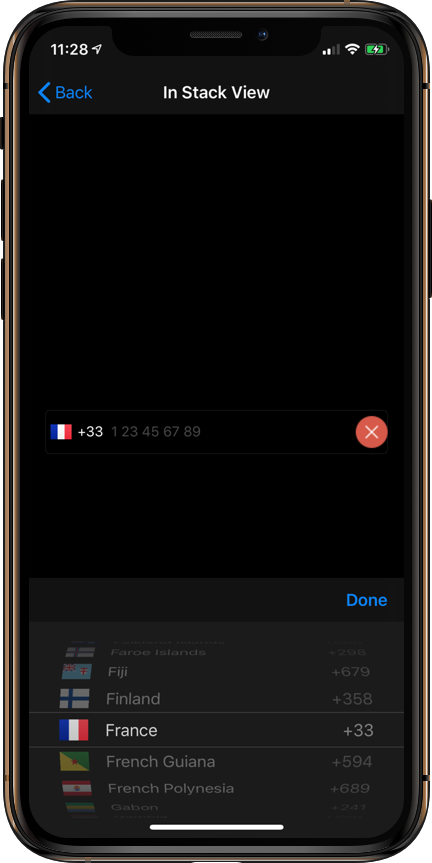
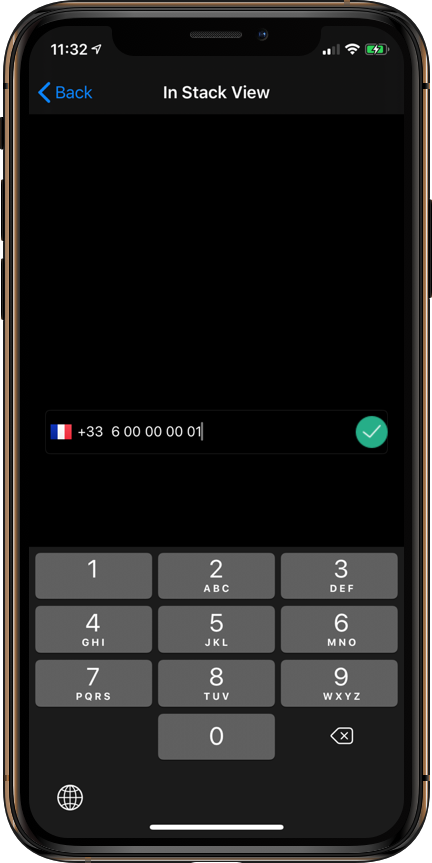
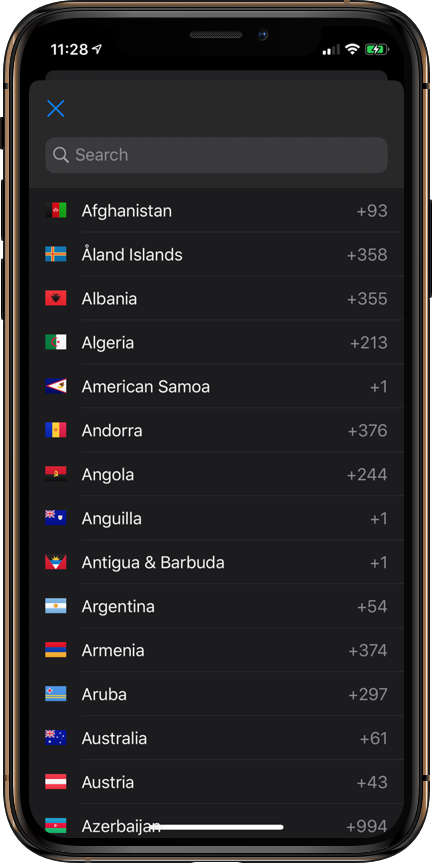
🌍 Localization
Country names are displayed according to the phone language
📲 Example
To run the example project, clone the repo, and run pod install from the Example directory first.
⬇️ Installation
FlagPhoneNumber is available through Swift Package Manager, CocoaPods and Carthage.
Swift Package Manager
Simply add in your Package Dependencies the following line:
https://github.com/chronotruck/FlagPhoneNumber
Carthage
Simply add in your Cartfile the following line:
github "chronotruck/FlagPhoneNumber"
Cocoapods
Simply add in your Podfile the following line:
pod "FlagPhoneNumber"
Manually
Simply import the Sources repository in your project.
👴🏻 Objective-C is supported
🗺 Usage
You can instantiate it in storyboards/xibs or programmatically:
let phoneNumberTextField = FPNTextField(frame: CGRect(x: 0, y: 0, width: view.bounds.width - 16, height: 50))

// You can change the chosen flag then set the phone number
phoneNumberTextField.setFlag(for: .FR)
phoneNumberTextField.set(phoneNumber: "0600000001")

// Or directly set the phone number with country code, which will update automatically the flag image
phoneNumberTextField.set(phoneNumber: "+33600000001")
🚨 FPNTextFieldDelegate
FPNTextFieldDelegate inherites from UITextFieldDelegate so nothing change:
phoneNumberTextField.delegate = self
It provides you three methods:
extension YourViewController: FPNTextFieldDelegate {

   /// The place to present/push the listController if you choosen displayMode = .list
   func fpnDisplayCountryList() {
      let navigationViewController = UINavigationController(rootViewController: listController)

      present(navigationViewController, animated: true, completion: nil)
   }

   /// Lets you know when a country is selected
   func fpnDidSelectCountry(name: String, dialCode: String, code: String) {
      print(name, dialCode, code) // Output "France", "+33", "FR"
   }

   /// Lets you know when the phone number is valid or not. Once a phone number is valid, you can get it in severals formats (E164, International, National, RFC3966)
   func fpnDidValidatePhoneNumber(textField: FPNTextField, isValid: Bool) {
      if isValid {
         // Do something...
         textField.getFormattedPhoneNumber(format: .E164),           // Output "+33600000001"
         textField.getFormattedPhoneNumber(format: .International),  // Output "+33 6 00 00 00 01"
         textField.getFormattedPhoneNumber(format: .National),       // Output "06 00 00 00 01"
         textField.getFormattedPhoneNumber(format: .RFC3966),        // Output "tel:+33-6-00-00-00-01"
         textField.getRawPhoneNumber()                               // Output "600000001"
      } else {
         // Do something...
      }
   }
}
🎨 Customization
By default, the picker view is showed but you can display the countries with a list view controller:
var listController: FPNCountryListViewController = FPNCountryListViewController(style: .grouped)

phoneNumberTextField.displayMode = .list // .picker by default

listController.setup(repository: textField.countryRepository)
listController.didSelect = { [weak self] country in
self?.textField.setFlag(countryCode: country.code)
Don't forget to implement the fpnDisplayCountryList:
func fpnDisplayCountryList() {
   let navigationViewController = UINavigationController(rootViewController: listController)

   listController.title = "Countries"

   self.present(navigationViewController, animated: true, completion: nil)
}
FlagKit is used by default but you can customize the list with your own flag icons assets:
// Be sure to set it before initializing a FlagPhoneNumber instance.
Bundle.FlagIcons = YOUR_FLAG_ICONS_BUNDLE
You can change the size of the flag button:
phoneNumberTextField.flagButtonSize = CGSize(width: 44, height: 44)
You can customize the inputAccessoryView of the textfield:
phoneNumberTextField.textFieldInputAccessoryView = getCustomTextFieldInputAccessoryView(with: items)
You can also customize the flag button's properties:
// This will freeze the flag.
// Only one particular country's phone numbers will be formatted and validated.
// You can set the country by setting the flag as shown earlier.
phoneNumberTextField.flagButton.isUserInteractionEnabled = false
You can have in the placeholder an example of a phone number according to the selected country or have your own placeholder:
phoneNumberTextField.hasPhoneNumberExample = false // true by default
phoneNumberTextField.placeholder = "Phone Number"
You can choose which country can appears in the list:
phoneNumberTextField.setCountries(including: [.FR, .ES, .IT, .BE, .LU, .DE])
Or exclude countries from the list:
phoneNumberTextField.setCountries(excluding: [.AM, .BW, .BA])
You can choose to display the country phone code in the picker or in the list view controller:
phoneNumberTextField.pickerView.showCountryPhoneCode = false // true by default
listController.showCountryPhoneCode = false // true by default
You can reuses FPN classes as you see fit !
☕️ Conception
This library uses libPhoneNumber-iOS library (https://github.com/iziz/libPhoneNumber-iOS)
Open source time proudly sponsored by Chronotruck.
💁🏻♂️ Author
grifas, [email protected]
Don't hesitate to contact me or make a pull request to upgrade this library.
📝 License
FlagPhoneNumber is available under the Apache license. See the LICENSE file for more info.
Explorar proyectos relacionados
Cargando…