
bcylin/QuickTableViewController
bcylin/QuickTableViewController has 554 GitHub stars and 64 forks. GitHot measured 0 stars in 24 hours and -3 in 7 days. Last checked 2026-11-23 17:52 UTC. Last push 2023-11-28.
Crecimiento de estrellas medido
- in 24h
- 0
- in 7 days
- -3
- in 15 days
- Recopilando historial
- in 1 month
- Recopilando historial
Cambios netos en períodos que se solapan, no totales diarios. Los datos no disponibles se dejan en blanco. Las estrellas indican interés, no calidad.
Acerca de
A simple way to create a UITableView for settings in Swift.
Herramientas de desarrolloREADME.md
OriginalQuickTableViewController


A simple way to create a table view for settings.
Sunsetting
ℹ️ If your deployment target is iOS 13 or above, please consider using SwiftUI.
QuickTableViewController was designed to show static table contents when it was around iOS 8 and Swift 1.2. Over the past few iterations, a couple more controls were added but it still has its limitations. After the introduction of List and Form in iOS 13, SwiftUI has become a better solution for both static and dynamic table views.
QuickTableViewController will stay at the latest released version v1.3.1 from now on. Future updates will be mostly experimental. To use QuickTableViewController in UIKit, please see:
SwiftUI
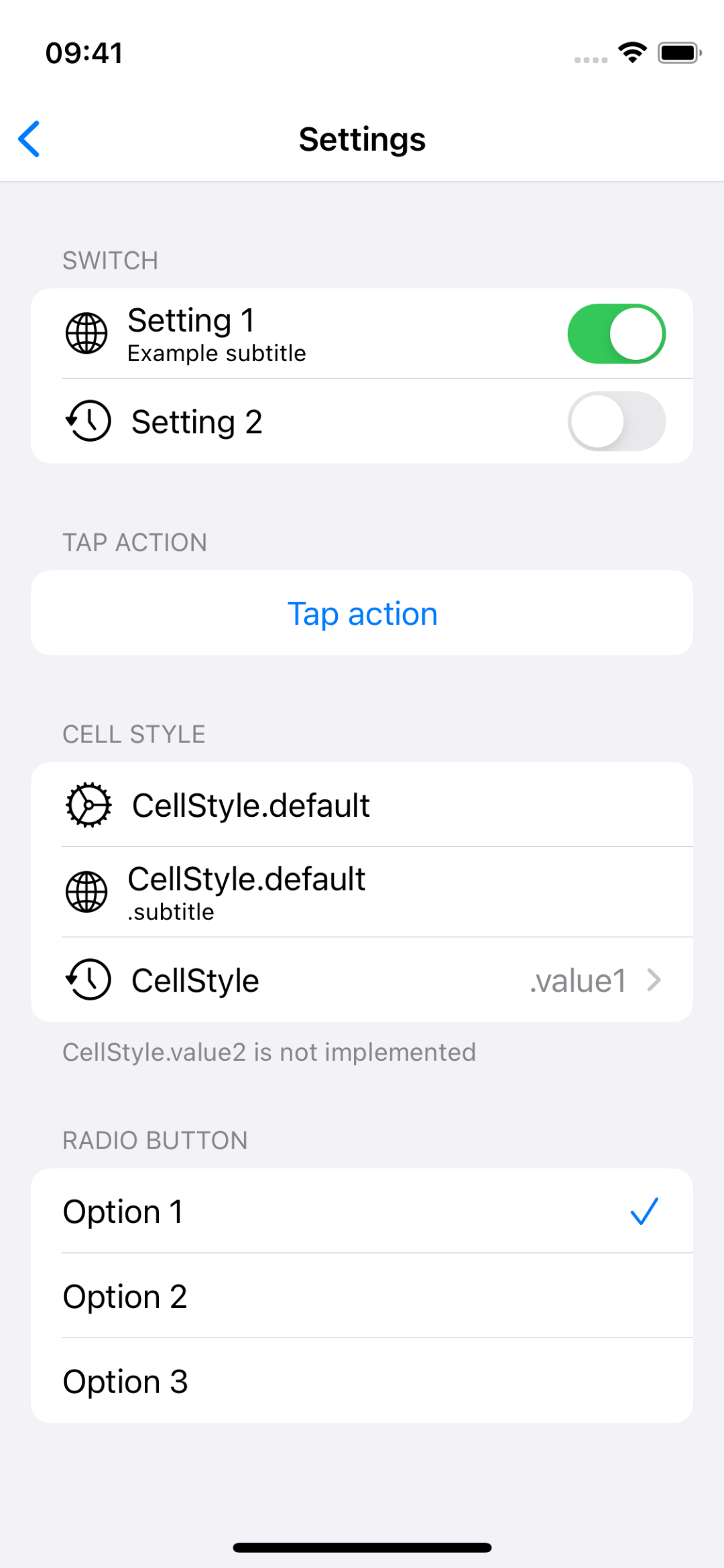
The same settings layout can be implemented in SwiftUI and integrated into UIKit using UIHostingController. For more, please see Example-iOS/SwiftUI.
var body: some View {
    Form {
        Section(header: Text("Switch")) {
            Toggle(isOn: $viewModel.flag1) {
                subtitleCellStyle(title: "Setting 1", subtitle: "Example subtitle")
                    .leadingIcon("globe")
            }
            Toggle(isOn: $viewModel.flag2) {
                subtitleCellStyle(title: "Setting 2", subtitle: nil)
                    .leadingIcon("clock.arrow.circlepath")
            }
        }

        Section(header: Text("Tap Action")) {
            Button {
                viewModel.performTapAction()
            } label: {
                Text("Tap action").frame(maxWidth: .infinity)
            }
        }

        Section(header: Text("Cell Style"), footer: Text("CellStyle.value2 is not implemented")) {
            subtitleCellStyle(title: "CellStyle.default", subtitle: nil)
                .leadingIcon("gear")
            subtitleCellStyle(title: "CellStyle.default", subtitle: ".subtitle")
                .leadingIcon("globe")
            value1CellStyle(title: "CellStyle", detailText: ".value1")
                .leadingIcon("clock.arrow.circlepath")
                .navigationFlow { viewModel.startNavigationFlow() }
        }

        Section(header: Text("Radio Button")) {
            ForEach(SettingsViewModel.Option.allCases) { option in
                checkmarkCellStyle(with: option, isSelected: viewModel.isOptionSelected(option))
            }
        }
    }
}
License
QuickTableViewController is released under the MIT license. Image source: iconmonstr
Explorar proyectos relacionados
Cargando…