
Acerca de
[NeurIPS 2022] Modelos de restauración por difusión con eliminación de ruido: repositorio oficial del código
Herramientas de desarrolloCrecimiento de estrellas medido
- in 24h
- 0
- in 7 days
- +1
- in 15 days
- Recopilando historial
- in 1 month
- Recopilando historial
Cambios netos en períodos que se solapan, no totales diarios. Los datos no disponibles se dejan en blanco. Las estrellas indican interés, no calidad.
README.md
OriginalDenoising Diffusion Restoration Models (DDRM)
arXiv | PDF | Project Website
Bahjat Kawar1, Michael Elad1, Stefano Ermon2, Jiaming Song2
1 Technion, 2Stanford University
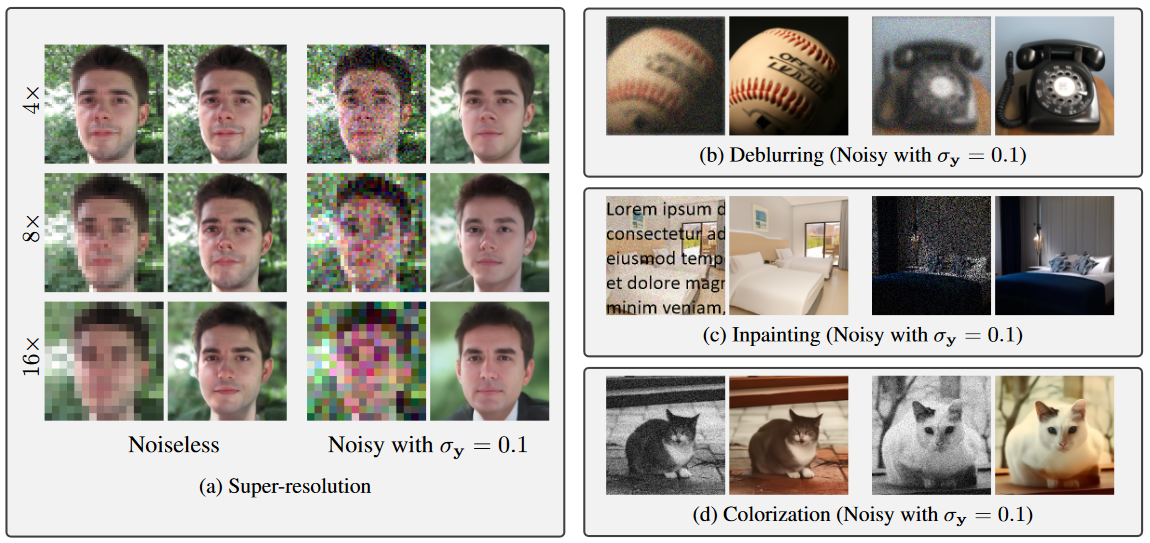
DDRM uses pre-trained DDPMs for solving general linear inverse problems. It does so efficiently and without problem-specific supervised training.
Running the Experiments
The code has been tested on PyTorch 1.8 and PyTorch 1.10. Please refer to environment.yml for a list of conda/mamba environments that can be used to run the code.
Pretrained models
We use pretrained models from https://github.com/openai/guided-diffusion, https://github.com/pesser/pytorch_diffusion and https://github.com/ermongroup/SDEdit
We use 1,000 images from the ImageNet validation set for comparison with other methods. The list of images is taken from https://github.com/XingangPan/deep-generative-prior/
The models and datasets are placed in the exp/ folder as follows:
<exp> # a folder named by the argument `--exp` given to main.py
├── datasets # all dataset files
│   ├── celeba # all CelebA files
│   ├── imagenet # all ImageNet files
│   ├── ood # out of distribution ImageNet images
│   ├── ood_bedroom # out of distribution bedroom images
│   ├── ood_cat # out of distribution cat images
│   └── ood_celeba # out of distribution CelebA images
├── logs # contains checkpoints and samples produced during training
│   ├── celeba
│   │   └── celeba_hq.ckpt # the checkpoint file for CelebA-HQ
│   ├── diffusion_models_converted
│   │   └── ema_diffusion_lsun_<category>_model
│   │       └── model-x.ckpt # the checkpoint file saved at the x-th training iteration
│   ├── imagenet # ImageNet checkpoint files
│   │   ├── 256x256_classifier.pt
│   │   ├── 256x256_diffusion.pt
│   │   ├── 256x256_diffusion_uncond.pt
│   │   ├── 512x512_classifier.pt
│   │   └── 512x512_diffusion.pt
├── image_samples # contains generated samples
└── imagenet_val_1k.txt # list of the 1k images used in ImageNet-1K.
We note that some models may not generate high-quality samples in unconditional image synthesis; this is especially the case for the pre-trained CelebA model.
Sampling from the model
The general command to sample from the model is as follows:
python main.py --ni --config {CONFIG}.yml --doc {DATASET} --timesteps {STEPS} --eta {ETA} --etaB {ETA_B} --deg {DEGRADATION} --sigma_0 {SIGMA_0} -i {IMAGE_FOLDER}
where the following are options
ETAis the eta hyperparameter in the paper. (default:0.85)ETA_Bis the eta_b hyperparameter in the paper. (default:1)STEPScontrols how many timesteps used in the process.DEGREDATIONis the type of degredation allowed. (One of:cs2,cs4,inp,inp_lolcat,inp_lorem,deno,deblur_uni,deblur_gauss,deblur_aniso,sr2,sr4,sr8,sr16,sr_bicubic4,sr_bicubic8,sr_bicubic16color)SIGMA_0is the noise observed in y.CONFIGis the name of the config file (seeconfigs/for a list), including hyperparameters such as batch size and network architectures.DATASETis the name of the dataset used, to determine where the checkpoint file is found.IMAGE_FOLDERis the name of the folder the resulting images will be placed in (default:images)
For example, for sampling noisy 4x super resolution from the ImageNet 256x256 unconditional model using 20 steps:
python main.py --ni --config imagenet_256.yml --doc imagenet --timesteps 20 --eta 0.85 --etaB 1 --deg sr4 --sigma_0 0.05
The generated images are place in the <exp>/image_samples/{IMAGE_FOLDER} folder, where orig_{id}.png, y0_{id}.png, {id}_-1.png refer to the original, degraded, restored images respectively.
The config files contain a setting controlling whether to test on samples from the trained dataset's distribution or not.
Images for Demonstration Purposes
A list of images for demonstration purposes can be found here: https://github.com/jiamings/ddrm-exp-datasets. Place them under the <exp>/datasets folder, and these commands can be excecuted directly:
CelebA noisy 4x super-resolution:
python main.py --ni --config celeba_hq.yml --doc celeba --timesteps 20 --eta 0.85 --etaB 1 --deg sr4 --sigma_0 0.05 -i celeba_hq_sr4_sigma_0.05
General content images uniform deblurring:
python main.py --ni --config imagenet_256.yml --doc imagenet_ood --timesteps 20 --eta 0.85 --etaB 1 --deg deblur_uni --sigma_0 0.0 -i imagenet_sr4_sigma_0.0
Bedroom noisy 4x super-resolution:
python main.py --ni --config bedroom.yml --doc bedroom --timesteps 20 --eta 0.85 --etaB 1 --deg sr4 --sigma_0 0.05 -i bedroom_sr4_sigma_0.05
References and Acknowledgements
@inproceedings{kawar2022denoising,
    title={Denoising Diffusion Restoration Models},
    author={Bahjat Kawar and Michael Elad and Stefano Ermon and Jiaming Song},
    booktitle={Advances in Neural Information Processing Systems},
    year={2022}
}
This implementation is based on / inspired by:
- https://github.com/hojonathanho/diffusion (the DDPM TensorFlow repo),
- https://github.com/pesser/pytorch_diffusion (PyTorch helper that loads the DDPM model), and
- https://github.com/ermongroup/ddim (code structure)
Explorar proyectos relacionados
Cargando…