
babarot/gist
babarot/gist has 130 GitHub stars and 17 forks. GitHot measured 0 stars in 24 hours and 0 in 7 days. Last checked 2026-11-24 08:24 UTC. Last push 2026-11-22.
Crecimiento de estrellas medido
- in 24h
- 0
- in 7 days
- 0
- in 15 days
- Recopilando historial
- in 1 month
- Recopilando historial
Cambios netos en períodos que se solapan, no totales diarios. Los datos no disponibles se dejan en blanco. Las estrellas indican interés, no calidad.
Acerca de
:octocat: Read and edit your GitHub Gists from the terminal
Herramientas de desarrolloREADME.md
Originalgist
Read and edit your GitHub Gists from the terminal.
gist
It opens your gists in a list, with the files of the one under the cursor below it, and a CLI does the same from a script:
- the files drawn with their syntax, and Markdown rendered
- a filter, fuzzy over what you type, with
file:,lang:,vis:,owner:anddesc:to look in one thing,size:>200KB,updated:<7dandcomments:>0to go by size, age and comments, and tab to fill them in - edits in your own editor, with the diff to read before anything is pushed, and a draft kept if you stop there
- a push that stops when the gist changed on GitHub since you opened it
- the gists you starred, and their comments
- the lists kept from the last launch, shown at once and then read again
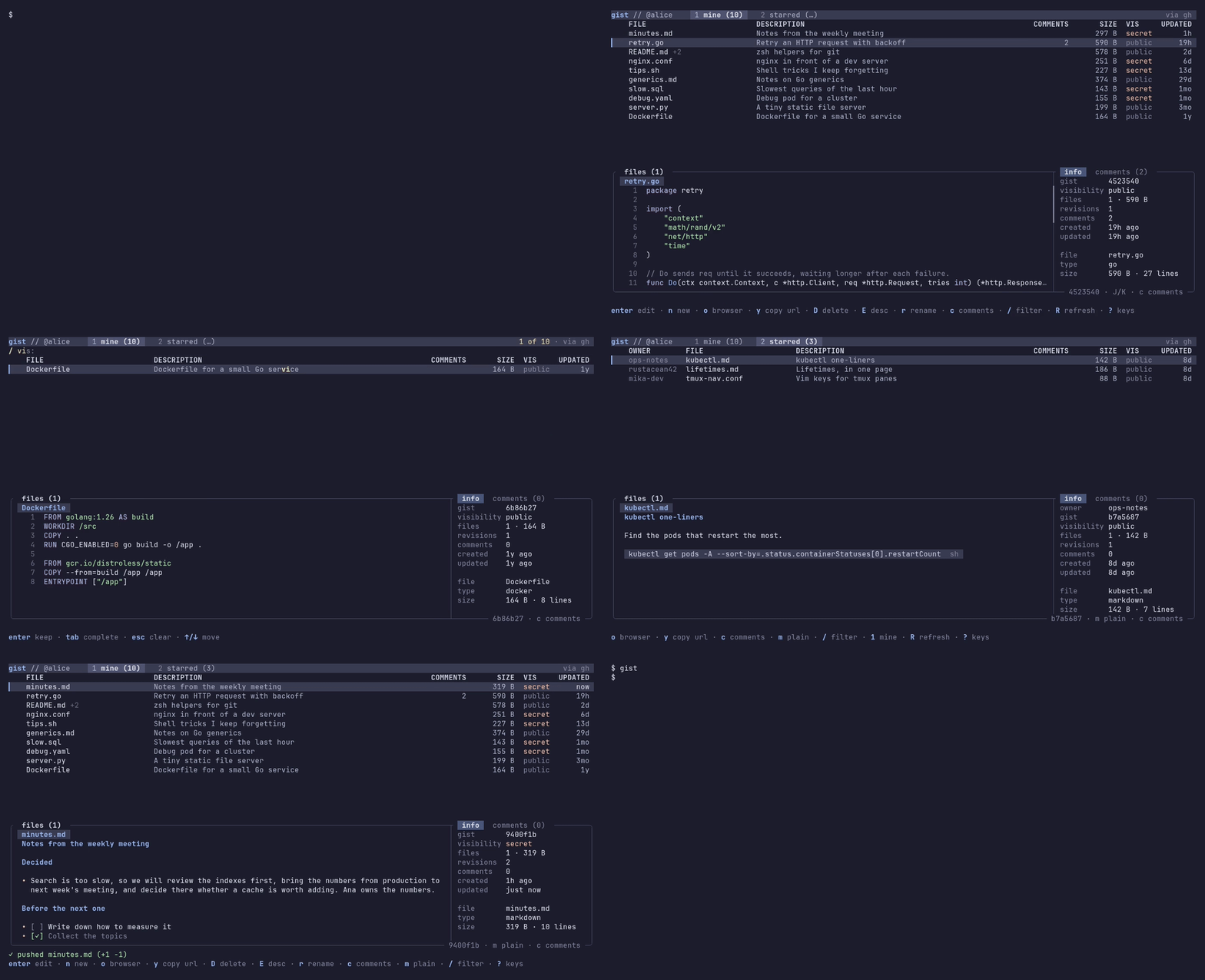
The page says the same in short.
Install
With Homebrew:
brew install babarot/tap/gist
With Nix:
nix profile install github:babarot/nur-packages#gist
With Go:
go install github.com/babarot/gist/v2@latest
Or take a binary from the releases.
gist reads GitHub with the account gh is logged in to (gh auth login), or with GH_TOKEN or GITHUB_TOKEN. The token needs the gist scope to change gists. gist auth says where it found one and what it can do.
Keys
? lists every key, and the line at the bottom shows the ones that work where you are. A few to start with:
| Key | |
|---|---|
j k, h l |
move, go to the previous or next file |
enter |
edit the file in your editor, then read the diff and push it |
n, D |
a new gist, delete |
space, V, u |
select gists for D to delete together, select all shown, clear the selection |
E, r |
change the description, rename the file |
y, Y |
copy the URL, copy the file |
/ |
filter |
1 2 |
your gists, the ones you starred |
c, m |
the comments, Markdown as written |
J K, + - |
scroll the preview, change its height |
Keys are bound by the name of their action, and can be changed in the config file.
Commands
Every command works without a terminal, and a gist is named by its ID, its URL, or a file in it.
gist list --public --json          # your gists, as JSON
gist view 1a2b3c main.go           # a file as it is written
gist new --public main.go go.mod   # a gist, printing its URL
echo hello | gist new -f hello.txt
gist edit 1a2b3c main.go           # in your editor
sed s/a/b/ main.go | gist edit 1a2b3c main.go
gist edit 1a2b3c --add go.sum --rename old.go=new.go -d 'a new description'
gist delete 1a2b3c --yes
gist open 1a2b3c
gist clone 1a2b3c
gist --help lists them all, and gist <command> --help their flags.
Config
The first launch writes ~/.config/gist/config.toml (or under $XDG_CONFIG_HOME), with every setting in a comment. A setting left out takes its default.
| Setting | Default | |
|---|---|---|
editor |
"" |
the editor; empty uses $VISUAL, then $EDITOR, then vi |
theme |
"auto" |
"auto" follows the terminal's background; "default" is dark, "latte" light |
new.visibility |
"secret" |
what a new gist is: "secret" or "public" |
list.lead |
"file" |
the first column: "file", or "description" alone, with a FILES column |
preview.markdown |
"rendered" |
how .md files show: "rendered", or "plain" as written |
[keys] |
the keys of an action, such as quit = ["q"] |
gist config check reads the file and prints its mistakes, each where it is, without starting.
A release build looks for a newer release once a day; set GIST_NO_UPDATE_CHECK to turn that off.
Files
~/.config/gist/config.toml |
the config file |
~/.cache/gist |
the lists and the contents last read |
~/.local/state/gist |
drafts, the preview's height, the log (gist log prints where) |
Each follows its XDG_*_HOME when set.
Development
mise run test    # the tests, with the race detector
mise run lint    # golangci-lint
mise run demo    # record docs/demo.gif with VHS in Docker
docs/architecture.md shows how the packages are layered.
License
MIT
Explorar proyectos relacionados
Cargando…