
aparsoft/yolo-streamlit-detection-tracking
aparsoft/yolo-streamlit-detection-tracking has 432 GitHub stars and 171 forks. GitHot measured 0 stars in 24 hours, +1 in 7 days, and 0 in 15 days. Last checked 2026-11-21 06:47 UTC. Last push 2026-10-13.
Crecimiento de estrellas medido
- in 24h
- 0
- in 7 days
- +1
- in 15 days
- 0
- in 1 month
- Recopilando historial
Cambios netos en períodos que se solapan, no totales diarios. Los datos no disponibles se dejan en blanco. Las estrellas indican interés, no calidad.
Acerca de
YOLO Vision Studio: a free, open-source Streamlit app for detection, segmentation, pose, text prompts (YOLO World, YOLOE) and tracking with honest counts. Built on Ultralytics YOLO26.
Aprendizaje automáticoREADME.md
Original🔬 YOLO Vision Studio
Detect · Segment · Read poses · Find what you type · Track and count in video
A free, open-source Streamlit app built on Ultralytics YOLO26, YOLOE, YOLO World v2 and RT-DETR.





Watch the film · 45-second cut · Quick start · Report a bug
Why this app
Point a camera at a street and ask how many people walked past. Counting the people in one frame is easy. Knowing how many different people walked past is the hard part: people overlap, cross and walk out of view, and a careless tracker counts the same person three times.
YOLO Vision Studio shows both numbers on every frame, and is honest about them. The overlay has three lines:
- In Frame (green): what the detector sees right now, per class.
- Total Tracked (yellow; Total Unique Objects in the sidebar): different objects so far. An object counts only after it has been seen in 5 processed frames, so a one-frame false detection never inflates the total.
- Churn (grey): track IDs the tracker opened ÷ IDs it actually showed. The tracker opens an ID for every candidate track, and a candidate that disappears before it is confirmed is never drawn. 1.0 means no ID was wasted; a high value means many short-lived candidates (flicker, occlusion, borderline detections).
What it does
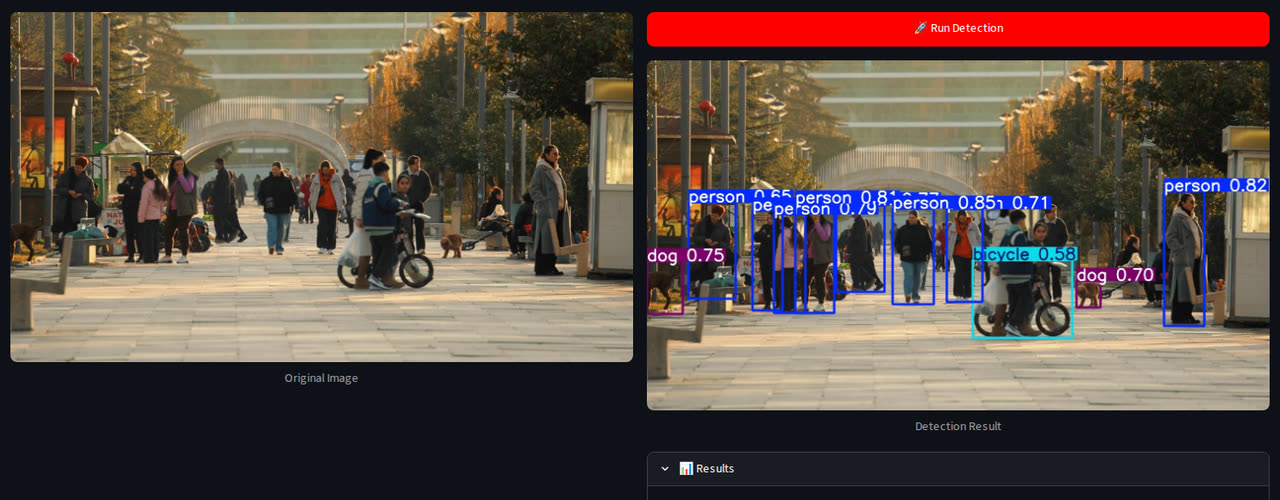 Detect the 80 COCO object types (YOLO26 nano → xlarge, or RT-DETR) |
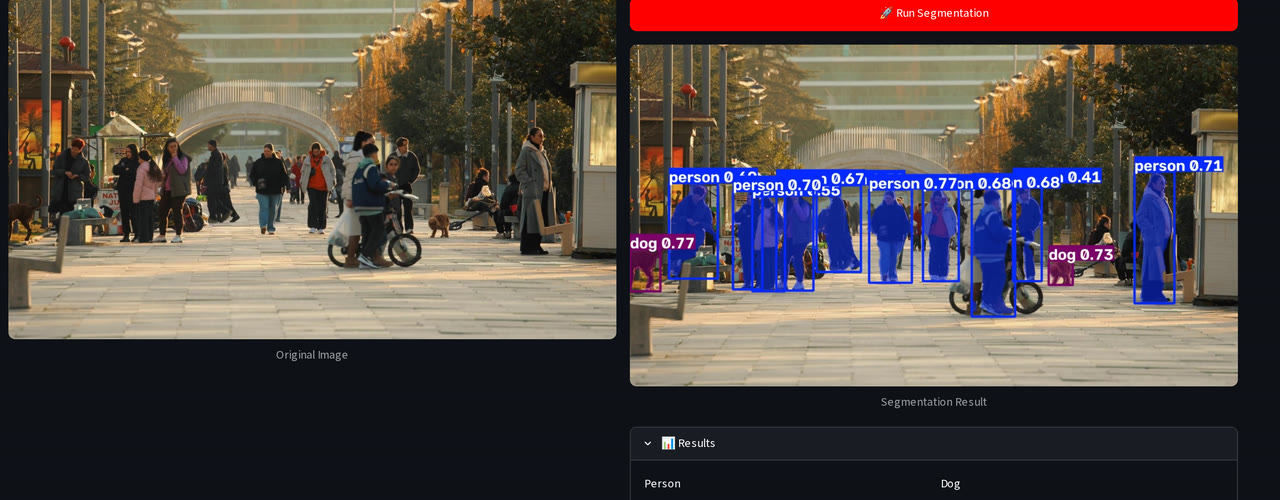 Segment: a pixel mask for every object |
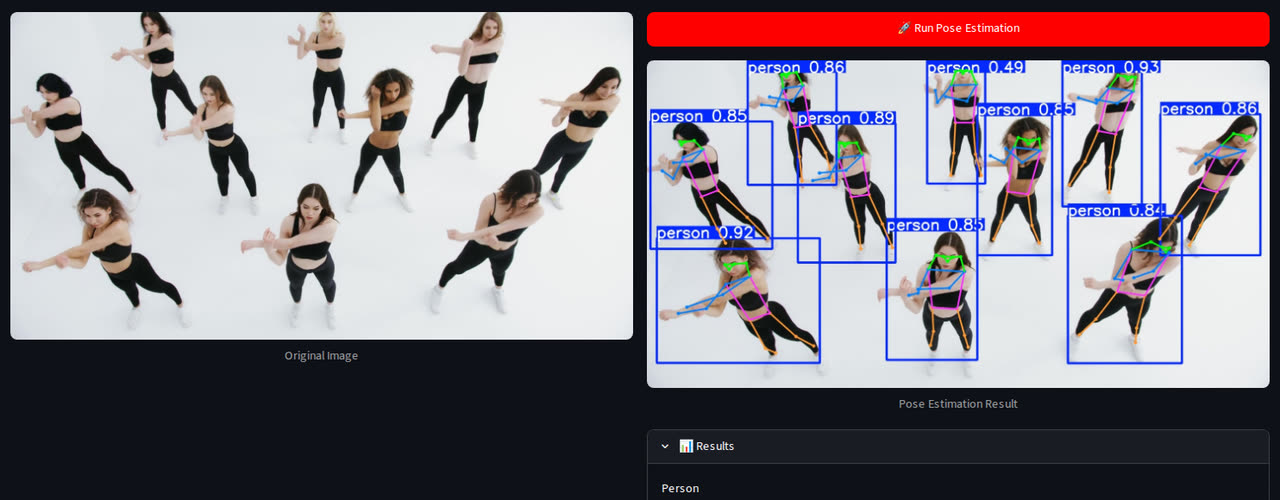 Pose: 17 body keypoints and the skeleton |
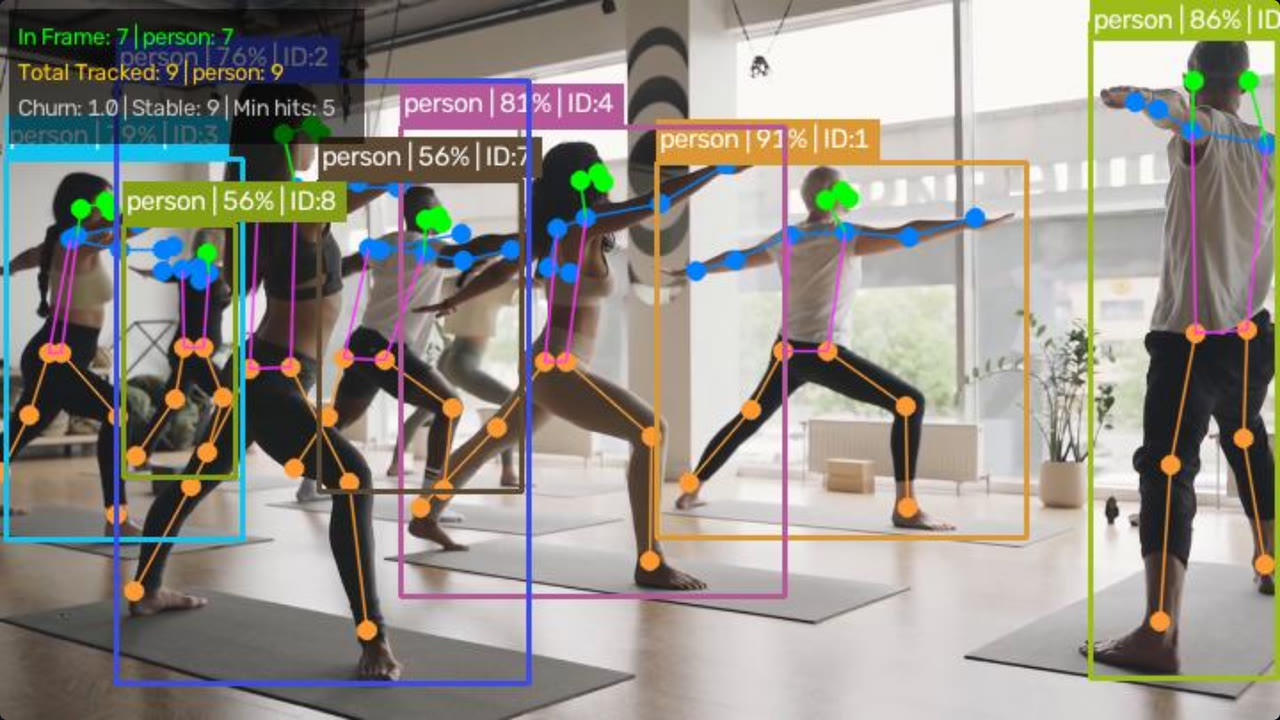 Every task works on video, here pose with tracked IDs |
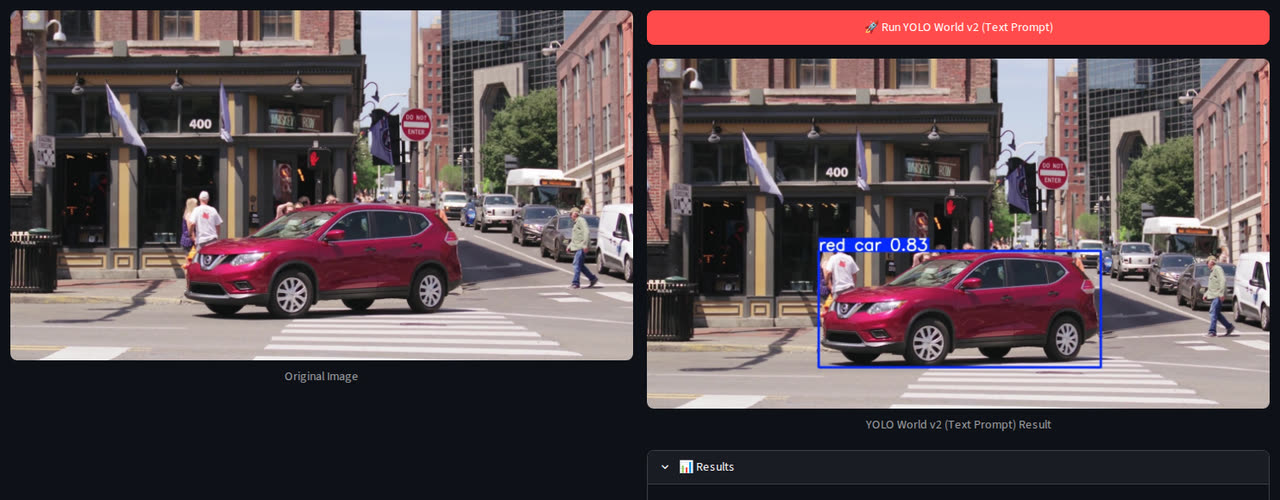 Type what you're looking for (YOLO World v2): red car finds only the red one |
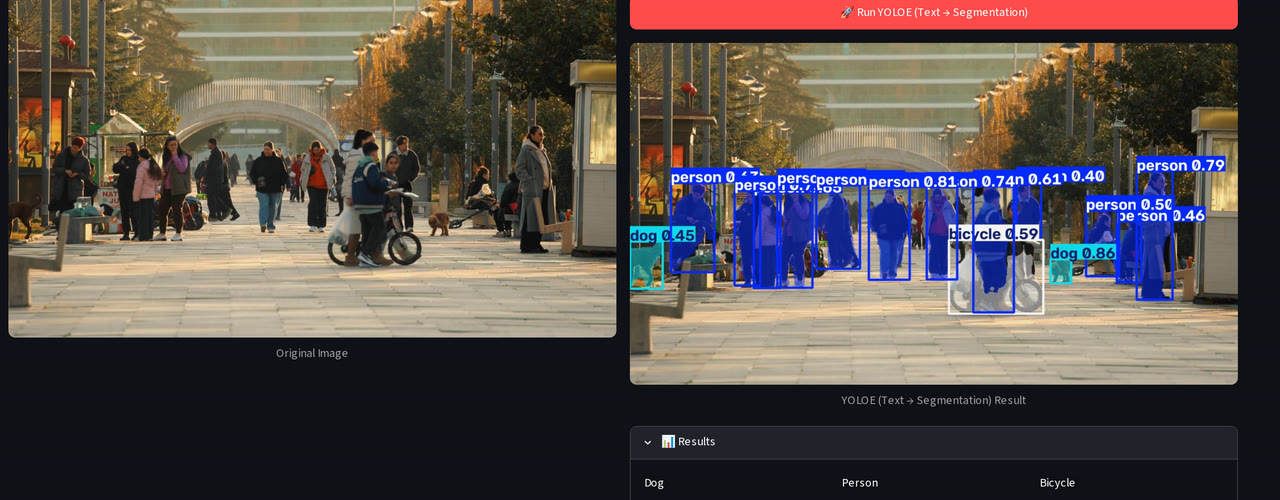 YOLOE: type category names, get boxes and masks |
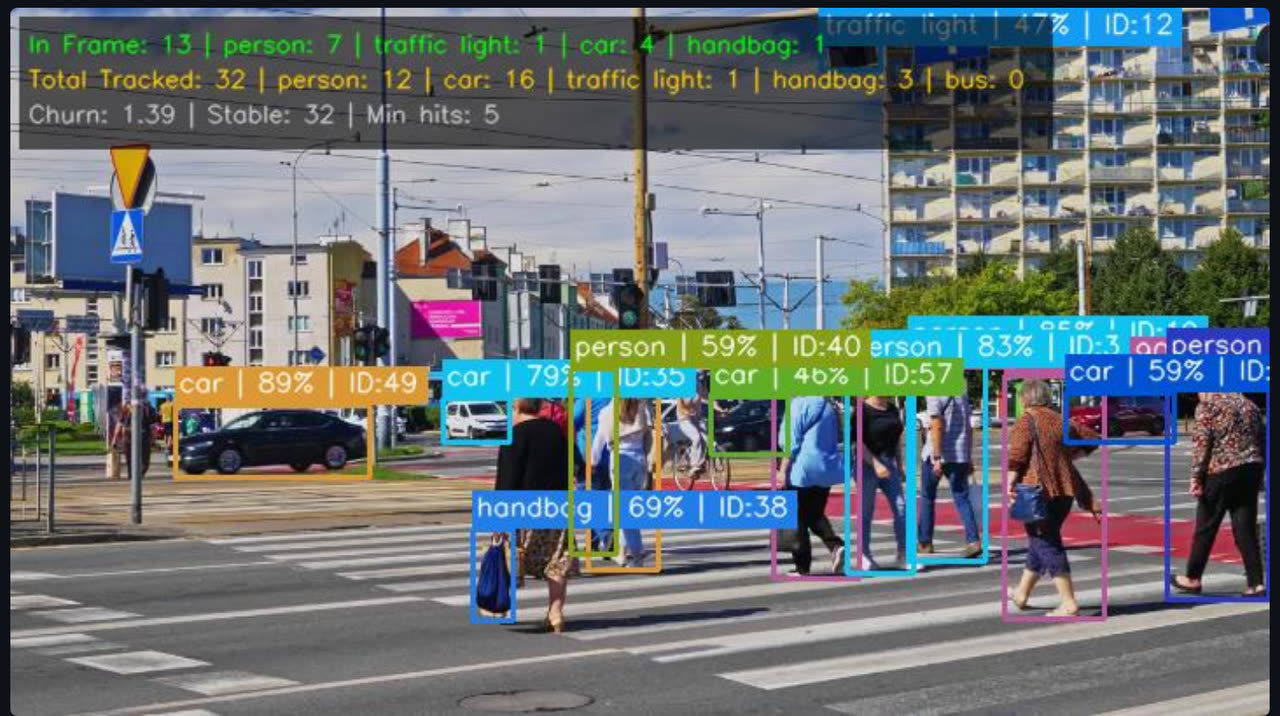 Four trackers and optional appearance ReID; every box reads class | conf | ID |
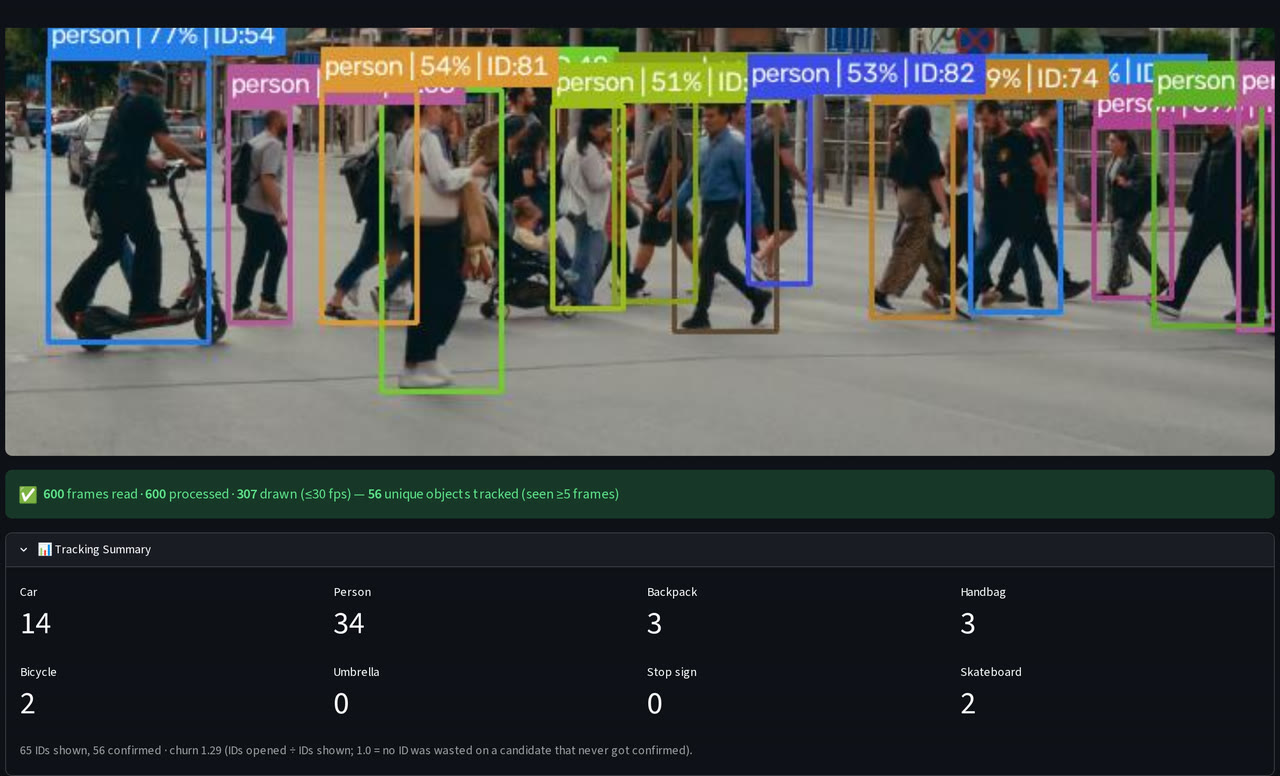 Tracking Summary: confirmed objects per class, IDs and churn |
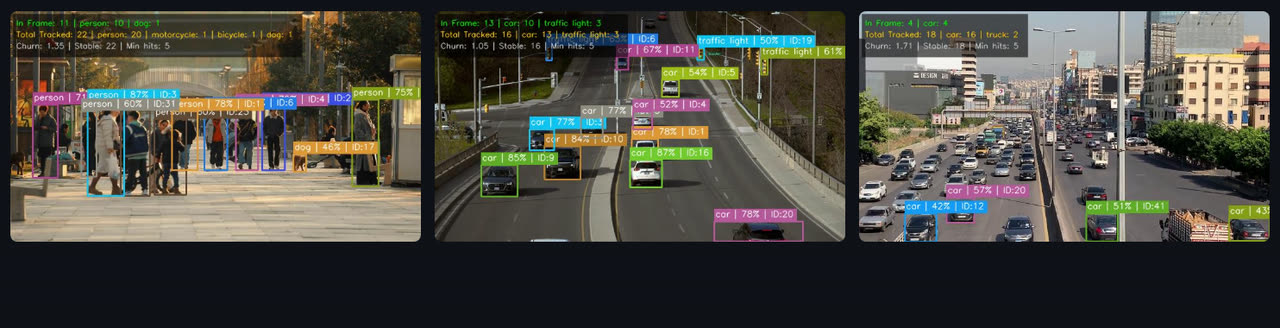
Several stored videos side by side, each with its own model and tracker, so IDs and counts never mix.
Feature overview
| Area | What you get |
|---|---|
| Tasks | Detection, Segmentation, Pose Estimation, YOLO World v2 (text prompt), YOLOE (text → masks). All of them work on images and on video |
| Models | YOLO26 n / s / m / l / x for detection, segmentation and pose; RT-DETR L / X (transformer) for detection; YOLO World v2 s / m / l / x; YOLOE-26 n / s / m / l / x. Weights download on first use |
| Images | Upload JPG, PNG, BMP or WEBP, or run on the default image. Phone photos are rotated by their EXIF tag. Results: the annotated image, a count and average confidence per class, every detection's confidence, and the pose or mask count |
| Video sources | Stored files (several at once), your webcam in the browser (streamlit-webrtc), RTSP camera streams, YouTube URLs (yt-dlp) |
| Tracking | ByteTrack (default), BoT-SORT, Deep OC-SORT, TrackTrack. Each box carries its ID, in a colour that belongs to that ID |
| Appearance ReID | For BoT-SORT, Deep OC-SORT and TrackTrack: choose an encoder (yolo26n-cls, yolo26s-reid.onnx or the detector's own features) and tune three gates: proximity (IoU), appearance similarity and lost-track memory |
| Speed controls | 🎯 Limit to classes (detection, segmentation, pose), ⏩ Skip frames 1–8×, a confidence slider. Every processed frame is detected and counted; only the display is capped at 30 fps, to keep the browser smooth |
| Live metrics | Frame, FPS, in-frame counts, confirmed totals per class and churn in the sidebar, refreshed 5× a second. ⏹ Stop ends a run and keeps the counts so far |
| Several users | Tracking runs on a model owned by each browser session, so two visitors never share a tracker. Shared cached models are locked during inference |
YOLO World prompts: one object with one attribute works best (red car, dog, wooden chair). Descriptions of
people (person in black) score low; if a prompt finds nothing, lower the confidence.
YOLOE prompts: category names only (person, car, laptop), not descriptions.
Privacy: appearance ReID compares how objects look within one video to keep an ID through a crossing. The app never knows who anyone is; there is no face recognition.
🚀 Quick start
With uv (recommended): installs the exact versions in uv.lock on Linux, macOS and
Windows.
git clone https://github.com/aparsoft/yolo-streamlit-detection-tracking.git
cd yolo-streamlit-detection-tracking
uv sync                                     # creates .venv with the locked versions
uv run python scripts/get_sample_videos.py  # optional: the 8 other sample clips (~34 MB)
uv run streamlit run app.py                 # opens http://localhost:8501
With pip:
git clone https://github.com/aparsoft/yolo-streamlit-detection-tracking.git
cd yolo-streamlit-detection-tracking
python -m venv .venv
source .venv/bin/activate                   # Windows: .venv\Scripts\activate
pip install -r requirements.txt             # or requirements-lock.txt for the exact locked versions
python scripts/get_sample_videos.py         # optional
streamlit run app.py
Requirements and first run
- Python 3.10+ (tested on 3.11 and 3.12). Runs on CPU; an NVIDIA GPU makes video much faster.
- GPU on Linux: PyTorch from PyPI already includes CUDA, with uv and with pip.
- GPU on Windows: PyPI's PyTorch is CPU-only there. With pip, install a CUDA build from
pytorch.org first, then
requirements.txt. With uv,uv syncinstalls the locked PyPI build, so install the CUDA build into.venvafterwards (uv pip install torch torchvision --index-url …) and start the app withuv run --no-sync streamlit run app.py. - Model weights download automatically on first use, into
weights/. YOLO World also fetches its CLIP text encoder (~340 MB) and YOLOE its MobileCLIP encoder (~245 MB) the first time you use them. uv syncalso installs Jupyter support for the playground notebook.uv sync --group rfdetradds RF-DETR andsupervisionfor your own experiments; the app does not use them.
Sample videos
One clip ships in git (videos/pedestrians_summer_street.mp4), so the app works straight after a clone. The other
eight live on the sample-videos release
to keep the repo small; scripts/get_sample_videos.py downloads them and checks each one against its SHA-256, so every
machine runs the same clips (--force downloads them again). They are Pexels clips,
chosen by running this app's own detector and tracker over 731 candidates; creators are credited in
videos/ATTRIBUTION.md.
| Clip | Good for |
|---|---|
pedestrians_summer_street (in git, the default) |
People counting and tracking |
crosswalk_red_car · street_person_in_red |
YOLO World prompts |
street_dogs_bikes |
Mixed classes: people, dogs, bicycles |
highway_bridge_traffic · city_traffic_dense |
Vehicle counting, many IDs at once |
yoga_warrior_pose · stretching_from_above |
Pose estimation |
busy_intersection |
Paths crossing: ReID trackers, multi-video |
Your own videos: drop .mp4, .avi, .mkv, .mov, .wmv or .webm files into videos/. They appear in the
picker on the next rerun. Extensions are matched in lower case, so rename CLIP.MP4 to CLIP.mp4.
📖 Using it
Sidebar, top to bottom: Inference Mode (📷 image / 🎬 video) → Task → 🧠 Model (nano is fastest, xlarge most accurate) → Model Confidence (10–100 %, default 40 %).
Images
- For YOLO World or YOLOE, type the prompt first (comma-separated).
- Upload an image, or keep the default one.
- Press 🚀 Run <task>. The result stays on screen until you change the image, task, model, prompt or confidence.
Video
- 📹 Video Source: Stored Video, Webcam, RTSP Stream or YouTube.
- Tracking is on by default. Pick a tracker; for BoT-SORT, Deep OC-SORT and TrackTrack you can switch on 🧬 Appearance ReID, choose its encoder and tune its gates. ReID costs roughly two-thirds of the FPS.
- Optional: 🎯 Limit to classes, ⏩ Skip frames. For YOLO World / YOLOE, type the prompts in the main panel.
- Start it:
| Source | How to start | What you get at the end |
|---|---|---|
| Stored Video, one clip | 🚀 Detect Video Objects | The last frame, a run summary and the 📊 Tracking Summary |
| Stored Video, several clips | Select them all, then 🚀 Detect Video Objects | A 3-per-row grid; one result line per video (IDs are per video and never summed) |
| RTSP Stream | Paste the URL, 🚀 Start RTSP Stream | As for one stored clip |
| YouTube | Paste the URL, 🚀 Detect YouTube Video | As for one stored clip |
| Webcam | START in the player, allow the camera | Live annotated video; stop it with the player's STOP |
⏹ Stop (sidebar) ends a stored, RTSP or YouTube run early; the frame on screen and the counts so far stay. With Skip frames above 1 and tracking on, objects move further between updates, which is where ReID helps most.
⚙️ Configuration
Every default lives in config.py:
| Setting | Default | What it does |
|---|---|---|
DEFAULT_CONFIDENCE |
0.40 |
Starting value of the confidence slider |
MIN_TRACK_HITS |
5 |
Processed frames before a track counts |
TRACKERS_LIST |
ByteTrack, BoT-SORT, Deep OC-SORT, TrackTrack | Trackers in the sidebar. TRACKER_OCSORT and TRACKER_FASTTRACK are already defined; add them to the list to offer them |
GMC_METHOD |
"none" |
Camera-motion compensation for the non-ByteTrack trackers; use "sparseOptFlow" for a moving camera |
REID_ENCODER_CHOICES, REID_PROXIMITY_THRESH, REID_APPEARANCE_THRESH, REID_TRACK_BUFFER |
see file | ReID encoders and the starting values of its three sliders |
VIDEO_DISPLAY_WIDTH |
720 |
A ceiling on the processed and streamed width; frames are never upscaled |
VIDEO_DISPLAY_FPS |
30.0 |
Frames painted per second (every frame is still inferred) |
VIDEO_JPEG_QUALITY, METRICS_REFRESH_HZ |
75, 5.0 |
Streaming quality and the sidebar refresh rate |
MIN_SKIP_FRAMES, MAX_SKIP_FRAMES |
1, 8 |
Range of the skip-frames slider |
DEFAULT_IMAGE, DEFAULT_VIDEO |
office_4.jpg, pedestrians_summer_street |
What the image page and the video picker start with |
DEFAULT_WORLD_CLASSES, DEFAULT_YOLOE_CLASSES |
person, car, dog, … |
Starting prompts |
Your own model: put the .pt file in weights/ and add it to the task's catalog in config.py
(for example DETECTION_MODELS["My model"] = "my_model.pt"). It then appears in the 🧠 Model selector.
🧠 How it works
- One per-frame path for every source (
video_service._process_frame): resize to at most 720 px, track or predict, count, draw the boxes and IDs, draw the overlay. - Isolated tracker state: tracking uses a session-owned model, multi-video gives each clip a fresh model, and each model keeps its own track-ID counter, so concurrent runs never interleave IDs. Trackers reset at the end of every run, so the same video with the same settings gives the same count.
- Smooth playback: frames are painted at most 30 times a second, sidebar metrics 5 times a second, and replaced frames are freed during the run instead of at its end.
The measurements behind these choices are in docs/single_video_performance.md
and docs/multi_video_performance.md.
📚 Learn with it
docs/yolo26_playground.ipynb: a runnable tour of YOLO26: theResultsobject, confidence and model size, RT-DETR, segmentation, pose, YOLO World vs YOLOE, tracking and local vs global counting, video sources, performance tuning (imgsz, skip frames, half precision), the architecture, export, oriented boxes (OBB) and the CLI.docs/obb_images.pyfetches the aerial image its OBB section uses.docs/yolo26_docs.md: notes on what YOLO26 changed (NMS-free heads, no DFL, ProgLoss, STAL, MuSGD).docs/test.py: the smallest possible YOLO26 script, as a starting point.
🗂️ Project structure
yolo-streamlit-detection-tracking/
├── app.py                    # page setup, sidebar, routing
├── config.py                 # models, paths, defaults
├── model_loader.py           # cached, per-session and per-video models; device placement
├── image_service.py          # image tasks: upload → run → results
├── video_service.py          # sources, tracking, counting, overlay, live metrics
├── scripts/
│   └── get_sample_videos.py  # downloads and verifies the sample clips
├── docs/                     # playground notebook, YOLO26 notes, performance write-ups
├── assets/readme/            # README media
├── images/                   # sample images (credits in images/ATTRIBUTION.md)
├── videos/                   # your clips + the default one (credits in videos/ATTRIBUTION.md)
├── weights/                  # model weights, downloaded on first use
├── pyproject.toml  uv.lock                              # uv
└── requirements.txt  requirements-lock.txt  packages.txt  # pip, Streamlit Cloud
☁️ Deploy to Streamlit Cloud
Connect the repo at share.streamlit.io with app.py as the main file; requirements.txt
and packages.txt handle the dependencies. Things to know:
- There is no GPU, so video is slower than on a local NVIDIA card.
- Only the default clip is in git. Add your own clips to
videos/in your fork, or use RTSP / YouTube. - The webcam connects through WebRTC. On some networks it needs a TURN server, which the app does not configure.
🤝 Contributing
Issues and pull requests are welcome: fork, branch, commit, open a PR. Good first ideas:
- Export detections and tracks to CSV / JSON
- Region-of-interest (line or zone) counting
- An
imgszcontrol in the sidebar (accuracy vs speed) - A model comparison page
- A multi-camera RTSP dashboard
📄 License
The app's code is Apache-2.0. The models come from Ultralytics under AGPL-3.0 (closed-source commercial use needs their Enterprise licence). The sample footage is from Pexels creators (credits).
🙏 Acknowledgements
- Ultralytics for YOLO26, YOLOE, YOLO World and RT-DETR
- Streamlit and streamlit-webrtc
- The Pexels creators whose clips make the demos, and all 400+ stargazers ⭐
Made by Aparsoft · Need vision AI on your own cameras? [email protected]