
WenyuChiou/agent-board
WenyuChiou/agent-board has 60 GitHub stars and 7 forks. Star changes are not measured yet. Last checked 2026-11-14 13:41 UTC. Last push 2026-11-13.
Crecimiento de estrellas medido
- in 24h
- Recopilando historial
- in 7 days
- Recopilando historial
- in 15 days
- Recopilando historial
- in 1 month
- Recopilando historial
Cambios netos en períodos que se solapan, no totales diarios. Los datos no disponibles se dejan en blanco. Las estrellas indican interés, no calidad.
Acerca de
A local dashboard for AI agents that shows what each one is doing and which one is waiting on you. Works with Claude Code, Codex, Antigravity, Cursor, OpenCode, Grok Build and Hermes Agent. Runs on your computer, keeps everything in one Markdown file, no account.
Herramientas de desarrolloREADME.md
Original
A board that shows which AI agent is waiting on you.



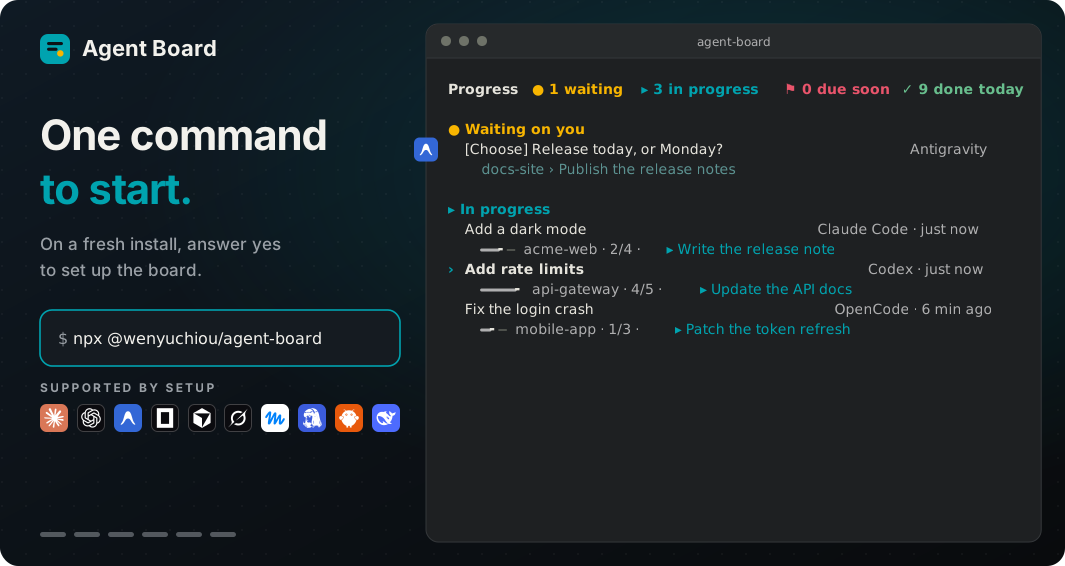
Claude Code, Codex, Antigravity and other AI agents report to one board on your computer. When one stops to ask you something, its question goes to the top within seconds, so you stop hunting through windows. One Markdown file, no account.
Quick start
With Node.js 22+, in any terminal:
npx @wenyuchiou/agent-board@next setup
Then open a new session of your agent and run:
npx @wenyuchiou/agent-board@next
setupshows what it will change and asks once before it writes.- In that new session, type
/agent-board($agent-boardin Codex; in Hermes, ask it for the Agent Board skill), or run the second command (Cursor has no such command). - Per-agent steps, language, options and other ways to install: setup guide.
What you get
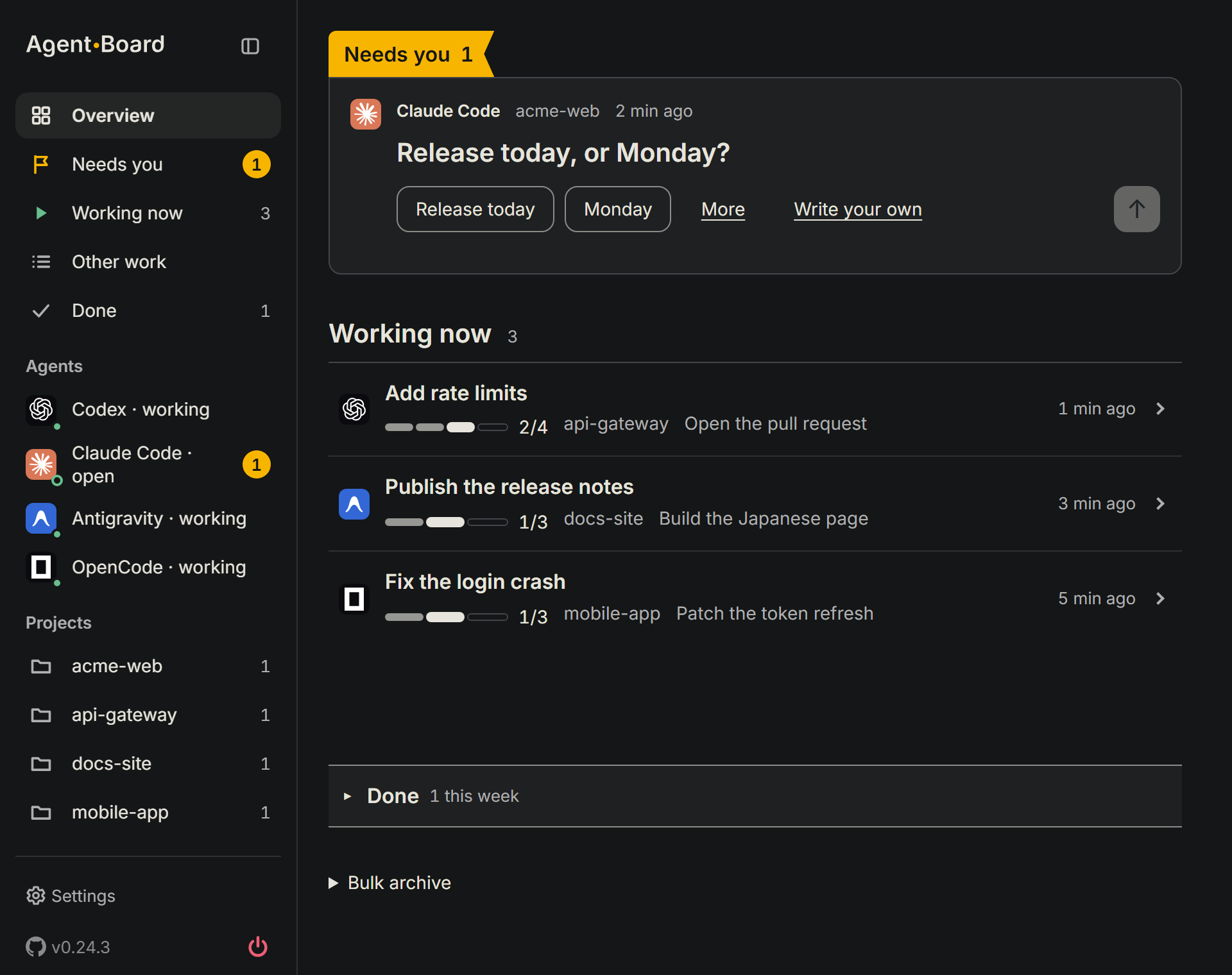
- Questions first. A question an agent is waiting on goes to the top, with a button for each option it can read, or you write your own answer.
- Every agent stays where it is. Agents keep running in their own terminals; the board reads what their hooks report.
- Local and plain. One Markdown file you can read and edit, a page on 127.0.0.1 only, and no model calls by the board.
- One command to install, one to remove.
setupshows what it will change before it writes;removetakes out what setup wrote and leaves your own settings alone.
Supported agents
In a terminal (command line)
| Agent | Open the board | Your reply reaches it | |
|---|---|---|---|
 |
Claude Code | /agent-board |
Sent when it is free |
 |
Codex | $agent-board |
Held for the session when its card offers it; when it is handed over |
 |
Antigravity | /agent-board |
Held for the session when its card offers it; when it is handed over |
 |
Cursor | The second Quick start command | You paste it |
 |
OpenCode | /agent-board |
You paste it |
 |
Grok Build | /agent-board |
You paste it |
 |
Hermes Agent | Ask it for the Agent Board skill | You paste it |
In a desktop app or IDE
| Agent | Open the board | Your reply reaches it | |
|---|---|---|---|
|
Claude Code | /agent-board (board page) |
Not yet |
|
Codex | Board page | Not yet |
|
Antigravity | Board page | Held for the session when its card offers it. Desktop app: checked in a live run; IDE: no run of its own, and it is treated like the app when its hook reports it as the app's surface; when it is handed over |
|
Cursor | Board page | Not tested yet |
|
OpenCode | Board page | Not yet |
- Board page: run
npx @wenyuchiou/agent-board@next --htmlin a terminal, the app's own included. - Not yet or Not tested yet: copy your answer from the board and paste it into the app.
- dot and other web chats report by hand: how.
Answer from the board
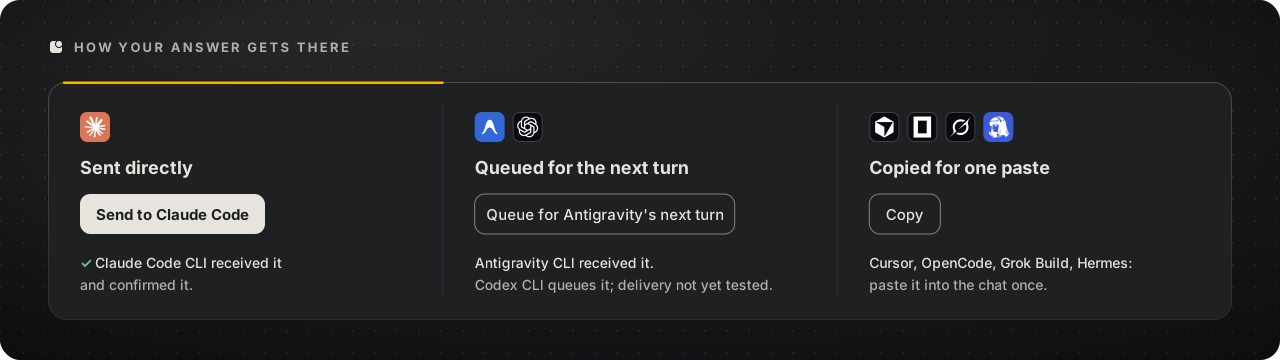
An answer to an agent's question and a message you send it travel the same way, by the button you press:
- Send hands it to a connected session; a confirmation from that session means it was received. With no confirmation it may still have arrived, so look at the agent before you use Copy answer, or it may get it twice. Send needs messaging on.
- Queue for the agent's next turn holds it for that session's turns, does not wake an idle one, and can be rejected if its 12-hour mailbox expires or, for an agent whose hook reports the end of a session, if the session ends first.
- Copy answer puts it on your clipboard to paste into that agent.
- Answered in the agent's own window? Press Already answered, hide to clear the card.
Open it anywhere
| Where | How |
|---|---|
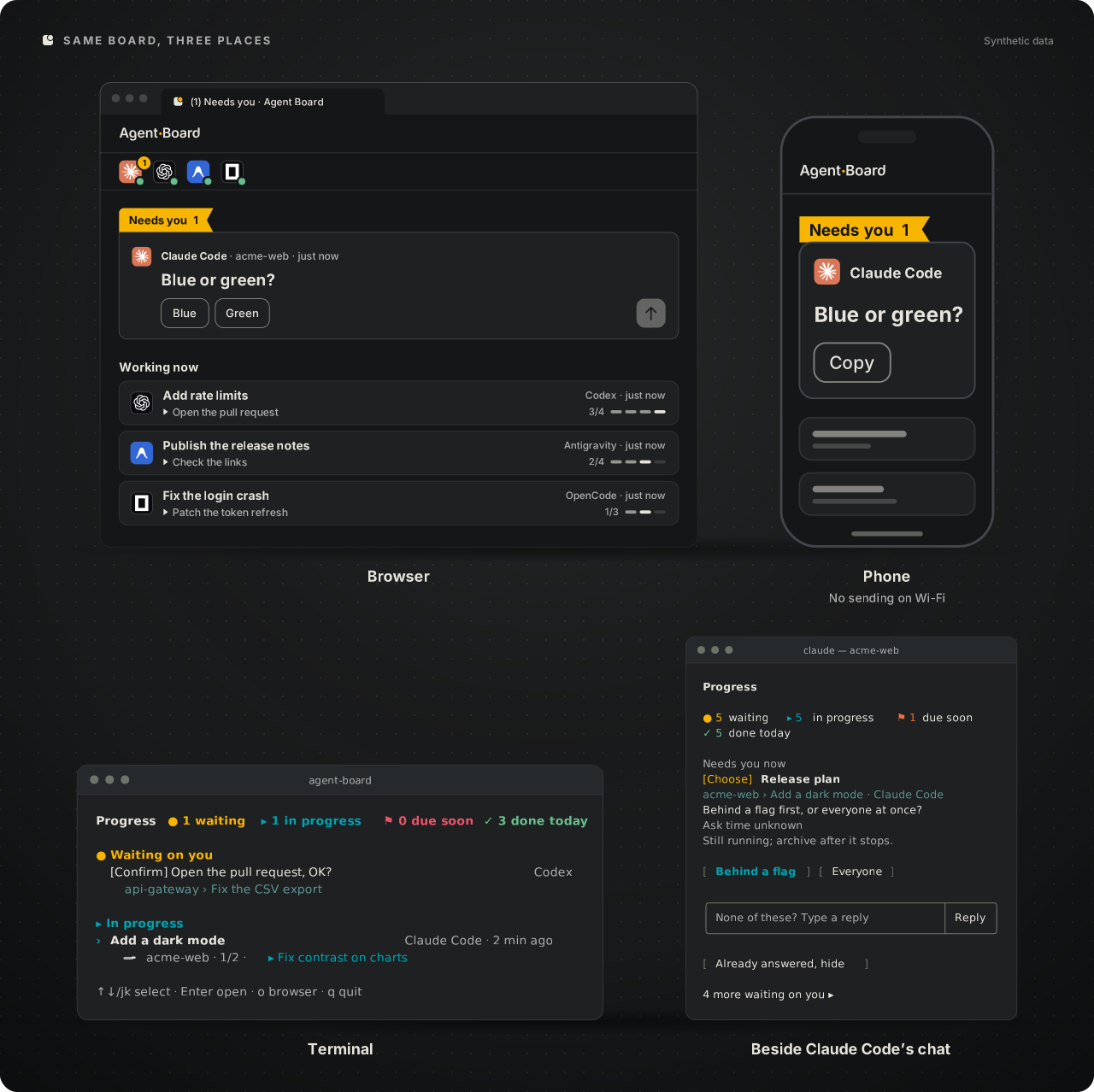
| In an agent | /agent-board ($agent-board in Codex) |
| A terminal | npx @wenyuchiou/agent-board: the terminal board in an interactive terminal over SSH or on Linux with no display, unless an agent's setting such as HERMES_HOME or OPENCODE_CONFIG_DIR is set in that shell; plain text in CI; the page everywhere else. --watch gives the terminal board in any interactive terminal |
| A phone on the same Wi-Fi | npx @wenyuchiou/agent-board --lan and scan the QR code. The phone can look, tick, archive and close the board, but cannot send an answer (it shows the answer to copy). Use it on a network you trust: the link is not encrypted and anyone who has it can open the page |
| An agent reading the board | npx @wenyuchiou/agent-board --json (fields) |
How it works
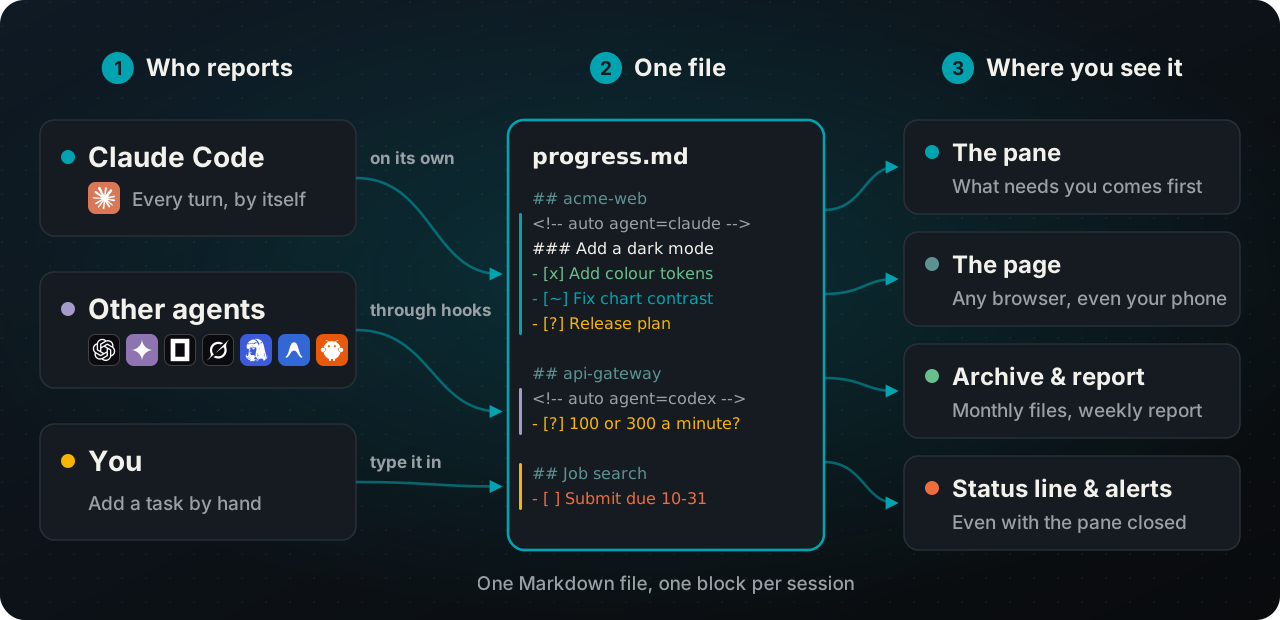
Each agent's hooks write what its session is doing into its own block of one local progress.md (a fresh install uses ~/.agent-board/progress.md; the format). The page listens on 127.0.0.1 only and needs no account. The board does not call a model; what the optional Claude Code plugin can send out is in the guide.
Update and remove
Run npx @wenyuchiou/agent-board@next setup again to see what an update would change, then setup --apply; files you edited are left alone. To remove what setup wrote:
npx @wenyuchiou/agent-board@next remove
npx @wenyuchiou/agent-board@next remove --apply
Your history stays beside progress.md; Update and uninstall lists what is kept, and a few small cache files can be left behind. For the shorter agent-board command, run npm install -g @wenyuchiou/agent-board@next once.
Troubleshooting
| You see | Try |
|---|---|
| An agent is not on the board | Start a new session of it; one that was already open is not connected. For Codex, preview npx @wenyuchiou/agent-board --codex-trust --codex-bin "<path-to-codex>" --json with Codex's full path, review it, then add --apply only if you approve. Codex CLI also offers /hooks. |
| Nothing changed after installing | Run npx @wenyuchiou/agent-board@next setup again without --apply (from a checkout: node scripts/setup-agent.mjs). Read the conflicts and Next steps; edited files are left alone and listed there. |
| If the board looks old | A session that was already open may still run the version it loaded: start a new session of that agent. To update, see the guide. |
| An agent shows up twice | It may be connected both by the Claude plugin and by setup: what to remove. |
To check Claude Code's setup, run claude plugin list and /progress connect status. More answers: the guide's FAQ and Troubleshooting. Found a bug? Open the bug form and follow the safe-report steps: no session ids, home-folder paths or tokens.
Documentation
| Read | For |
|---|---|
| Guide | Daily use, keys, the page, settings, update and uninstall, FAQ |
| Setup | What the installer writes for each agent |
| Codex · Messaging · File format · Remote reporters | Reference |
| AGENTS.md · Contributing · Security | Working on the code; how a non-Claude agent reports by hand |
License
MIT. Agent logos are from Simple Icons (CC0) and Lobe Icons (MIT) and belong to their owners; an agent without a logo is shown by its initial.
Latest stable version: 0.24.2 · 0.24.3 is a pre-release (npx @wenyuchiou/agent-board@next setup) · Changelog.
