
Turoad/CLRNet
Turoad/CLRNet has 600 GitHub stars and 123 forks. GitHot measured 0 stars in 24 hours. Last checked 2026-11-16 21:20 UTC. Last push 2024-07-16.
Crecimiento de estrellas medido
- in 24h
- 0
- in 7 days
- Actualización retrasada
- in 15 days
- Actualización retrasada
- in 1 month
- Actualización retrasada
Cambios netos en períodos que se solapan, no totales diarios. Los datos no disponibles se dejan en blanco. Las estrellas indican interés, no calidad.
Acerca de
Pytorch implementation of our paper "CLRNet: Cross Layer Refinement Network for Lane Detection" (CVPR2022 Acceptance).
Aprendizaje automáticoREADME.md
Original


CLRNet: Cross Layer Refinement Network for Lane Detection
Pytorch implementation of the paper "CLRNet: Cross Layer Refinement Network for Lane Detection" (CVPR2022 Acceptance).
Introduction
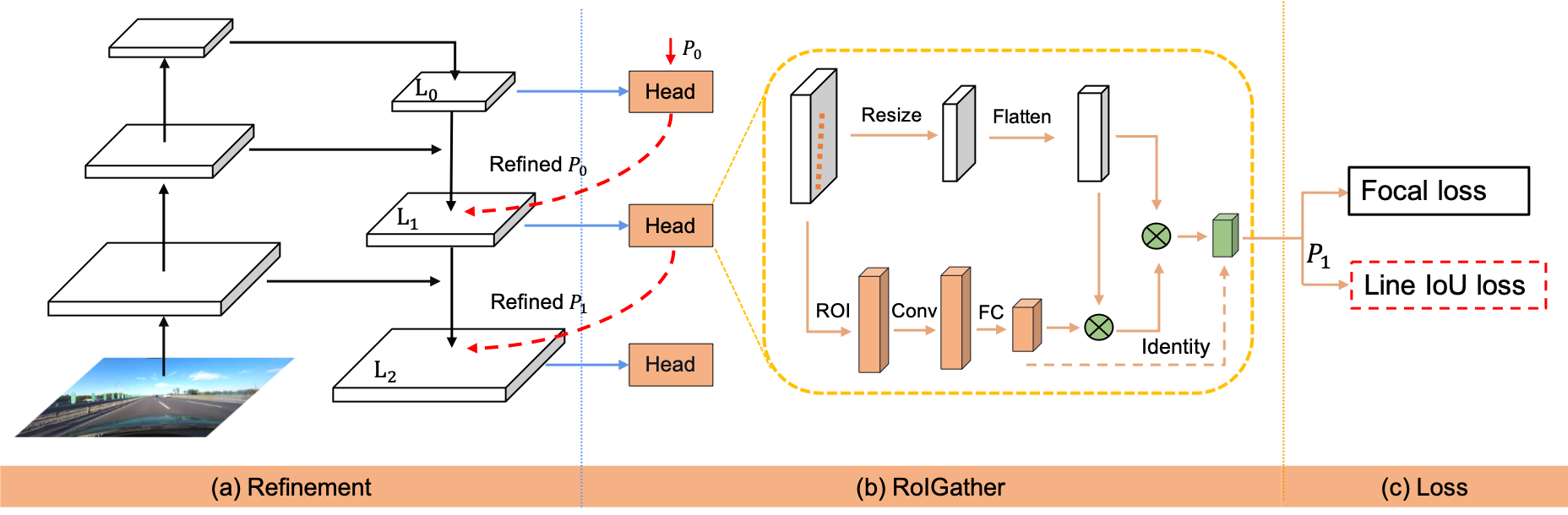
- CLRNet exploits more contextual information to detect lanes while leveraging local detailed lane features to improve localization accuracy.
- CLRNet achieves SOTA result on CULane, Tusimple, and LLAMAS datasets.
Installation
Prerequisites
Only test on Ubuntu18.04 and 20.04 with:
- Python >= 3.8 (tested with Python3.8)
- PyTorch >= 1.6 (tested with Pytorch1.6)
- CUDA (tested with cuda10.2)
- Other dependencies described in
requirements.txt
Clone this repository
Clone this code to your workspace.
We call this directory as $CLRNET_ROOT
git clone https://github.com/Turoad/clrnet
Create a conda virtual environment and activate it (conda is optional)
conda create -n clrnet python=3.8 -y
conda activate clrnet
Install dependencies
# Install pytorch firstly, the cudatoolkit version should be same in your system.

conda install pytorch torchvision cudatoolkit=10.1 -c pytorch

# Or you can install via pip
pip install torch==1.8.0 torchvision==0.9.0

# Install python packages
python setup.py build develop
Data preparation
CULane
Download CULane. Then extract them to $CULANEROOT. Create link to data directory.
cd $CLRNET_ROOT
mkdir -p data
ln -s $CULANEROOT data/CULane
For CULane, you should have structure like this:
$CULANEROOT/driver_xx_xxframe    # data folders x6
$CULANEROOT/laneseg_label_w16    # lane segmentation labels
$CULANEROOT/list                 # data lists
Tusimple
Download Tusimple. Then extract them to $TUSIMPLEROOT. Create link to data directory.
cd $CLRNET_ROOT
mkdir -p data
ln -s $TUSIMPLEROOT data/tusimple
For Tusimple, you should have structure like this:
$TUSIMPLEROOT/clips # data folders
$TUSIMPLEROOT/lable_data_xxxx.json # label json file x4
$TUSIMPLEROOT/test_tasks_0627.json # test tasks json file
$TUSIMPLEROOT/test_label.json # test label json file
For Tusimple, the segmentation annotation is not provided, hence we need to generate segmentation from the json annotation.
python tools/generate_seg_tusimple.py --root $TUSIMPLEROOT
# this will generate seg_label directory
LLAMAS
Dowload LLAMAS. Then extract them to $LLAMASROOT. Create link to data directory.
cd $CLRNET_ROOT
mkdir -p data
ln -s $LLAMASROOT data/llamas
Unzip both files (color_images.zip and labels.zip) into the same directory (e.g., data/llamas/), which will be the dataset's root. For LLAMAS, you should have structure like this:
$LLAMASROOT/color_images/train # data folders
$LLAMASROOT/color_images/test # data folders
$LLAMASROOT/color_images/valid # data folders
$LLAMASROOT/labels/train # labels folders
$LLAMASROOT/labels/valid # labels folders
Getting Started
Training
For training, run
python main.py [configs/path_to_your_config] --gpus [gpu_num]
For example, run
python main.py configs/clrnet/clr_resnet18_culane.py --gpus 0
Validation
For testing, run
python main.py [configs/path_to_your_config] --[test|validate] --load_from [path_to_your_model] --gpus [gpu_num]
For example, run
python main.py configs/clrnet/clr_dla34_culane.py --validate --load_from culane_dla34.pth --gpus 0
Currently, this code can output the visualization result when testing, just add --view.
We will get the visualization result in work_dirs/xxx/xxx/visualization.
Results
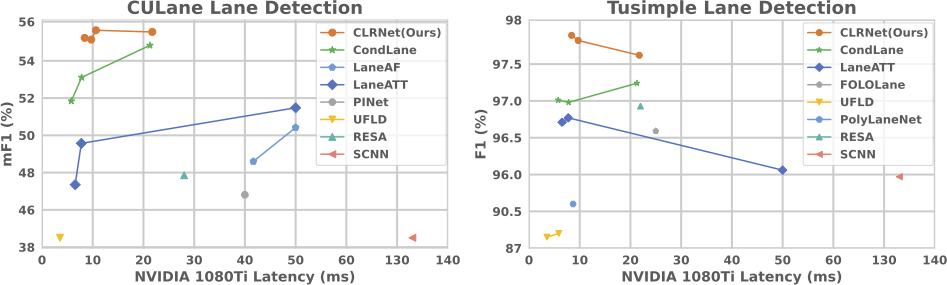
CULane
| Backbone | mF1 | F1@50 | F1@75 |
|---|---|---|---|
| ResNet-18 | 55.23 | 79.58 | 62.21 |
| ResNet-34 | 55.14 | 79.73 | 62.11 |
| ResNet-101 | 55.55 | 80.13 | 62.96 |
| DLA-34 | 55.64 | 80.47 | 62.78 |
TuSimple
| Backbone | F1 | Acc | FDR | FNR |
|---|---|---|---|---|
| ResNet-18 | 97.89 | 96.84 | 2.28 | 1.92 |
| ResNet-34 | 97.82 | 96.87 | 2.27 | 2.08 |
| ResNet-101 | 97.62 | 96.83 | 2.37 | 2.38 |
LLAMAS
| Backbone | valid mF1 F1@50 F1@75 |
test F1@50 |
|---|---|---|
| ResNet-18 | 70.83 96.93 85.23 | 96.00 |
| DLA-34 | 71.57 97.06 85.43 | 96.12 |
“F1@50” refers to the official metric, i.e., F1 score when IoU threshold is 0.5 between the gt and prediction. "F1@75" is the F1 score when IoU threshold is 0.75.
Citation
If our paper and code are beneficial to your work, please consider citing:
@InProceedings{Zheng_2022_CVPR,
    author    = {Zheng, Tu and Huang, Yifei and Liu, Yang and Tang, Wenjian and Yang, Zheng and Cai, Deng and He, Xiaofei},
    title     = {CLRNet: Cross Layer Refinement Network for Lane Detection},
    booktitle = {Proceedings of the IEEE/CVF Conference on Computer Vision and Pattern Recognition (CVPR)},
    month     = {June},
    year      = {2022},
    pages     = {898-907}
}