
Nasogaa/immich-drop
Acerca de
Una pequeña aplicación web sin necesidad de iniciar sesión para recopilar fotos y vídeos de cualquier persona en tu servidor Immich.
Creación y multimediaWhat you can do
- Invite Links: public-by-URL links for uploads; one-time or multi-use
- Manage Links: search/sort, enable/disable, delete, edit name/expiry
- Row Actions: icon-only actions with tooltips (Open, Copy, Details, QR, Save)
- Passwords (optional): protect invites with a password gate
Crecimiento de estrellas medido
- in 24h
- 0
- in 7 days
- 0
- in 15 days
- Recopilando historial
- in 1 month
- Recopilando historial
Cambios netos en períodos que se solapan, no totales diarios. Los datos no disponibles se dejan en blanco. Las estrellas indican interés, no calidad.
README.md
OriginalImmich Drop Uploader
A tiny web app for collecting photos/videos into your Immich server. Admin users log in to create public invite links; invite links are always public-by-URL. A public uploader page is optional and disabled by default.
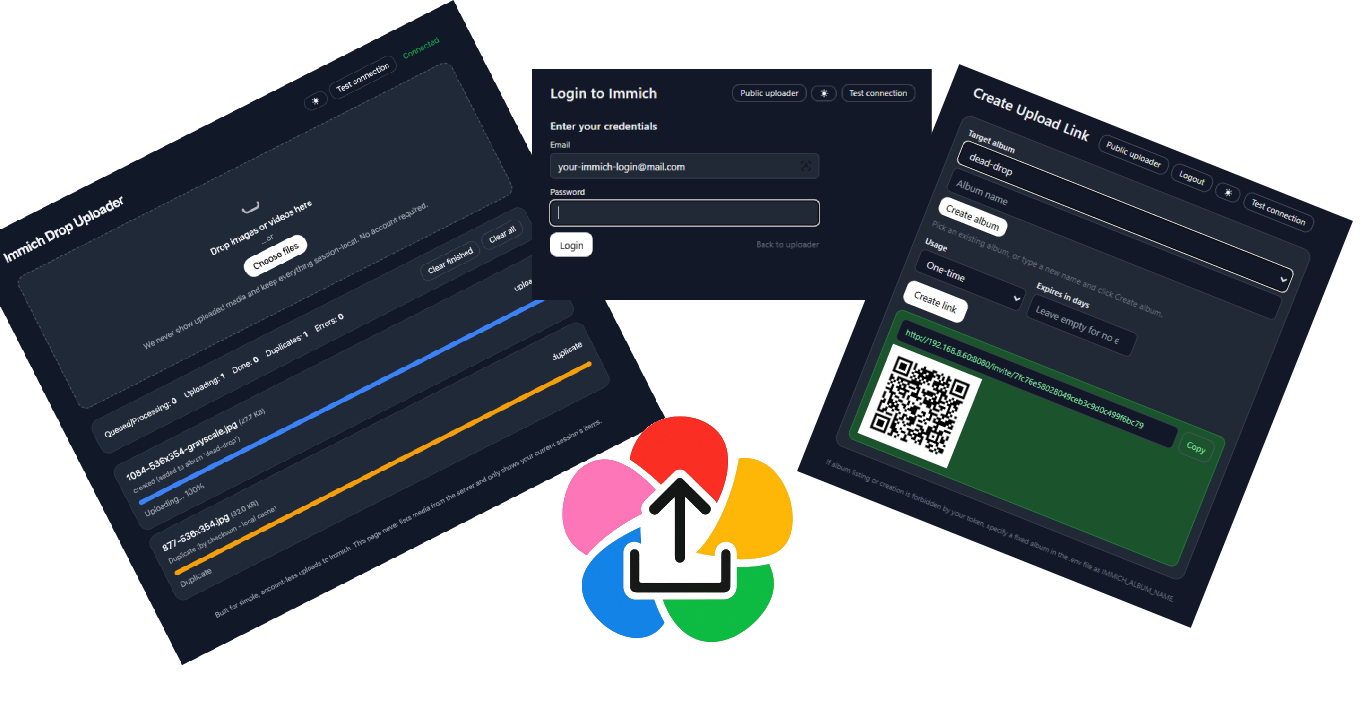
Features
- Invite Links: public-by-URL links for uploads; one-time or multi-use
- Manage Links: search/sort, enable/disable, delete, edit name/expiry
- Row Actions: icon-only actions with tooltips (Open, Copy, Details, QR, Save)
- Passwords (optional): protect invites with a password gate
- Albums (optional): upload into a specific album (auto-create supported)
- Duplicate Prevention: local SHA‑1 cache (+ optional Immich bulk-check)
- Progress Queue: WebSocket updates; retry failed items
- Chunked Uploads (optional): large-file support with configurable chunk size
- Privacy-first: never lists server media; session-local uploads only
- Mobile + Dark Mode: responsive UI, safe-area padding, persistent theme
Table of contents
- Quick start
- New Features
- Chunked Uploads
- Architecture
- Folder structure
- Requirements
- Configuration (.env)
- How it works
- Mobile notes
- Troubleshooting
- Security notes
- Development
- License
Quick start
You can run without a .env file by putting all settings in docker-compose.yml (recommended for deploys).
Use a .env file only for local development.
docker-compose.yml (deploy without .env)
version: "3.9"

services:
  immich-drop:
    image: ghcr.io/nasogaa/immich-drop:latest
    pull_policy: always
    container_name: immich-drop
    restart: unless-stopped

    # Configure all settings here (no .env required)
    environment:

      # Immich connection (must include /api)
      IMMICH_BASE_URL: https://immich.example.com/api
      IMMICH_API_KEY: ${IMMICH_API_KEY}

      # Optional behavior
      IMMICH_ALBUM_NAME: dead-drop
      PUBLIC_UPLOAD_PAGE_ENABLED: "false"   # keep disabled by default
      PUBLIC_BASE_URL: https://drop.example.com

      # Large files: chunked uploads (bypass 100MB proxy limits)
      CHUNKED_UPLOADS_ENABLED: "false"      # enable chunked uploads
      CHUNK_SIZE_MB: "95"                  # per-chunk size (MB)

      # App internals
      SESSION_SECRET: ${SESSION_SECRET}

    # Expose the app on the host
    ports:
      - 8080:8080

    # Persist local dedupe cache (state.db) across restarts
    volumes:
      - immich_drop_data:/data

    # Simple healthcheck
    healthcheck:
      test: ["CMD-SHELL", "python - <<'PY'\nimport os,urllib.request,sys; url=f\"http://127.0.0.1:{os.getenv('PORT','8080')}/\";\ntry: urllib.request.urlopen(url, timeout=3); sys.exit(0)\nexcept Exception: sys.exit(1)\nPY"]
      interval: 30s
      timeout: 5s
      retries: 3
      start_period: 10s

volumes:
  immich_drop_data:
### CLI
```bash
docker compose pull
docker compose up -d
What's New
v0.5.0 – Manage Links overhaul
- In-panel bulk actions footer (Delete/Enable/Disable stay inside the box)
- Per-row icon actions with tooltips; Save button lights up only on changes
- Per-row QR modal; Details modal close fixed and reliable
- Auto-refresh after creating a link; new row is highlighted and scrolled into view
- Expiry save fix: stores end-of-day to avoid off-by-one date issues
Roadmap highlight
- We’d like to add a per-user UI and remove reliance on a fixed API key by allowing users to authenticate and provide their own Immich API tokens. This is not in scope for the initial versions but aligns with future direction.
- The frontend automatically switches to chunked mode only for files larger than the configured chunk size.
📱 Device‑Flexible HMI (New)
- Fully responsive UI with improved spacing and wrapping for small and large screens.
- Mobile‑safe file picker and a sticky bottom “Choose files” bar on phones.
- Safe‑area padding for devices with notches; refined dark/light theme behavior.
- Desktop keeps the dropzone clickable; touch devices avoid accidental double‑open.
♻️ Reliability & Quality of Life (New)
- Retry button to re‑attempt any failed upload without re‑selecting the file.
- Progress and status updates are more resilient to late/reordered WebSocket events.
- Invites can be created without an album, keeping uploads unassigned when preferred.
Last 8 Days – Highlights
- Added chunked uploads with configurable chunk size.
- Added optional passwords for invite links with in‑UI unlock prompt.
- Responsive HMI overhaul: mobile‑safe picker, sticky mobile action bar, safe‑area support.
- Retry for failed uploads and improved progress handling.
- Support for invites with no album association.
🌙 Dark Mode
- Automatic or manual toggle; persisted preference
📁 Album Integration
- Auto-create + assign album if configured; optional invites without album
Chunked Uploads
- Enable chunked uploads by setting
CHUNKED_UPLOADS_ENABLED=true. - Configure chunk size with
CHUNK_SIZE_MB(default:95). The client only uses chunked mode for files larger than this. - Intended to bypass upstream limits (e.g., 100MB) while preserving duplicate checks, EXIF timestamps, album add, and per‑item progress via WebSocket.
Architecture
- Frontend: static HTML/JS (Tailwind). Drag & drop or "Choose files", queue UI with progress and status chips.
- Backend: FastAPI + Uvicorn.
- Proxies uploads to Immich
/assets - Computes SHA‑1 and checks a local SQLite cache (
state.db) - Optional Immich de‑dupe via
/assets/bulk-upload-check - WebSocket
/wspushes per‑item progress to the current browser session only
- Proxies uploads to Immich
- Persistence: local SQLite (
state.db) prevents re‑uploads across sessions/runs.
Folder structure
immich_drop/
├─ app/                     # FastAPI application (Python package)
│  ├─ app.py                # ASGI app (uvicorn entry: app.app:app)
│  └─ config.py             # Settings loader (reads .env/env)
├─ frontend/                # Static UI (served at /static)
│  ├─ index.html            # Public uploader (optional)
│  ├─ login.html            # Login page (admin)
│  ├─ menu.html             # Admin menu (create invites)
│  ├─ invite.html           # Public invite upload page
│  ├─ app.js                # Uploader logic (drop/queue/upload/ws)
│  ├─ header.js             # Shared header (theme + ping + banner)
│  └─ favicon.png           # Tab icon (optional)
├─ data/                    # Local dev data dir (bind to /data in Docker)
├─ main.py                  # Thin dev entrypoint (python main.py)
├─ requirements.txt         # Python dependencies
├─ Dockerfile
├─ docker-compose.yml
├─ .env.example             # Example dev environment (optional)
├─ README.md
└─ screenshot.png           # UI screenshot for README
Requirements
- Python 3.11
- An Immich server + API key
Local dev quickstart
Development
Run with live reload:
python main.py
The backend contains docstrings so you can generate docs later if desired.
Dev Configuration (.env)
# Server (dev only)
HOST=0.0.0.0
PORT=8080

# Immich connection (include /api)
IMMICH_BASE_URL=http://REPLACE_ME:2283/api
IMMICH_API_KEY=ADD-YOUR-API-KEY   # needs: asset.upload; for albums also: album.create, album.read, albumAsset.create
MAX_CONCURRENT=3

# Public uploader page (optional) — disabled by default
PUBLIC_UPLOAD_PAGE_ENABLED=TRUE

# Album (optional): auto-add uploads from public uploader to this album (creates if needed)
IMMICH_ALBUM_NAME=dead-drop

# Local dedupe cache (SQLite)
STATE_DB=./data/state.db

# Base URL for generating absolute invite links (recommended for production)
# e.g., PUBLIC_BASE_URL=https://photos.example.com
#PUBLIC_BASE_URL=

# Session and security
SESSION_SECRET=SET-A-STRONG-RANDOM-VALUE
LOG_LEVEL=DEBUG

# Chunked uploads (optional)
CHUNKED_UPLOADS_ENABLED=true
CHUNK_SIZE_MB=95
You can keep a checked‑in /.env.example with the keys above for onboarding.
How it works
- Queue – Files selected in the browser are queued; each gets a client‑side ID.
- De‑dupe (local) – Server computes SHA‑1 and checks
state.db. If seen, marks as duplicate. - De‑dupe (server) – Attempts Immich
/assets/bulk-upload-check; if Immich reports duplicate, marks accordingly. - Upload – Multipart POST to
${IMMICH_BASE_URL}/assetswith:assetData,deviceAssetId,deviceId,fileCreatedAt,fileModifiedAt(from EXIF when available; elselastModified),isFavorite=false,filename, and headerx-immich-checksum.
- Album – If
IMMICH_ALBUM_NAMEis configured, adds the uploaded asset to the album (creates album if it doesn't exist). - Progress – Backend streams progress via WebSocket to the same session.
- Privacy – UI shows only the current session's items. It never lists server media.
Security notes
- The menu and invite creation are behind login. Logout clears the session.
- Invite links are public by URL; share only with intended recipients.
- The default uploader page at
/is disabled unlessPUBLIC_UPLOAD_PAGE_ENABLED=true. - The Immich API key remains server‑side; the browser never sees it.
- No browsing of uploaded media; only ephemeral session state is shown.
- Run behind HTTPS with a reverse proxy and restrict CORS to your domain(s).
Usage flow
- Admin: Login → Menu → Create invite link (optionally one‑time / expiry / album) → Share link or QR.
- Guest: Open invite link → Drop files → Upload progress and results shown.
- Optional: Enable public uploader and set
IMMICH_ALBUM_NAMEfor a default landing page.
License
MIT.
Explorar proyectos relacionados
Cargando…