
JetSquirrel/DuckLocal
JetSquirrel/DuckLocal has 35 GitHub stars and 5 forks. GitHot measured 0 stars in 24 hours. Last checked 2026-11-15 09:10 UTC. Last push 2026-11-12.
Crecimiento de estrellas medido
- in 24h
- 0
- in 7 days
- Recopilando historial
- in 15 days
- Recopilando historial
- in 1 month
- Recopilando historial
Cambios netos en períodos que se solapan, no totales diarios. Los datos no disponibles se dejan en blanco. Las estrellas indican interés, no calidad.
Acerca de
A local-first workspace for querying and exploring your data, built natively on DuckDB.
DatosREADME.md
Original
DuckLocal
Point it at your files. Get answers in SQL.
A fast, native desktop workspace for CSV, Parquet, JSON, Excel and DuckDB files.
No connections to set up, no schema to create, nothing uploaded.




Download · ducklocal.app · Docs · 中文文档
Why DuckLocal
- Zero setup. Open a file, a folder or a glob, and every table in it can be queried at once.
- Private by default. Your data never leaves your machine. There's no account and no telemetry.
- Native and fast. It's a Rust app built on GPUI with DuckDB inside, not a browser tab.
- From a query to a dashboard. You can turn results into charts, and save dashboards as plain-text
.dashfiles that live next to your data. - Agents can use it too. The same binary runs headless and returns JSON, so AI agents can explore data and hand results back to your window.
Download
| Platform | Package |
|---|---|
| macOS 12+ (Apple silicon) | ducklocal-macos-arm64.dmg (signed and notarized) |
| Windows x86_64 | ducklocal-windows-x86_64.zip |
| Linux x86_64 | ducklocal-linux-x86_64.tar.gz |
All releases are on the releases page.
Open your data
ducklocal ./logs/             # every data file under a folder, recursively
ducklocal ./billing.parquet   # one file
ducklocal './data/*.csv'      # a pattern
ducklocal warehouse.duckdb    # or an existing DuckDB database
You can also drag files onto the window or pick them from the file dialog. DuckLocal remembers the workspace for the next launch.
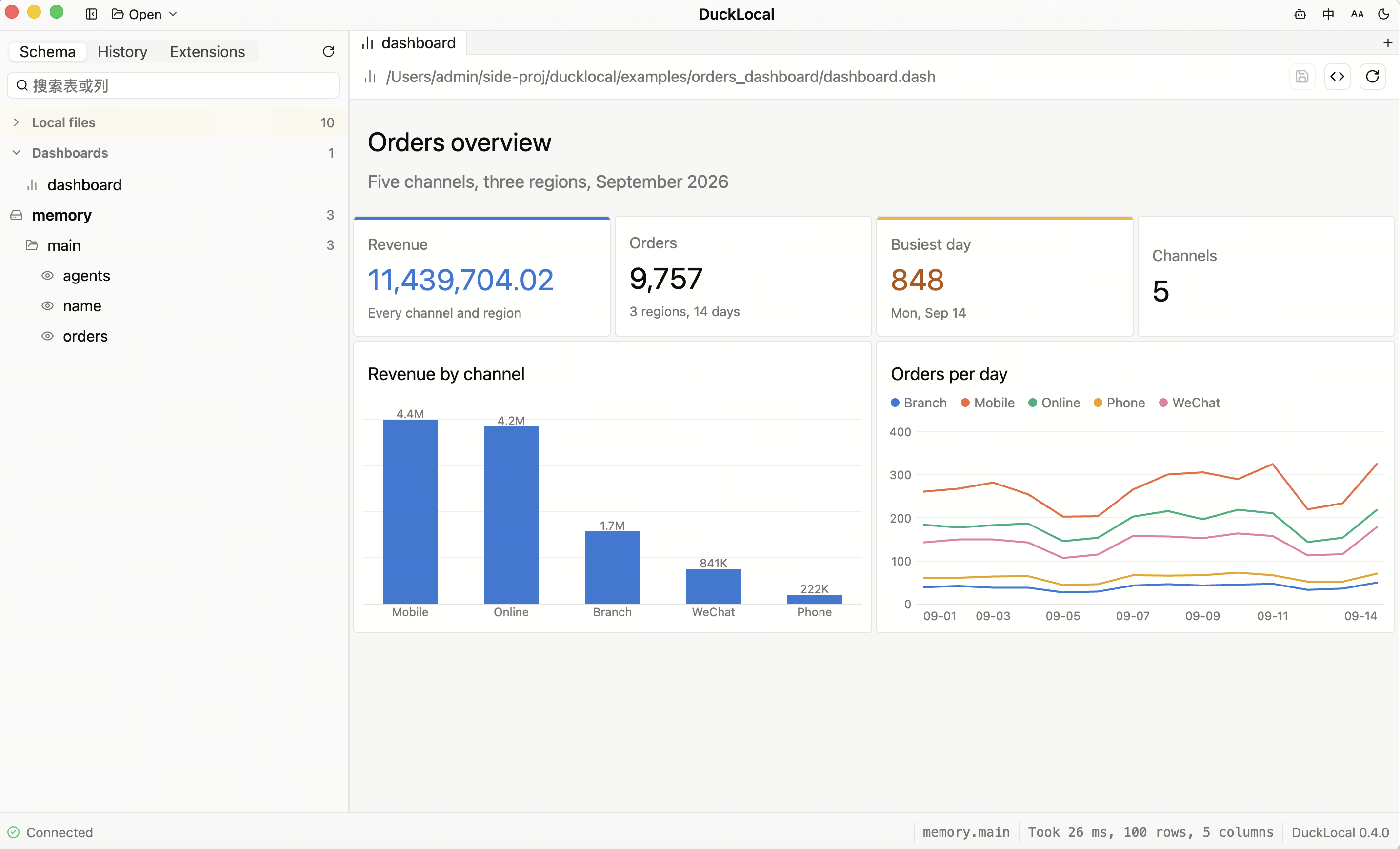
To try the dashboard in the screenshot above, run this from a checkout of the repository:
ducklocal examples/orders_dashboard/dashboard.dash
Features
⌨️ SQL editor
|
🔍 Data exploration
|
📊 Dashboards
|
🧩 DuckDB inside
|
🍎 At home on macOS
|
🎨 Comfortable to use
|
Built for AI agents
The same binary runs headless and returns structured JSON, so an AI agent can explore data without opening a window, then show you the result in the window:
ducklocal schema ./data/                                  # what can be queried, with columns
ducklocal query --sql "SELECT * FROM 'sales.csv'" --limit 20
ducklocal check dashboard.dash                            # validate a dashboard spec
ducklocal propose dashboard.dash --from new.dash          # suggest a change for a person to review
ducklocal session show                                    # how an analysis got here, and what no longer holds
ducklocal open --run --sql "SELECT ..."                   # hand a result to the running window
ducklocal open --state                                    # read back what the window shows
ducklocal project check                                   # will this analysis folder work here, and if not, why
A worked investigation follows a made-up CloudTrail incident from the first query to a reviewed dashboard.
The official agent skill teaches an agent to read the schema first, then run SQL analysis and convert files. Copy it into your project:
mkdir -p /path/to/your-project/.claude/skills
cp -R skills/ducklocal /path/to/your-project/.claude/skills/
Safe defaults. Database files open read-only unless you pass
--read-write. Run SQL you didn't write yourself withquery --restricted --allow-read PATH, and check a dashboard you didn't write withcheck --restricted --allow-read PATH. In restricted mode, DuckDB refuses access to other files, the network, extensions and writes. It is not an OS sandbox; see what it does and doesn't limit.
The CLI guide covers every command and option. The handoff contract explains how an agent stays in step with the window.
Privacy
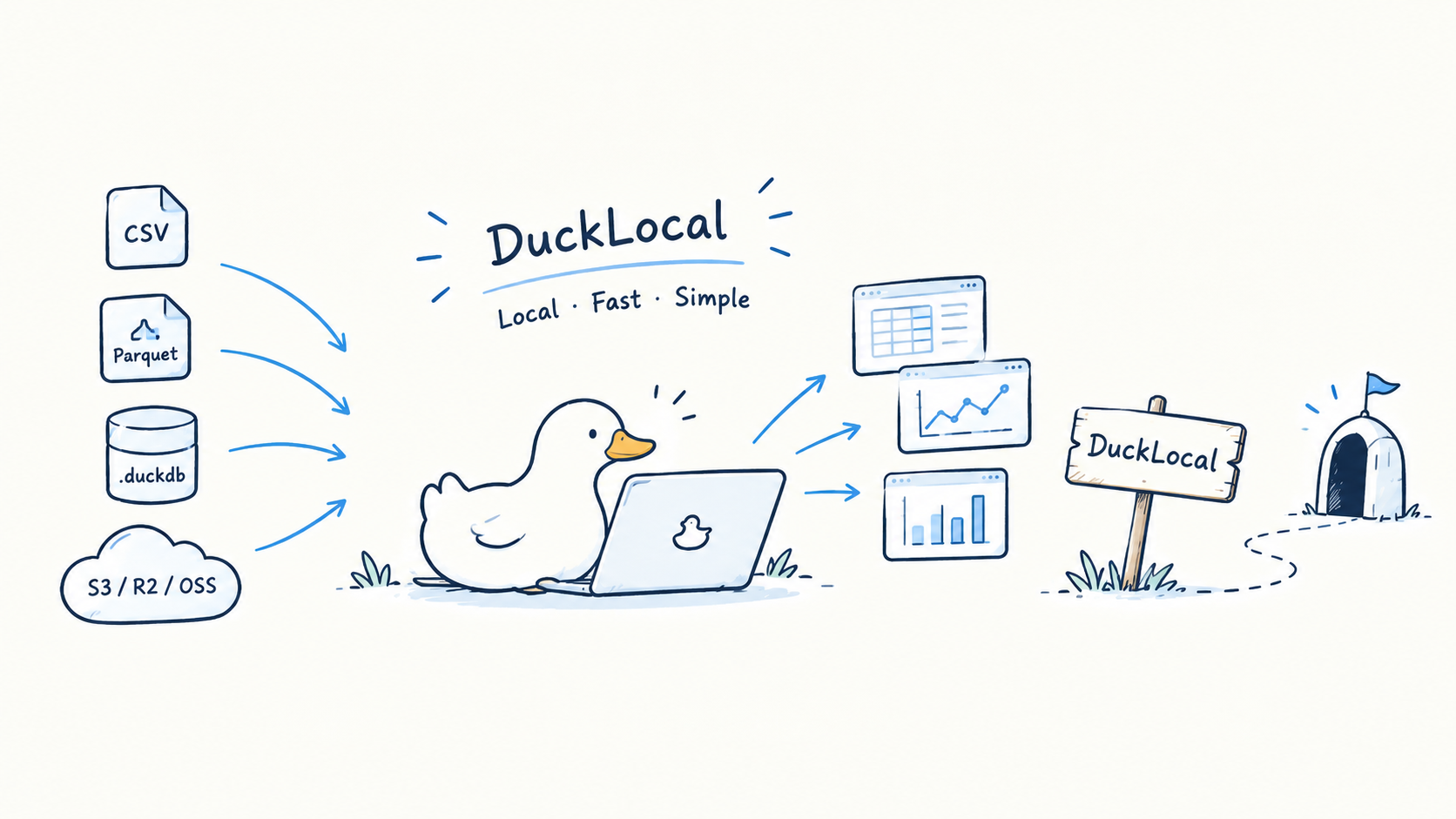
Your data stays on your machine. DuckLocal goes online only for these optional features:
- The OpenStreetMap base map for map charts (View → Online base map, off by default)
- The update check, which downloads a newer release from dl.ducklocal.app and installs it on restart (click the version in the status bar, or turn on DuckLocal → Check for Updates at Launch, off by default)
- S3, when you configure it
- Extensions you install
- SQL that names a remote address
There is no telemetry. Network and privacy lists every network path and how to verify it.
Documentation
Guides, a tutorial and troubleshooting are at ducklocal.app/docs (source: JetSquirrel/ducklocal-site).
Development
cargo run                     # start with an empty workspace
cargo run -- ./data/logs/     # or open something straight away
./scripts/bundle.sh           # build target/release/DuckLocal.app (unsigned)
Release builds target macOS 12+ on Apple silicon, Linux x86_64 and Windows x86_64. scripts/package-macos.sh builds the signed, notarized dmg. See development.
Windows notes
cargo build --release --locked
python scripts/check-windows.py target/release/ducklocal.exe
The executable opens the GUI without a console window, and Explorer and the taskbar show its embedded duck icon. CLI commands attach to the caller's console and keep redirected stdin/stdout/stderr and LSP pipes working. In PowerShell, use Start-Process -Wait -PassThru when you need to wait for an exit code, or a pipeline to capture JSON, for example ./ducklocal.exe query --sql "SELECT 42" | Out-String.
For a smaller binary, build with cargo build --profile compact --locked (output: target/compact/ducklocal.exe). This optimizes the Rust code for size while DuckDB's C++ engine keeps optimization level 3; both profiles keep LTO and symbol stripping. The normal release build stays optimized for speed, so compare actual size and performance on the target machine.
To regenerate the committed Windows icon, run python scripts/make-icons.py --windows (requires Pillow). Normal builds need neither Python nor Pillow. MSVC builds need the Visual Studio C++ tools and the Windows SDK. Run cargo test --release perf_g_ -- --nocapture --test-threads=1 to compare category-chart allocations, and perf_h_ to compare long-text column fitting.
License
Apache-2.0 · Copyright © 2026 JetSquirrel