
GVCLab/PersonaLive
GVCLab/PersonaLive has 4,128 GitHub stars and 618 forks. GitHot measured +7 stars in 24 hours and +60 in 7 days. Last checked 2026-11-11 05:09 UTC. Last push 2026-08-28.
[CVPR 2026] PersonaLive!: Animación expresiva de imágenes de retratos para emisiones en directo
Crecimiento de estrellas medido
- in 24h
- +7
- in 7 days
- +60
- in 15 days
- Actualización retrasada
- in 1 month
- Actualización retrasada
Cambios netos en períodos que se solapan, no totales diarios. Los datos no disponibles se dejan en blanco. Las estrellas indican interés, no calidad.
README.md
Original
Expressive Portrait Image Animation for Live Streaming
Zhiyuan Li1,2,3 · Chi-Man Pun1,📪 · Chen Fang2 · Jue Wang2 · Xiaodong Cun3,📪
1 University of Macau 2 Dzine.ai 3 GVC Lab, Great Bay University





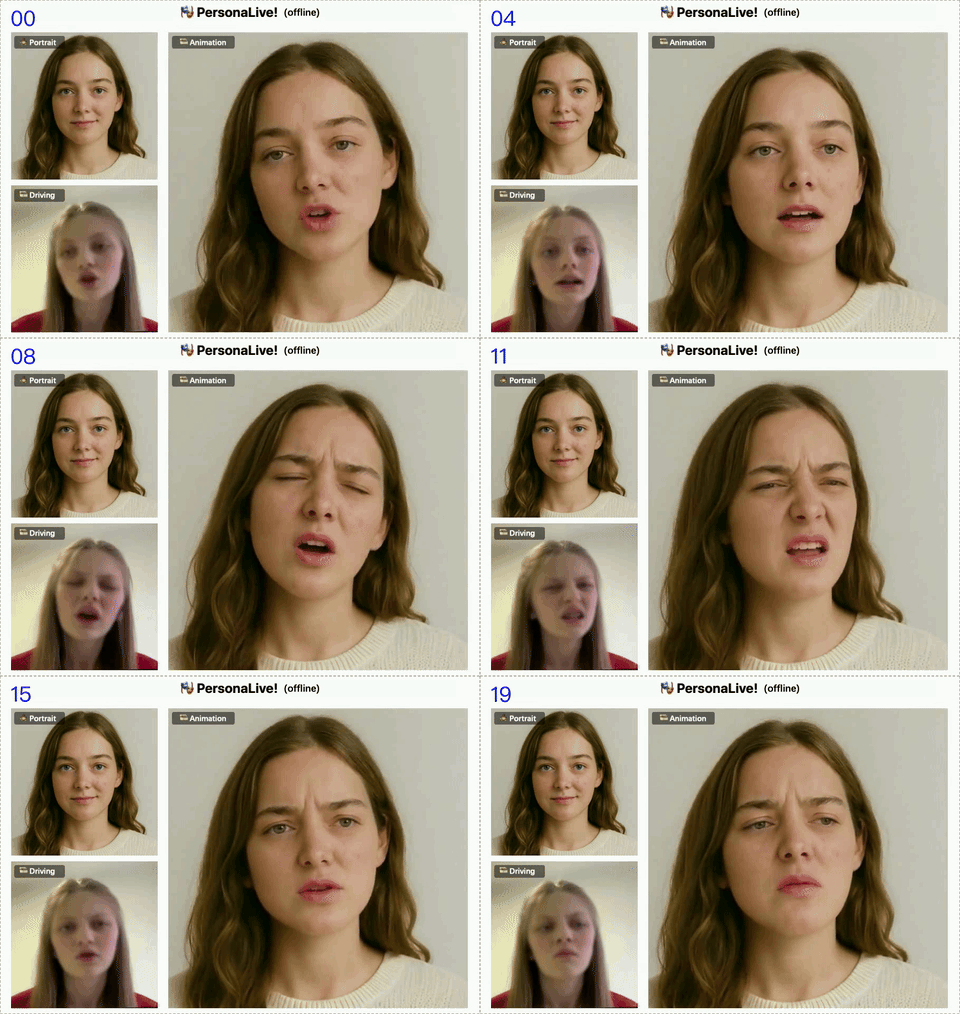
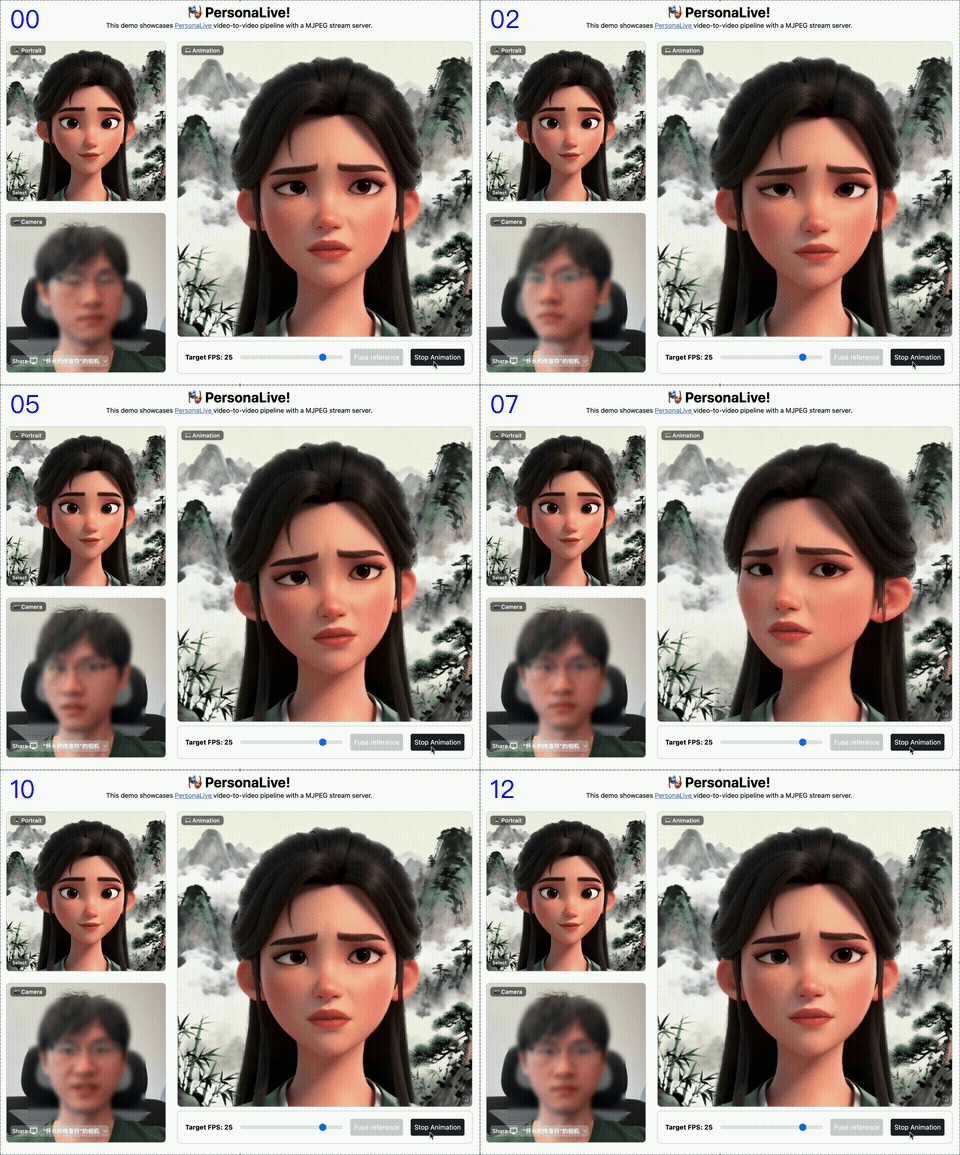
📋 TODO
- If you find PersonaLive useful or interesting, please give us a Star🌟! Your support drives us to keep improving.
- Fix bugs (If you encounter any issues, please feel free to open an issue or contact me! 🙏)
- [2026.08.28] 🔥 We release EditaLive, the updated version of PersonaLive with both full body animation and editing abilities!
- [2026.05.15] 🔥 Release
training code. - [2026.02.21] 🥳 PersonaLive is accepted by CVPR2026 🎉.
- [2025.12.29] 🔥 Enhance WebUI (Support reference image replacement).
- [2025.12.22] 🔥 Supported streaming strategy in offline inference to generate long videos on 12GB VRAM!
- [2025.12.17] 🔥 ComfyUI-PersonaLive is now supported! (Thanks to @okdalto)
- [2025.12.15] 🔥 Release
paper! - [2025.12.12] 🔥 Release
inference code,config, andpretrained weights!
⚖️ Disclaimer
- This project is released for academic research only.
- Users must not use this repository to generate harmful, defamatory, or illegal content.
- The authors bear no responsibility for any misuse or legal consequences arising from the use of this tool.
- By using this code, you agree that you are solely responsible for any content generated.
⚙️ Framework
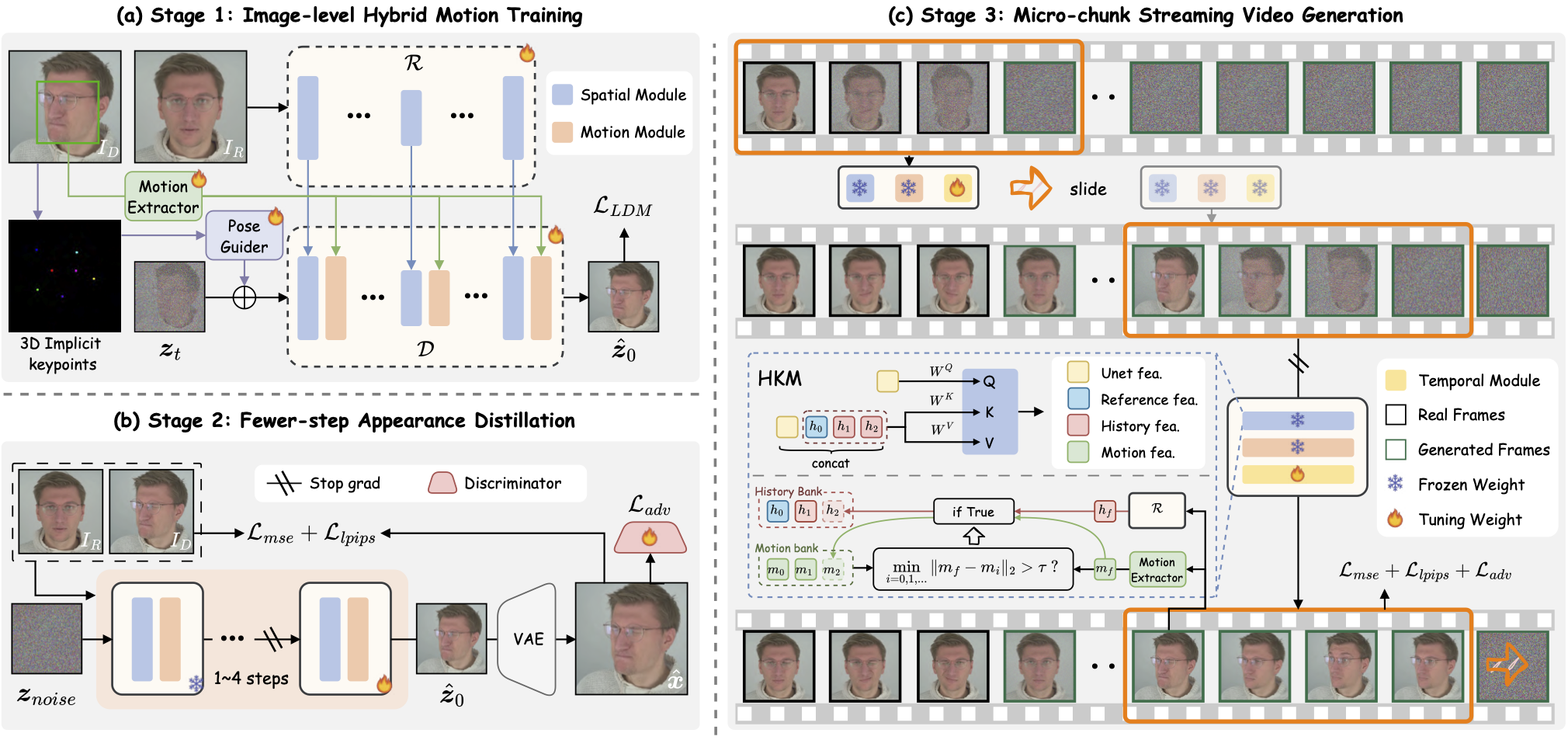
We present PersonaLive, a real-time and streamable diffusion framework capable of generating infinite-length portrait animations.
🚀 Getting Started
🛠 Installation
# clone this repo
git clone https://github.com/GVCLab/PersonaLive
cd PersonaLive

# Create conda environment
conda create -n personalive python=3.10
conda activate personalive

# Install packages with pip
pip install -r requirements_base.txt
⏬ Download weights
Option 1: Download pre-trained weights of base models and other components (sd-image-variations-diffusers and sd-vae-ft-mse). You can run the following command to download weights automatically:
python tools/download_weights.py
Option 2: Download pre-trained weights into the ./pretrained_weights folder from one of the below URLs:


Finally, these weights should be organized as follows:
pretrained_weights
├── onnx
│   ├── unet_opt
│   │   ├── unet_opt.onnx
│   │   └── unet_opt.onnx.data
│   └── unet
├── personalive
│   ├── denoising_unet.pth
│   ├── motion_encoder.pth
│   ├── motion_extractor.pth
│   ├── pose_guider.pth
│   ├── reference_unet.pth
│   └── temporal_module.pth
├── sd-vae-ft-mse
│   ├── diffusion_pytorch_model.bin
│   └── config.json
├── sd-image-variations-diffusers
│   ├── image_encoder
│   │   ├── pytorch_model.bin
│   │   └── config.json
│   ├── unet
│   │   ├── diffusion_pytorch_model.bin
│   │   └── config.json
│   └── model_index.json
└── tensorrt
    └── unet_work.engine
🎞️ Offline Inference
Run offline inference with the default configuration:
python inference_offline.py
-L: Max number of frames to generate. (Default: 100)--use_xformers: Enable xFormers memory efficient attention. (Default: True)--stream_gen: Enable streaming generation strategy. (Default: True)--reference_image: Path to a specific reference image. Overrides settings in config.--driving_video: Path to a specific driving video. Overrides settings in config.
⚠️ Note for RTX 50-Series (Blackwell) Users: xformers is not yet fully compatible with the new architecture. To avoid crashes, please disable it by running:
python inference_offline.py --use_xformers False
📸 Online Inference
📦 Setup Web UI
# install Node.js 18+
curl -o- https://raw.githubusercontent.com/nvm-sh/nvm/v0.39.1/install.sh | bash
nvm install 18

source web_start.sh
🏎️ Acceleration (Optional)
Converting the model to TensorRT can significantly speed up inference (~ 2x ⚡️). Building the engine may take about 20 minutes depending on your device. Note that TensorRT optimizations may lead to slight variations or a small drop in output quality.
# Install packages with pip
pip install -r requirements_trt.txt

# src/models/motion_encoder/FAN_temporal_feature_extractor.py
self.pos_embed.pos_embed.requires_grad = False

# Converting the model to TensorRT
python torch2trt.py
💡 PyCUDA Installation Issues: If you encounter a "Failed to build wheel for pycuda" error during the installation above, please follow these steps:
# Install PyCUDA manually using Conda (avoids compilation issues):
conda install -c conda-forge pycuda "numpy<2.0"

# Open requirements_trt.txt and comment out or remove the line "pycuda==2024.1.2"

# Install other packages with pip
pip install -r requirements_trt.txt

# Converting the model to TensorRT
python torch2trt.py
⚠️ The provided TensorRT model is from an H100. We recommend ALL users (including H100 users) re-run python torch2trt.py locally to ensure best compatibility.
▶️ Start Streaming
python inference_online.py --acceleration none (for RTX 50-Series) or xformers or tensorrt
Then open http://0.0.0.0:7860 in your browser. (*If http://0.0.0.0:7860 does not work well, try http://localhost:7860)
How to use: Upload Image ➡️ Fuse Reference ➡️ Start Animation ➡️ Enjoy! 🎉
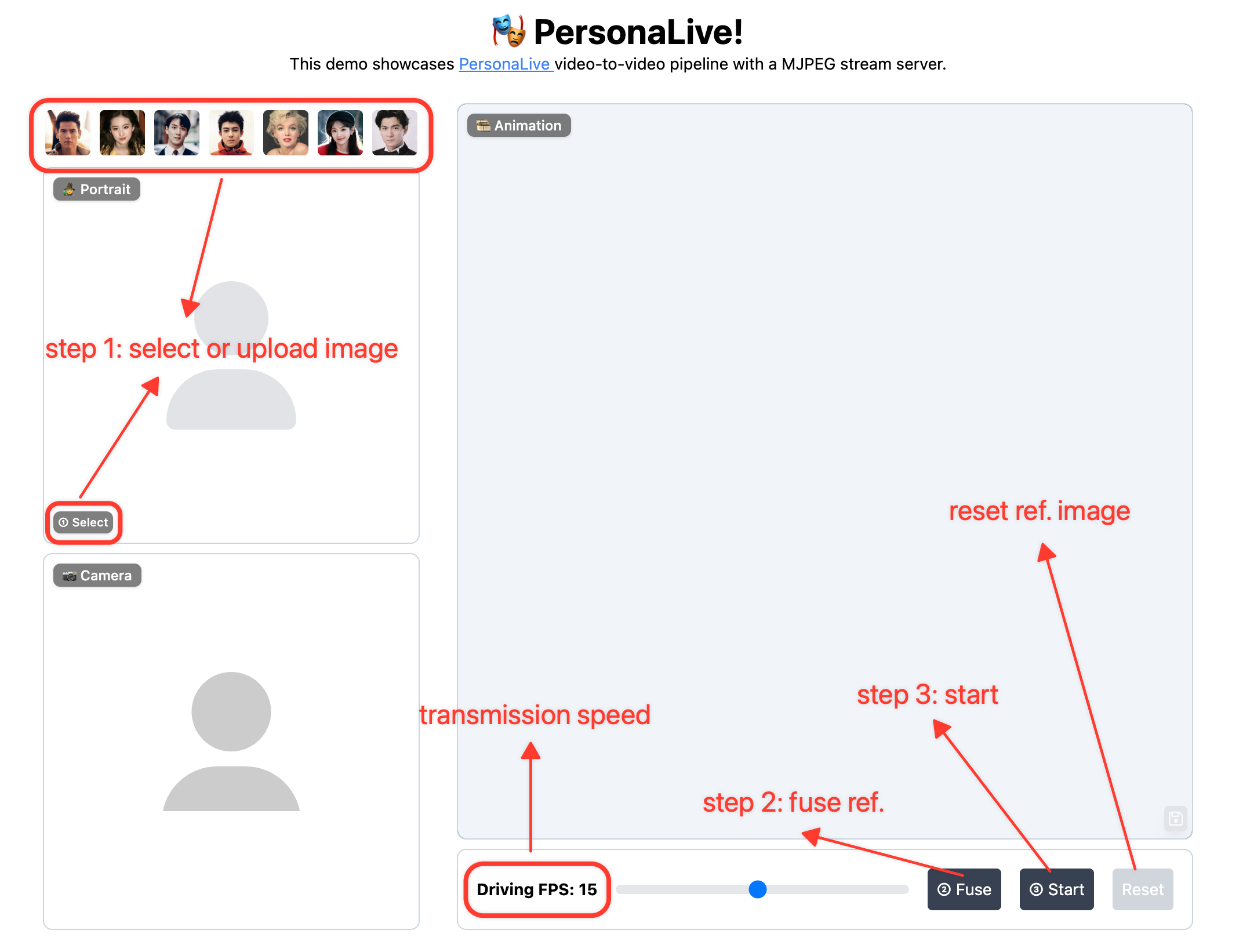
Regarding Latency: Latency varies depending on your device's computing power. You can try the following methods to optimize it:
- Lower the "Driving FPS" setting in the WebUI to reduce the computational workload.
- You can increase the multiplier (e.g., set to
num_frames_needed * 4or higher) to better match your device's inference speed. https://github.com/GVCLab/PersonaLive/blob/6953d1a8b409f360a3ee1d7325093622b29f1e22/webcam/util.py#L73
🚄 Model Training
PersonaLive training is organized into three stages. Approximate training time on 8x H100 with default configs: Stage 1 ~13h, Stage 2 ~15h, Stage 3 ~20h.
1️⃣ Environment setup
Install base dependencies first (see installation section), then install training-only packages:
pip install -r requirements_train.txt
If you use multi-GPU or multi-node training, configure Accelerate once before launching training:
accelerate config
2️⃣ Data preparation
Your dataset should contain a videos directory and a matching boxes directory:
Datasets
├── VFHQ
│   ├── videos
│   │   ├── example1.mp4
│   │   ├── example2.mp4
│   │   └── ...
│   └── boxes
│       ├── example1.pt
│       ├── example2.pt
│       └── ...
└── ...
Preprocessing example:
# 1) Extract face / eye / mouth boxes from each frame
python tools/get_boxes.py --video_dir ./Datasets/VFHQ/videos --save_dir ./Datasets/VFHQ/boxes --workers 8

# 2) Generate meta json: [{"video_path": ".../videos/xxx.mp4"}, ...]
python tools/extract_meta_info.py --root_path ./Datasets/VFHQ --dataset_name VFHQ
Then set data.meta_paths in each training config:
data:
  meta_paths:
    - "./data/VFHQ_meta.json"
    - "./data/OtherDataset_meta.json"
3️⃣ Download weights
Download the training initialization weights: X-NeMo, pose_guider, and stylegan2_discriminator.
pretrained_weights
├── xnemo
│   ├── xnemo_motion_encoder.pth
│   ├── xnemo_denoising_unet.pth
│   ├── xnemo_reference_unet.pth
│   └── xnemo_temporal_module.pth
├── sd-vae-ft-mse
│   ├── diffusion_pytorch_model.bin
│   └── config.json
├── sd-image-variations-diffusers
│   ├── image_encoder
│   │   ├── pytorch_model.bin
│   │   └── config.json
│   ├── unet
│   │   ├── diffusion_pytorch_model.bin
│   │   └── config.json
│   └── model_index.json
├── pose_guider.pth
└── stylegan2_discriminator_ffhq512.pth
4️⃣ Training workflow
Stage 1: Image-level warm-up
Run:
accelerate launch train_stage1.py --config ./configs/train/personalive_stage1.yaml
Default output folder: ./exp_output/personalive_stage1/
Stage 2: Image-level adversarial refinement
Update configs/train/personalive_stage2.yaml to point to Stage 1 outputs:
motion_encoder_path: './exp_output/personalive_stage1/motion_encoder-xxxxx.pth'
denoising_unet_path: './exp_output/personalive_stage1/denoising_unet-xxxxx.pth'
reference_unet_path: './exp_output/personalive_stage1/reference_unet-xxxxx.pth'
pose_guider_path: './exp_output/personalive_stage1/pose_guider-xxxxx.pth'
Run:
accelerate launch train_stage2.py --config ./configs/train/personalive_stage2.yaml
Default output folder: ./exp_output/personalive_stage2/
Stage 3: Temporal module fine-tuning for streaming
Update configs/train/personalive_stage3.yaml to point to Stage 2 outputs:
motion_encoder_path: './exp_output/personalive_stage2/motion_encoder-xxxxx.pth'
denoising_unet_path: './exp_output/personalive_stage2/denoising_unet-xxxxx.pth'
reference_unet_path: './exp_output/personalive_stage2/reference_unet-xxxxx.pth'
pose_guider_path: './exp_output/personalive_stage2/pose_guider-xxxxx.pth'
discriminator_path: './exp_output/personalive_stage2/discriminator-xxxxx.pth'
Run:
accelerate launch train_stage3.py --config ./configs/train/personalive_stage3.yaml
Default output folder: ./exp_output/personalive_stage3/
📚 Community Contribution
Special thanks to the community for providing helpful setups! 🥂
Windows + RTX 50-Series Guide: Thanks to @dknos for providing a detailed guide on running this project on Windows with Blackwell GPUs.
TensorRT on Windows: If you are trying to convert TensorRT models on Windows, this discussion might be helpful. Special thanks to @MaraScott and @Jeremy8776 for their insights.
ComfyUI: Thanks to @okdalto for helping implement the ComfyUI-PersonaLive support.
Useful Scripts: Thanks to @suruoxi for implementing
download_weights.py, and to @andchir for adding audio merging functionality.
🎬 More Results
👀 Visualization results
🤺 Comparisons
⭐ Citation
If you find PersonaLive useful for your research, welcome to cite our work using the following BibTeX:
@article{li2025personalive,
  title={PersonaLive! Expressive Portrait Image Animation for Live Streaming},
  author={Li, Zhiyuan and Pun, Chi-Man and Fang, Chen and Wang, Jue and Cun, Xiaodong},
  journal={arXiv preprint arXiv:2512.11253},
  year={2025}
}
❤️ Acknowledgement
This code is mainly built upon Moore-AnimateAnyone, X-NeMo, StreamDiffusion, RAIN and LivePortrait, thanks to their invaluable contributions.
Explorar proyectos relacionados
ytdl-org/youtube-dl
Programa de línea de comandos para descargar vídeos de YouTube.com y otros sitios de vídeo
141,539 estrellasexcalidraw/excalidraw
Pizarra virtual para esbozar diagramas con aspecto de dibujo a mano
135,492 estrellasgodotengine/godot
Godot Engine – Motor de videojuegos 2D y 3D multiplataforma
120,003 estrellasmrdoob/three.js
Biblioteca 3D de JavaScript.
118,122 estrellas