
Enter-tainer/cxx2flow
Acerca de
Convierte tu código C/C++ en un diagrama de flujo.
Creación y multimediaCrecimiento de estrellas medido
- in 24h
- 0
- in 7 days
- +1
- in 15 days
- Recopilando historial
- in 1 month
- Recopilando historial
Cambios netos en períodos que se solapan, no totales diarios. Los datos no disponibles se dejan en blanco. Las estrellas indican interés, no calidad.
README.md
Originalcxx2flow
将 C/C++ 代码转换为流程图
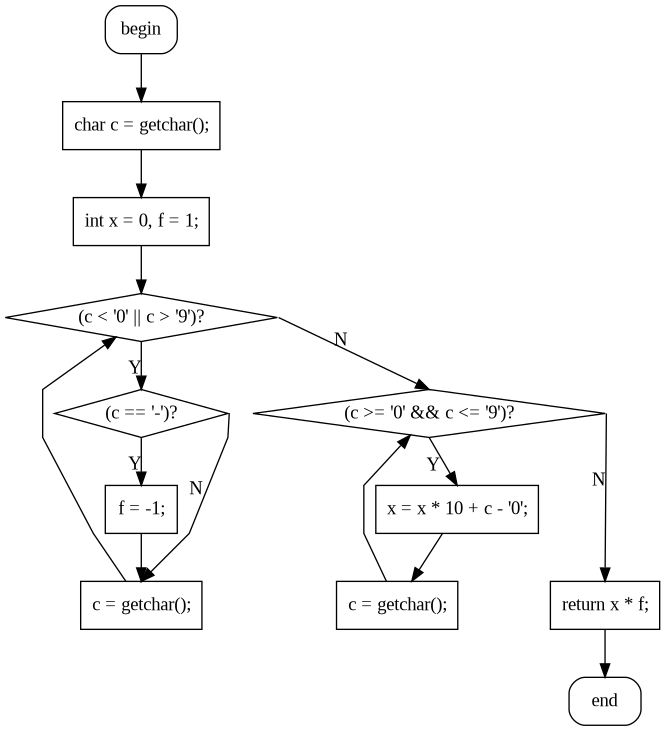
效果
更多效果图请参考 GALLERY
两种样式:
| 折线 | 平滑 |
 |
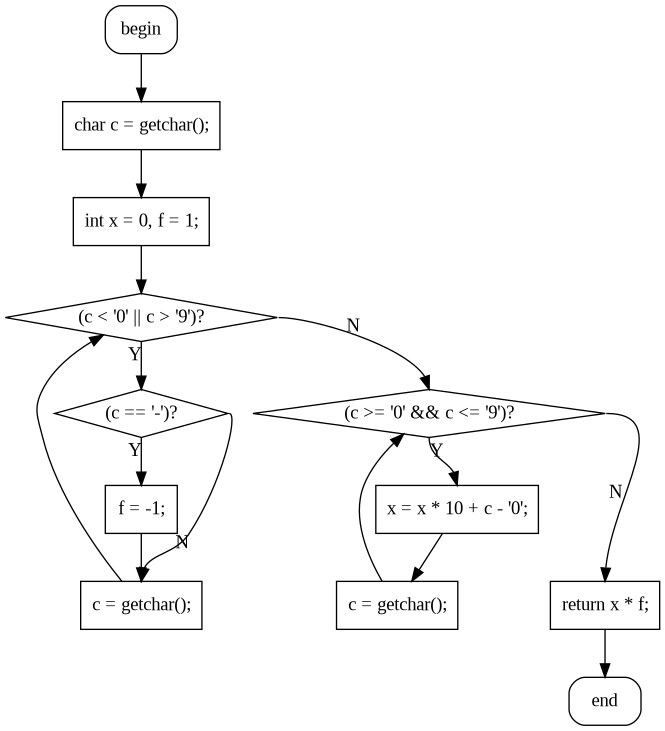 |
inline int read() {  //快读
  char c = getchar();
  int x = 0, f = 1;
  while (c < '0' || c > '9') {
    if (c == '-') f = -1;
    c = getchar();
  }
  while (c >= '0' && c <= '9') {
    x = x * 10 + c - '0';
    c = getchar();
  }
  return x * f;
}
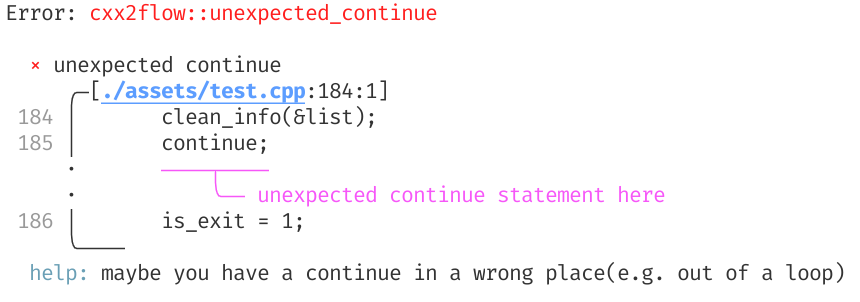
错误报告
安装
在线使用(推荐)
推荐直接使用在线网页版本,无需下载安装!
访问:https://enter-tainer.github.io/cxx2flow/
在线版本提供了完整的功能,包括代码编辑器和实时流程图预览,无需安装任何软件即可使用。
自行编译
cargo install cxx2flow
下载预构建二进制
推荐从右侧的 Github Release 下载对应平台的二进制文件。
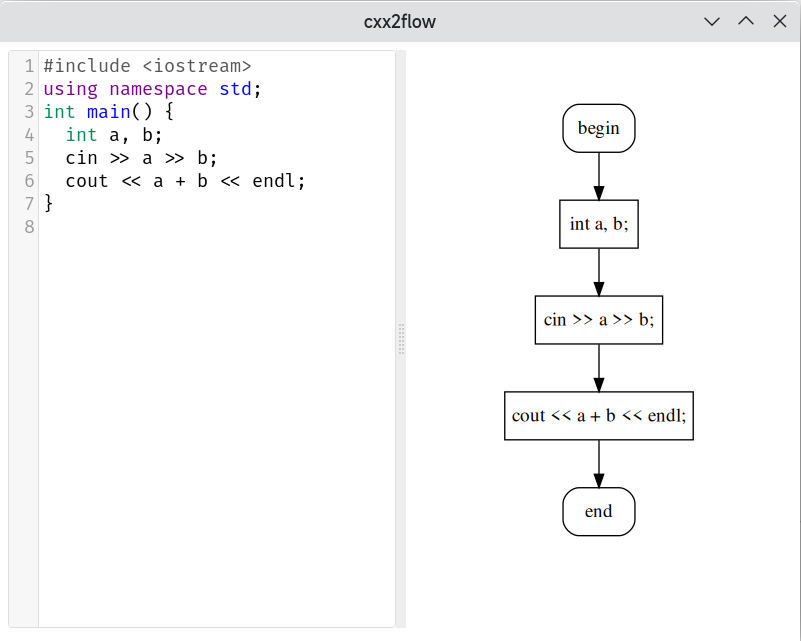
使用 GUI 版本
对于没有命令行使用经验的用户,推荐下载使用基于 tauri 编写的 GUI 版本。 https://github.com/Enter-tainer/cxx2flow-gui/releases
使用
为了编译生成的 dot 文件,你需要安装 graphviz,并将其添加到 PATH 中。也可以将生成的结果复制进在线的 graphviz 服务中,如 http://magjac.com/graphviz-visual-editor/ 。
Convert your C/C++ code to control flow chart

Usage: cxx2flow [OPTIONS] [INPUT] [FUNCTION]

Arguments:
  [INPUT]     Sets the path of the input file. e.g. test.cpp
              If not specified, cxx2flow will read from stdin.
  [FUNCTION]  The function you want to convert. e.g. main [default: main]

Options:
  -o, --output <OUTPUT>  Sets the output file.
                         If not specified, result will be directed to stdout.
                         e.g. graph.dot
  -c, --curly            Sets the style of the flow chart.
                         If specified, output flow chart will have curly connection line.
      --cpp              Use C preprocessor.
  -t, --tikz             Use tikz backend.
  -d, --dump-ast         Dump AST(For debug purpose only).
  -h, --help             Print help information
  -V, --version          Print version information

Note that you need to manually compile the dot file using graphviz to get SVG or PNG files.

EXAMPLES:
    cat main.cpp | cxx2flow | dot -Tsvg -o test.svg
    cxx2flow test.cpp | dot -Tpng -o test.png
    cxx2flow main.cpp my_custom_func | dot -Tsvg -o test.svg

Please give me star if this application helps you!
如果这个应用有帮助到你,请给我点一个 star!
https://github.com/Enter-tainer/cxx2flow
限制
- 对于预处理器的支持基于
cpp,默认关闭,需要使用--cpp参数手动启用。如果PATH中不存在cpp则会失败。 - 支持的控制流语句有:while,for,if,break,continue,break,return,switch, goto, do-while。
- 对 range for 有基本支持。部分情况下,受到 tree-sitter-cpp 能力限制,会出现一些问题。
WebAssembly(浏览器 / Node.js)
cxx2flow 现在提供了 wasm 入口点 generate_dot(content, function_name, curly) 用于浏览器使用。
构建 wasm 包:
CC_wasm32_unknown_unknown="$PWD/scripts/clang-wasm.sh" wasm-pack build --target web --release
或者使用 just(自动检测操作系统):
just wasm-build
Windows (PowerShell):
$env:CC_wasm32_unknown_unknown = (Resolve-Path scripts/clang-wasm.cmd).Path
wasm-pack build --target web --release
在 Node.js 中运行最小烟雾测试:
node scripts/wasm-smoke.mjs
使用 just:
just wasm-smoke
Web UI(React + shadcn 风格 + lucide)
本仓库在 web/ 目录下包含了一个浏览器应用:
- 左侧面板:C/C++ 源代码编辑器
- 右侧面板:Graphviz SVG 预览
- 引擎:
cxx2flowwasm +@hpcc-js/wasm-graphviz
本地运行:
just web-install
just web-dev
此 Web 应用使用 pnpm。
构建静态资源:
just web-build
GitHub Pages 部署配置在 .github/workflows/pages.yml 中,并在推送到 master 分支时触发。
注意事项:
- 浏览器/wasm 模式仅通过
generate_dot暴露 DOT 后端。 - 仅 CLI 功能(如
--cpp和 AST dump 彩色输出)仅在原生模式下可用。 .cargo/config.toml故意不用于 wasm 工具链配置;请在每个 shell/会话中显式设置CC_wasm32_unknown_unknown。
Explorar proyectos relacionados
Cargando…