
BertaBescos/DynaSLAM
BertaBescos/DynaSLAM has 950 GitHub stars and 207 forks. GitHot measured 0 stars in 24 hours and 0 in 7 days. Last checked 2026-11-23 14:56 UTC. Last push 2020-03-18.
Crecimiento de estrellas medido
- in 24h
- 0
- in 7 days
- 0
- in 15 days
- Recopilando historial
- in 1 month
- Recopilando historial
Cambios netos en períodos que se solapan, no totales diarios. Los datos no disponibles se dejan en blanco. Las estrellas indican interés, no calidad.
Acerca de
DynaSLAM es un sistema SLAM robusto en entornos dinámicos, compatible con configuraciones monoculares, estéreo y RGB-D.
Herramientas de desarrolloREADME.md
OriginalDynaSLAM
DynaSLAM is a visual SLAM system that is robust in dynamic scenarios for monocular, stereo and RGB-D configurations. Having a static map of the scene allows inpainting the frame background that has been occluded by such dynamic objects.
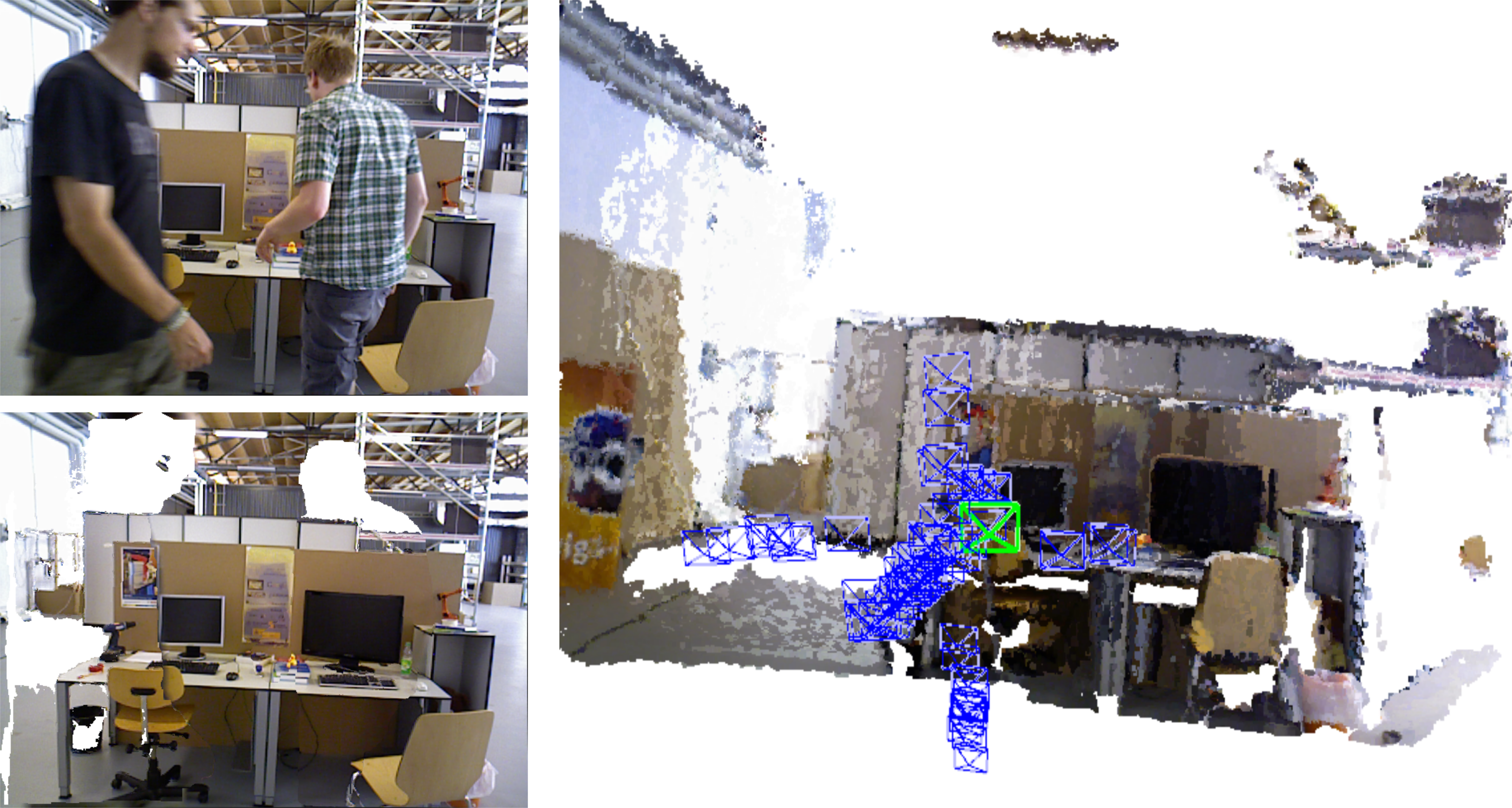
DynaSLAM: Tracking, Mapping and Inpainting in Dynamic Scenes
Berta Bescos, José M. Fácil, Javier Civera and José Neira
RA-L and IROS, 2018
We provide examples to run the SLAM system in the TUM dataset as RGB-D or monocular, and in the KITTI dataset as stereo or monocular.
News
- DynaSLAM supports now both OpenCV 2.X and OpenCV 3.X.
Getting Started
- Install ORB-SLAM2 prerequisites: C++11 or C++0x Compiler, Pangolin, OpenCV and Eigen3 (https://github.com/raulmur/ORB_SLAM2).
- Install boost libraries with the command
sudo apt-get install libboost-all-dev. - Install python 2.7, keras and tensorflow, and download the
mask_rcnn_coco.h5model from this GitHub repository: https://github.com/matterport/Mask_RCNN/releases. - Clone this repo:
git clone https://github.com/BertaBescos/DynaSLAM.git
cd DynaSLAM
cd DynaSLAM
chmod +x build.sh
./build.sh
- Place the
mask_rcnn_coco.h5model in the folderDynaSLAM/src/python/.
RGB-D Example on TUM Dataset
Download a sequence from http://vision.in.tum.de/data/datasets/rgbd-dataset/download and uncompress it.
Associate RGB images and depth images executing the python script associate.py:
python associate.py PATH_TO_SEQUENCE/rgb.txt PATH_TO_SEQUENCE/depth.txt > associations.txt
These associations files are given in the folder ./Examples/RGB-D/associations/ for the TUM dynamic sequences.
Execute the following command. Change
TUMX.yamlto TUM1.yaml,TUM2.yaml or TUM3.yaml for freiburg1, freiburg2 and freiburg3 sequences respectively. ChangePATH_TO_SEQUENCE_FOLDERto the uncompressed sequence folder. ChangeASSOCIATIONS_FILEto the path to the corresponding associations file.PATH_TO_MASKSandPATH_TO_OUTPUTare optional parameters../Examples/RGB-D/rgbd_tum Vocabulary/ORBvoc.txt Examples/RGB-D/TUMX.yaml PATH_TO_SEQUENCE_FOLDER ASSOCIATIONS_FILE (PATH_TO_MASKS) (PATH_TO_OUTPUT)
If PATH_TO_MASKS and PATH_TO_OUTPUT are not provided, only the geometrical approach is used to detect dynamic objects.
If PATH_TO_MASKS is provided, Mask R-CNN is used to segment the potential dynamic content of every frame. These masks are saved in the provided folder PATH_TO_MASKS. If this argument is no_save, the masks are used but not saved. If it finds the Mask R-CNN computed dynamic masks in PATH_TO_MASKS, it uses them but does not compute them again.
If PATH_TO_OUTPUT is provided, the inpainted frames are computed and saved in PATH_TO_OUTPUT.
Stereo Example on KITTI Dataset
Download the dataset (grayscale images) from http://www.cvlibs.net/datasets/kitti/eval_odometry.php
Execute the following command. Change
KITTIX.yamlto KITTI00-02.yaml, KITTI03.yaml or KITTI04-12.yaml for sequence 0 to 2, 3, and 4 to 12 respectively. ChangePATH_TO_DATASET_FOLDERto the uncompressed dataset folder. ChangeSEQUENCE_NUMBERto 00, 01, 02,.., 11. By providing the last argumentPATH_TO_MASKS, dynamic objects are detected with Mask R-CNN.
./Examples/Stereo/stereo_kitti Vocabulary/ORBvoc.txt Examples/Stereo/KITTIX.yaml PATH_TO_DATASET_FOLDER/dataset/sequences/SEQUENCE_NUMBER (PATH_TO_MASKS)
Monocular Example on TUM Dataset
Download a sequence from http://vision.in.tum.de/data/datasets/rgbd-dataset/download and uncompress it.
Execute the following command. Change
TUMX.yamlto TUM1.yaml,TUM2.yaml or TUM3.yaml for freiburg1, freiburg2 and freiburg3 sequences respectively. ChangePATH_TO_SEQUENCE_FOLDERto the uncompressed sequence folder. By providing the last argumentPATH_TO_MASKS, dynamic objects are detected with Mask R-CNN.
./Examples/Monocular/mono_tum Vocabulary/ORBvoc.txt Examples/Monocular/TUMX.yaml PATH_TO_SEQUENCE_FOLDER (PATH_TO_MASKS)
Monocular Example on KITTI Dataset
Download the dataset (grayscale images) from http://www.cvlibs.net/datasets/kitti/eval_odometry.php
Execute the following command. Change
KITTIX.yamlby KITTI00-02.yaml, KITTI03.yaml or KITTI04-12.yaml for sequence 0 to 2, 3, and 4 to 12 respectively. ChangePATH_TO_DATASET_FOLDERto the uncompressed dataset folder. ChangeSEQUENCE_NUMBERto 00, 01, 02,.., 11. By providing the last argumentPATH_TO_MASKS, dynamic objects are detected with Mask R-CNN.
./Examples/Monocular/mono_kitti Vocabulary/ORBvoc.txt Examples/Monocular/KITTIX.yaml PATH_TO_DATASET_FOLDER/dataset/sequences/SEQUENCE_NUMBER (PATH_TO_MASKS)
Citation
If you use DynaSLAM in an academic work, please cite:
@article{bescos2018dynaslam,
  title={{DynaSLAM}: Tracking, Mapping and Inpainting in Dynamic Environments},
  author={Bescos, Berta, F\'acil, JM., Civera, Javier and Neira, Jos\'e},
  journal={IEEE RA-L},
  year={2018}
 }
Acknowledgements
Our code builds on ORB-SLAM2.
DynaSLAM
Explorar proyectos relacionados
Cargando…