
A3sal0n/FalconGate
A3sal0n/FalconGate has 253 GitHub stars and 52 forks. GitHot measured 0 stars in 24 hours and -1 in 7 days. Last checked 2026-11-24 15:32 UTC. Last push 2026-11-09.
Crecimiento de estrellas medido
- in 24h
- 0
- in 7 days
- -1
- in 15 days
- Recopilando historial
- in 1 month
- Recopilando historial
Cambios netos en períodos que se solapan, no totales diarios. Los datos no disponibles se dejan en blanco. Las estrellas indican interés, no calidad.
Acerca de
A smart gateway to stop cyber criminals
SeguridadREADME.md
OriginalFalcongate
A self-hosted security gateway that watches the devices on your home or small-office network and tells you when one of them is in trouble.
Falcongate turns a Linux machine with two network interfaces into a gateway that inspects network traffic, filters DNS, audits your devices for weak spots and raises alerts in a web console and by email. It is free, open source and runs entirely on hardware you control.
- Why Falcongate
- What it does
- How it works
- Getting started
- Configuration
- Project status
- Contributing
- License
Why Falcongate
Most devices on a typical home or small-business network can't protect themselves. Cameras, TVs, printers, routers and other Internet of Things devices can't run antivirus software, rarely get updates and often ship with default passwords. Once one of them is compromised, it can be used to spy on its owner, attack other devices on the same network or join a botnet. Ransomware has made the same problem expensive for the people and small businesses who can least absorb the loss.
The network is the one place where all of these devices can be observed together. A compromised device still has to look up domains, contact its operators and probe its neighbours, whatever software it runs. Companies have long used that fact, with network monitoring and security teams to act on what it finds, but those tools are priced and designed for organisations with a security budget.
Falcongate exists to bring that kind of visibility to everyone else: people, families and small businesses who need protection but have no security team. It is built from proven open source components and set up by a single installer, and your traffic data stays on your own machine.
What it does
Detect
| Threat or activity | How it is detected | Needs |
|---|---|---|
| Lookups of known bad domains (malware, ransomware, phishing, fraud, scams and more) | DNS logs checked against The Block List Project, refreshed weekly | Nothing extra |
| Domain Generation Algorithm (DGA) malware | Patterns in a device's DNS lookups | Nothing extra |
| Malware sending spam | Patterns in a device's DNS lookups | Nothing extra |
| Port scans and traceroutes on your network | Zeek notices | Nothing extra |
| Suspicious domains | VirusTotal domain reports | VirusTotal API key |
| Malware files downloaded by your devices | Files extracted by Zeek, checked against VirusTotal | VirusTotal API key |
Block
- Domains, by DNS filtering, using your own blacklist and any ad or malware lists you configure.
- IP addresses, by firewall, using your own blacklist.
- Unsolicited inbound connections from the Internet side.
Audit your own devices
- Report each new device that joins the network, including its vendor.
- Scan devices for open ports.
- Test for active default vendor accounts over SSH, FTP, Telnet, RDP, SMB and VNC.
[!WARNING] The default-account check really does attempt logins, using Hydra and the SecLists credential lists. Run Falcongate only on networks you own or are authorised to test. Devices with lockout policies may react to these attempts.
Protect privacy and report
- Encrypt DNS traffic with dnscrypt-proxy, so your ISP and others on the path can't read or spoof your lookups.
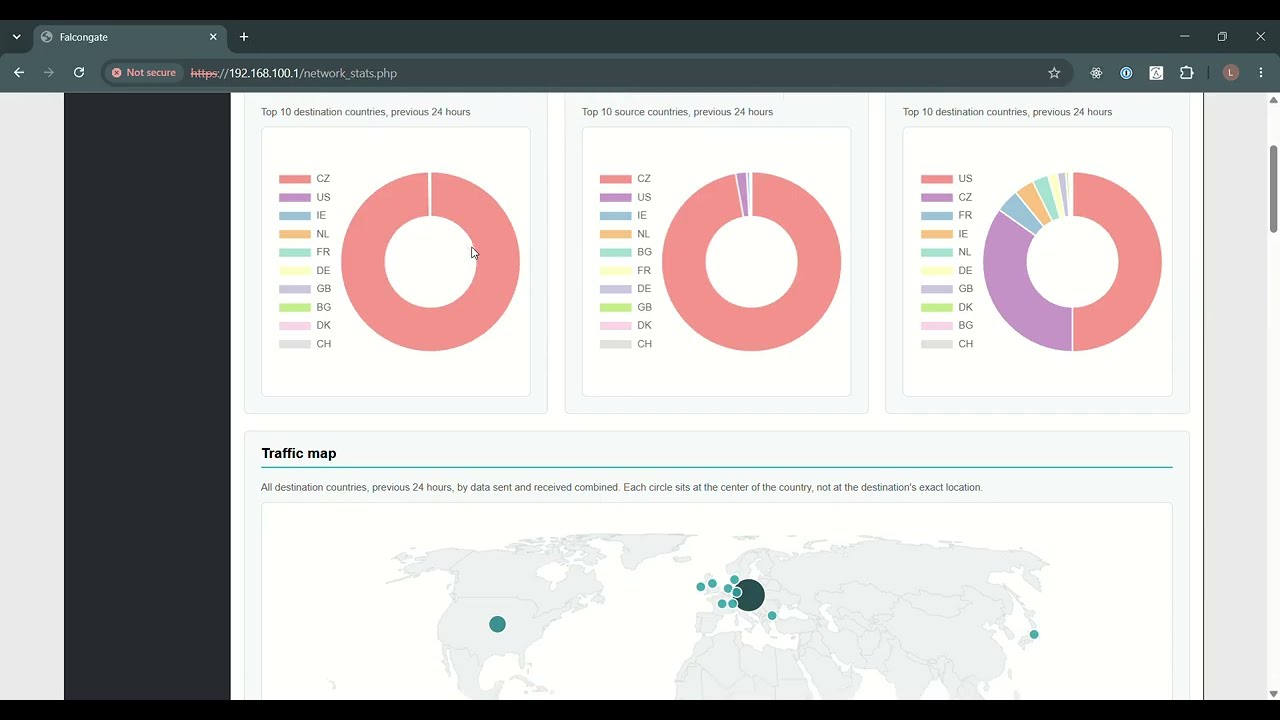
- Review alerts, network statistics, service health and logs in the web console.
- Receive alerts by email through a Gmail account.
How it works
Internet ── modem/router ── [WAN Falcongate LAN] ── switch/Wi-Fi ── your devices
| Component | Role |
|---|---|
| Zeek | Inspects traffic on the LAN interface and writes the logs Falcongate analyses |
| dnsmasq | DHCP and DNS filtering for the LAN |
| dnscrypt-proxy | Encrypted upstream DNS |
| iptables and ipset | Firewall, NAT and IP blocking |
| Nmap and Hydra | Open port discovery and default-account checks |
| Nginx and PHP | Web console |
| Falcongate engine (Python) | Correlates the above, raises alerts and sends reports |
Falcongate can be deployed in two modes:
- Router mode (recommended): Falcongate becomes the gateway for a new LAN, and every device connected to it is covered automatically.
- Attached mode: Falcongate joins your existing network beside your current router, and covers only the devices whose traffic you send through it.
Getting started
Requirements
- Ubuntu Server 24.04 LTS (primary target) or Debian 13
- Two active network interfaces
- At least 5 GiB of free disk space
The installer adds the software Falcongate depends on, including Zeek 8.0. It builds CPython 3.15.0 in /opt/python/3.15.0 for Falcongate's own use and leaves the system Python alone.
Install
The installer reconfigures networking and system services, so use a dedicated machine and review the script first. Run it as root:
git clone https://github.com/A3sal0n/FalconGate.git
cd FalconGate/install/Ubuntu    # or install/Debian
sudo bash easy_install.sh
It asks for the deployment mode, the two interfaces and the LAN IP address. When it finishes, connect a device to the LAN side and open https://<LAN IP>.
Full instructions, including how each deployment mode is addressed:
Configuration
User settings such as email recipients, the VirusTotal key and your own blacklists and whitelists use the fields from user_config.ini.tpl.
| To enable | Set |
|---|---|
| VirusTotal detections | vt_api_key, using a VirusTotal API key |
| Email alerts | mailer_address and mailer_pwd for the Gmail sender, and dst_emails for recipients |
| Your own blocking rules | blacklist, whitelist, domain_blacklist and domain_whitelist |
Blocklist feeds are off by default. To block ads or malware domains, add list URLs under [blacklists_domain] in config.ini.
Project status
Falcongate is being migrated to Ubuntu 24.04, Debian 13 and Python 3.15. Known limitations:
- The installers have not yet been fully validated on those releases, so treat them as a target rather than a tested-support claim.
- Monitoring personal accounts for breaches is not currently working: it uses version 2 of the Have I Been Pwned API, and the current version requires an API key.
- Automatic IP blocking from threat feeds is disabled in the code, so only your own IP blacklist is enforced.
Contributing
Bug reports and pull requests are welcome. See CONTRIBUTING.md and the Code of Conduct. The tests folder explains how to run the compatibility tests and exercise the detections.
Collaborators: easy4MEr
License
Falcongate is licensed under the GPLv3. See LICENSE for details. Bundled data sources and their licenses are listed in data/README.md.
Explorar proyectos relacionados
Cargando…