
66-m/sorting-visualizer
66-m/sorting-visualizer has 69 GitHub stars and 9 forks. Star changes are not measured yet. Last checked 2026-11-14 07:39 UTC. Last push 2026-11-09.
What you can do
- Classic and unusual sorts (Quick, Merge, Heap, Radix, Bogo and more), one at a time or all in a row with a comparison table
- 2D and 3D visualizations, custom colors and optional MIDI sound
- Sort a playing video (needs ffmpeg), your own 3D models (.obj) or the Earth
- Arrays of up to 100,000 elements, with live metrics
Crecimiento de estrellas medido
- in 24h
- Recopilando historial
- in 7 days
- Recopilando historial
- in 15 days
- Recopilando historial
- in 1 month
- Recopilando historial
Cambios netos en períodos que se solapan, no totales diarios. Los datos no disponibles se dejan en blanco. Las estrellas indican interés, no calidad.
Acerca de
See and hear Sorting Algorithms in Real Time: 22 Algorithms, 30 Visuals
Creación y multimediaREADME.md
Original
Sorting Algorithm Visualizer
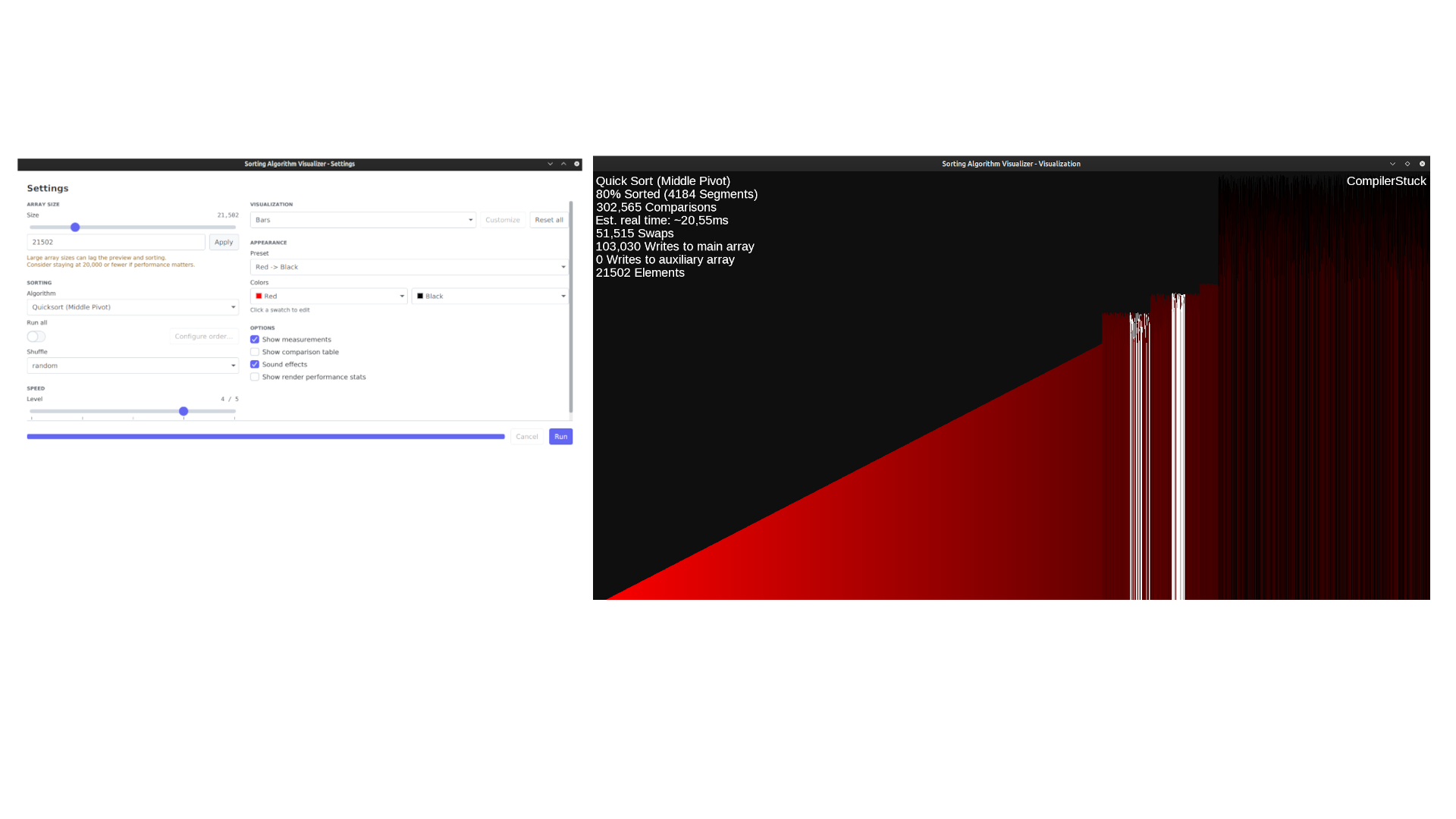
Watch and listen to 23 sorting algorithms in real time, with 36 visualizations, live metrics and MIDI sound.


Install
Download the file for your system from the latest release.
| System | Download |
|---|---|
| Windows 10/11 (x64) | sorting-visualizer-<version>-windows-x64.msi, or the portable …-windows-x64.zip (run Sorting Visualizer.exe) |
| macOS, Apple Silicon | sorting-visualizer-<version>-macos-arm64.dmg |
| macOS, Intel | sorting-visualizer-<version>-macos-x64.dmg |
| Linux (x64), Ubuntu 24.04+ or Debian 13+ | sorting-visualizer-<version>-linux-x64.deb |
| Linux (x64), any distribution | sorting-visualizer-<version>-linux-x64.tar.gz (extract it and run sorting-visualizer/bin/sorting-visualizer) |
The packages are not signed yet, so your system warns you on first launch:
- macOS: right-click the app and choose Open, or use System Settings → Privacy & Security → Open Anyway.
- Windows: if SmartScreen says "Windows protected your PC", choose More info → Run anyway.
Already have Java?
With Java 25 or newer you can also run the sorting-visualizer.jar on Windows, Linux and Intel Macs. On Apple Silicon, use the .dmg.
java --enable-native-access=ALL-UNNAMED --add-opens=java.desktop/com.sun.media.sound=ALL-UNNAMED -jar sorting-visualizer.jar
Launch flags
Add these after the program or JAR name.
| Flag | Effect |
|---|---|
fullscreen |
Show the visualization in exclusive fullscreen |
portrait |
Use a tall window (about 9:16) |
--display=N |
Show the visualization on display N, counting from 1 (default: 2 if you have several monitors) |
--self-check |
Check that the installation works, then exit without opening a window |
Features
- Classic and unusual sorts (Quick, Merge, Heap, Radix, Bogo and more), one at a time or all in a row with a comparison table
- 2D and 3D visualizations, custom colors and optional MIDI sound
- Sort a playing video (needs ffmpeg), your own 3D models (
.obj) or the Earth - Arrays of up to 100,000 elements, with live metrics
Build from source
You need JDK 25 or newer. Maven is included (./mvnw).
git clone https://github.com/66-m/sorting-visualizer.git
cd sorting-visualizer
./mvnw clean package
./run
| Command | What it does |
|---|---|
./build |
Build and run the tests |
./build skip-tests |
Build without tests |
./run |
Start the app (accepts the flags above) |
On Windows, use build.cmd, run.cmd and mvnw.cmd. For packaging and releases, see Contributing.
Docs
License
Copyright (C) 2020-2026 Marcel Mauel
Licensed under the GNU Affero General Public License v3.0. See LICENSE.
Explorar proyectos relacionados
ytdl-org/youtube-dl
Programa de línea de comandos para descargar vídeos de YouTube.com y otros sitios de vídeo
141,560 estrellasexcalidraw/excalidraw
Pizarra virtual para esbozar diagramas con aspecto de dibujo a mano
135,664 estrellasgodotengine/godot
Godot Engine – Motor de videojuegos 2D y 3D multiplataforma
120,117 estrellasmrdoob/three.js
Biblioteca 3D de JavaScript.
118,350 estrellas