
wingjay/BlurImageView
wingjay/BlurImageView has 1,330 GitHub stars and 233 forks. GitHot measured 0 stars in 24 hours and 0 in 7 days. Last checked 2026-11-16 03:14 UTC. Last push 2018-05-25.
Gemessener Sternzuwachs
- in 24h
- 0
- in 7 days
- 0
- in 15 days
- Verlauf wird gesammelt
- in 1 month
- Verlauf wird gesammelt
Nettoänderungen in überlappenden Zeiträumen, keine Tagessummen. Fehlende Messwerte bleiben leer. Sterne zeigen Interesse, nicht Qualität.
Über uns
BlurImageView, you can load your image progressively like Medium does.First show user a blurry image, At the same time, load the real image, once loaded, replace the blurry one automatically
EntwicklerwerkzeugeREADME.md
Original
BlurImageView
BlurImageView For Android, you can load your image progressively like Medium.
How it works?
- First it will show user a blurry image;
- At the same time, it starts to load the real image;
- once loaded, replace the blurry one automatically.
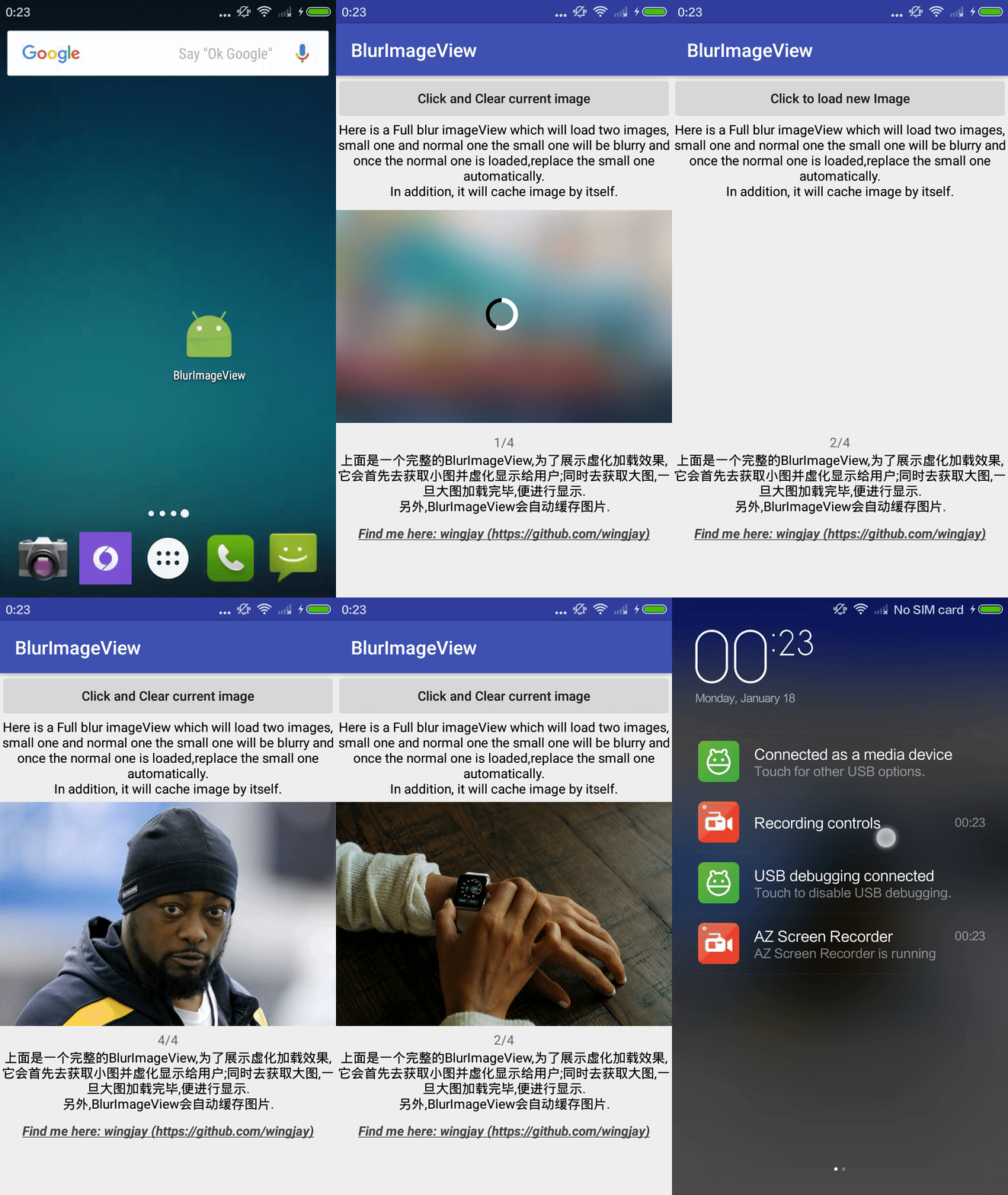
Playable apk
You can Download sample apk and play on your phone. Try it!
Why I do this?
This lib is inspired by Medium and users love this way of loading pics, Because a beautiful Blurry pic is always better than a blank area or an ugly thumbnail.
How to get it?
Simply add the dependency
dependencies {
	compile 'com.wingjay:blurimageviewlib:2.0.1'
}
How to use it?
    BlurImageView blurImageView = (BlurImageView) findViewById(R.id.XXX);
    blurImageView.setBlurImageByUrl(blurImageUrl);
This will load and blur a image.
  BlurImageView fullBlurImageView = (BlurImageView) findViewById(R.id.XXX)
  fullBlurImageView.setFullImageByUrl(blurImageUrl, normalImageUrl);
This will load two images progressively.
blurImageView.setBlurFactor(blurFactor);
This can set the factor of blurry, default 8 - 10.
  blurImageView.setFailDrawable(Drawable failDrawable);
  blurImageView.setDefaultDrawable(Drawable defaultDrawable);
Configure your own drawable for loading failure & default. Use null to remove them.
Related resource
Thanks for the algorithms: Stack Blur: http://www.quasimondo.com/StackBlurForCanvas/StackBlurDemo.html
Reach me - wingjay
Weibo: http://weibo.com/u/1625892654
Blog: http://wingjay.com/
GitHub: https://github.com/wingjay
Feel free to give me advices by <mailto:yinjiesh AT 126 DOT com>
Thanks!