
watsonbox/exportify
watsonbox/exportify has 4,303 GitHub stars and 550 forks. GitHot measured 0 stars in 24 hours and +14 in 7 days. Last checked 2026-11-13 08:34 UTC. Last push 2026-10-20.
So werden diese Zahlen gemessen
Export/Backup Spotify playlists using the Web API
What you can do
- ⚙️ Optional inclusion of album, artist and audio features data in export files
- 🔍 Playlist search with advanced search syntax and results export
- 💿 Saved albums export, one line per album
- 🗺 Available in 15 languages (English, French, Spanish, Italian, German, Portuguese, Swedish, Dutch, Greek, Turkish, Japanese, Arabic, Simplified Chinese, Traditional Chinese and Cantonese)
Gemessener Sternzuwachs
- in 24h
- 0
- in 7 days
- +14
- in 15 days
- Verlauf wird gesammelt
- in 1 month
- Verlauf wird gesammelt
Nettoänderungen in überlappenden Zeiträumen, keine Tagessummen. Fehlende Messwerte bleiben leer. Sterne zeigen Interesse, nicht Qualität.
README.md
Original
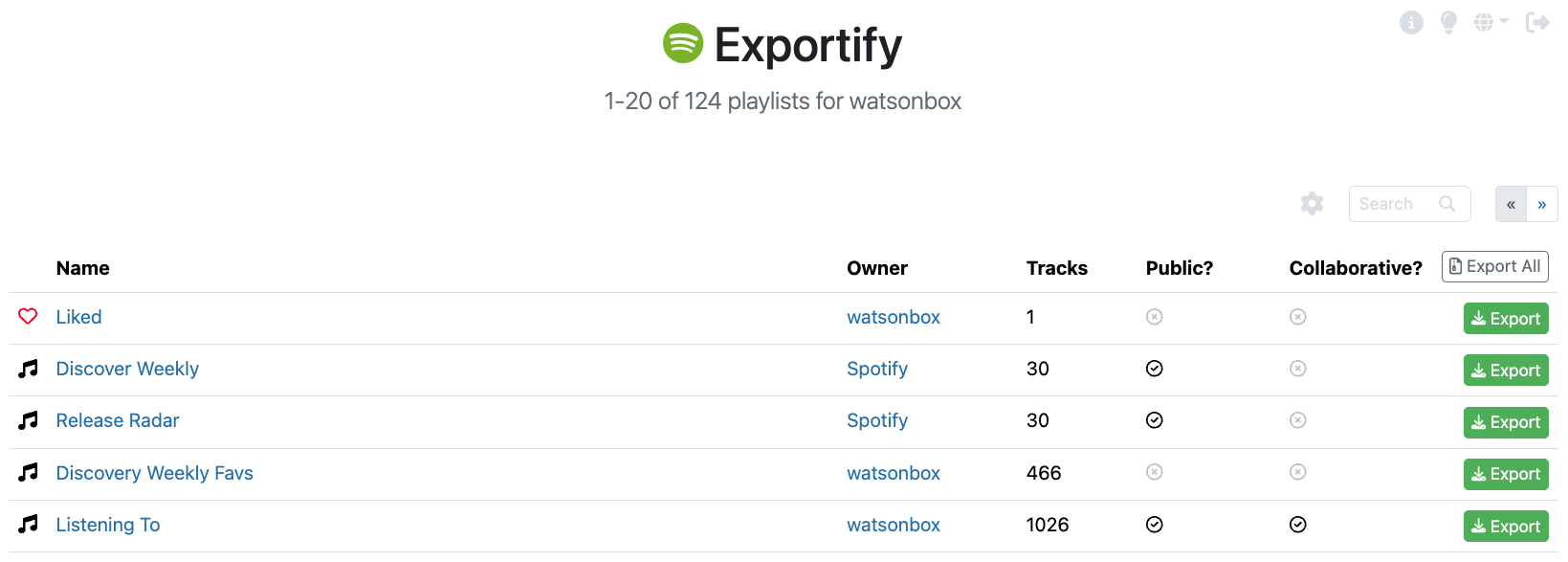
Export your Spotify playlists, Liked Songs and saved albums to CSV by clicking on this link: https://exportify.app/.
As many users have noted, there is no way to export/archive/backup playlists from the Spotify client for safekeeping. This application provides a simple interface for doing that using the Spotify Web API.
No data will be saved - the entire application runs in the browser.
Features
- ⚙️ Optional inclusion of album, artist and audio features data in export files
- 🔍 Playlist search with advanced search syntax and results export
- 💿 Saved albums export, one line per album
- 🌓 Dark mode
- 🗺 Available in 15 languages (English, French, Spanish, Italian, German, Portuguese, Swedish, Dutch, Greek, Turkish, Japanese, Arabic, Simplified Chinese, Traditional Chinese and Cantonese)
- 📱 Mobile friendly
- ℹ Quick reference help
- 🚀 Advanced rate limiting handling for speedy exports
- 👩💻 Modern React-based development stack + test suite
Usage
- Fire up the app
- Click 'Get Started'
- Grant Exportify read-only access to your playlists and library
- Click the 'Export' button to export a playlist
Click 'Export All' to save a zip file containing a CSV file for each playlist in your account. This may take a while when many playlists exist and/or they are large.
Liked Songs and saved albums appear as the first rows of the table. 'Export All' includes them, with your saved albums as saved_albums.csv.
Re-importing Playlists
Once playlists are saved, it's also pretty straightforward to re-import them into Spotify. Open up the CSV file in Excel, for example, select and copy the spotify:track:xxx URIs, then simply create a playlist in Spotify and paste them in. This has only been tested with the desktop app.
Export Format
Track data is exported in UTF-8 encoded CSV format with the following fields from the Spotify track object:
- Track URI
- Track Name
- Artist URI(s)
- Artist Name(s)
- Album URI
- Album Name
- Album Artist URI(s)
- Album Artist Name(s)
- Album Release Date
- Album Image URL (typically 640x640px jpeg)
- Disc Number
- Track Number
- Track Duration (ms)
- Track Preview URL (mp3)
- Explicit?
- Popularity
- ISRC (International Standard Recording Code)
- Added By
- Added At
By clicking on the cog, additional data can be exported.

By selecting "Include artists data", the following fields will be added from the Spotify artist object:
- Artist Genres
And by selecting "Include audio features data", the following fields will be added from the Spotify audio features object:
- Danceability
- Energy
- Key
- Loudness
- Mode
- Speechiness
- Acousticness
- Instrumentalness
- Liveness
- Valence
- Tempo
- Time Signature
Additionally, by selecting "Include album data", the following fields will be added from the Spotify album object (full)
- Album Genres
- Label
- Copyrights
Note that the more data being exported, the longer the export will take.
Saved Albums
Saved albums are exported one line per album, most recently saved first, with these fields from the Spotify album object:
- Album URI
- Album Name
- Album Artist URI(s)
- Album Artist Name(s)
- Album Type (album, single or compilation)
- Album Release Date
- Total Tracks
- Label
- UPC (Universal Product Code)
- Popularity
- Album Image URL
- Added At (when the album was saved)
The settings under the cog don't apply to this file.
Playlist Search
If you're searching for a specific playlist to export, you can use the search facility to find it quickly by name:

- Searching is case-insensitive.
- Search results can be exported as a zip file by clicking "Export Results"
[!WARNING] Please be aware that if you have a very large number of playlists, there may be a small delay before the first search results appear since the Spotify API itself doesn't allow for searching directly, so all playlists must be retrieved first.
Advanced Search Syntax
Certain search queries have special meaning:
| Search query | Meaning |
|---|---|
public:true |
Only show public playlists |
public:false |
Only show private playlists |
collaborative:true |
Only show collaborative playlists |
collaborative:false |
Don't show collaborative playlists |
owner:me |
Only show playlists I own |
owner:[owner] |
Only show playlists owned by [owner] |
Development
In the project directory, first run pnpm install to set up dependencies, then you can run:
pnpm start
Runs the app with the Vite development server.
Open http://127.0.0.1:3000 to view it in the browser. The page updates as you make edits.
pnpm test
Launches Vitest in watch mode. Use pnpm test --run to run the suite once.
pnpm build
Typechecks and builds the app for production to the dist folder. pnpm preview serves that build locally.
Stack
In addition to Vite and Vitest, the application is built using the following tools/libraries:
- React - A JavaScript library for building user interfaces
- Bootstrap 5 - styling and UI components
- Font Awesome 6 - vector icon set and toolkit
- react-i18next - internationalization framework
- React Testing Library - light-weight solution for testing React DOM nodes
- MSW - network-level request mocking (more of my own thoughts here)
History
- 2015: Exportify is born
- 2020: Major release including search, artist and audio features, liked songs export, and a new rate limiting system
- 2024: Major release including dark mode, internationalization, and search enhancements
Notes
According to Spotify's documentation:
Folders are not returned through the Web API at the moment, nor can be created using it".
Unfortunately that's just how it is.
I've gone to some lengths to try to eliminate errors resulting from excessively high usage of the Spotify API. Nonetheless, exporting data in bulk is a fairly request-intensive process, so please do try to use this tool responsibly. If you do require more throughput, please consider creating your own Spotify application which you can use with Exportify directly.
Disclaimer: It should be clear, but this project is not affiliated with Spotify in any way. It's just an app using their API like any other, with a cheeky name and logo 😇.
In case you don't see the playlists you were expecting to see and realize you've accidentally deleted them, it's actually possible to recover them.
Error Monitoring
Error monitoring provided by Bugsnag.

Running With Docker
The Docker image builds the production bundle and serves it with nginx on port 80. To build and run it:
docker build . -t exportify
docker run --rm -p 3000:80 exportify
And then open http://127.0.0.1:3000 to view it in the browser. Spotify only accepts logins redirected back to a registered address, so keep the host port at 3000 and use 127.0.0.1 rather than localhost. To serve it anywhere else, register that address as a redirect URI on your own Spotify application and open Exportify with ?app_client_id=<your client ID>.
Contributing
- Fork it ( https://github.com/watsonbox/exportify/fork )
- Create your feature branch (
git checkout -b my-new-feature) - Commit your changes (
git commit -am 'Add some feature') - Push to the branch (
git push origin my-new-feature) - Create a new Pull Request
Ähnliche Projekte entdecken
freeCodeCamp/freeCodeCamp
Die Open-Source-Codebasis und das Curriculum von freeCodeCamp.org. Lerne Mathematik, Programmierung und Informatik kostenlos.
459,070 Sternedonnemartin/system-design-primer
Lerne, Systeme im großen Maßstab zu entwerfen, und bereite dich auf das Systemdesign-Interview vor. Enthält Anki-Karteikarten.
377,741 Sternereact/react
Die Bibliothek für Web- und native Benutzeroberflächen.
252,571 Sternevuejs/vue
Dies ist das Repository für Vue 2. Das Repository für Vue 3 findest du unter https://github.com/vuejs/core
212,527 Sterne