
uzysjung/UzysAssetsPickerController
uzysjung/UzysAssetsPickerController has 712 GitHub stars and 136 forks. Star changes are not measured yet. Last checked 2026-11-14 05:59 UTC. Last push 2019-12-08.
Gemessener Sternzuwachs
- in 24h
- Verlauf wird gesammelt
- in 7 days
- Verlauf wird gesammelt
- in 15 days
- Verlauf wird gesammelt
- in 1 month
- Verlauf wird gesammelt
Nettoänderungen in überlappenden Zeiträumen, keine Tagessummen. Fehlende Messwerte bleiben leer. Sterne zeigen Interesse, nicht Qualität.
Über uns
Alternative UIImagePickerController , You can take a picture with camera and pick multiple photos and videos
Kreativität und MedienREADME.md
OriginalPlease note, This project is no longer maintained because the Assets Library framework is deprecated as of iOS 9.0
UzysAssetsPickerController


Alternative UIImagePickerController , You can take a picture with camera and choose multiple photos and videos
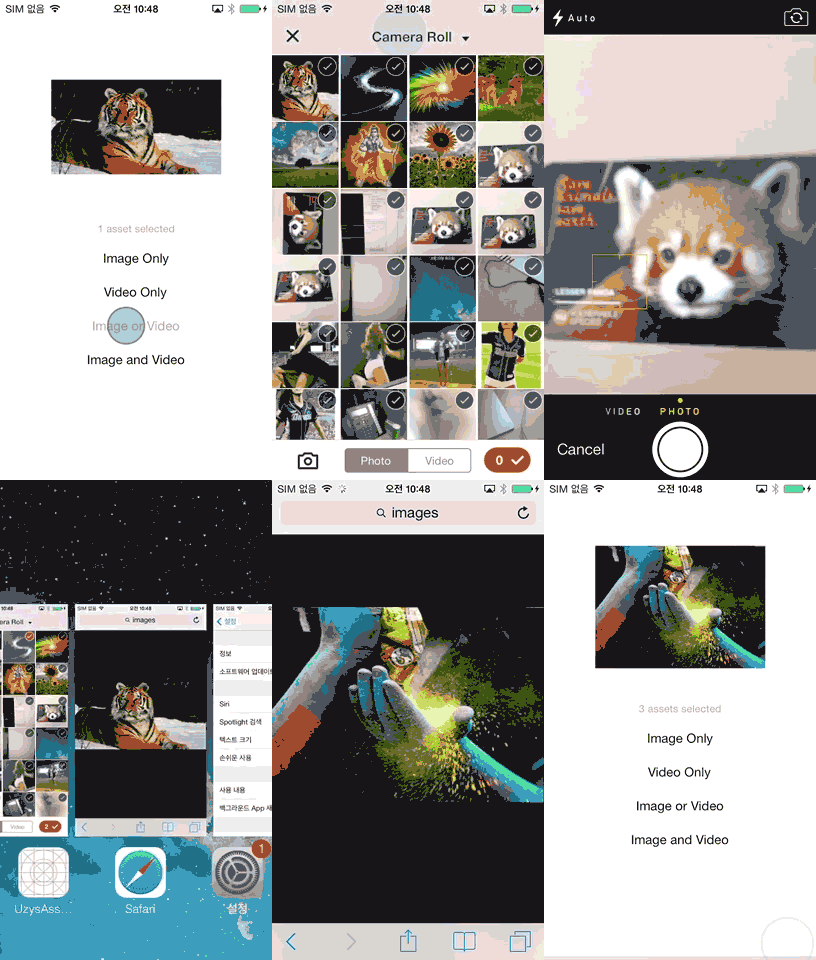
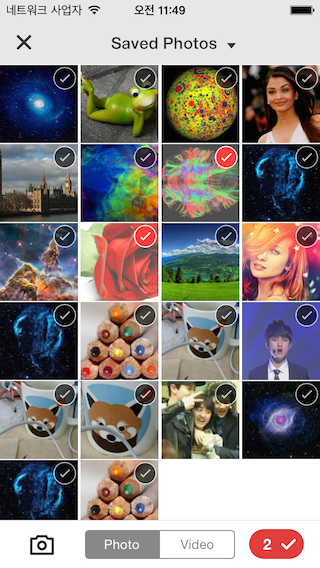
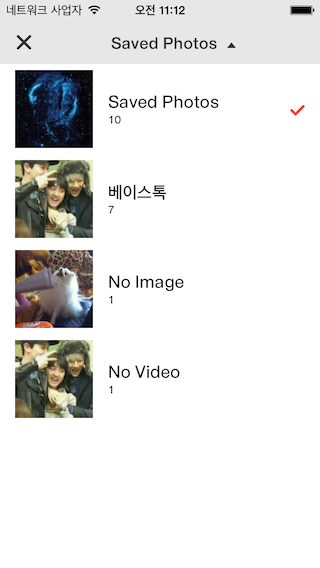 UzysAssetsPickerController features:
- Easy customization using Inferface Builder. (XIB - 'UzysAssetsPickerController.xib')
- With Assetpicker, taking pictures and or making videos are also possible.
- UzysAssetPickerController automatically update photos that has been taken & saved with other apps
- ARC Only (if your project doesn't use ARC , Project -> Build Phases Tab -> Compile Sources Section -> Double Click on the file name Then add -fno-objc-arc to the popup window.)
Installation
- Just add
pod 'UzysAssetsPickerController'to your Podfile. - Copy over the files library folder to your project folder
Usage
###Import header.
#import "UzysAssetsPickerController.h"
Customize Appearance of UzysAssetsPickerController
if you want to customize the appearance of UzysAssetsPickerController, you can init UzysAppearanceConfig instance, and config its property, then call
+ (void)setUpAppearanceConfig:(UzysAppearanceConfig *)config
of UzysAssetsPickerController before you init UzysAssetsPickerController
sample code is like this:
    UzysAppearanceConfig *appearanceConfig = [[UzysAppearanceConfig alloc] init];
    appearanceConfig.finishSelectionButtonColor = [UIColor blueColor];
    appearanceConfig.assetsGroupSelectedImageName = @"checker";
    [UzysAssetsPickerController setUpAppearanceConfig:appearanceConfig];
for more configable properties, please refer to UzysAppearanceConfig.h
open UzysAssetsPickerController
    UzysAssetsPickerController *picker = [[UzysAssetsPickerController alloc] init];
    picker.delegate = self;
    picker.maximumNumberOfSelectionMedia = 2;
    [self presentViewController:picker animated:YES completion:^{

    }];
UzysAssetPickerControllerDelegate
- (void)uzysAssetsPickerController:(UzysAssetsPickerController *)picker didFinishPickingAssets:(NSArray *)assets
{
    __weak typeof(self) weakSelf = self;
    if([[assets[0] valueForProperty:@"ALAssetPropertyType"] isEqualToString:@"ALAssetTypePhoto"]) //Photo
    {
            [assets enumerateObjectsUsingBlock:^(id obj, NSUInteger idx, BOOL *stop) {
                ALAsset *representation = obj;

                    UIImage *img = [UIImage imageWithCGImage:representation.defaultRepresentation.fullResolutionImage
                                                       scale:representation.defaultRepresentation.scale
                                                 orientation:(UIImageOrientation)representation.defaultRepresentation.orientation];
                weakSelf.imageView.image = img;
                *stop = YES;
            }];


    }
    else //Video
    {
        ALAsset *alAsset = assets[0];

        UIImage *img = [UIImage imageWithCGImage:alAsset.defaultRepresentation.fullResolutionImage
                                           scale:alAsset.defaultRepresentation.scale
                                     orientation:(UIImageOrientation)alAsset.defaultRepresentation.orientation];
        weakSelf.imageView.image = img;


        ALAssetRepresentation *representation = alAsset.defaultRepresentation;
        NSURL *movieURL = representation.url;
        NSURL *uploadURL = [NSURL fileURLWithPath:[[NSTemporaryDirectory() stringByAppendingPathComponent:@"test"] stringByAppendingString:@".mp4"]];
        AVAsset *asset      = [AVURLAsset URLAssetWithURL:movieURL options:nil];
        AVAssetExportSession *session =
        [AVAssetExportSession exportSessionWithAsset:asset presetName:AVAssetExportPresetMediumQuality];

        session.outputFileType  = AVFileTypeQuickTimeMovie;
        session.outputURL       = uploadURL;

        [session exportAsynchronouslyWithCompletionHandler:^{

            if (session.status == AVAssetExportSessionStatusCompleted)
            {
                NSLog(@"output Video URL %@",uploadURL);
            }

        }];

    }
}
filter option
images only
  UzysAssetsPickerController *picker = [[UzysAssetsPickerController alloc] init];
  picker.delegate = self;
  picker.maximumNumberOfSelectionVideo = 0;
  picker.maximumNumberOfSelectionPhoto = 3;
videos only
  UzysAssetsPickerController *picker = [[UzysAssetsPickerController alloc] init];
  picker.delegate = self;
  picker.maximumNumberOfSelectionVideo = 3;
  picker.maximumNumberOfSelectionPhoto = 0;
images or videos
  UzysAssetsPickerController *picker = [[UzysAssetsPickerController alloc] init];
  picker.delegate = self;
  picker.maximumNumberOfSelectionVideo = 4;
  picker.maximumNumberOfSelectionPhoto = 3;
both images and videos
  UzysAssetsPickerController *picker = [[UzysAssetsPickerController alloc] init];
  picker.delegate = self;
  picker.maximumNumberOfSelectionMedia = 5;
Customization
- You can easily modify UzysAssetsPickerController Design using InterfaceBuilder
- check out 'UzysAssetsPickerController.xib'
ChangeLog
- V0.9.6 - changing Delegate Method name because of supporting Swift. #28
- V0.9.7 - fixed self retain bug
- V0.9.8 - implement selection order; settings to change cellspacing columns number; support cocoapod on SWIFT
Contact
- Uzys.net
- This Library was designed by minjee Hahm
License
- See LICENSE.
Ähnliche Projekte entdecken
ytdl-org/youtube-dl
Kommandozeilenprogramm zum Herunterladen von Videos von YouTube.com und anderen Videoseiten
141,560 Sterneexcalidraw/excalidraw
Virtuelles Whiteboard zum Skizzieren von Diagrammen im handgezeichneten Stil
135,665 Sternegodotengine/godot
Godot Engine – Plattformübergreifende 2D- und 3D-Spiele-Engine
120,117 Sternemrdoob/three.js
JavaScript-3D-Bibliothek.
118,347 Sterne