
twilio/twilio-video-app-android
twilio/twilio-video-app-android has 253 GitHub stars and 102 forks. GitHot measured 0 stars in 24 hours, 0 in 7 days, and -1 in 15 days. Last checked 2026-11-20 20:25 UTC. Last push 2026-10-27.
What you can do
- Video conferencing with real-time video and audio
- Enable/disable camera
- Mute/unmute mic
- Switch between front and back camera
Gemessener Sternzuwachs
- in 24h
- 0
- in 7 days
- 0
- in 15 days
- -1
- in 1 month
- Verlauf wird gesammelt
Nettoänderungen in überlappenden Zeiträumen, keine Tagessummen. Fehlende Messwerte bleiben leer. Sterne zeigen Interesse, nicht Qualität.
Über uns
A collaboration application built with the Twilio Video Android SDK
Kreativität und MedienREADME.md
OriginalTwilio Video Android App
To make sure your app is ready for Android 11 please visit this page.

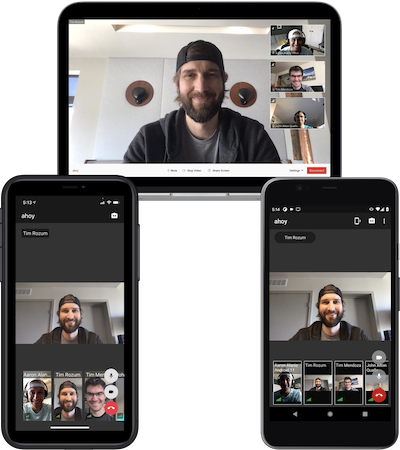
This application demonstrates multi-party voice and video built with Twilio’s Programmable Video Android SDK.
Features
- Video conferencing with real-time video and audio
- Enable/disable camera
- Mute/unmute mic
- Switch between front and back camera
- Dominant speaker indicator
- Network quality indicator
- Bandwidth Profile API
Requirements
| Android Studio Version | Android API Version Min |
|---|---|
| 3.5+ | 21 |
Getting Started
In order to run this application on an Android device or emulator, complete the following steps.
Deploy Twilio Access Token Server
NOTE: The Twilio Function that provides access tokens via a passcode should NOT be used in a production environment. This token server supports seamlessly getting started with the collaboration app, and while convenient, the passcode is not secure enough for production environments. You should use an authentication provider to securely provide access tokens to your client applications. You can find more information about Programmable Video access tokens in this tutorial.
The app requires a back-end to generate Twilio access tokens. Follow the instructions below to deploy a serverless back-end using Twilio Functions.
- Install Twilio CLI.
- Run
twilio loginand follow prompts to login to your Twilio account. - Run
twilio plugins:install @twilio-labs/plugin-rtc. - Run
twilio rtc:apps:video:deploy --authentication passcode. - The passcode that is output will be used later to sign in to the app.
The passcode will expire after one week. To generate a new passcode, run twilio rtc:apps:video:deploy --authentication passcode --override.
Troubleshooting The Twilio CLI
If any errors occur after running a Twilio CLI RTC Plugin command, then try the following steps.
- Run
twilio plugins:updateto update the rtc plugin to the latest version. - Run
twilio rtc:apps:video:deleteto delete any existing authentication servers. - Run
twilio rtc:apps:video:deploy --authentication passcodeto deploy a new authentication server.
Build
There are different product flavors for the application:
- Internal - The application intended for internal testing and QA at Twilio. This variant can only be built by Twilions.
- Community - The application intended for developers interested in using Programmable Video. This variant can be built by all developers.
- debug and release build types are supported.
Building the Community Flavor
The community flavor of the application is meant for developers who would like to work with the Video Android SDK in the context of a full-fledged application.
To get started with the community flavor follow these steps:
- Select the
communityDebugBuild Variant. - Run the application.
Start Video Call
For each device:
- Run the app.
- Enter any unique name in the
Your namefield. - Enter the passcode from Deploy Twilio Access Token Server in the
Passcodefield. - Tap
Log in. - Enter a room name.
- Tap
Join.
The passcode will expire after one week. Follow the steps below to sign in with a new passcode.
- Generate a new passcode.
- In the app tap
Settings > Sign Out. - Repeat the steps above.
NOTE: Usage charges will apply for video calls. See pricing for more information.
Tests
Unit Tests
- Android Studio - Right click and run unit tests on package
app/src/main/java/com/twilio/video/app - Terminal -
./gradlew app:testInternalDebugUnitTest
UI Tests
UI tests require credentials that are only available to Twilio employees.
Community Contributions and Support
This repository is publicly available and maintained by Twilio under a limited external contribution model.
Due to limited maintenance capacity, external pull requests are not currently accepted.
GitHub Issues may be used to report reproducible bugs or provide feature feedback about this application. Issues are reviewed on a best-effort basis, with no SLA or guaranteed response.
GitHub Issues are not an official Twilio support channel. For production issues, general usage questions, or account-specific assistance, please contact Twilio Support. If you have a Twilio account manager, you may also escalate through them.
Do not share Personally Identifiable Information (PII) or sensitive account information, including access tokens, API keys, and credentials, in issues, logs, or screenshots.
Report security vulnerabilities privately through Twilio's Vulnerability Disclosure Program, rather than public GitHub Issues.
See CONTRIBUTING.md for reporting guidance.
Related
For Twilions
Twilio employees should follow these instructions for internal testing.
License
Apache 2.0 license. See LICENSE.txt for details.