
terminatorover/RGCardViewLayout
terminatorover/RGCardViewLayout has 1,338 GitHub stars and 158 forks. GitHot measured 0 stars in 24 hours and +1 in 7 days. Last checked 2026-11-15 09:39 UTC. Last push 2016-03-20.
Gemessener Sternzuwachs
- in 24h
- 0
- in 7 days
- +1
- in 15 days
- Verlauf wird gesammelt
- in 1 month
- Verlauf wird gesammelt
Nettoänderungen in überlappenden Zeiträumen, keine Tagessummen. Fehlende Messwerte bleiben leer. Sterne zeigen Interesse, nicht Qualität.
Über uns
This is a layout that clones the interaction of going through city "cards" in the City Guide App. (this app is #3 for the top iOS app animations on the raywenderlich
Kreativität und MedienREADME.md
OriginalRGCardViewLayout
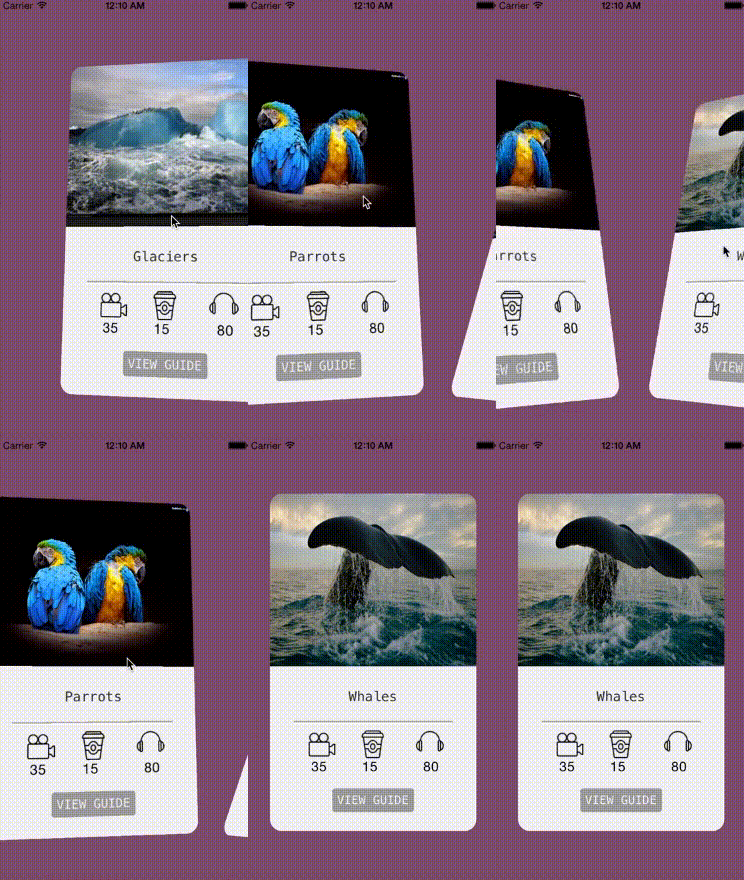
Watch it in action here This is a layout that clones the interaction of going through cities in the City Guide App. (this app is #3 for the top iOS app animations on the raywenderlich
To use this simply drop it in as a class in the storyboard or nib when you create your collection view. or you can instantiate it in code and give it your collection view(via initWithFrame:collectionViewLayout: or just set the layout propery of the collection View. and you can use your collection View as you always do.
One important this for this layout is that in the datasource protcol to specify the number of cards you must use numberOfSectionsInCollectionView: , and for collectionView:numberOfItemsInSection: you must always return 1.
also note that the itemsize is computed by the layout to be "appropriate" to the size of the collection view itself so setting it won't do anything.
Place the following line into your podfile to use RGCardViewLayout: pod 'RGCardViewLayout','1.0'