
tcita/HushSnap
tcita/HushSnap has 65 GitHub stars and 3 forks. GitHot measured 0 stars in 24 hours, +1 in 7 days, and +1 in 15 days. Last checked 2026-11-14 21:42 UTC. Last push 2026-10-17.
Gemessener Sternzuwachs
- in 24h
- 0
- in 7 days
- +1
- in 15 days
- +1
- in 1 month
- Verlauf wird gesammelt
Nettoänderungen in überlappenden Zeiträumen, keine Tagessummen. Fehlende Messwerte bleiben leer. Sterne zeigen Interesse, nicht Qualität.
Über uns
HushSnap is an opinionated, deliberately minimal screenshot tool built around a thumbnail hub. Press a hotkey, select a region, and the capture is done—no floating toolbar, no extra confirmation step. It lands on your clipboard instantly.
SicherheitREADME.md
Original
HushSnap

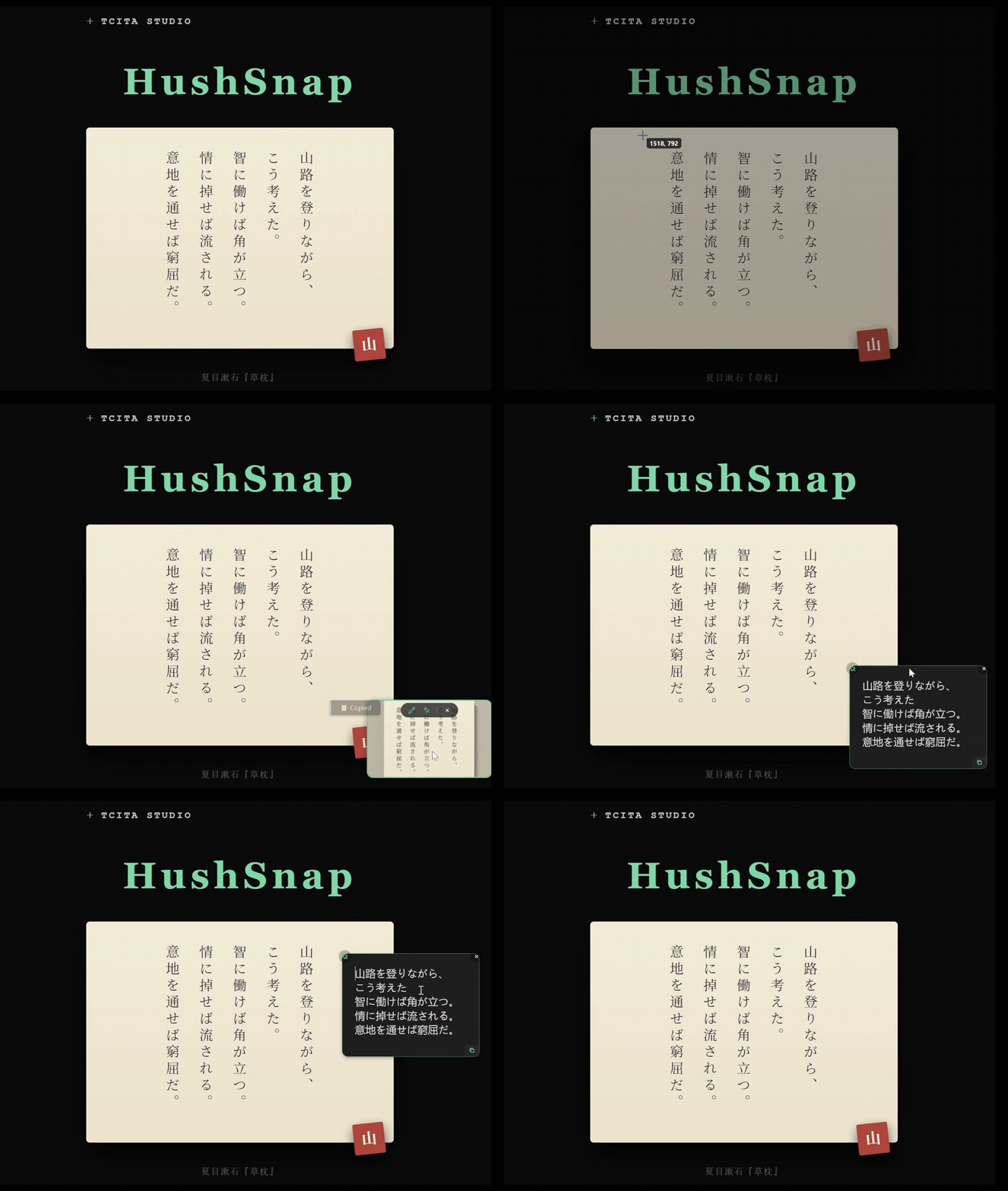
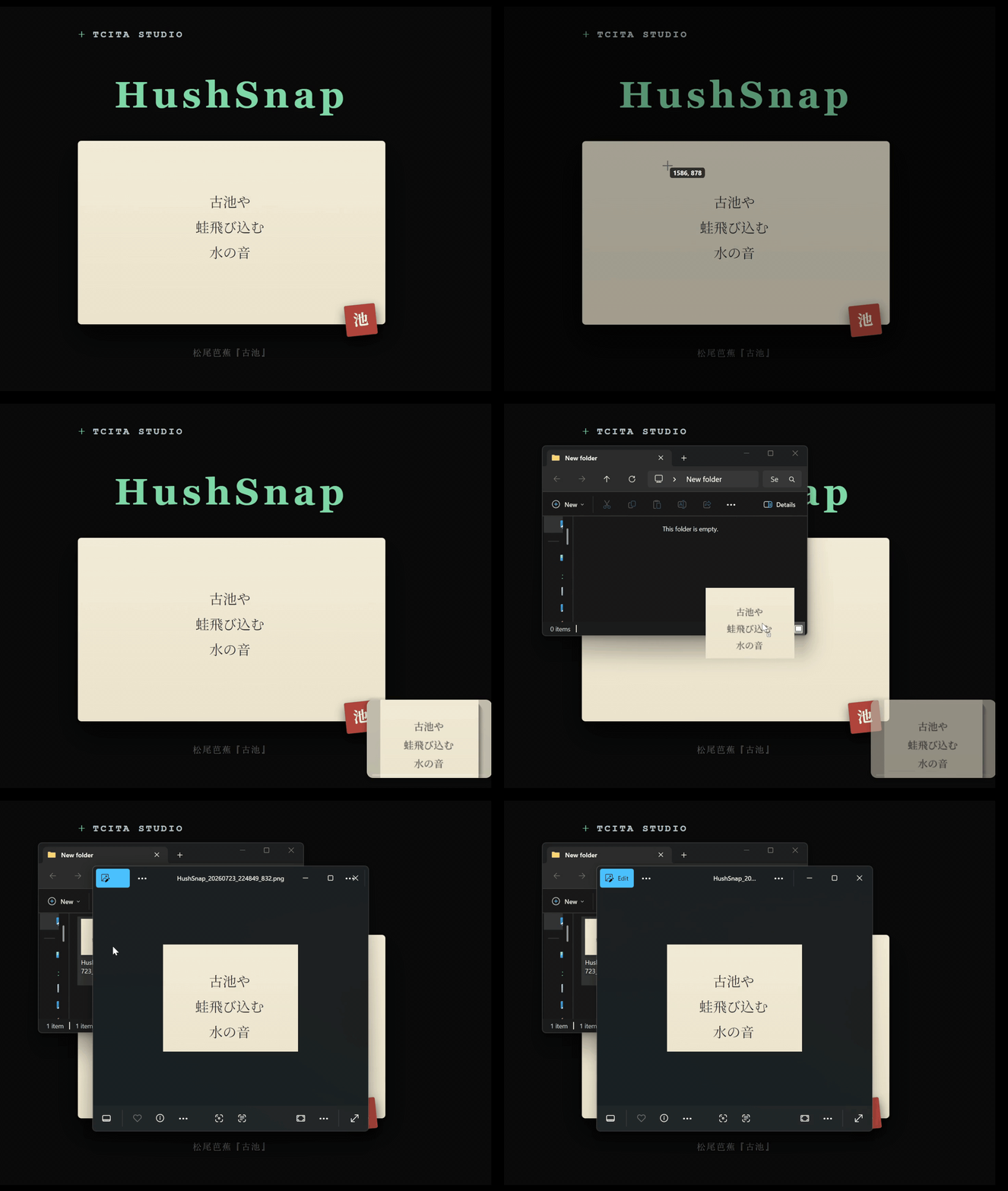
HushSnap is an opinionated, deliberately minimal screenshot tool built around a thumbnail hub. Press a hotkey, select a region, and the capture is done—no floating toolbar, no extra confirmation step. It lands on your clipboard instantly. A subtle thumbnail fades in at the bottom-right corner. It is the interface: use its controls to edit or pin, drag it to save, or click it for OCR. The recognized text pops up already reformatted into a clean, readable layout you can edit on the spot. HushSnap stays quietly in the tray until you need it. Everything runs locally—your screenshots and recognized text never leave your device. |
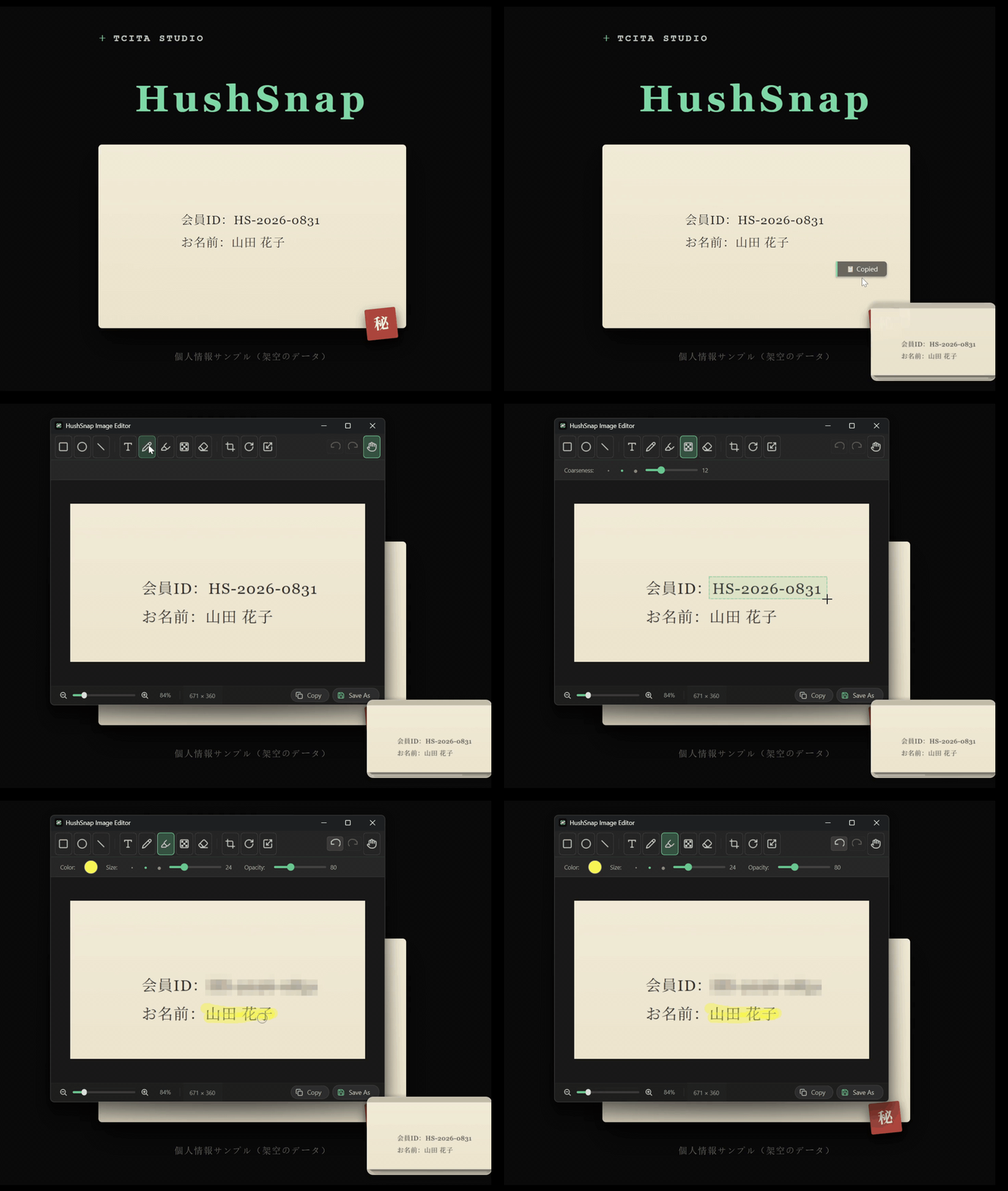
| Click thumbnail → OCR | Drag thumbnail → Save | Edit → Redact |
 |
 |
 |
After capture, a thumbnail fades in at the bottom-right corner of your screen. This thumbnail is the heart of HushSnap's post-capture flow:
- Hover to pause auto-hide and reveal an action pill with Edit, Pin, and Close buttons.
- Drag and drop the thumbnail anywhere to save the image - into a chat, an email, a folder, or another app.
- Left-click the thumbnail to run OCR. Recognized text opens in a floating popup where you can edit, copy, resize, or pin the window to keep it visible.
- Edit (the brush button on the action pill) opens the built-in image editor - see Image Editor below for the full toolset.
- Right-click the thumbnail for View Original (open the capture in your default viewer), Copy Image to clipboard, or Save to Desktop.
- Optionally overlay a decorative vine ornament on the thumbnail’s top-left corner (enable it in Settings - Capture). It is purely cosmetic; it does not change the thumbnail’s hit area or any behavior.
- Enable Background OCR Prefetch in Settings to run OCR quietly after each capture so the thumbnail popup opens instantly. It only warms the cache and never touches your clipboard.
Release Notes
See what's new.txt for the full changelog (Simplified Chinese, Traditional Chinese, English, Japanese — newest first).
As the project continues to evolve, some parts of this README may occasionally lag behind the latest behavior or features.
Image Editor
The built-in image editor opens from the thumbnail's Edit button, or from the right-click menu on a pinned image. It's a lightweight, dark-themed window for touching up a capture before sharing - annotate, redact, crop, rotate, resize, then copy to clipboard or save. The window opens centered on the cursor's screen and remembers its size across sessions.
Tools: rectangle / ellipse / line (color, size, fill, optional arrowhead), text (font, size, color), brush, highlighter, mosaic (pixelate/redact), eraser, pan, and the crop / rotate / resize transforms. Plus undo/redo (Ctrl+Z / Ctrl+Y), fit-to-viewport (Ctrl+0), copy, and Save As… (Ctrl+S, PNG / JPEG / BMP). Transforms run as atomic sessions - Esc cancels - so the state stays unambiguous mid-edit.
OCR Engine
HushSnap uses PP-OCRv6 as its sole OCR engine:
- PP-OCRv6 (via RapidOCR): Runs PP-OCRv6 small ONNX models in-process via the
rapidocrPython package (Apache 2.0). No external dependencies or language packs needed. Works offline. Uses a unified multilingual model covering 50 languages in a single 7.7M-parameter model - surpassing the accuracy of the previous-generation v5 server model at a fraction of the size.
The engine supports the following 50 languages out of the box:
Core: Simplified Chinese, Traditional Chinese, English, Japanese
Latin-script (46): French, German, Italian, Spanish, Portuguese, Dutch, Polish, Romanian, Czech, Swedish, Norwegian, Danish, Finnish, Hungarian, Turkish, Vietnamese, Indonesian, Malay, Azerbaijani, Afrikaans, Bosnian, Croatian, Welsh, Estonian, Irish, Icelandic, Kurdish, Lithuanian, Latvian, Maltese, Māori, Occitan, Slovak, Slovenian, Albanian, Swahili, Tagalog, Uzbek, Latin, Serbian (Latin), Catalan, Basque, Galician, Luxembourgish, Romansh, Quechua
Minimal cv2 build
The shipped MSIX is slimmed down: HushSnap uses a purpose-built 24.8 MB static cv2.pyd instead of the official 82 MB opencv-python wheel — 70% smaller, OCR output byte-identical (this is a size optimization only; the standard pip wheel works too). The trimmed package is committed in the repo (third_party/ binary + the cv2/ package at repo root, which dev and tests import directly). Rebuild when OpenCV or Python changes:
pwsh scripts/build/build_minimal_opencv.ps1 -NoIPP -ForceClean
Third-Party Acknowledgment
Design references: Text-Grab (MIT,
OCR workflow), Pinta (MIT, image editor
toolset), ShareX (GPL-3.0, capture workflow).
Built with PyQt6 (GPL-3.0-only,
© Riverbank Computing Limited) — see THIRD_PARTY_NOTICES.md for all attributions.
License
HushSnap is distributed under the GNU General Public License v3.0
(LICENSE.md). See THIRD_PARTY_NOTICES.md for third-party
attribution.
Copyright © 2026 HushSnap.
Development & Debugging
Install dependencies:
pip install -r requirements.txt
Run from source:
python HushSnap.py
To enable debug mode, set debug = true in hushsnap_config.toml (the --debug CLI flag was removed because MSIX packages cannot receive command-line arguments).
Key Features of Debug Mode:
- Isolation: Running from source uses
%LOCALAPPDATA%\HushSnap_Dev, ensuring your production settings remain untouched. - Traceability: Sets log level to
DEBUGand opens the log folder immediately upon startup. - Live Output: Real-time logs are streamed to the terminal via the logging console handler (
StreamHandler). - OCR Inspection: Debug mode saves detection-box images to the data directory. Right-click the tray icon → "Config Folder" to open this location directly.
ocr_debug_words.png- raw PP-OCR detector word boxes (red)ocr_debug_lines.png- post-clustering line boxes (green, L0/L1/… badges)- Source run:
%LOCALAPPDATA%\HushSnap_Dev\ - Packaged run (MSIX):
%LOCALAPPDATA%\Packages\<PackageFamilyName>\LocalState\ - Packaged run (PyInstaller standalone):
%LOCALAPPDATA%\HushSnap\
Building (MSIX)
build_msix.bat              # build unsigned MSIX; version auto-resolved from git tag
sign_for_local_test.bat     # self-sign the package for local install testing
The build requires HEAD at a git tag (e.g. v0.3.0). For local testing, sign_for_local_test.bat auto-creates a self-signed certificate and trusts it - run as Administrator.
Every release is tagged in git — git checkout v1.5.4, run build_msix.bat, then sign_for_local_test.bat to produce a locally-installable MSIX for that version.
Release notes (four languages, newest first) are in what's new.txt.
Installation
HushSnap is distributed exclusively through the Microsoft Store.