
soroushamdg/acd has 141 GitHub stars and 71 forks. GitHot measured 0 stars in 24 hours. Last checked 2026-11-16 18:48 UTC. Last push 2026-10-13.
Gemessener Sternzuwachs
- in 24h
- 0
- in 7 days
- Aktualisierung verzögert
- in 15 days
- Aktualisierung verzögert
- in 1 month
- Aktualisierung verzögert
Nettoänderungen in überlappenden Zeiträumen, keine Tagessummen. Fehlende Messwerte bleiben leer. Sterne zeigen Interesse, nicht Qualität.
Über uns
ACD helps you download Adobe Connect Sessions Videos and Audios, download files from FTP server, transfer files using Shift I/O
Kreativität und MedienREADME.md
Original


❓ What was the problem? What is ACD?
ACD solves three main problems that students may face in online courses and online learning during quantine. What I tried to do was packaging some tools to solve those a bit, but still, there is a lot more to fix.
- Adobe Connect Classes : As most public schools and universities can't afford fast and powerful servers to host Adobe Connect meetings, they lack one main feature, exporting meetings for offline usage. So students(including me) couldn't download courses and had to watch them online, and problems start to show up when you have unstable internet connection. So the solution was to download and merge meetings manually, this is ACD's main feature.
- FTP : Another problem was most students couldn't use ftps. So I came up with straight answer, ACD's FTP downloader, fast, easy to use.
- Shift I/O : This one also solves another problem, imagine you're taking an exam and you have to take a picture of your paper, scan and export it to .pdf file, and then upload it to you portal, there are many ways to send files from mobile phones to PC or laptop, but they ain't Shift I/O ( :D ). Cause Shift I/O is fast and easy to use, and most importantly, easy to setup. No additional app required, just start the service, connect and it's ready-to-go!
🔨 Installation
ACD v.2 need no installation, no importing, no additional library.It's All-in-one. It also automatically downloads and compiles engine files. No effort needed.
But you need Google Chrome installed for Adobe Connect Downloader feature.
if your using Linux you need to install following packages for Adobe Connect Downloader feature :
Google Chrome
wget https://dl.google.com/linux/direct/google-chrome-stable_current_amd64.deb
sudo dpkg -i google-chrome-stable_current_amd64.deb
Chromium Browser
sudo apt install -y chromium-browserMedia codec packs
For ubuntu :
sudo add-apt-repository multiverse
sudo apt install ubuntu-restricted-extras
👻 Usage
Using ACD v.2 is way more easier than ACD v.1, it's built for 6th grades. But still I've made enough documentations in case anybody needed. There's a help button on right-top corner, it shows information for each service that you're currenty at.
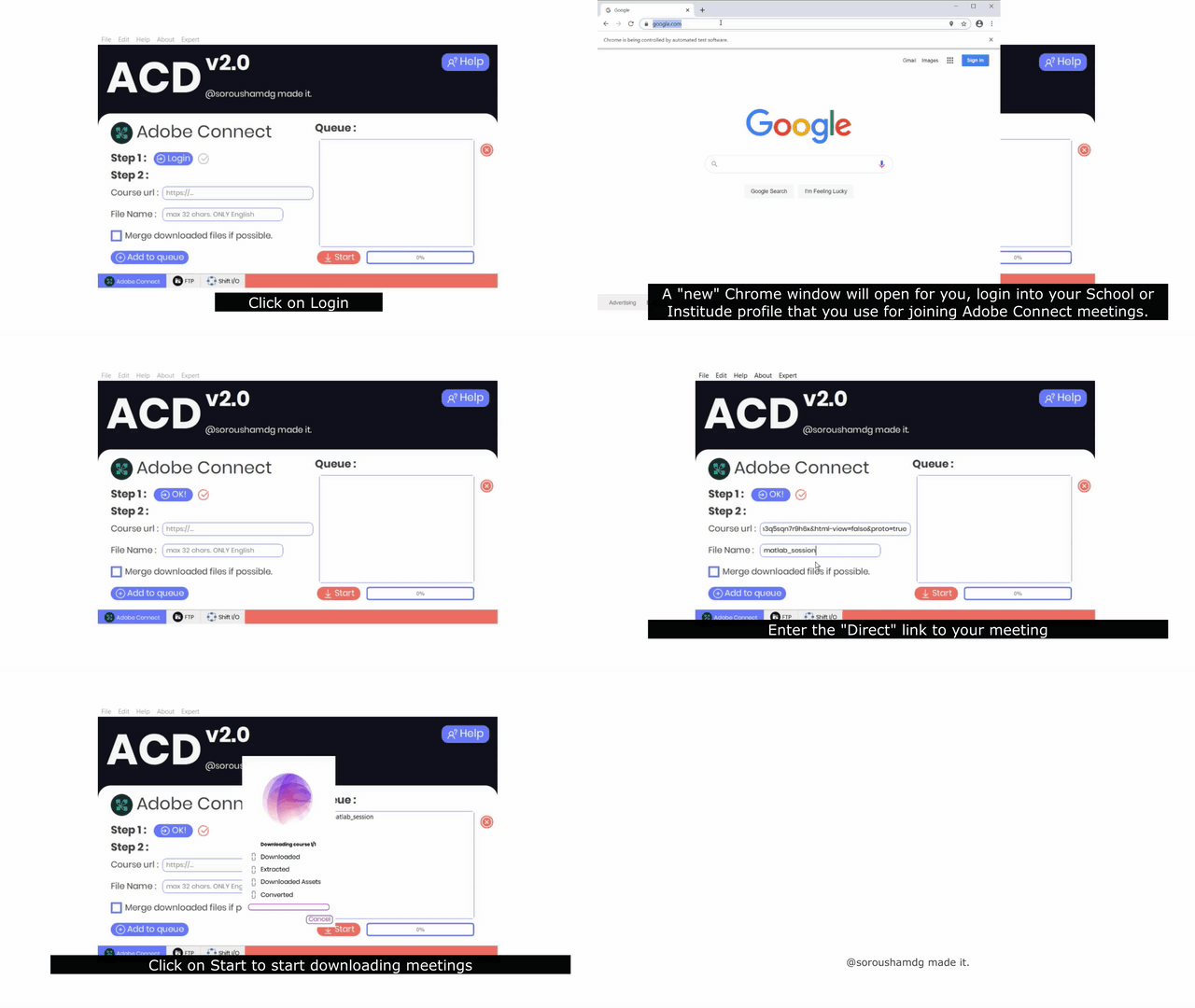
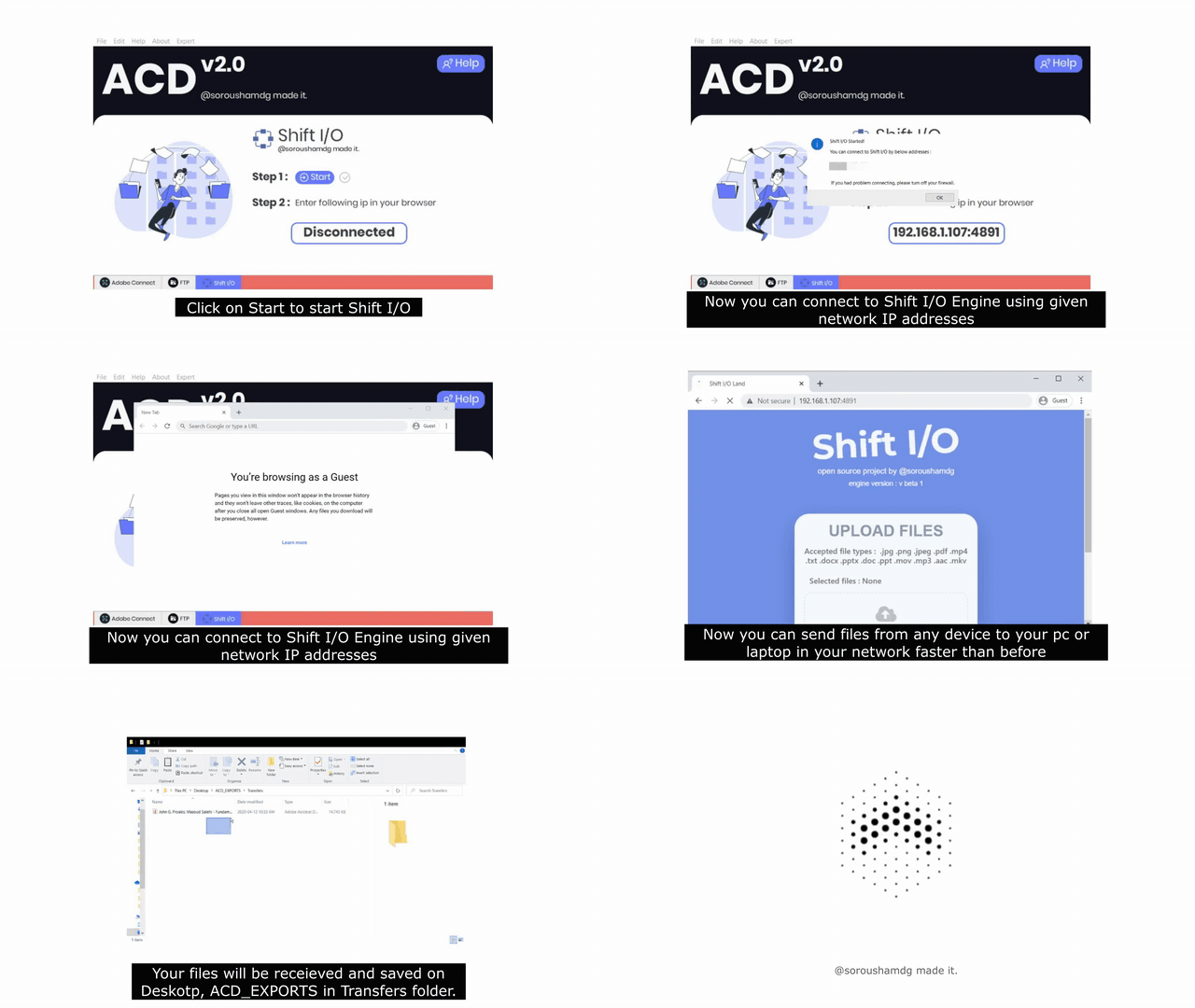
Also here's a short video of Adobe Connect Downloader and Shift I/O instructions.
Adobe Connect Downloader
Shift I/O
👨🏫 How it works?
Well, it's really complicated, there are too many hand writings, diagrams and flow charts, but I guess they aren't necessary, so I let a debugger draw accurate flowchart of application's workflow, It really doesn't show how ACD works, but it's sexy :p
🧑💻 Source code
The full source of both versions now lives in this repository, with its complete commit history (it was originally developed in private repositories).
- ACD v2 (current version): the repository root. To run it from source, install the dependencies with
pip install -r req.txtand runpython main.py. - ACD v1 (legacy):
legacy/v1/, along with the original v1 README.
Ready-to-use builds are still available on the Releases page.