
samplaman/owmb has 113 GitHub stars and 8 forks. GitHot measured 0 stars in 24 hours and +2 in 7 days. Last checked 2026-11-24 08:44 UTC. Last push 2026-11-22.
What you can do
- 3D Cloud Instant Preview & Resynthesis: Seamlessly explore your sample library in a 3D constellation with real-time additive resynthesis powered by Loris.
- Interactive 2D/3D Zoom & Pan: Fluid navigation through thousands of samples with high-performance hardware-accelerated rendering and orbital camera rotation.
- Multi-Velocity Keyzone Sample Mapper: Chromatic zone mapping on MIDI Channel 2 with velocity-sensitive on-screen keybed, auto-pitch, auto-chromatic mapping, auto-velocity spreading, and round-robin triggering.
- 16-DSP Modular Effects Rack: Dedicated 19" rack effects processor for mapped instruments featuring 16 studio-grade DSP algorithms (Bitcrusher, Tape Saturation, Multi-Mode Filter, Chorus, Reverb, Delay, and more) with custom presets.
Gemessener Sternzuwachs
- in 24h
- 0
- in 7 days
- +2
- in 15 days
- Verlauf wird gesammelt
- in 1 month
- Verlauf wird gesammelt
Nettoänderungen in überlappenden Zeiträumen, keine Tagessummen. Fehlende Messwerte bleiben leer. Sterne zeigen Interesse, nicht Qualität.
Über uns
open wav media browser
Kreativität und MedienREADME.md
OriginalOWMB - OpenWav Media Browser (Audio Plugin & Standalone App)
OWMB (OpenWav Media Browser) is an open-source, high-performance audio plugin (VST3, Standalone) and sample library management system built with JUCE 8 and C++17. Designed for music producers, sound designers, and sample collectors, OWMB features an interactive 3D and 2D Sample Cloud Constellation Visualizer, multi-tag filtering, ultra-fast asynchronous WAV scanning, and direct DAW drag-and-drop integration.
Visual Tour & Workspaces
Explore the core workspaces and specialized sound design views within OWMB:
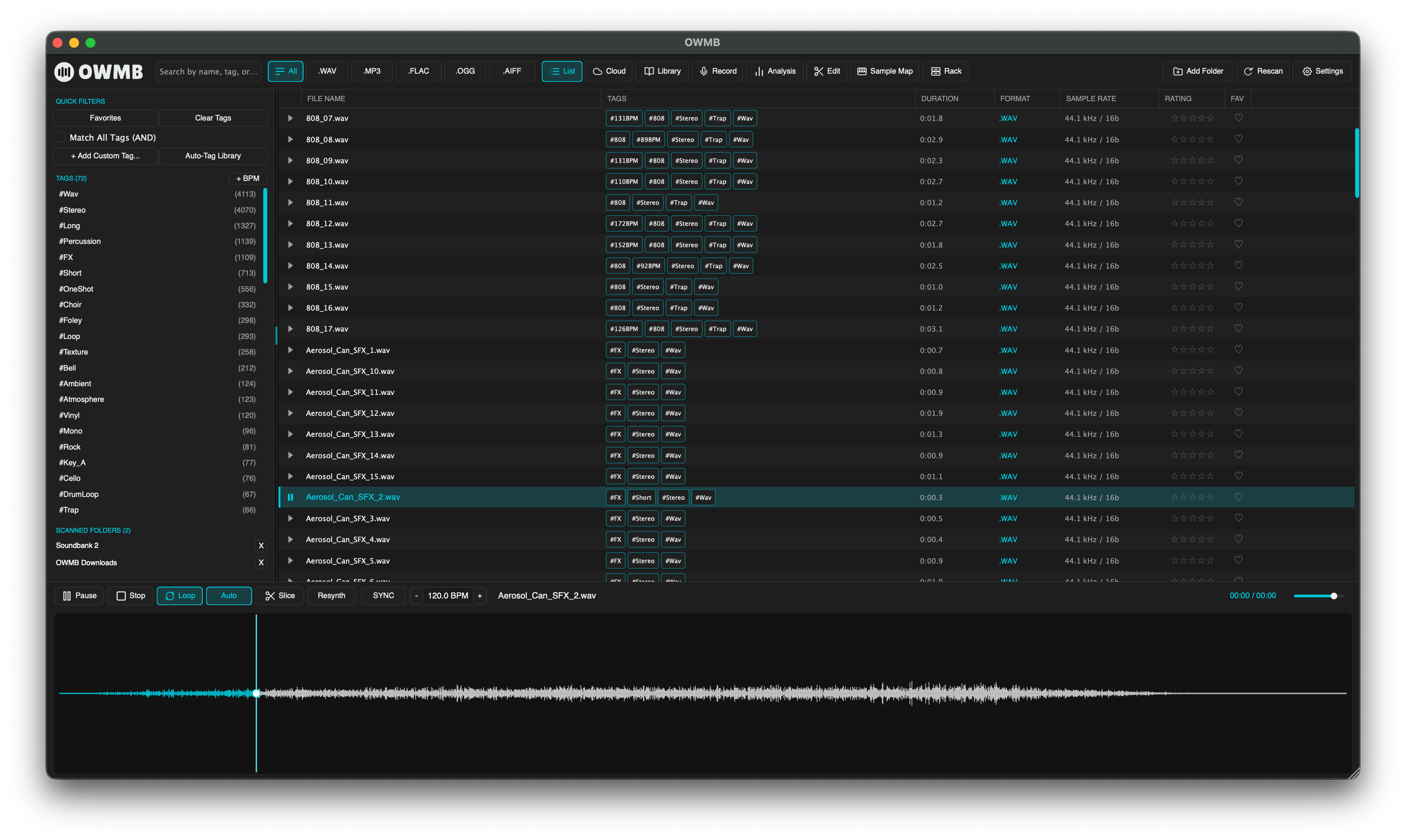
1. List Browser & Waveform Transport
Multi-column sample browser with instant multi-tag Boolean filtering (AND/OR logic), format filters (.WAV, .MP3, .FLAC, .OGG, .AIFF), scanned folder manager, and waveform playback transport with transient auto-slicing and Loris resynthesis.
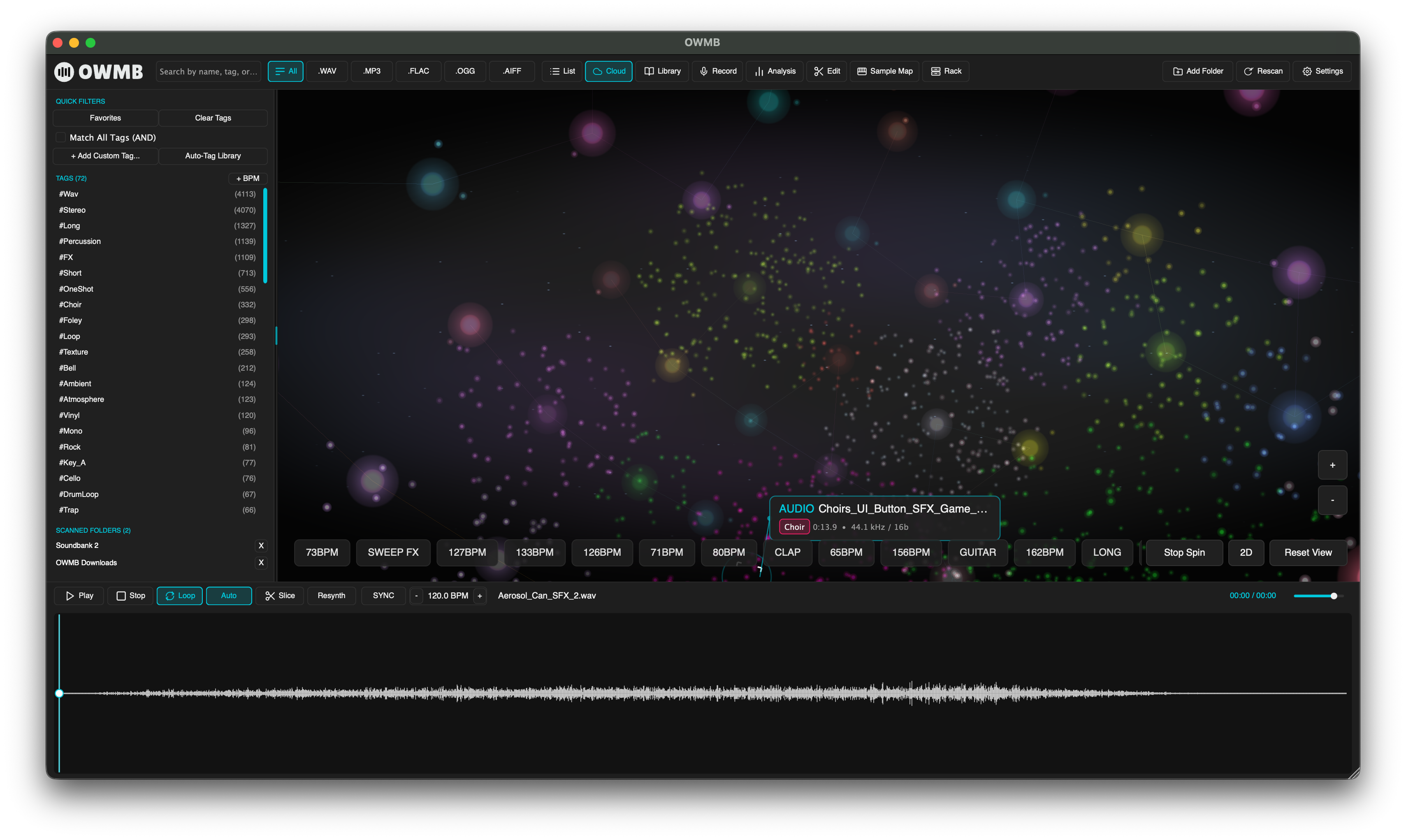
2. 3D Cloud Constellation Visualizer
Interactive 3D spatial constellation clustering thousands of samples organically by acoustic timbre and spectral similarity. Features hardware-accelerated orbital camera navigation, tag pills, instant node auditioning, and real-time additive resynthesis.
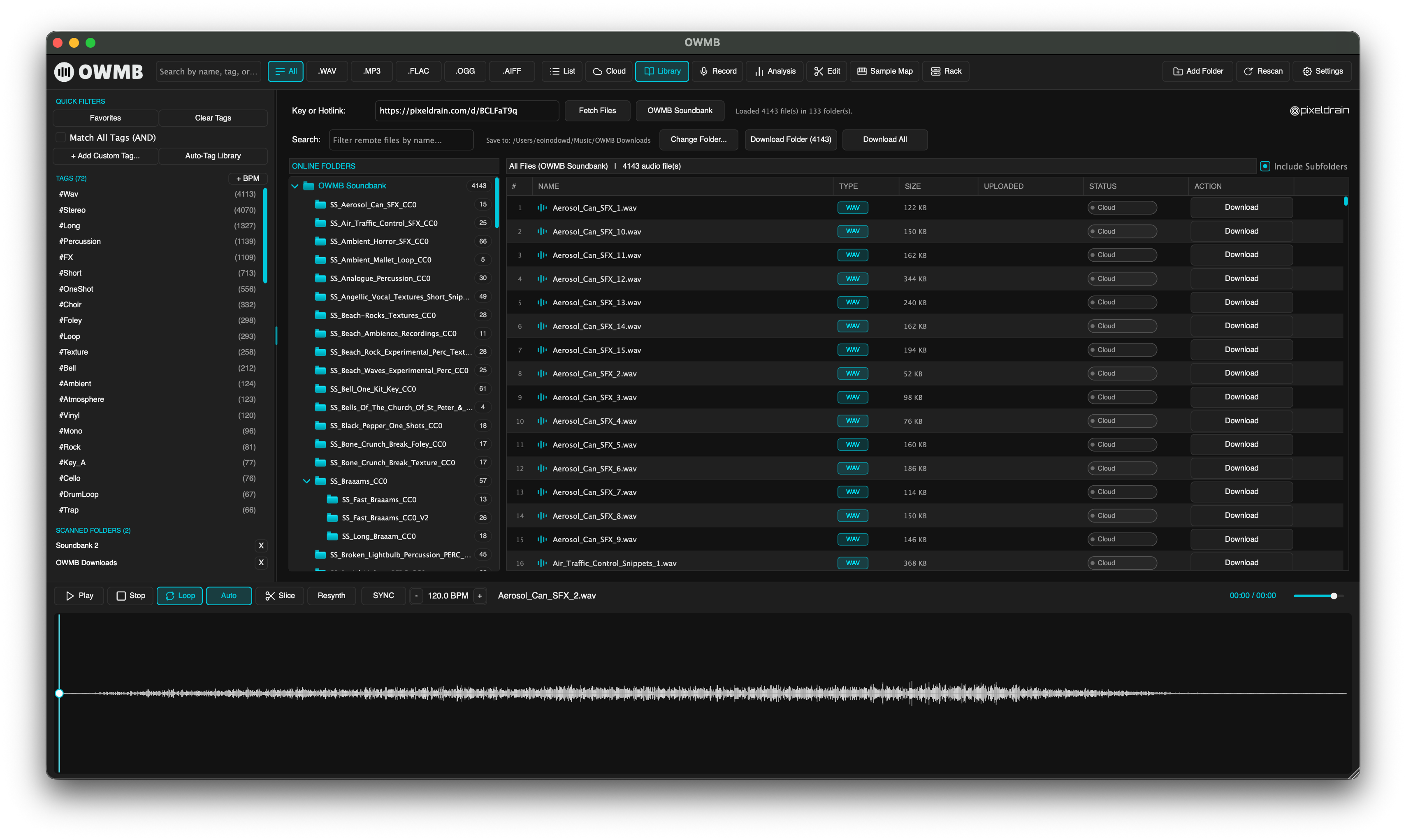
3. Online Cloud Soundbank Library
Direct integration with cloud storage (Pixeldrain) for discovering, previewing, and downloading curated soundbanks, royalty-free sample collections, and instrument bundles straight into your local workspace.
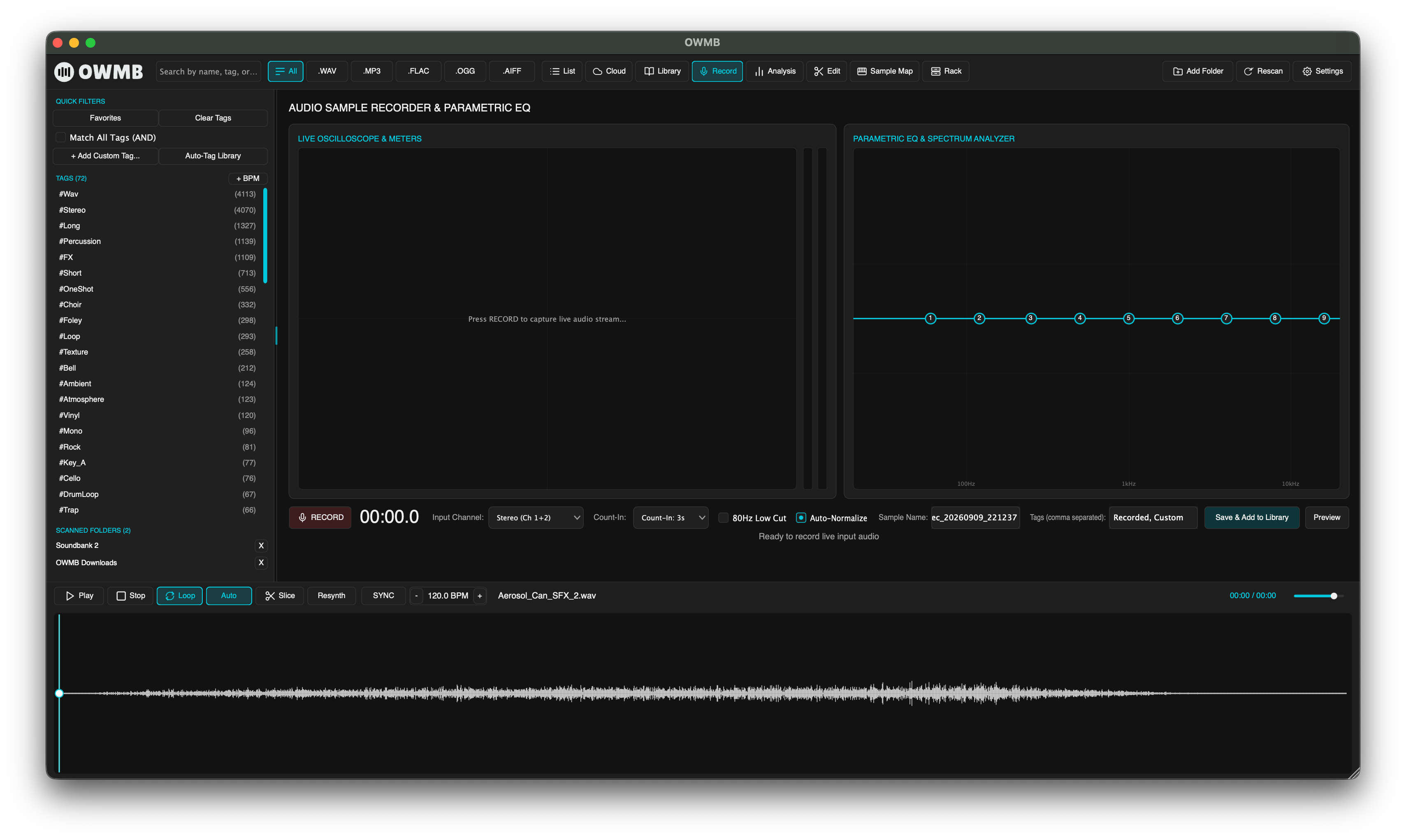
4. Audio Sample Recorder & Parametric EQ
Full-featured stereo audio recording suite with live input level meters, count-in metronome, low-cut filter, live oscilloscope, and an interactive parametric equalizer.
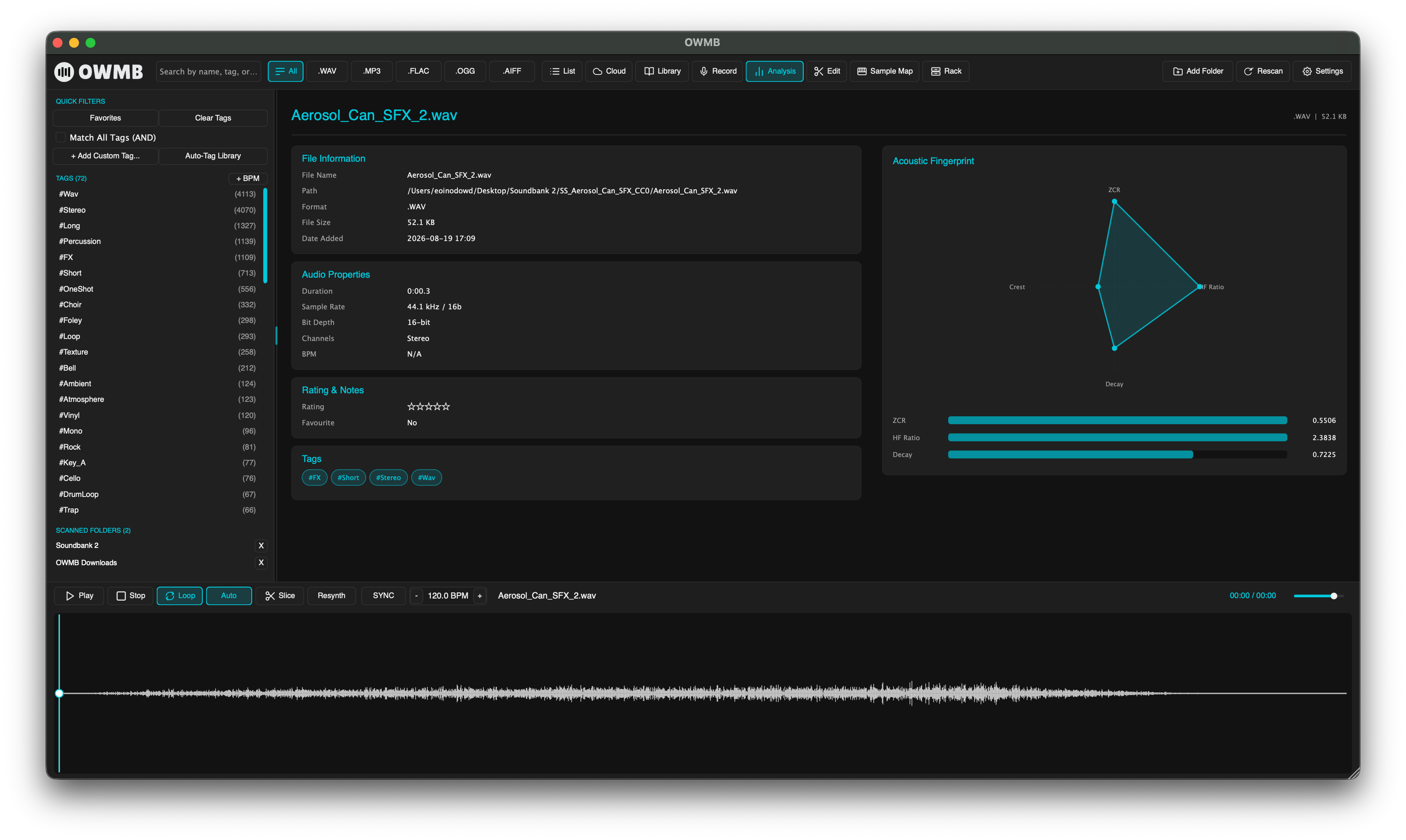
5. Acoustic Fingerprint & Timbral Analysis
Comprehensive real-time acoustic analysis and timbral radar chart displaying Zero Crossing Rate (ZCR), Crest Factor, High-Frequency (HF) Energy Ratio, and Envelope Decay metrics.
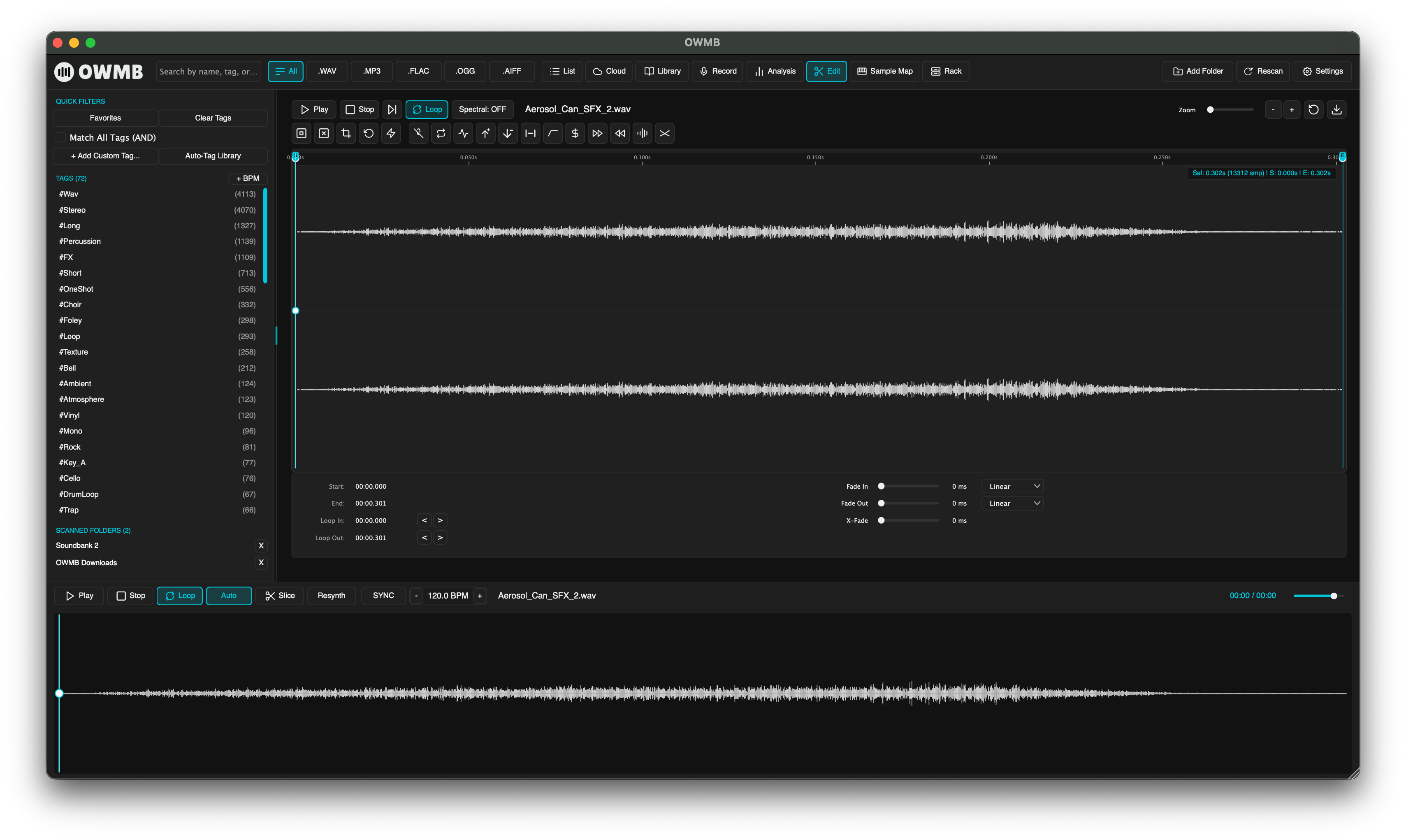
6. Waveform Editor & Transient Slicer
Precision sample editing suite featuring automatic beat and transient slicing, zoomable waveform navigation, attack/decay crossfades, sample reverse, and loop point configurations.
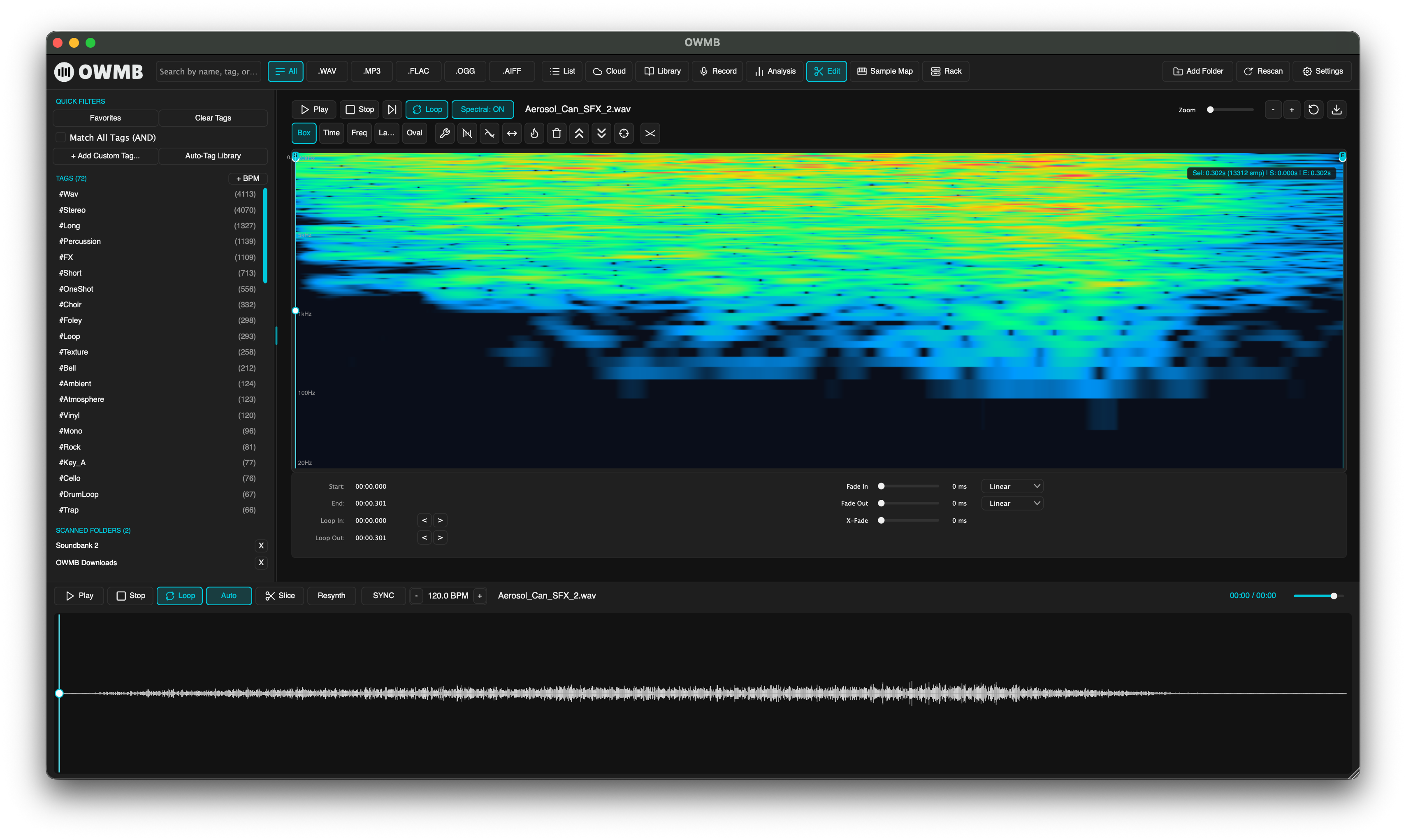
7. Spectral Audio Editor
High-resolution STFT spectrogram visualization for inspecting harmonic structures, spectral distribution, and frequency-domain audio editing with interactive selection brushes.
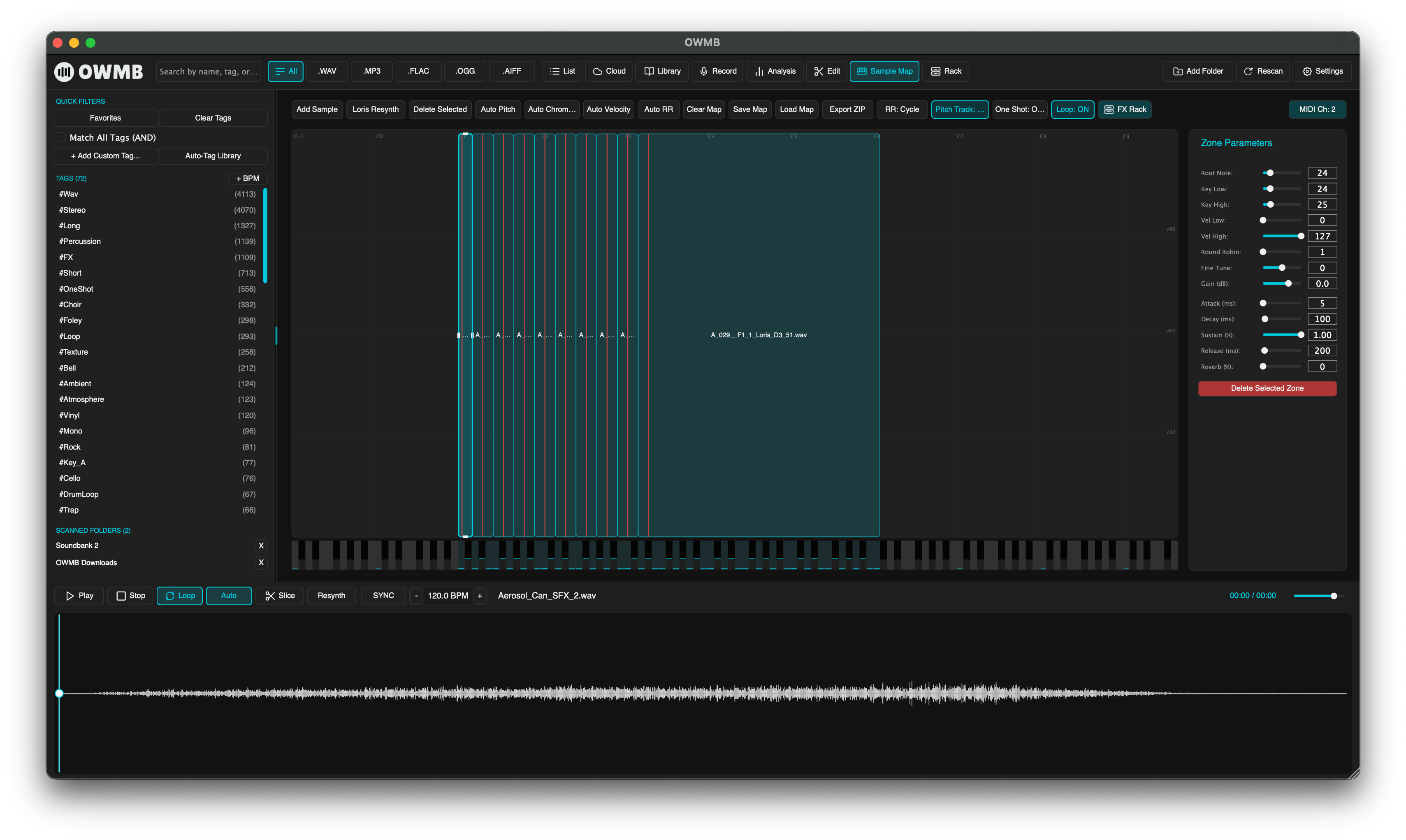
8. Multi-Velocity Keyzone Sample Mapper
Comprehensive chromatic sample mapping instrument on MIDI Channel 2 with interactive on-screen keybed (velocity-sensitive Y-axis positioning: bottom of key = 127, top = lowest velocity), zone ADSR shaping, auto-pitch detection, chromatic distribution, auto-velocity spreading, and round-robin cycle modes.
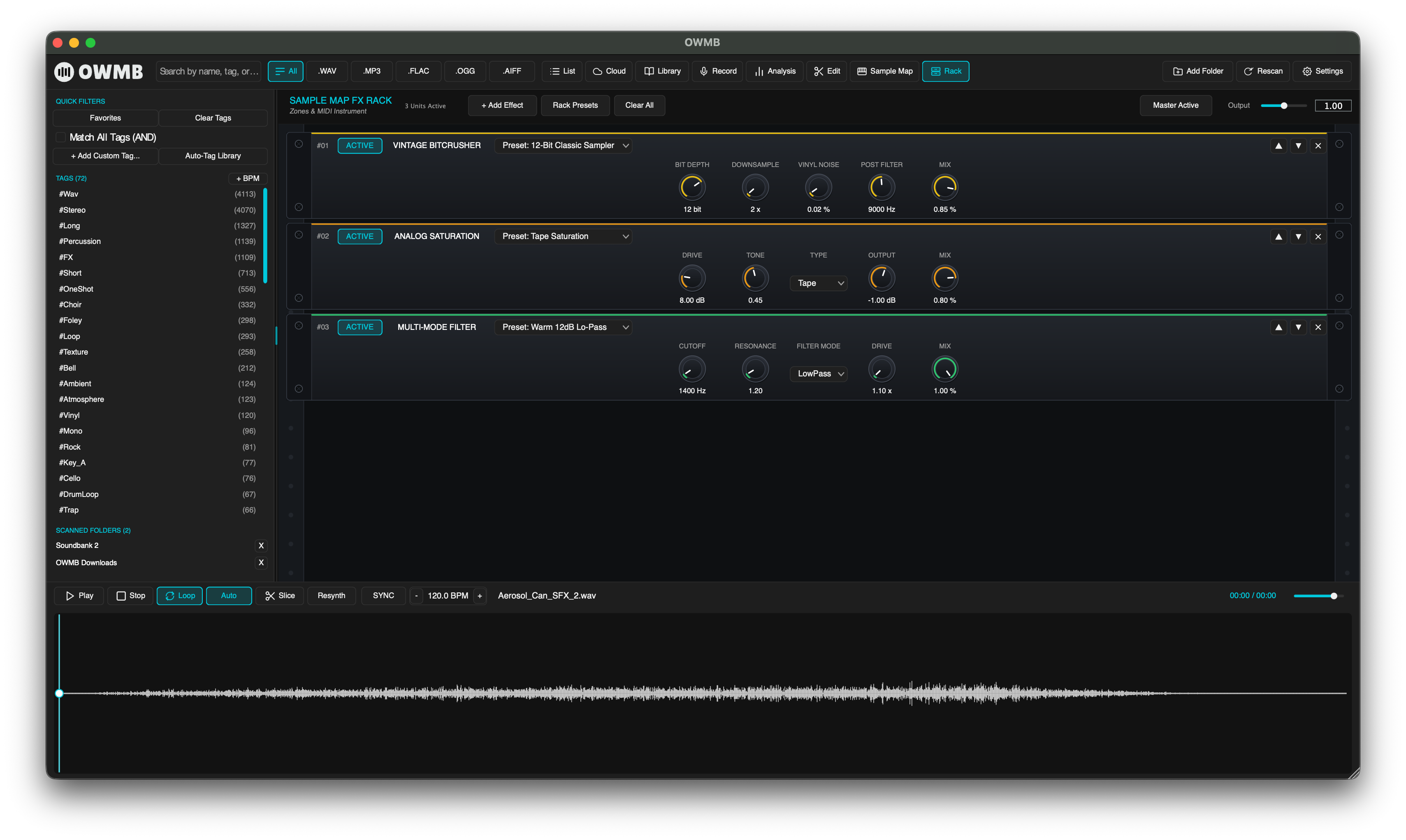
9. 16-DSP Effects Rack
Modular 19" rack-mount hardware-style effects rack exclusively dedicated to sample mapped zones and MIDI instruments. Includes 16 studio-grade DSP units (Vintage Bitcrusher, Analog Saturation, Multi-Mode Filter, Stereo Delay, Algorithmic Reverb, Chorus, Flanger, Phaser, Pitch Shifter, Wavefolder, Auto-Pan, Graphic EQ, Master Limiter, Stereo Widener, Ring Modulator, Noise Gate) with draggable re-ordering, active bypass toggles, and factory presets.
Key Features
- 3D Cloud Instant Preview & Resynthesis: Seamlessly explore your sample library in a 3D constellation with real-time additive resynthesis powered by Loris.
- Interactive 2D/3D Zoom & Pan: Fluid navigation through thousands of samples with high-performance hardware-accelerated rendering and orbital camera rotation.
- Multi-Velocity Keyzone Sample Mapper: Chromatic zone mapping on MIDI Channel 2 with velocity-sensitive on-screen keybed, auto-pitch, auto-chromatic mapping, auto-velocity spreading, and round-robin triggering.
- 16-DSP Modular Effects Rack: Dedicated 19" rack effects processor for mapped instruments featuring 16 studio-grade DSP algorithms (Bitcrusher, Tape Saturation, Multi-Mode Filter, Chorus, Reverb, Delay, and more) with custom presets.
- Waveform Slicer & Spectral Editor: Precision transient slicing, loop points, fades, and high-resolution STFT spectrogram visualization.
- Audio Recorder & Parametric EQ: Direct stereo audio sample recorder with live monitoring and parametric equalization.
- Acoustic Fingerprint Radar: Timbral analysis profiling Crest factor, Zero Crossing Rate, HF content, and envelope decay.
- Online Cloud Soundbanks: Browse and download soundbank packs directly from Pixeldrain into local storage.
- Advanced Tag-Based Searching: Powerful filtering with automated inference and multi-tag Boolean (AND/OR) queries to find sounds faster than ever.
- Ultra-Fast Asynchronous Library Scanner: Rapidly index massive sample libraries without impacting audio playback or UI performance.
- Sample Map Management: Full support for exporting and importing sample map bundles (.zip) with automated sample reloading and mapping state synchronization.
- DAW Drag-and-Drop: Effortless integration with all major DAWs (Ableton Live, FL Studio, Logic Pro, Reaper, Cubase, Bitwig). (Note: On macOS, hold
Controlwhile dragging to ensure proper OS-level drag-and-drop behavior). - Platform Agnostic: Stable performance across Windows 11, macOS (Apple Silicon & Intel), and Linux.
Application Keyboard Shortcuts
| Key | Action |
|---|---|
Space |
Play/Pause / Transport Control |
Enter |
Trigger Convert / Confirm Action |
Escape |
Cancel / Close Dialogs |
Delete / Backspace |
Delete Selection |
Up |
Previous Item / Increase Value |
Down |
Next Item / Decrease Value |
Left |
Previous Item / Decrease Note |
Right |
Next Item / Increase Note |
Numpad + |
Increment Selection/Value |
Numpad - |
Decrement Selection/Value |
Numpad 0 |
Reset Selection/Value |
Download & Releases
Pre-built binaries and installers for Windows 11, macOS (Universal for Apple Silicon & Intel), and Linux Distros are available under GitHub Releases.
- Microsoft Store / Standalone (.exe):
OWMB-MicrosoftStore-Standalone.exe(Unzipped Direct Executable) - Windows Installer (.exe):
OWMB-MicrosoftStore-Installer.exe/OWMB-Installer.exe(Unzipped Setup Installer) - Windows 11 Bundle (.zip):
OWMB-Windows-11-x64.zip(VST3 Plugin & Standalone.exe) - macOS Universal Installer (.pkg / .dmg):
OWMB-macOS-Universal-Installer.pkg/OWMB-macOS-Universal-Installer.dmg/OWMB-macOS-Universal.dmg(VST3, AU & App for Apple Silicon & Intel) - Linux Distros (.tar.gz):
OWMB-Linux-Distros-x64.tar.gz(VST3 Plugin & Standalone Executable)
[!TIP] macOS Installation & Gatekeeper:
- Native Package Installer (
.pkg): RunOWMB-macOS-Universal-Installer.pkgto install the standalone application (/Applications), VST3 (/Library/Audio/Plug-Ins/VST3), and AU Component (/Library/Audio/Plug-Ins/Components).- Disk Image Installer (
.dmg): You can also openOWMB-macOS-Universal-Installer.dmgand drag the app and plugins into the folder shortcuts.- If macOS Gatekeeper displays an "unidentified developer" prompt, Control-click (or right-click) the
.pkgand select Open, or navigate to System Settings > Privacy & Security and click Open Anyway.
Building OWMB Locally
Requirements
- CMake 3.22 or higher
- C++17 compatible compiler (Visual Studio 2022 / MSVC, Clang, or GCC)
- Git (for automatically fetching JUCE 8 via CMake
FetchContent)
Build Steps
macOS (Universal: Apple Silicon & Intel)
# Clone the repository
git clone https://github.com/samplaman/owmb.git
cd owmb

# Option A: Use the macOS build helper script
./build-macos.sh

# Option B: Manual CMake configuration
cmake -B build -DCMAKE_BUILD_TYPE=Release \
  -DCMAKE_OSX_ARCHITECTURES="arm64;x86_64" \
  -DCMAKE_OSX_DEPLOYMENT_TARGET="10.15"
cmake --build build --config Release -j 4
Windows & Linux
# Configure build directory with CMake
cmake -B build -DCMAKE_BUILD_TYPE=Release

# Compile VST3 & Standalone targets
cmake --build build --config Release -j 4
The compiled binaries will be output in:
- VST3 Plugin:
build/OpenWav_artefacts/Release/VST3/OWMB.vst3 - AU Plugin (macOS):
build/OpenWav_artefacts/Release/AU/OWMB.component - Standalone App:
build/OpenWav_artefacts/Release/Standalone/OWMB.app(macOS) orOWMB.exe(Windows)
macOS Code Signing & Notarization
See docs/MACOS_CODESIGNING_GUIDE.md for full instructions on signing and notarizing with your Apple Developer Account (Developer ID Application).
Architecture & Project Structure
owmb/
├── CMakeLists.txt              # CMake build configuration (JUCE 8 FetchContent)
├── .github/workflows/          # Automated GitHub Actions CI/CD release workflow
│   └── release.yml             # Windows 11 & Linux matrix release builder
├── docs/                       # Project documentation & preview screenshots
│   ├── MACOS_CODESIGNING_GUIDE.md
│   └── screenshots/            # High-resolution screenshots of all 9 workspaces
│       ├── 01-list-browser.png
│       ├── 02-3d-cloud.png
│       ├── 03-online-library.png
│       ├── 04-recorder-eq.png
│       ├── 05-acoustic-analysis.png
│       ├── 06-waveform-editor.png
│       ├── 07-spectral-editor.png
│       ├── 08-sample-map.png
│       └── 09-effects-rack.png
└── Source/
    ├── Audio/                  # Asynchronous disk read-ahead sample transport engine
    │   ├── AudioEngine.h / .cpp
    │   └── EffectsRackEngine.h / .cpp        # 16-DSP studio rack effects processor
    ├── Database/               # Persistent JSON metadata library index & tag manager
    │   ├── TagDatabaseManager.h / .cpp
    │   └── PixeldrainClient.h / .cpp
    ├── Models/                 # MediaItem & SampleMap data structures & serialization
    │   ├── MediaItem.h
    │   └── SampleMap.h
    ├── Scanner/                # Multi-threaded fast RIFF/WAVE header reader scanner
    │   ├── LibraryScanner.h / .cpp
    │   └── AcousticAnalyzer.h / .cpp
    └── UI/                     # JUCE LookAndFeel & GUI components
        ├── HeaderBarComponent.h / .cpp       # Top control bar, search, & view switcher
        ├── TagPanelComponent.h / .cpp        # Sidebar tag cloud & scanned folders manager
        ├── SampleTableComponent.h / .cpp     # Multi-column sample list table view
        ├── SampleCloudComponent.h / .cpp     # 3D interactive sample constellation visualizer
        ├── WaveformTransportComponent.h / .cpp # Audio waveform player & playhead transport
        ├── AudioRecorderComponent.h / .cpp   # Audio recorder with parametric EQ
        ├── AcousticAnalysisComponent.h / .cpp # Timbral radar chart & spectral analysis
        ├── WaveformEditorComponent.h / .cpp  # Waveform editor, transient slicer & fades
        ├── SpectralEditorComponent.h / .cpp  # High-resolution spectrogram spectral editor
        ├── SampleMapComponent.h / .cpp       # Multi-velocity sample mapper with keybed
        ├── EffectsRackComponent.h / .cpp     # 16-DSP modular effects rack
        └── OpenWavLookAndFeel.h / .cpp       # Pro-audio dark LookAndFeel design system
License
Copyright (c) 2026 OWMB Developer. Open-source under MIT / JUCE 8 License terms.
Ähnliche Projekte entdecken
Wird geladen…