
saeid-adz/azure-php-scout
saeid-adz/azure-php-scout has 54 GitHub stars and 0 forks. Star changes are not measured yet. Last checked 2026-11-12 08:07 UTC. Last push 2026-11-11.
So werden diese Zahlen gemessen
Self-hosted Azure PHP and WordPress discovery with version-based advisory triage and offline HTML reports.
Gemessener Sternzuwachs
- in 24h
- Aktualisierung verzögert
- in 7 days
- Aktualisierung verzögert
- in 15 days
- Aktualisierung verzögert
- in 1 month
- Aktualisierung verzögert
Nettoänderungen in überlappenden Zeiträumen, keine Tagessummen. Fehlende Messwerte bleiben leer. Sterne zeigen Interesse, nicht Qualität.
README.md
OriginalAzure PHP Scout
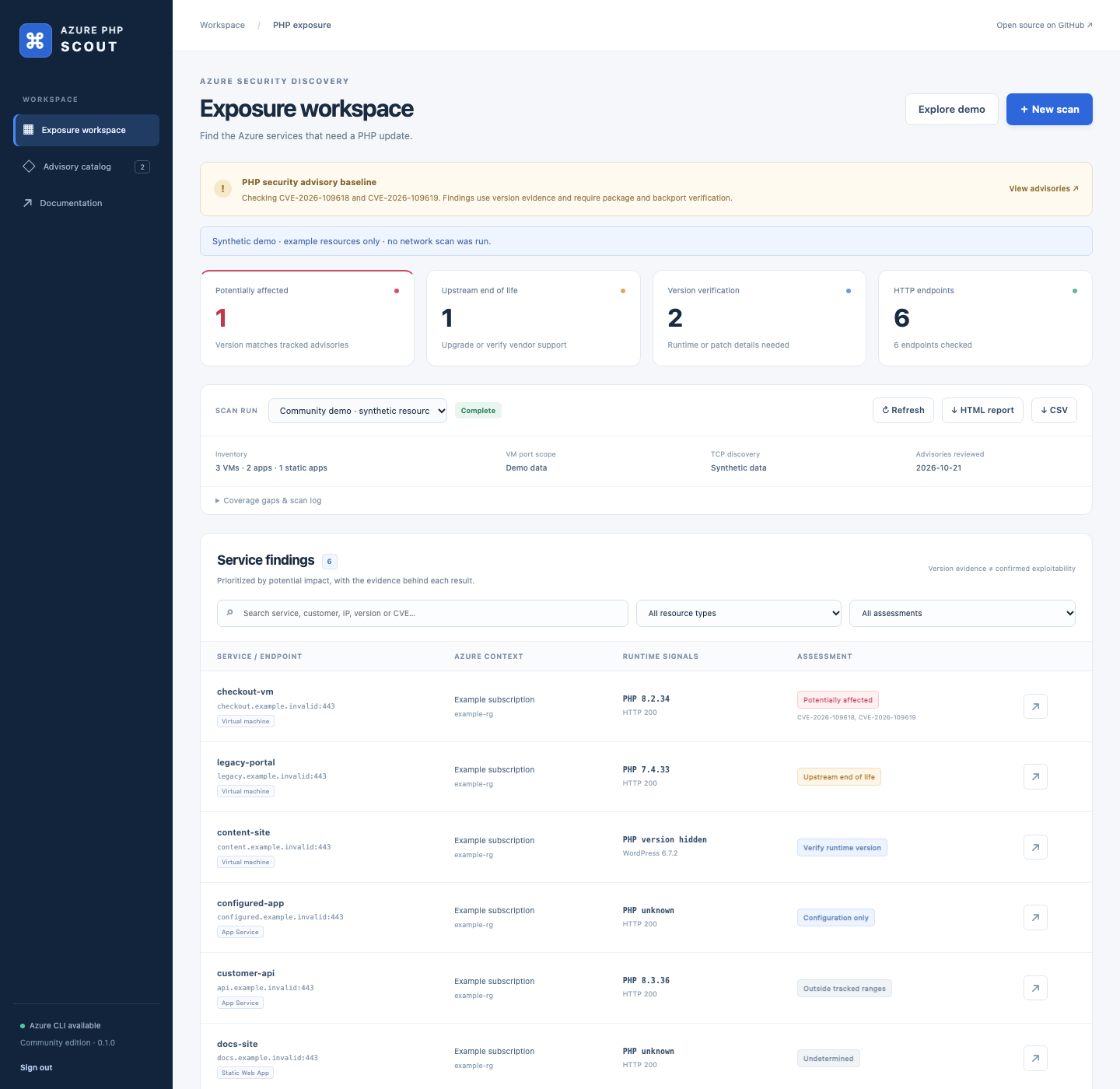
Find Azure services that may need a PHP security update. Azure PHP Scout combines read-only Azure inventory, TCP/HTTP discovery, and source-linked PHP version assessment in a self-hosted dashboard and CLI.


What it does
- Discovers VMs, App Services, deployment slots, and Static Web Apps across the enabled subscriptions visible to Azure CLI, including delegated subscriptions where access is available.
- Finds open VM ports and checks them for HTTP/HTTPS, including nonstandard ports. Managed applications are checked on their default/custom hostnames on 80/443.
- Identifies PHP/WordPress signatures and keeps runtime evidence separate from Azure configuration settings.
- Prioritizes potentially affected PHP versions, upstream end-of-life branches, and services whose runtime version needs verification.
- Runs scans in a persistent, cancellable queue with live coverage, history, isolated artifacts, and offline HTML/CSV/JSON exports.
- Optionally inspects PHP inside Windows/Linux VMs across all accessible subscriptions, one selected subscription, or specific VMs, including private VMs, using fixed Azure Run Command scripts.
The bundled catalog was reviewed on 21 October 2026 and tracks CVE-2026-109618 and CVE-2026-109619. It is deliberately scoped to those two PHP core advisories; it is not a complete vulnerability database. A version match is a triage finding. Verify the serving runtime, deployment conditions, package build, and vendor backports before deciding a service's actual patch status.
Quick start
Requirements: Python 3.11+; Azure CLI and its Resource Graph extension for live Azure inventory. CSV/manual scans and the synthetic demo work without Azure CLI.
git clone https://github.com/saeid-adz/azure-php-scout.git
cd azure-php-scout
python3 -m venv .venv
. .venv/bin/activate
pip install .
azure-php-scout serve
On Windows, activate with .venv\Scripts\Activate.ps1.
Open http://127.0.0.1:8000, then obtain the service token in another terminal:
azure-php-scout token
Paste it into the sign-in form. The browser keeps it for the lifetime of its tab. Use Explore demo to see synthetic findings without making network requests, or New scan to choose Azure, individual targets, or an inventory CSV.
The service defaults to a local listener and stores its token, SQLite history,
and run artifacts in .scout/. --data-dir or SCOUT_DATA_DIR changes that folder.
Use the same directory for serve and token. Keep it private and backed up.
Connect Azure
On the service host:
az login
az extension add --name resource-graph
The identity needs permission to read the selected resources, typically the Reader role on the subscriptions being scanned. Resource Graph queries are explicitly scoped, grouped by tenant, and paginated. The UI can list available subscription IDs; leaving that selection empty includes all enabled subscriptions visible to the CLI session.
Azure CLI credentials stay on the operator's host. The application does not ask
for Azure passwords in the browser. For a self-hosted worker in Azure with an
assigned managed identity, authenticate its CLI session with az login --identity
before scanning. See deployment guidance.
CLI workflows
Discover Azure resources and scan common web ports:
azure-php-scout scan --azure -o results.csv
Scan the complete VM TCP range, then fingerprint open services:
azure-php-scout scan --azure --vm-ports all -o full-scan.csv
Full range means 1–65535 TCP ports per public VM address and can take hours. The default common profile contains 127 candidate ports. Both the terminal and report show the selected scope; the common profile never claims full coverage. App Service and Static Web App addresses are not subjected to fleet port sweeps.
# Restrict Azure scope; repeat --subscription for more IDs.
azure-php-scout scan --azure --subscription SUBSCRIPTION-ID --running-only

# A custom VM discovery range.
azure-php-scout scan --azure --vm-ports 80,443,3000-3010,8000-9000

# A named website pinned to an IP, with explicit port checks.
azure-php-scout scan --ip 203.0.113.10 --host www.example.com --ports 80,443,8080,8443

# Import inventory; no Azure API access is required.
azure-php-scout scan -i inventory.csv --vm-ports web

# Validate scope without making endpoint connections.
azure-php-scout scan --azure --dry-run

# Re-assess existing scanner results offline.
azure-php-scout assess results.csv -o reviewed.csv

# Convert saved scanner results and adjacent coverage JSON to HTML.
azure-php-scout scan --report-from results.csv
--dry-run --azure still performs read-only Azure inventory, while omitting output
files and endpoint connections. CLI scans save their inventory beside the run's
working directory; each service run uses its own directory. No local inventory is
implicitly loaded into a new scan.
CSV inventories need publicIp, ip, or hostname. Optional fields such as
subscription, vm, app, resourceGroup, and resourceType preserve ownership.
A row containing both IP and hostname uses that IP with the hostname for HTTP Host
and TLS SNI. See examples/inventory.csv. Explicit targets
and -i inputs can be repeated.
Control work with --workers, --timeout, --port-workers, --port-rate, and
--port-timeout. Pending HTTP work and TCP sockets are bounded. Redirects stay on
the original connect address; new DNS hostnames change Host/SNI. Redirects to a
different literal IP or an unselected port are recorded instead of followed.
Inspect PHP inside Windows and Linux VMs
To continue after an interrupted scan or expired Azure sign-in, run az login
on the service host, select the previous run in the dashboard, and click
Retry remaining VMs. The new run targets only failed, timed-out, cancelled, and
unsubmitted VMs, without a 50-VM limit. Successful, incomplete-but-inspected, and
skipped VMs are excluded; the original report stays unchanged. The retry has its
own report. Review Azure before retrying timeouts because an accepted command
may still be running. Expired/interactive-sign-in errors now stop further guest
submissions and preserve the rest as unsubmitted, ready for another retry.
The dashboard shows the current VM, inspection phase, and seconds spent in that phase. Local Azure CLI timeout/cancellation cleanup also stops launcher children and has bounded waits, so an inherited output pipe cannot freeze the next VM. The Run Command wait and metadata requests have separate time limits; stopping the local CLI does not cancel a script already accepted by Azure.
az login
azure-php-scout guest --retry-from previous-results.csv --dry-run
azure-php-scout guest --retry-from previous-results.csv -o retried-results.csv
In New scan, select VM guest inspection (Windows / Linux), then All accessible subscriptions (automatic). Start the inspection without entering subscription or VM IDs. The service refreshes the host Azure CLI account's subscriptions, discovers VMs across tenants, and runs the fixed inspection scripts. Windows and Linux VMs with or without public IPs are included, with no 50-VM limit. One HTML report combines findings and coverage by subscription, including empty, disabled, inaccessible, and partially inspected subscriptions. A failure in one subscription or VM does not stop the rest.
You can also choose All VMs in one subscription and select or paste one subscription ID. Previewing the VM inventory and reviewing both bundled scripts is optional; neither step is required to start an automated scan.
For a smaller scope, choose Selected VM resource IDs and browse or paste up to 50 IDs. Normal external scans never submit guest commands automatically.
# Automatically discover and inspect all accessible subscriptions; create one report.
azure-php-scout guest --all-subscriptions -o account-php.csv

# Preview subscription coverage and the command plan without executing guest scripts.
azure-php-scout guest --all-subscriptions --dry-run

# Discover all VMs in one subscription and preview the command plan.
azure-php-scout guest --subscription SUBSCRIPTION-ID --dry-run

# Inspect the subscription and create subscription-php.html, .csv and .coverage.json.
azure-php-scout guest --subscription SUBSCRIPTION-ID -o subscription-php.csv

# Preview a selected VM without submitting a guest command.
azure-php-scout guest --vm-id /subscriptions/SUBSCRIPTION-ID/resourceGroups/MY-RG/providers/Microsoft.Compute/virtualMachines/MY-VM --dry-run

# Inspect a selected VM; repeat --vm-id to include Windows and Linux VMs together.
azure-php-scout guest --vm-id /subscriptions/SUBSCRIPTION-ID/resourceGroups/MY-RG/providers/Microsoft.Compute/virtualMachines/MY-VM -o guest-results.csv
This is a separate, opt-in execution mode. Azure Run Command executes the fixed inspection scripts as root on Linux / SYSTEM on Windows. The scripts do not install packages or change application configuration; Azure still creates Run Command agent/extension artifacts and logs. The identity needs Run Command permission in addition to read access; Reader alone is insufficient.
Linux inspection checks common PHP/FPM/CGI binary paths, Debian/RPM core packages,
and PHP process presence. Windows checks common PHP locations, running PHP process
paths, and IIS FastCGI mappings, reading executable version metadata without
executing php.exe. Guest evidence is labeled separately from HTTP evidence.
Installed package/file versions do not prove which runtime is executing web
requests, and vendor backports require verification.
Private VMs need a running, ready Azure VM Agent and its outbound connectivity; they do not need a public IP, SSH, or RDP. VMs are inspected sequentially. Stopping a run prevents further submissions and stops waiting, but cannot cancel a guest script already submitted to Azure. Timeouts and incomplete output remain visible. See guest inspection and permissions for limits, supported locations, and the exact authorization required.
Docker
The image includes Azure CLI and Resource Graph, runs as a non-root user, and uses
/data for persistent state. Generate an API token and start the local Compose
service:
python3 -c "import secrets; print('SCOUT_API_TOKEN=' + secrets.token_urlsafe(32))" > .env
docker compose up --build -d
Open http://127.0.0.1:8000 and sign in with the token from .env. To authenticate
Azure CLI inside the container:
docker compose exec scout az login --use-device-code
Use az login --identity in an Azure environment configured for managed identity.
The named volume persists CLI state and scan history. docker compose down stops
the service; deleting the volume also deletes its saved data.
For remote hosting, set a random SCOUT_API_TOKEN, set SCOUT_ALLOWED_HOSTS to the
service hostname, and place the service behind TLS and a restricted ingress. The
built-in token is a single-operator credential. This release is not a multi-tenant
SaaS platform. Run one service worker per data directory.
Understanding findings
| Assessment | Meaning | Action |
|---|---|---|
| Potentially affected | Observed upstream version matches a tracked CVE range. | Verify package/backports and update the serving runtime. |
| Upstream end of life | Branch is outside recorded upstream security support. | Upgrade or verify an appropriate vendor support arrangement. |
| Verify runtime version | PHP/WordPress evidence lacks a complete, unambiguous runtime version, or branch coverage is unavailable. | Confirm the runtime serving traffic and its build. |
| Configuration only | Azure exposes PHP configuration without runtime version evidence. | Check whether the setting is used by the deployed app. |
| Outside tracked ranges | Observed version does not match this catalog's ranges. | Continue checking vendor advisories; this is not a clean bill of health. |
| Undetermined | Evidence is insufficient to assess a PHP runtime. | Investigate as needed; absence of a signature does not prove absence of PHP. |
The reviewed upstream fixed releases for both bundled CVEs are 8.2.35, 8.3.36, 8.4.27, and 8.5.12. Version comparisons are branch-specific; prereleases do not count as the stable fixed release. Distribution and LTS vendors may ship backported fixes under older upstream version numbers. Older branches are flagged for support/vendor verification rather than asserting identical exploitability for every historical PHP release.
Updating an application or WordPress does not establish that its underlying PHP runtime is patched. Apply the appropriate PHP package/image/platform update, restart or redeploy serving workers, and verify the runtime handling web requests. The app provides guidance and official links; it does not run remediation commands.
Sources: PHP security announcement, OOM corruption advisory, stale global state advisory, PHP support lifecycle.
Coverage and limits
- This is an external scan of directly attached VM public IPs and managed app hostnames. Private/NAT-only VMs appear as skipped. Supply a reachable target and run from an appropriate network to assess internal services.
- Azure access failures, expired tenant sessions, skipped resources, TCP timeouts, and selected ranges remain visible. A timeout is not proof a port is closed.
- Name-based virtual hosts and hidden runtime headers limit fingerprinting. Known hostnames improve coverage. Static exports/CDNs can retain WordPress markers.
- WordPress implies possible PHP use, while configured PHP values remain separate. The scanner does not derive PHP versions from WordPress or plugin asset versions.
- Static Web App default/custom production hostnames and App Service slots are included when returned by Resource Graph. Static preview environments are not separately enumerated. DNS/ingress can route outside the Azure resource itself.
- The probe uses HTTP GETs for
/and limited WordPress discovery paths. It does not send exploit payloads, crawl arbitrary pages, or request PHP diagnostics. - TLS certificate checks default off for bare IP/self-signed endpoints; use
--verify-tlswhen trusted certificate matching is required. The scan does not assess TLS security. Response and decompression limits are 300 KB. - Assessment reflects the bundled reviewed catalog, not a continuously updated vulnerability feed. See advisory maintenance.
Development and community
pip install -e '.[dev]'
python -m pytest -q
python -m build
Tests use synthetic Azure records and local TCP/HTTP/HTTPS fixtures. CI also builds the container. Neither automatically scans a developer's Azure estate. Review CONTRIBUTING.md, SECURITY.md, API documentation, and architecture.
Please keep real inventories, report files, credentials, and tenant identifiers out of issues and pull requests. The repository contains only synthetic examples. Licensed under MIT.
Ähnliche Projekte entdecken
trimstray/the-book-of-secret-knowledge
Eine Sammlung inspirierender Listen, Handbücher, Spickzettel, Blogs, Tricks, Einzeiler, CLI- und Web-Tools und mehr.
258,062 SterneHack-with-Github/Awesome-Hacking
Eine Sammlung verschiedener Awesome-Listen für Hacker, Pentester und Sicherheitsforscher.
125,360 Sterneswisskyrepo/PayloadsAllTheThings
Eine Liste nützlicher Payloads und Bypass-Methoden für die Sicherheit von Webanwendungen sowie für Pentests/CTF.
82,623 Sternecaddyserver/caddy
Schneller, erweiterbarer und plattformübergreifender HTTP/1-2-3-Webserver mit automatischem HTTPS
79,020 Sterne