
rupeshs/fastsdcpu
rupeshs/fastsdcpu has 2,211 GitHub stars and 223 forks. GitHot measured +5 in 7 days. Last checked 2026-11-13 17:12 UTC. Last push 2026-10-31.
What you can do
- Desktop GUI, web UI and CLI
- Supports 256,512,768,1024 image sizes
- Supports Windows,Linux,Mac
- Saves images and diffusion setting used to generate the image
Gemessener Sternzuwachs
- in 24h
- Aktualisierung verzögert
- in 7 days
- +5
- in 15 days
- Verlauf wird gesammelt
- in 1 month
- Verlauf wird gesammelt
Nettoänderungen in überlappenden Zeiträumen, keine Tagessummen. Fehlende Messwerte bleiben leer. Sterne zeigen Interesse, nicht Qualität.
Über uns
Fast stable diffusion on CPU and AI PC
EntwicklerwerkzeugeREADME.md
OriginalFastSD CPU :sparkles:
FastSD CPU is a faster version of Stable Diffusion on CPU. Based on Latent Consistency Models ,
Adversarial Diffusion Distillation and distilled few steps models.
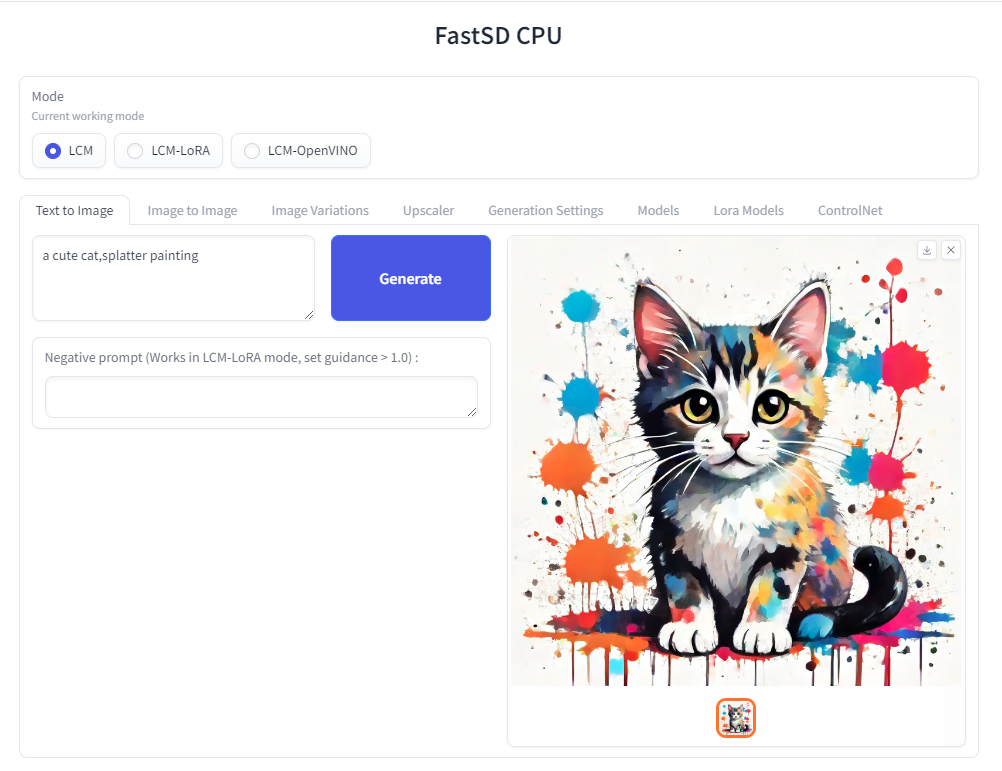 The following interfaces are available :
- Desktop GUI, basic text to image generation (Qt,faster)
- WebUI (Advanced features,Lora,controlnet etc)
- CLI (CommandLine Interface)
🚀 Using OpenVINO(SDXS-512-0.9), it took 0.82 seconds (820 milliseconds) to create a single 512x512 image on a Core i7-12700.
📰 News
- 2026-10-31 - Added Fibo 2.0 Edit Turbo support (OpenVINO, INT4), instruction based image editing (4 steps)
- 2026-10-25 - Added FLUX.3 Image Klein support (OpenVINO, INT4), text-to-image and image editing (2 to 4 steps)
- 2026-10-18 - Add Iris 3B Turbo OpenVINO support for pixel-space image generation (No VAE)
- 2026-07-05 - Add bonsai image (1 bit) GGUF support, Flux2 Klein GGUF support
- 2026-06-21 - Added FLUX.2-klein-4B support(OpenVINO), image editing support, photo restoration, colorization (2 to 4 steps)
- 2026-05-01 - Docker support, HF demo
- 2025-12-22 - FastSD engine integrated into Intel's OpenVINO™ AI Plugins for GIMP
- 2025-05-17 - Added SANA Sprint(OpenVINO) support,Tiny AutoEncoder 1.3(Mocha Croissant) support
- 2025-04-20 - Added MCP server support,faster uv based installation,Claude desktop, Open WebUI support
- 2024-11-03 - Added Intel Core Ultra Series 2 (Lunar Lake) NPU support
- 2024-10-02 - Added GGUF diffusion model(Flux) support
- 2024-09-03 – Added Intel AI PC GPU, NPU support 🚀
Table of Contents 👇
- Supported Platforms
- Dependencies
- Memory requirements
- Features
- Architecture
- Benchmarks
- OpenVINO Support
- Iris 3B OpenVINO (pixel-space)
- FLUX.3 Image Klein OpenVINO
- Fibo 2.0 Edit Turbo OpenVINO
- Image Editing support
- Installation
- Real-time text to image (EXPERIMENTAL)
- Models
- How to use Lora models
- How to use controlnet
- Docker support
- Android + Termux
- Raspberry Pi 4
- API Support
- GGUF support (Flux)
- AI PC Support - OpenVINO
- MCP Server Support
- Open WebUI Support
- ComfyUI support
- GIMP Plugin
- License
- Contributors
Supported platforms⚡️
FastSD CPU works on the following platforms:
- Windows
- Linux
- Mac
- Android + Termux
- Raspberry PI 4
Dependencies 📦
- Python 3.10 or higher
- uv - fast Python package and project manager
Memory requirements
Minimum system RAM requirement for FastSD CPU.
Model (LCM,OpenVINO): SD Turbo, 1 step, 512 x 512
Model (LCM-LoRA): Dreamshaper v8, 3 step, 512 x 512
| Mode | Min RAM |
|---|---|
| LCM | 2 GB |
| LCM-LoRA | 4 GB |
| OpenVINO(Flux2) | 8 GB |
| OpenVINO(Iris 3B)(1024 x 1024) | 8.4 GB |
If we enable Tiny decoder(TAESD) we can save some memory(2GB approx) for example in OpenVINO mode memory usage will become 9GB.
:exclamation: Please note that guidance scale >1 increases RAM usage and slow inference speed.
Features ✨
- Desktop GUI, web UI and CLI
- Supports 256,512,768,1024 image sizes
- Supports Windows,Linux,Mac
- Saves images and diffusion setting used to generate the image
- Settings to control,steps,guidance and seed
- Added safety checker setting
- Maximum inference steps increased to 25
- Added OpenVINO support
- Fixed OpenVINO image reproducibility issue
- Fixed OpenVINO high RAM usage,thanks deinferno
- Added multiple image generation support
- Application settings
- Added Tiny Auto Encoder for SD (TAESD) support, 1.4x speed boost (Fast,moderate quality)
- Safety checker disabled by default
- Added SDXL,SSD1B - 1B LCM models
- Added LCM-LoRA support, works well for fine-tuned Stable Diffusion model 1.5 or SDXL models
- Added negative prompt support in LCM-LoRA mode
- LCM-LoRA models can be configured using text configuration file
- Added support for custom models for OpenVINO (LCM-LoRA baked)
- OpenVINO models now supports negative prompt (Set guidance >1.0)
- Real-time inference support,generates images while you type (experimental)
- Fast 2,3 steps inference
- Lcm-Lora fused models for faster inference
- Supports integrated GPU(iGPU) using OpenVINO (export DEVICE=GPU)
- 5.7x speed using OpenVINO(steps: 2,tiny autoencoder)
- Image to Image support (Use Web UI)
- OpenVINO image to image support
- Fast 1 step inference (SDXL Turbo)
- Added SD Turbo support
- Added image to image support for Turbo models (Pytorch and OpenVINO)
- Added image variations support
- Added 2x upscaler (EDSR and Tiled SD upscale (experimental)),thanks monstruosoft for SD upscale
- Works on Android + Termux + PRoot
- Added interactive CLI,thanks monstruosoft
- Added basic lora support to CLI and WebUI
- ONNX EDSR 2x upscale
- Add SDXL-Lightning support
- Add SDXL-Lightning OpenVINO support (int8)
- Add multilora support,thanks monstruosoft
- Add basic ControlNet v1.1 support(LCM-LoRA mode),thanks monstruosoft
- Add ControlNet annotators(Canny,Depth,LineArt,MLSD,NormalBAE,Pose,SoftEdge,Shuffle)
- Add SDXS-512 0.9 support
- Add SDXS-512 0.9 OpenVINO,fast 1 step inference (0.8 seconds to generate 512x512 image)
- Default model changed to SDXS-512-0.9
- Faster realtime image generation
- Add NPU device check
- Revert default model to SDTurbo
- Update realtime UI
- Add hypersd support
- 1 step fast inference support for SDXL and SD1.5
- Experimental support for single file Safetensors SD 1.5/SDXL models(Civitai models), simply add local model path to configs/stable-diffusion-models.txt file.
- Add REST API support
- Add Aura SR (4x)/GigaGAN based upscaler support
- Add Aura SR v2 upscaler support
- Add FLUX.1 schnell OpenVINO int 4 support
- Add CLIP skip support
- Add token merging support
- Add Intel AI PC support
- AI PC NPU(Power efficient inference using OpenVINO) supports, text to image ,image to image and image variations support
- Add TAEF1 (Tiny autoencoder for FLUX.1) openvino support
- Add Image to Image and Image Variations Qt GUI support,thanks monstruosoft
- Add single file SDXL safetensor file support,thanks monstruosoft
- Add FLUX.2-klein-4B OpenVINO support
- Add image editing support
- Add bonsai image (1 bit) GGUF support, Flux 2 Klein GGUF model support
- Add Iris 3B Turbo OpenVINO support for pixel-space image generation (VAE-free)
- Add FLUX.3 image kelin(OpenVINO) support, text to image and image editing(2 to 4 steps)
- Add Fibo 2.0 Edit Turbo (OpenVINO) support, instruction based image editing(4 steps)
Architecture
FastSDCPU follows a loosely coupled architecture focusing on maintainability and usability.
Key Design Principles
Separation of Concerns: The core diffusion pipelines (Pytorch, OpenVINO, GGUF) are decoupled from the user interfaces.
Interface Flexibility: A unified underlying engine powers multiple frontend experiences seamlessly, including the Desktop GUI (Qt), the Advanced WebUI, and the Command Line Interface (CLI).
Extensibility: The modular setup allows easy integration of new features, such as the MCP server protocol and custom third-party plugins like GIMP.

Fast Inference Benchmarks
🚀 Fast 1 step inference with Hyper-SD
Stable diffuion 1.5
Works with LCM-LoRA mode.
Fast 1 step inference supported on runwayml/stable-diffusion-v1-5 model,select rupeshs/hypersd-sd1-5-1-step-lora lcm_lora model from the settings.
Stable diffuion XL
Works with LCM and LCM-OpenVINO mode.
Hyper-SD SDXL 1 step - rupeshs/hyper-sd-sdxl-1-step
Hyper-SD SDXL 1 step OpenVINO - rupeshs/hyper-sd-sdxl-1-step-openvino-int8
Inference Speed
Tested on Core i7-12700 to generate 768x768 image(1 step).
| Diffusion Pipeline | Latency |
|---|---|
| Pytorch | 19s |
| OpenVINO | 13s |
| OpenVINO + TAESDXL | 6.3s |
Fastest 1 step inference (SDXS-512-0.9)
:exclamation:This is an experimental model, only text to image workflow is supported.
Inference Speed
Tested on Core i7-12700 to generate 512x512 image(1 step).
SDXS-512-0.9
| Diffusion Pipeline | Latency |
|---|---|
| Pytorch | 4.8s |
| OpenVINO | 3.8s |
| OpenVINO + TAESD | 0.82s |
🚀 Fast 1 step inference (SD/SDXL Turbo - Adversarial Diffusion Distillation,ADD)
Added support for ultra fast 1 step inference using sdxl-turbo model
:exclamation: These SD turbo models are intended for research purpose only.
Inference Speed
Tested on Core i7-12700 to generate 512x512 image(1 step).
SD Turbo
| Diffusion Pipeline | Latency |
|---|---|
| Pytorch | 7.8s |
| OpenVINO | 5s |
| OpenVINO + TAESD | 1.7s |
SDXL Turbo
| Diffusion Pipeline | Latency |
|---|---|
| Pytorch | 10s |
| OpenVINO | 5.6s |
| OpenVINO + TAESDXL | 2.5s |
🚀 Fast 2 step inference (SDXL-Lightning - Adversarial Diffusion Distillation)
SDXL-Lightning works with LCM and LCM-OpenVINO mode.You can select these models from app settings.
Tested on Core i7-12700 to generate 768x768 image(2 steps).
| Diffusion Pipeline | Latency |
|---|---|
| Pytorch | 18s |
| OpenVINO | 12s |
| OpenVINO + TAESDXL | 10s |
SDXL-Lightning - rupeshs/SDXL-Lightning-2steps
SDXL-Lightning OpenVINO - rupeshs/SDXL-Lightning-2steps-openvino-int8
2 Steps fast inference (LCM)
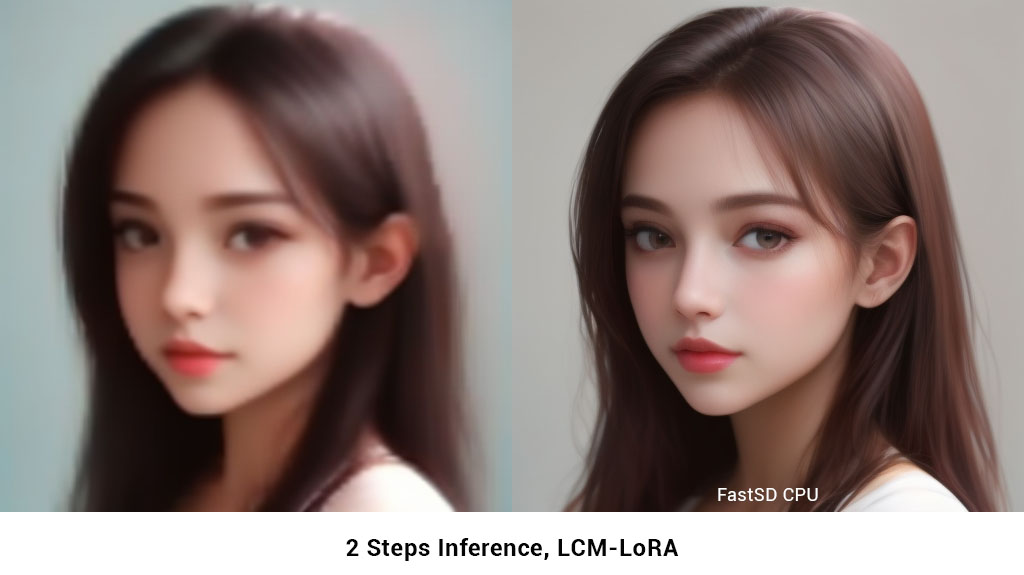
FastSD CPU supports 2 to 3 steps fast inference using LCM-LoRA workflow. It works well with SD 1.5 models.
FLUX.1-schnell OpenVINO support
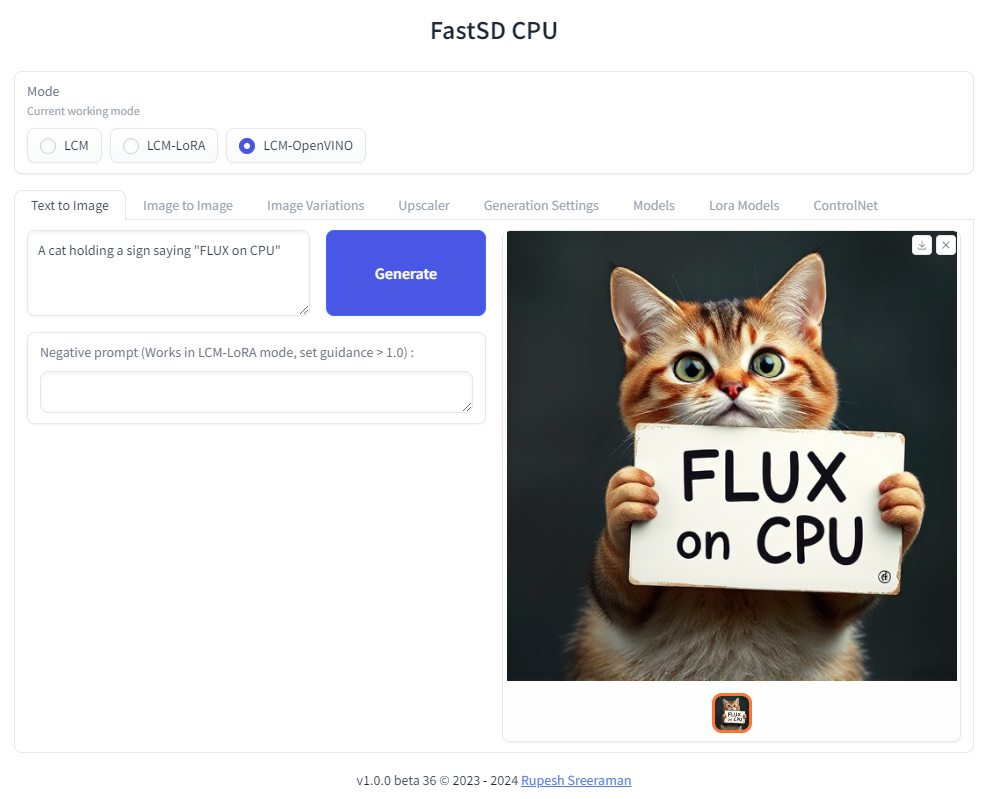
:exclamation: Important - Please note the following points with FLUX workflow
- As of now only text to image generation mode is supported
- Use OpenVINO mode
- Use int4 model - rupeshs/FLUX.1-schnell-openvino-int4
- 512x512 image generation needs around 30GB system RAM
Tested on Intel Core i7-12700 to generate 512x512 image(3 steps).
| Diffusion Pipeline | Latency |
|---|---|
| OpenVINO | 4 min 30sec |
Benchmark scripts
To benchmark run the following batch file on Windows:
benchmark.bat- To benchmark Pytorchbenchmark-openvino.bat- To benchmark OpenVINO
Alternatively you can run benchmarks by passing -b command line argument in CLI mode.
OpenVINO support
Fast SD CPU utilizes OpenVINO to speed up the inference speed. Thanks deinferno for the OpenVINO model contribution. We can get 2x speed improvement when using OpenVINO. Thanks Disty0 for the conversion script.
OpenVINO SDXL models
These are models converted to use directly use it with FastSD CPU. These models are compressed to int8 to reduce the file size (10GB to 4.4 GB) using NNCF
- Hyper-SD SDXL 1 step - rupeshs/hyper-sd-sdxl-1-step-openvino-int8
- SDXL Lightning 2 steps - rupeshs/SDXL-Lightning-2steps-openvino-int8
OpenVINO SD Turbo models
We have converted SD/SDXL Turbo models to OpenVINO for fast inference on CPU. These models are intended for research purpose only. Also we converted TAESDXL MODEL to OpenVINO and
- SD Turbo OpenVINO - rupeshs/sd-turbo-openvino
- SDXL Turbo OpenVINO int8 - rupeshs/sdxl-turbo-openvino-int8
- TAESDXL OpenVINO - rupeshs/taesdxl-openvino
You can directly use these models in FastSD CPU.
Iris 3B Turbo OpenVINO support (pixel-space generation)
FastSD CPU supports Iris-3B Turbo in OpenVINO mode. Iris is a pixel-space diffusion transformer: it generates the image pixels directly, with no VAE and no latents, so there is no VAE decode step.
- Iris 3B Turbo OpenVINO int8 - rupeshs/iris-3b-int8-ov
The model is compressed to int8 (weight compression, NNCF INT8_ASYM), giving a 6.9 GB download (transformer and Qwen3-VL text encoder).
| Item | Value |
|---|---|
| Model size | 6.9 GB (int8) |
| Peak system RAM | ~8.4 GB |
| Image size | 1024 x 1024 only |
| Steps | 4 (1 to 3 also run, with rougher images) |
| Latency | ~90 s per image, 4 steps, Core i7-12700 |
To use it, select OpenVINO mode, choose rupeshs/iris-3b-int8-ov and use these settings:
- Image size 1024 x 1024
- Inference steps 4
- Negative prompt empty, Tiny AutoEncoder off
:exclamation: Please note the following points with the Iris workflow:
- Only text to image generation is supported
- Guidance scale, LoRA and ControlNet have no effect
- Tested on CPU and iGPU
FLUX.3 Image Klein OpenVINO support
FastSD CPU supports FLUX.3 Image Klein in OpenVINO mode, for both text to image and image editing. The model is the 5.6B Klein base with a 4-step distillation LoRA merged into the DiT, so it needs only 2 to 4 steps.
- FLUX.3 Image Klein OpenVINO int4 - rupeshs/flux3-image-klein-int4-ov
The DiT and the Qwen3-VL text encoder are compressed to int4 (NNCF weight compression), and the VAE stays FP16. This brings the 20.5 GB original download down to 5.6 GB.
- 512x512 image generation needs around 8 to 9 GB system RAM
| Item | Value |
|---|---|
| Model size | 5.6 GB (int4) |
| Image size | Width and height must be multiples of 16 |
| Steps | 4 (2 steps gives good results at 1024 x 1024) |
| Latency | ~36 s, text to image, 512 x 512, 4 steps,Intel Core i7-12700 |
| Latency (edit) | ~72 s, 1 reference image, 512 x 512, 4 steps,Intel Core i7-12700 |
To use it, select OpenVINO mode and choose rupeshs/flux3-image-klein-int4-ov.
:exclamation: Please note the following points with the FLUX.3 workflow:
- Use long, descriptive prompts. FLUX.3 is trained on detailed scene captions, so describe the subject, setting, lighting, style and composition. There is no 77 token CLIP limit: the Qwen3-VL text encoder accepts prompts up to 4096 tokens
- Guidance scale and negative prompt have no effect (the few-step model runs without CFG)
- The weights are under the FLUX Kommunity License, and the text encoder is under Apache-2.0
Fibo 2.0 Edit Turbo OpenVINO support
FastSD CPU supports Fibo 2.0 Edit Turbo by Bria AI in OpenVINO mode, for image editing. It is an 8B flow-matching DiT distilled for 4-step editing without classifier-free guidance, with a Qwen3-VL-4B text encoder that sees the image to edit and the FLUX.2 VAE.
- Fibo 2.0 Edit Turbo OpenVINO int4 - rupeshs/fibo2-edit-turbo-int4-ov
The DiT is compressed to int4 and the Qwen3-VL language model to int8 (NNCF weight compression), the Qwen3-VL vision encoder and the VAE stay FP16.
| Item | Value |
|---|---|
| Task | Image editing only (no text to image, use Fibo 2.0 Dev for that) |
| Steps | 4 |
| Image size | The aspect ratio of the input image, at about the area of the width x height setting |
| Model size | 8.8 GB (int4 DiT, int8 text encoder) |
| Latency (edit) | ~146 s, 560 x 448 (about 512 x 512), 4 steps, Intel Core i7-12700 |
To use it, select OpenVINO mode, choose rupeshs/fibo2-edit-turbo-int4-ov and use the Edit Image tab.
:exclamation: Please note the following points with the Fibo 2.0 workflow:
- Fibo 2.0 is trained on structured JSON captions (VGL). A plain edit instruction works, you can also pass a JSON caption of the result with an
edit_instructionkey, as bria-vgl writes it - Guidance scale and negative prompt have no effect (the turbo model runs without CFG)
- The weights are under the CC BY-NC 4.0 license, for non-commercial use only; commercial use needs an agreement with Bria AI
Convert SD 1.5 models to OpenVINO LCM-LoRA fused models
We first creates LCM-LoRA baked in model,replaces the scheduler with LCM and then converts it into OpenVINO model. For more details check LCM OpenVINO Converter, you can use this tools to convert any StableDiffusion 1.5 fine tuned models to OpenVINO.
Image Editing Support
FastSD CPU supports image editing in OpenVINO mode with the following models:
| Model | OpenVINO model | Steps | Text to image | Details |
|---|---|---|---|---|
| FLUX.2-klein-4B | rupeshs/flux2-klein-4b-int4-ov | 3 to 4 | Yes | - |
| FLUX.3 Image Klein | rupeshs/flux3-image-klein-int4-ov | 2 to 4 | Yes | Notes |
| Fibo 2.0 Edit Turbo | rupeshs/fibo2-edit-turbo-int4-ov | 4 | No, edit only | Notes (non-commercial) |
To edit an image, select OpenVINO mode, choose one of these models and use the Edit Image tab in the Web UI.
FastSD comes with following image editing prompt presets:
- Restore old photo
- Restore old photo and colorize
- Colorize photo
- Enhance photo
- Professional headshot
 Restore an old photo using FastSDCPU image edit prompt preset
 Restore an old photo and colorize using FastSDCPU image edit prompt preset
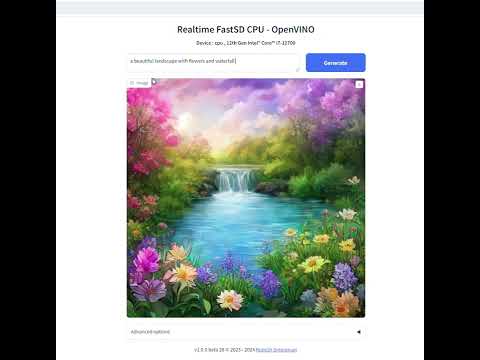
Real-time text to image (EXPERIMENTAL)
We can generate real-time text to images using FastSD CPU.
CPU (OpenVINO)
Near real-time inference on CPU using OpenVINO, run the start-realtime.bat batch file and open the link in browser (Resolution : 512x512,Latency : 0.82s on Intel Core i7)
Watch YouTube video :
Models
To use single file Safetensors SD 1.5/SDXL models(Civit AI) follow this YouTube tutorial. Use LCM-LoRA Mode for single file safetensors.
Fast SD supports LCM models and LCM-LoRA models.
LCM Models
These models can be configured in configs/lcm-models.txt file.
OpenVINO models
These are LCM-LoRA baked in models. These models can be configured in configs/openvino-lcm-models.txt file
LCM-LoRA models
These models can be configured in configs/lcm-lora-models.txt file.
- lcm-lora-sdv1-5 - distilled consistency adapter for runwayml/stable-diffusion-v1-5
- lcm-lora-sdxl - Distilled consistency adapter for stable-diffusion-xl-base-1.0
- lcm-lora-ssd-1b - Distilled consistency adapter for segmind/SSD-1B
These models are used with Stablediffusion base models configs/stable-diffusion-models.txt.
:exclamation: Currently no support for OpenVINO LCM-LoRA models.
How to add new LCM-LoRA models
To add new model follow the steps:
For example we will add wavymulder/collage-diffusion, you can give Stable diffusion 1.5 Or SDXL,SSD-1B fine tuned models.
- Open
configs/stable-diffusion-models.txtfile in text editor. - Add the model ID
wavymulder/collage-diffusionor locally cloned path.
Updated file as shown below :
Fictiverse/Stable_Diffusion_PaperCut_Model
stabilityai/stable-diffusion-xl-base-1.0
runwayml/stable-diffusion-v1-5
segmind/SSD-1B
stablediffusionapi/anything-v5
wavymulder/collage-diffusion
Similarly we can update configs/lcm-lora-models.txt file with lcm-lora ID.
How to use LCM-LoRA models offline
Please follow the steps to run LCM-LoRA models offline :
- In the settings ensure that "Use locally cached model" setting is ticked.
- Download the model for example
latent-consistency/lcm-lora-sdv1-5Run the following commands:
git lfs install
git clone https://huggingface.co/latent-consistency/lcm-lora-sdv1-5
Copy the cloned model folder path for example "D:\demo\lcm-lora-sdv1-5" and update the configs/lcm-lora-models.txt file as shown below :
D:\demo\lcm-lora-sdv1-5
latent-consistency/lcm-lora-sdxl
latent-consistency/lcm-lora-ssd-1b
How to use Lora models
Place your lora models in "lora_models" folder. Use LCM or LCM-Lora mode. You can download lora model (.safetensors/Safetensor) from Civitai or Hugging Face E.g: cutecartoonredmond
ControlNet support
We can use ControlNet in LCM-LoRA mode.
Download ControlNet models from ControlNet-v1-1.Download and place controlnet models in "controlnet_models" folder.
Use the medium size models (723 MB)(For example : https://huggingface.co/comfyanonymous/ControlNet-v1-1_fp16_safetensors/blob/main/control_v11p_sd15_canny_fp16.safetensors)
Installation
FastSD CPU on Windows
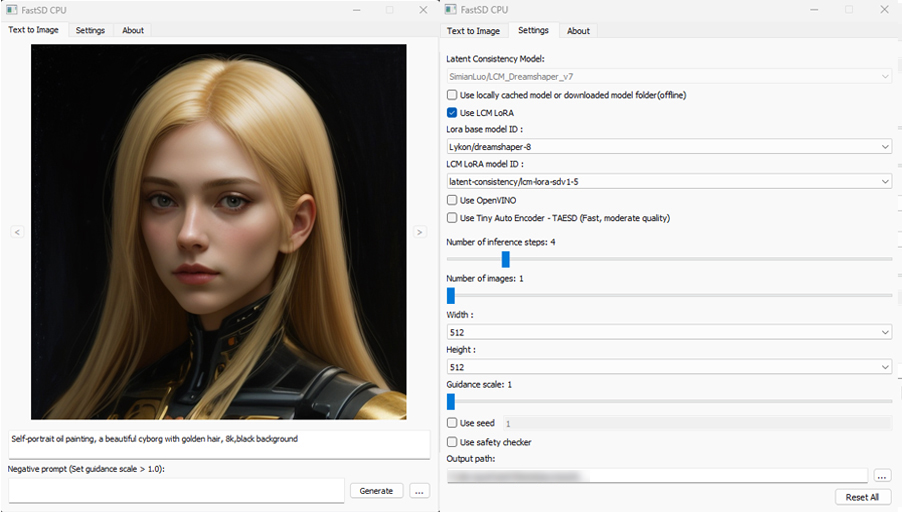
:exclamation:You must have a working Python and uv installation.(Recommended : Python 3.10 or higher )
To install FastSD CPU on Windows run the following steps :
- Clone/download this repo or download release.
- Double click
install.bat(It will take some time to install,depending on your internet speed.) - You can run in desktop GUI mode or web UI mode.
Desktop GUI
- To start desktop GUI double click
start.bat
Web UI
- To start web UI double click
start-webui.bat
FastSD CPU on Linux
:exclamation:Ensure that you have Python 3.10 and uv installed.
Clone/download this repo or download release.
In the terminal, enter into fastsdcpu directory
Run the following command
chmod +x install.sh./install.sh
To start Desktop GUI
./start.sh
To start Web UI
./start-webui.sh
FastSD CPU on Mac
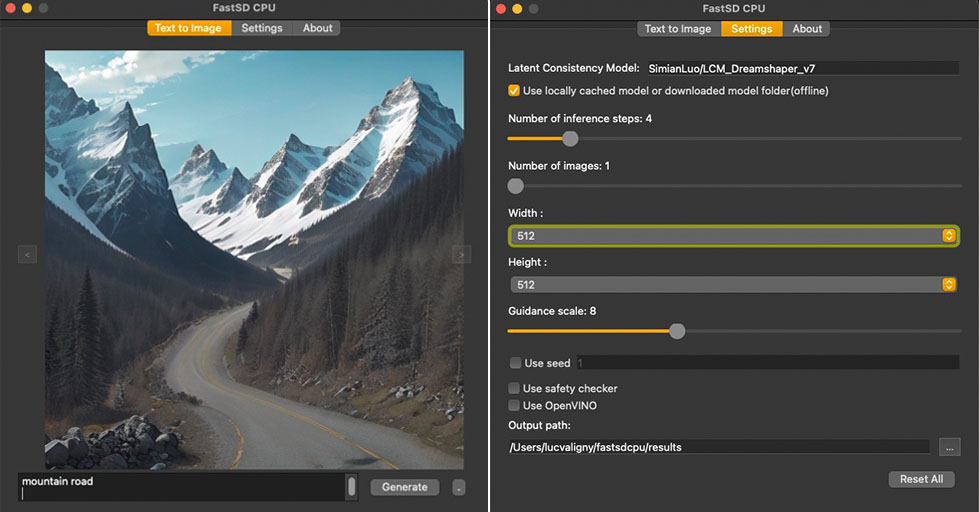
:exclamation:Ensure that you have Python 3.9 or 3.10 or 3.11 version installed.
Run the following commands to install FastSD CPU on Mac :
Clone/download this repo or download release.
In the terminal, enter into fastsdcpu directory
Run the following command
chmod +x install-mac.sh./install-mac.sh
To start Desktop GUI
./start.sh
To start Web UI
./start-webui.sh
Thanks Autantpourmoi for Mac testing.
:exclamation:We don't support OpenVINO on Mac (M1/M2/M3 chips, but does work on Intel chips).
If you want to increase image generation speed on Mac(M1/M2 chip) try this:
export DEVICE=mps and start app start.sh
Web UI screenshot
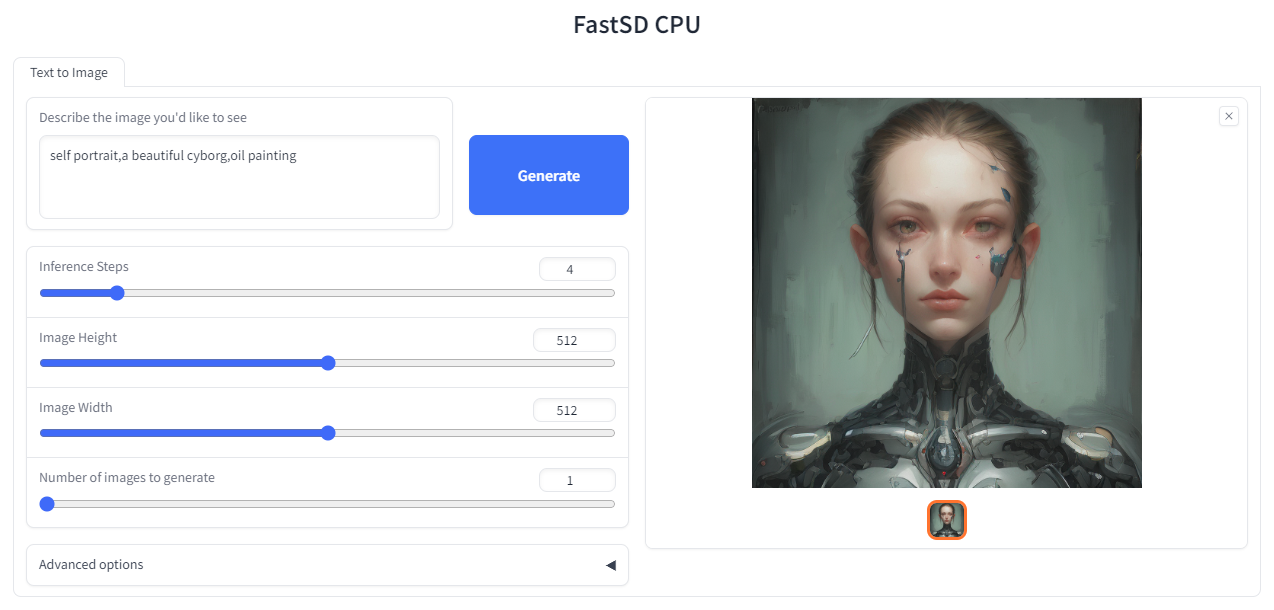
Google Colab
Due to the limitation of using CPU/OpenVINO inside colab, we are using GPU with colab.

CLI mode (Advanced users)
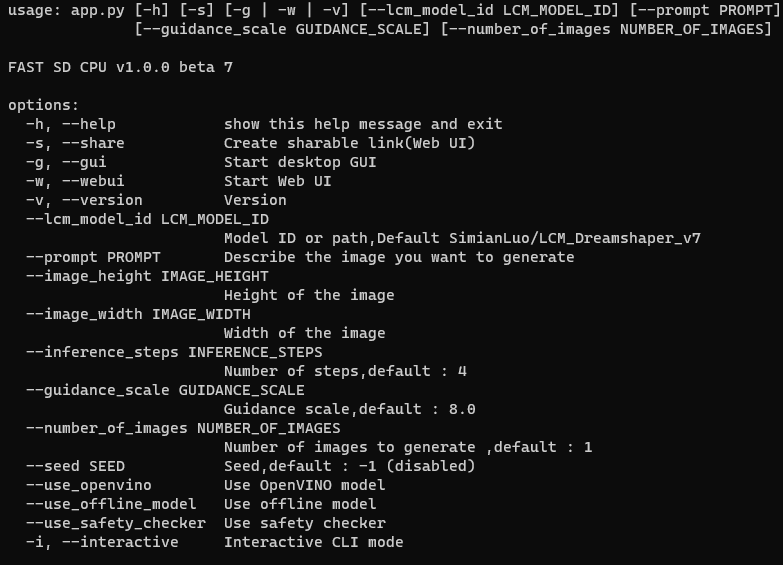
Open the terminal and enter into fastsdcpu folder. Activate virtual environment using the command:
Windows users
(Suppose FastSD CPU available in the directory "D:\fastsdcpu")
D:\fastsdcpu\env\Scripts\activate.bat
Linux users
source env/bin/activate
Docker support
To run FastSDCPU using docker run the following command:
docker compose up
Android (Termux + PRoot)
FastSD CPU running on Google Pixel 7 Pro.
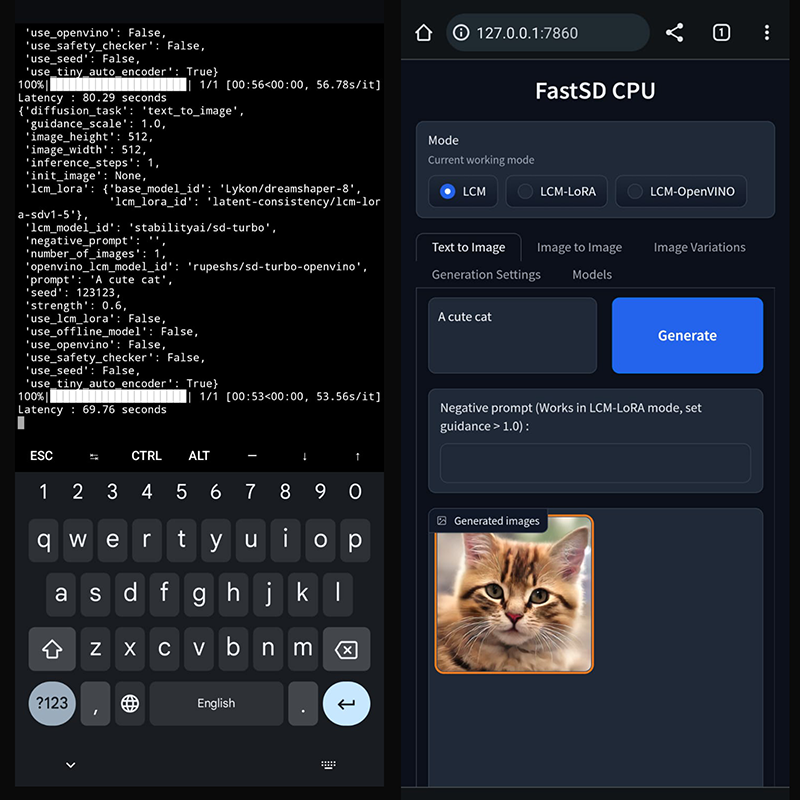
Install FastSD CPU on Android
Follow this guide to install FastSD CPU on Android + Termux How To Install and Run FastSD CPU on Android + Temux – Step By Step Guide [Updated]
Raspberry PI 4 support
Thanks [WGNW_MGM] for Raspberry PI 4 testing.FastSD CPU worked without problems. System configuration - Raspberry Pi 4 with 4GB RAM, 8GB of SWAP memory.
API support
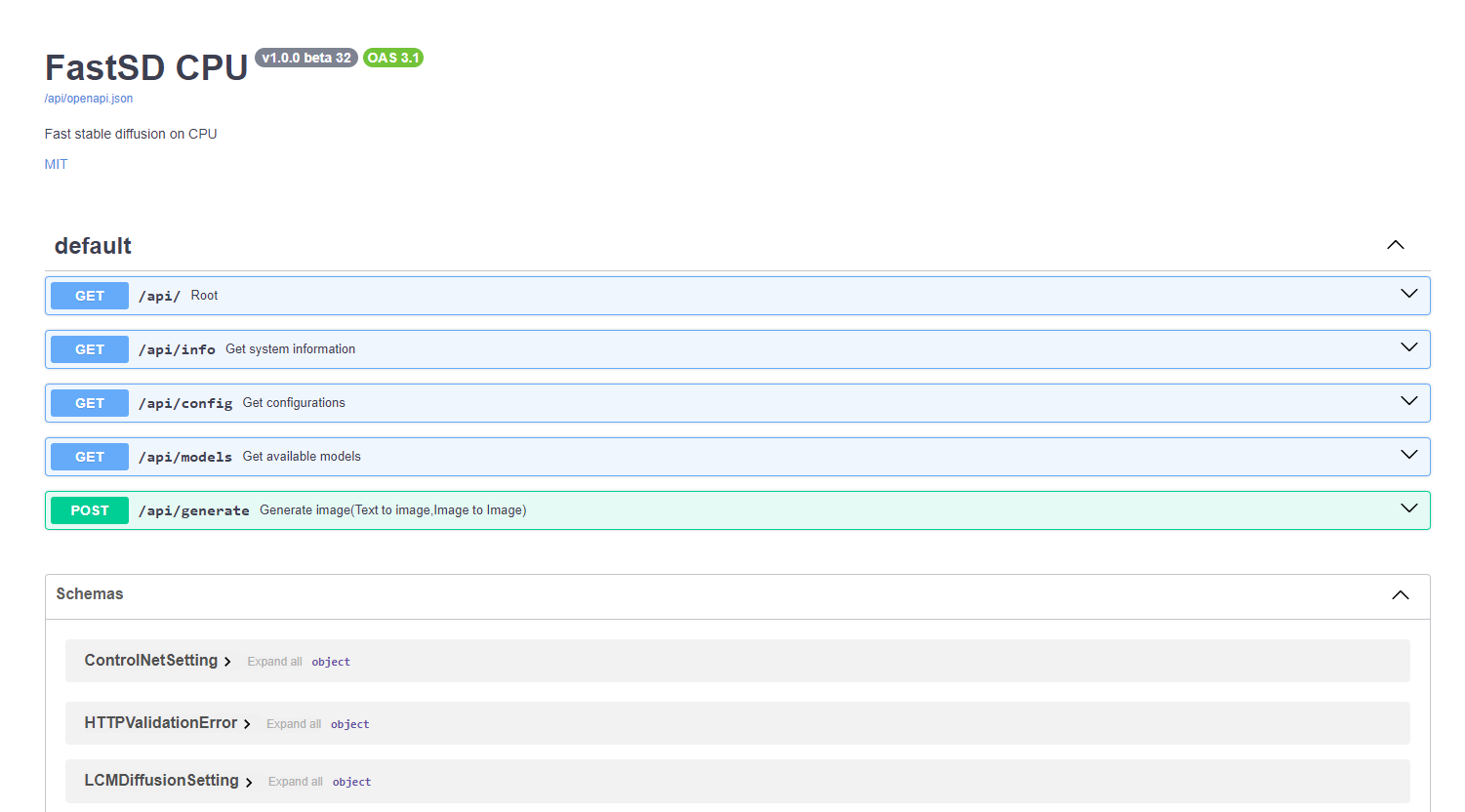
FastSD CPU supports basic API endpoints. Following API endpoints are available :
- /api/info - To get system information
- /api/config - Get configuration
- /api/models - List all available models
- /api/generate - Generate images (Text to image,image to image)
To start FastAPI in webserver mode run:
python src/app.py --api
or use start-webserver.sh for Linux and start-webserver.bat for Windows.
Access API documentation locally at http://localhost:8000/api/docs .
Generated image is JPEG image encoded as base64 string. In the image-to-image mode input image should be encoded as base64 string.
To generate an image a minimal request POST /api/generate with body :
{
    "prompt": "a cute cat",
    "use_openvino": true
}
GGUF Support - Flux 2 (Lower Quantization)
GGUF models for Flux 2 are supported via the stable-diffusion.cpp shared library. Currently, the Flux 2 Klein model is supported.
To use a GGUF model, open the web UI and select GGUF mode.
- Quantization levels: 4-bit down to 1-bit
- Supported mode: Text-to-image
- Tested on: Windows, Linux
How to run Flux 2 klein GGUF model
Download stablediffusion.cpp prebuilt shared library and place it inside fastsdcpu folder For Windows users, download stable-diffusion.dll
For Linux users download libstable-diffusion.so
You can also build the library manully by following the guide "Build stablediffusion.cpp shared library for GGUF flux model support"
1 bit model - Download diffusion model from bonsai_image_4b-q1_0 and place it inside
models/gguf/diffusiondirectory4 bit model - Download diffusion model from flux-2-klein-4b-Q4_K_M.gguf and place it inside
models/gguf/diffusiondirectoryDownload LLM model from Qwen3-4B-Q4_K_M.gguf and place it inside
models/gguf/llmdirectoryDownload VAE model from ae.safetensors and place it inside
models/gguf/vaedirectoryStart web UI and select GGUF mode
Select the models settings tab and select GGUF diffusion,LLM and VAE models.
Enter your prompt and generate image
Credit: 1-bit GGUF quantization by Green-Sky, based on prism-ml/bonsai-image-binary-4B-unpacked (Apache 2.0).
Intel AI PC support - OpenVINO (CPU, GPU, NPU)
Fast SD now supports AI PC with Intel® Core™ Ultra Processors. To learn more about AI PC and OpenVINO.
GPU
For GPU mode set device=GPU and run webui. FastSD GPU benchmark on AI PC as shown below.
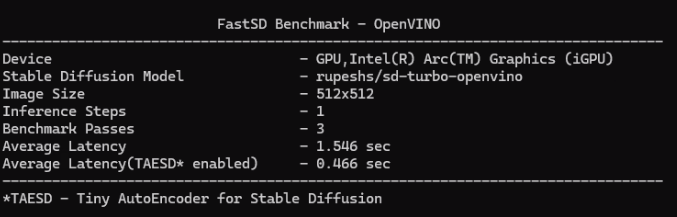
NPU
FastSD CPU now supports power efficient NPU (Neural Processing Unit) that comes with Intel Core Ultra processors.
FastSD tested with following Intel processor's NPUs:
- Intel Core Ultra Series 1 (Meteor Lake)
- Intel Core Ultra Series 2 (Lunar Lake)
Currently FastSD support this model for NPU rupeshs/sd15-lcm-square-openvino-int8.
Supports following modes on NPU :
- Text to image
- Image to image
- Image variations
To run model in NPU follow these steps (Please make sure that your AI PC's NPU driver is the latest):
- Start webui
- Select LCM-OpenVINO mode
- Select the models settings tab and select OpenVINO model
rupeshs/sd15-lcm-square-openvino-int8 - Set device envionment variable
set DEVICE=NPU - Now it will run on the NPU
This is heterogeneous computing since text encoder and Unet will use NPU and VAE will use GPU for processing. Thanks to OpenVINO.
Please note that tiny auto encoder will not work in NPU mode.
Thanks to Intel for providing AI PC dev kit and Tiber cloud access to test FastSD, special thanks to Pooja Baraskar,Dmitriy Pastushenkov.
MCP Server Support
FastSDCPU now supports MCP(Model Context Protocol) server.
- Start FastSDCPU MCP server:
python src/app.py --mcpor Runstart-mcpserver.shfor Linux andstart-mcpserver.batfor Windows.
FastSDCPU MCP server will be running at http://127.0.0.1:8000/mcp
It can be used with AI apps that support MCP protocol for example Claude desktop
Note: OpenWebUI not directly using MCP protocol it is based on OpenAPI protocol.
Claude desktop
To connect with FastSD MCP server first configure Claude desktop :
- First configure Claude desktop,open File - >Settings -> Developer - Edit config
- Add below config(Also ensure that node.js installed on your machine)
{
  "mcpServers": {
    "fastsdcpu": {
      "command": "npx",
      "args": [
        "mcp-remote",
        "http://127.0.0.1:8000/mcp"
      ]
    }
  }
}
- Restart Claude desktop
- Give a sample prompt to generate image "create image of a cat"
Screenshot of Claude desktop accessing Intel AI PC NPU to generate an image using the FastSD MCP server
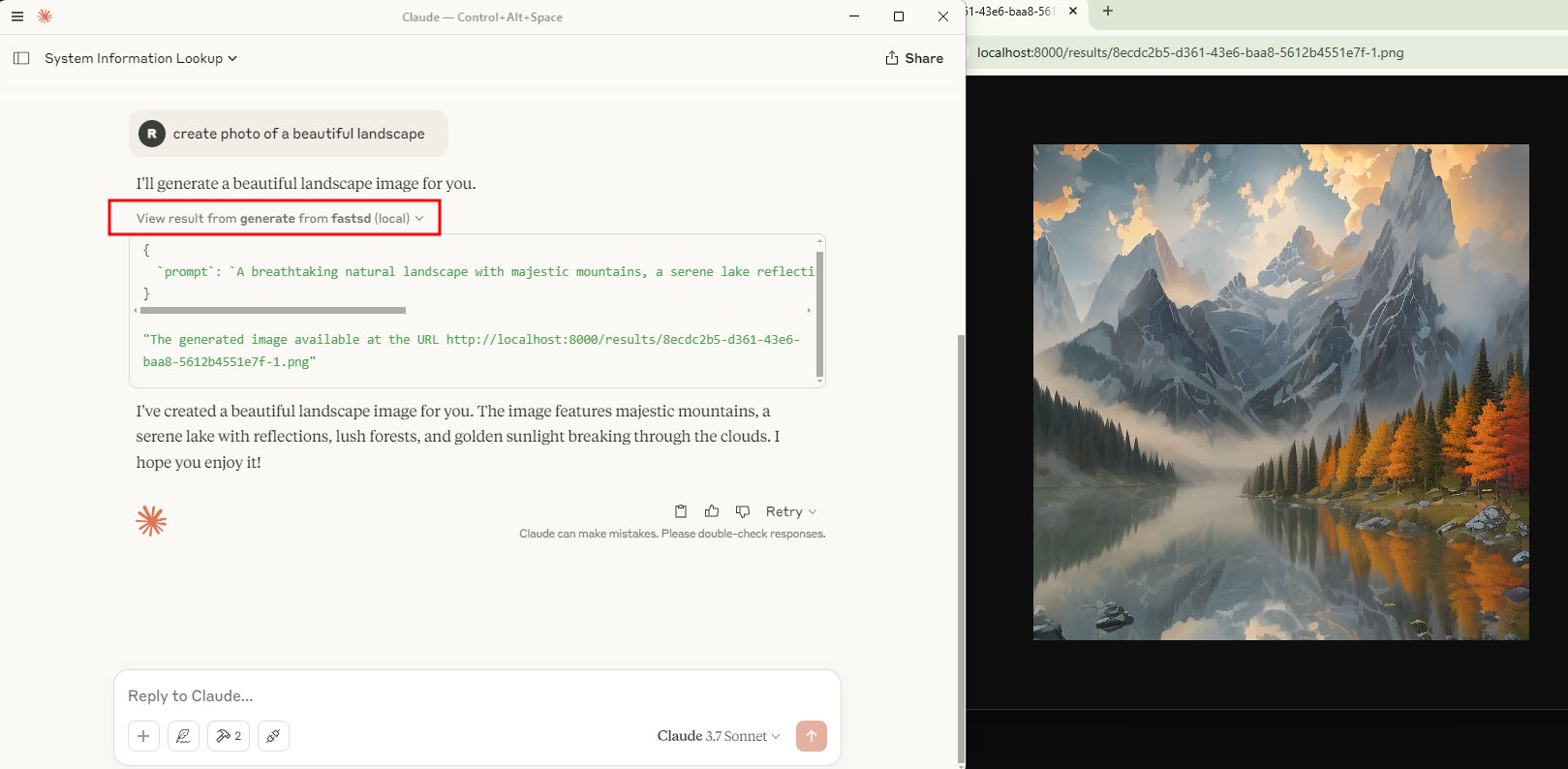
Open WebUI Support
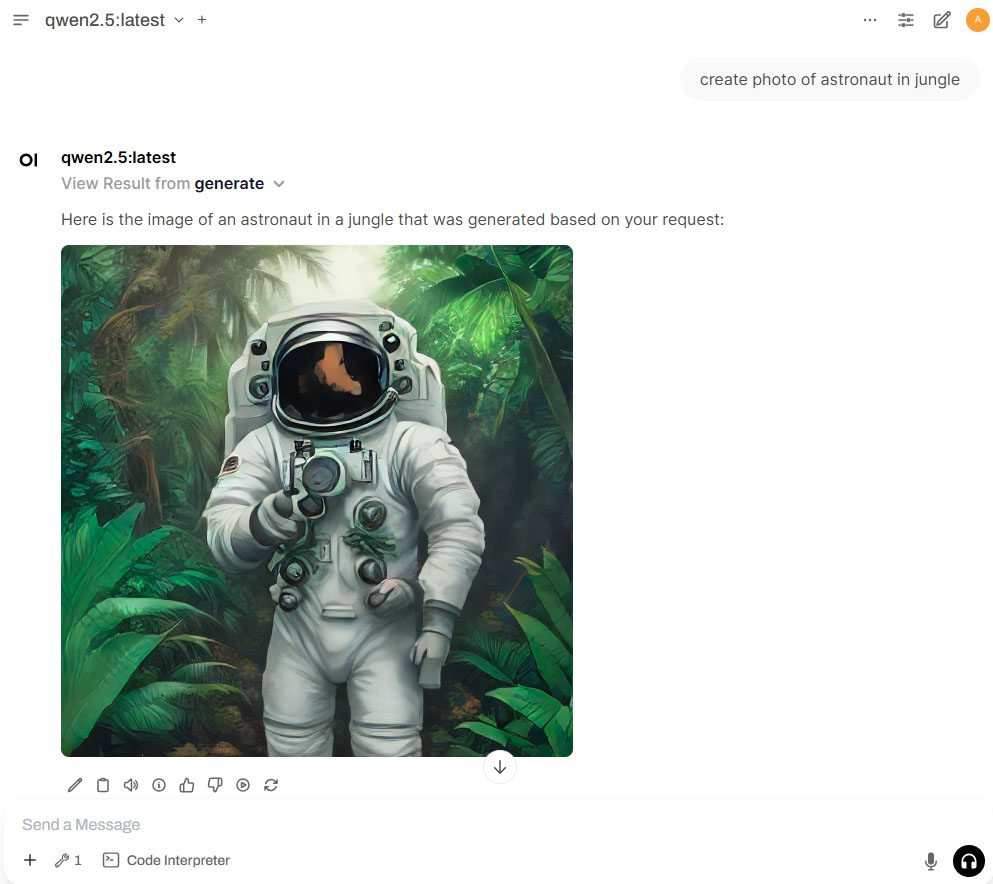
The FastSDCPU can be used with OpenWebUI for local image generation using LLM and tool calling.
Follow the below steps to FastSD to use with Open WebUI.
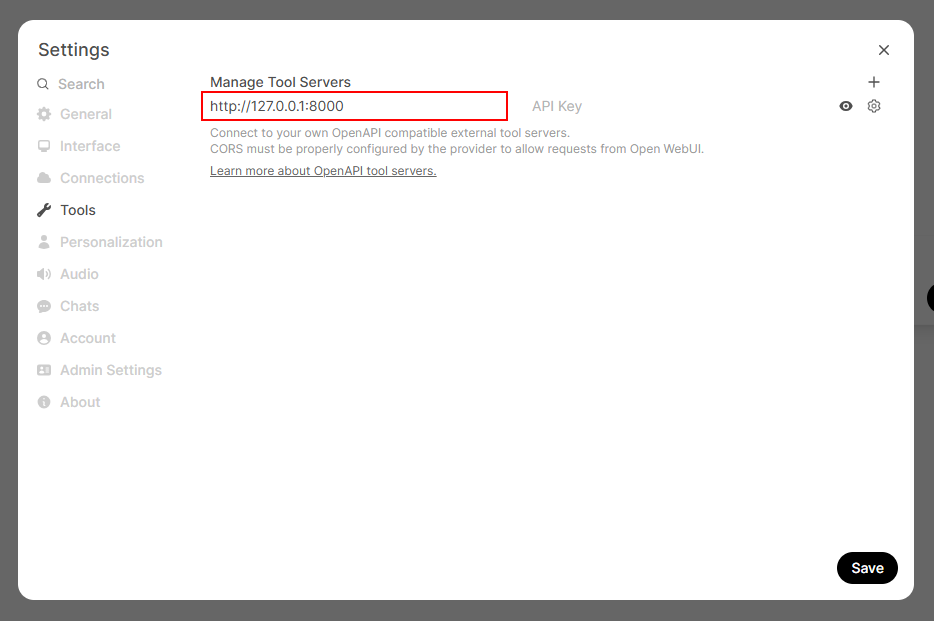
Start FastSDCPU MCP server:
python src/app.py --mcpor Runstart-mcpserver.shfor Linux andstart-mcpserver.batfor Windows.Update server URL in the settings page as shown below
Change chat controls setting "Function Calling" to "Native"
Generate image using text prompt (Qwen 2.5 7B model used for the demo)
ComfyUI support
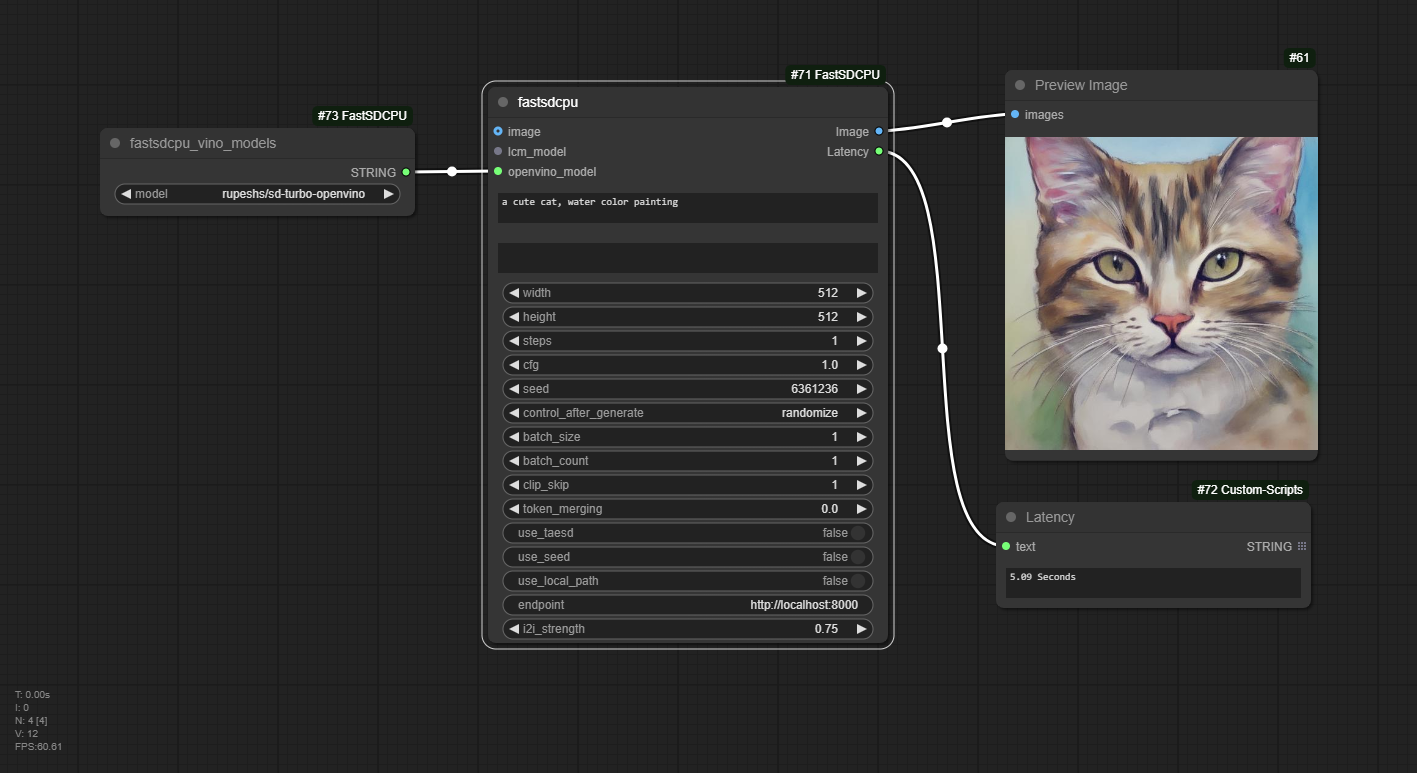
FastSD can be used with ComfyUI with ComfyUI-FastSDCPU node. To use it follow this step by step guide. To use NPU set environment variable "DEVICE=NPU" and choose "rupeshs/sd15-lcm-square-openvino-int8" as your OpenVINO Model.
License
The fastsdcpu project is available as open source under the terms of the MIT license
GIMP Plugin
FastSD engine integrated into Intel's OpenVINO™ AI Plugins for GIMP. It supports CPU/GPU and NPU and AI PC. Thanks to Intel for providing access to Intel® Tiber™ AI Cloud to develop and test with latest AI PC( Intel Core Ultra Series 2).
For more details check this readme.
Disclaimer
Users are granted the freedom to create images using this tool, but they are obligated to comply with local laws and utilize it responsibly. The developers will not assume any responsibility for potential misuse by users.
Thanks to all our contributors
Original Author & Maintainer - Rupesh Sreeraman
We thank all contributors for their time and hard work!
Ähnliche Projekte entdecken
codecrafters-io/build-your-own-x
Meistere das Programmieren, indem du deine Lieblingstechnologien von Grund auf neu erschaffst.
562,325 Sternepublic-apis/public-apis
Eine gemeinschaftliche Liste kostenloser APIs
498,764 Sternemorluto/rea
Mit Agenten alles per Reverse Engineering untersuchen, vom Verhalten der Anwendung bis hin zu nativen Binärdateien.
457,409 Sterneopenclaw/openclaw
Die KI, die wirklich Dinge erledigt. Jedes Betriebssystem, jede Plattform. Auf die Hummer-Art. 🦞
394,393 Sterne