
routineLife1/DRBA has 57 GitHub stars and 1 forks. Star changes are not measured yet. Last checked 2026-11-12 01:10 UTC. Last push 2026-08-12.
So werden diese Zahlen gemessen
Distance Ratio Based Adjuster for Animeinterp
Gemessener Sternzuwachs
- in 24h
- Verlauf wird gesammelt
- in 7 days
- Verlauf wird gesammelt
- in 15 days
- Verlauf wird gesammelt
- in 1 month
- Verlauf wird gesammelt
Nettoänderungen in überlappenden Zeiträumen, keine Tagessummen. Fehlende Messwerte bleiben leer. Sterne zeigen Interesse, nicht Qualität.
README.md
OriginalDistance Ratio Based Adjuster for Animeinterp
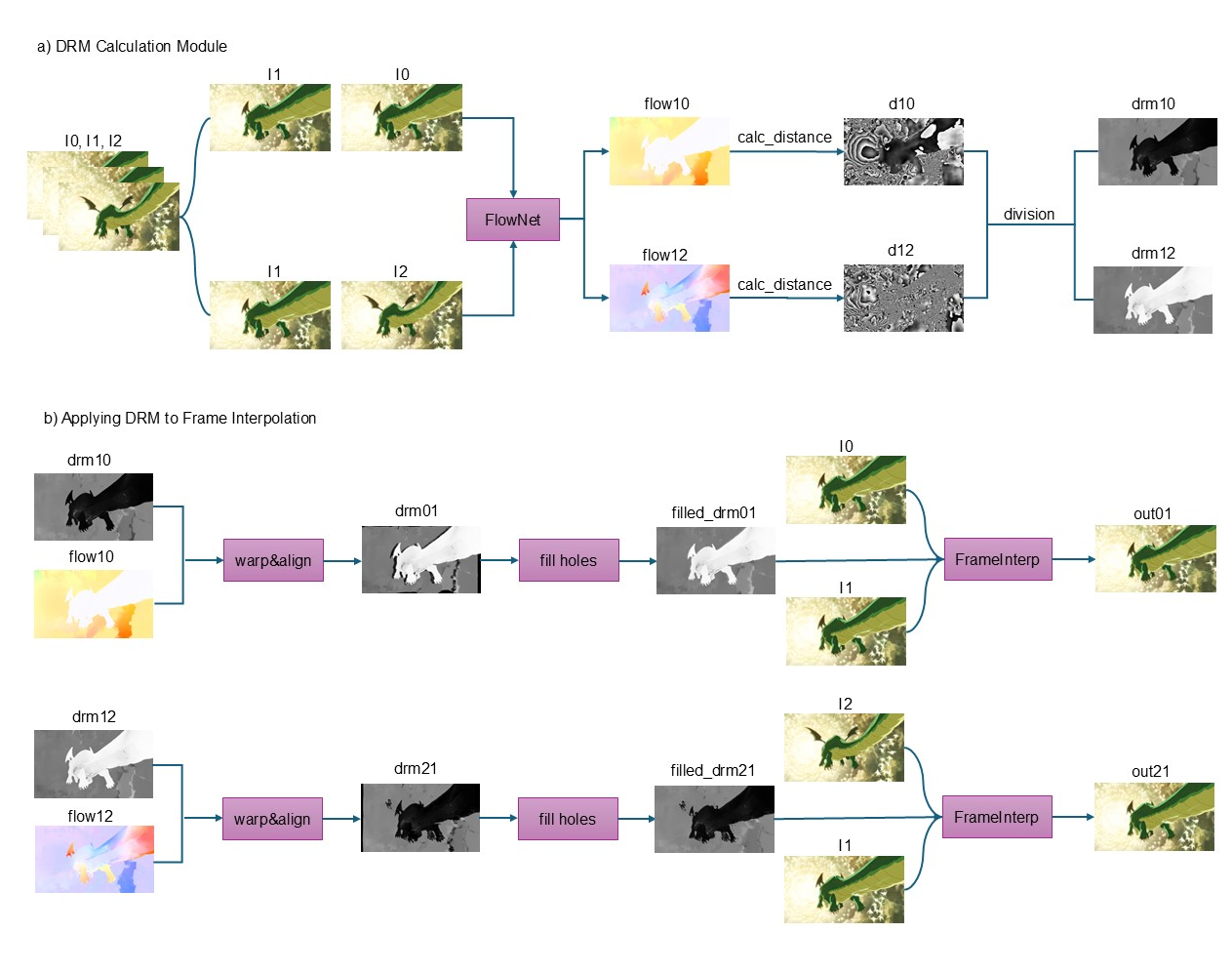
Abstract: This project serves as a control mechanism for Video Frame Interpolation (VFI) networks specifically tailored for anime. By calculating the DistanceRatioMap, it adjusts the frame interpolation strategies for spatiotemporally nonlinear and linear regions, thereby preserving the original pace and integrity of the characters while avoiding distortions common in frame interpolation.

📘中文文档
👀Demo
https://github.com/user-attachments/assets/1f1dd01a-2edb-4198-a4a8-edf0979bb8ba
🔧Installation
git clone https://github.com/routineLife1/DRBA.git
cd DRBA
pip3 install -r requirements.txt
The cupy package is included in the requirements, but its installation is optional. It is used to accelerate computation. If you encounter difficulties while installing this package, you can skip it.
⚡Usage
Video Interpolation
  # For speed preference
  python infer.py -m rife -i input.mp4 -o output.mp4 -fps 60 -scale 1.0 -s -st 0.3
  # For quality preference
  python infer.py -m gmfss_union -i input.mp4 -o output.mp4 -fps 60 -scale 1.0 -s -st 0.3
Full Usage
Usage: python infer.py -m model -i in_video -o out_video [options]...

  -h                   show this help
  -m model             model name (rife, gmfss, gmfss_union) (default=rife)
  -i input             input video path (absolute path of input video)
  -o output            output video path (absolute path of output video)
  -fps dst_fps         target frame rate (default=60)
  -t times             interpolation times (default=-1, if specified, the times mode will be used as priority)
  -s enable_scdet      enable scene change detection (default False)
  -st scdet_threshold  ssim scene detection threshold (default=0.3)
  -hw hwaccel          enable hardware acceleration encode (default Disable) (require nvidia graph card)
  -scale scale         flow scale factor (default=1.0), generally use 1.0 with 1080P and 0.5 with 4K resolution
- model accept model name. Current support: rife, gmfss, gmfss_union
- input accept absolute video file path. Example: E:/input.mp4
- output accept absolute video file path. Example: E:/output.mp4
- dst_fps = target interpolated video frame rate. Example: 60
- times = interpolation times. Example: 2 (if specified, the times mode will be used as priority)
- enable_scdet = enable scene change detection.
- scdet_threshold = scene change detection threshold. The larger the value, the more sensitive the detection.
- hwaccel = enable hardware acceleration during encoding output video.
- scale = flow scale factor. Decrease this value to reduce the computational difficulty of the model at higher resolutions. Generally, use 1.0 for 1080P and 0.5 for 4K resolution.
Using the VapourSynth + TensorRT version can achieve 400% acceleration. Refer to this project: VS-DRBA.
👀Other Demos(BiliBili)
📖Overview
DRBA consists two parts('DRM Calculation' and 'Applying DRM to Frame Interpolation') to generate the adjusted in-between anime frame given three inputs.
🔗Reference
Optical Flow: GMFlow
Video Interpolation: Practical-RIFE GMFSS MultiPassDedup
Acknowledgment
This project is sponsored by SVFI Development Team
Ähnliche Projekte entdecken
ytdl-org/youtube-dl
Kommandozeilenprogramm zum Herunterladen von Videos von YouTube.com und anderen Videoseiten
141,539 Sterneexcalidraw/excalidraw
Virtuelles Whiteboard zum Skizzieren von Diagrammen im handgezeichneten Stil
135,492 Sternegodotengine/godot
Godot Engine – Plattformübergreifende 2D- und 3D-Spiele-Engine
120,003 Sternemrdoob/three.js
JavaScript-3D-Bibliothek.
118,122 Sterne