
realstrawhat/csakura
realstrawhat/csakura has 271 GitHub stars and 6 forks. Star changes are not measured yet. Last checked 2026-11-13 21:20 UTC. Last push 2026-11-13.
Gemessener Sternzuwachs
- in 24h
- Verlauf wird gesammelt
- in 7 days
- Verlauf wird gesammelt
- in 15 days
- Verlauf wird gesammelt
- in 1 month
- Verlauf wird gesammelt
Nettoänderungen in überlappenden Zeiträumen, keine Tagessummen. Fehlende Messwerte bleiben leer. Sterne zeigen Interesse, nicht Qualität.
Über uns
A sakura tree with falling petals for your terminal
EntwicklerwerkzeugeREADME.md
Originalcsakura 3.0 🌸


A sakura tree with falling petals for your terminal — in the spirit of
cmatrix and cava, but prettier.
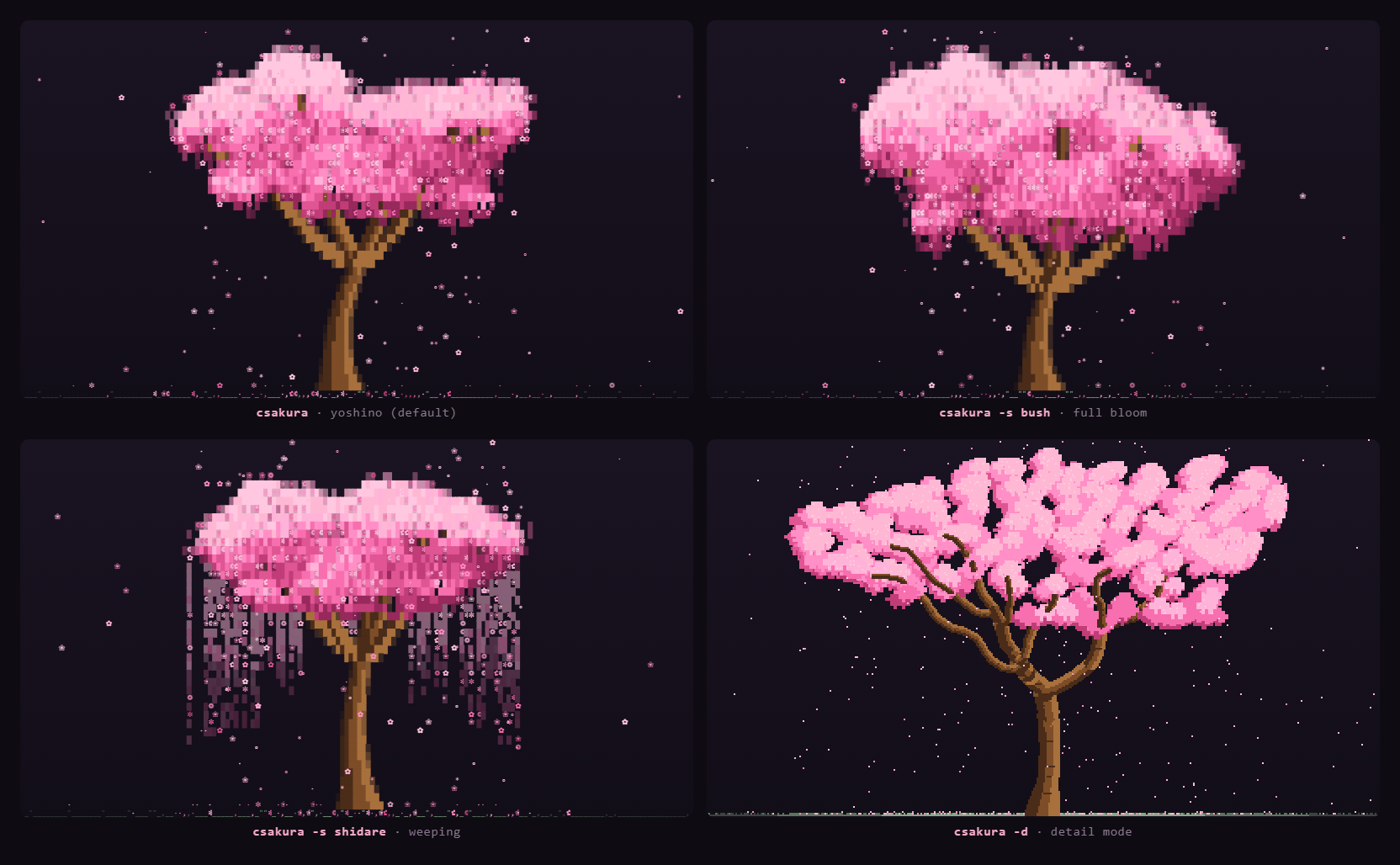
- Procedurally grown cherry-blossom tree (different every run, press
rto regrow) - Three cherry forms: the spreading somei-yoshino, a bush-form cherry in full
bloom with its crown closed into one cloud, and the weeping shidare-zakura
with blossom hanging in curtains (
-s/ presss). Every tree draws its own proportions, lean and limbs from ranges true to its form, so no two match;-s randomchanges form each regrow - Petals drift down on a wandering wind, settle on the ground, and fade
- Detail mode (
-d/ pressd): a fully branched tree in half-block pixels, its limbs grown by space colonisation so they fork low, spread and taper into twigs carrying clusters of blossom, with petals falling half a cell at a time - Keeps its proportions at any terminal size, from a 30×12 split to a full screen, and regenerates on resize
- Written in C99 + ncurses, low CPU (default 20 FPS)
- 15 blossom color palettes (
-c/ pressc) - Live keyboard shortcuts for every setting — palette, petals, wind, speed, ASCII and flat mode, all without restarting
- Matching HTML demo in
web/
What's new in 3.0
- Three tree forms. Somei-yoshino (the default), a full-bloom bush, and the
weeping shidare-zakura —
-sor presss;-s randompicks a new one each regrow. - Detail mode.
-dor pressdfor a fully branched tree in half-block pixels. Off by default, so plaincsakurastays the classic yoshino. - Any size. The tree keeps its proportions from a 30×12 split to a full screen.
What's new in 2.1
The canopy is painted on a dark shadow tone so eight colours can read as one solid mass. That tone shipped as a fixed neutral grey, which shows up as grey squares on a terminal whose background is any other shade.
-H COLOR. Set the shadow to any xterm colour (0-255) so it matches your own background instead of fighting it.-H none. Leave the shadow unpainted while the blossom keeps its shading, for a crown that still has depth over a transparent terminal.-tis unchanged and still turns every cell background off.
What's new in 2.0
The tree is grown rather than stamped. The canopy now follows the limbs that were actually generated instead of a fixed arrangement of blobs, so no two crowns share a silhouette:
- Clumped blossom. Two octaves of value noise break the crown into clusters, with a per-column wobble roughing up the outline — a cherry, not a smooth dome.
- Directional light. Light falls from the upper left and the mass shades what hangs below it, so the crown has volume instead of a flat tint.
- Limbs through the blossom. Branches show through where the clusters thin, following the noise field so a limb emerges as a continuous run rather than a scatter of dashes.
- Smooth taper. Trunk and branches use partial block glyphs (
░▒▓) at their edges, so the wood curves instead of stepping, and the trunk keeps its proportion to the crown at every terminal size. - Shaded cells. Canopy cells sit on a dark tint of the blossom colour, and the block glyphs blend the ramp step against it — this is what lets eight colours read as a solid, saturated mass with a fringe that dissolves.
- Sane at any shape. A short split, a tall narrow pane, or a full screen all get a correctly proportioned tree rather than a pancake or a lamppost.
The shaded cells mean csakura paints a background behind the canopy, so a
transparent terminal no longer shows through it. Pass -t (or press t) for
flat mode, which never paints cell backgrounds and keeps your terminal — or
your wallpaper — visible behind the tree.
Install
Arch Linux
From the AUR, with yay (or paru):
yay -S csakura        # latest release
yay -S csakura-git    # builds from main
Or build the PKGBUILD by hand:
sudo pacman -S --needed base-devel ncurses
git clone https://github.com/realstrawhat/csakura.git
cd csakura
makepkg -si
Or without pacman at all:
make && sudo make install
Uninstall: sudo pacman -R csakura or sudo make uninstall.
macOS
With Homebrew. This repository doubles as its own tap, so there is nothing to clone by hand:
brew tap realstrawhat/csakura https://github.com/realstrawhat/csakura
brew install realstrawhat/csakura/csakura         # latest release
brew install --HEAD realstrawhat/csakura/csakura  # builds from main
Once the tap is added, plain brew install csakura works too, as long as no
other tap you have provides that name. Homebrew pulls in ncurses itself.
Or build yourself:
brew install ncurses
git clone https://github.com/realstrawhat/csakura.git
cd csakura
make
sudo make install
Then run csakura. Uninstall with brew uninstall csakura (and
brew untap realstrawhat/csakura) or sudo make uninstall.
Other Linux
Need a C compiler + wide-char ncurses (libncursesw5-dev / ncurses-devel):
git clone https://github.com/realstrawhat/csakura.git
cd csakura
make && sudo make install
Usage
csakura [options]

  -f FPS    frames per second, 5-60 (default: 20)
  -p NUM    petal density, 1-10 (default: 5)
  -w NUM    wind strength, 0-10 (default: 1)
  -c NAME   blossom palette (default: sakura)
  -s STYLE  tree form: yoshino, bush, shidare (weeping), or
            random for a new one each regrow (default: yoshino)
  -d        detail mode: a finer, fully branched tree drawn
            in half-block pixels (needs 256 colours)
  -a        ASCII glyphs only (no unicode blossoms)
  -t        flat mode: never paint cell backgrounds, so a
            transparent terminal shows through the canopy
  -H COLOR  canopy shadow colour, 0-255, or none to leave the
            shadow unpainted (default: the palette's own shade)
  -h        help
  -v        version

palettes:
  sakura, rose, blush, magenta, peach,
  coral, sunset, gold, lavender, violet,
  sky, mint, matcha, white, ink
Examples:
csakura                 # default: yoshino, not detailed
csakura -f 12 -p 3      # chill / low CPU (nice in a side pane)
csakura -p 10 -w 6      # windy petal storm
csakura -c mint         # mint palette
csakura -s shidare      # weeping cherry
csakura -d -s bush      # detailed, in full bloom
csakura -s random       # a different form every regrow
csakura -d              # detail mode, a fully branched pixel tree
csakura -t              # let a transparent terminal show through
csakura -H 235          # match the shadow to your own background
csakura -H none         # shadow unpainted, blossom still shaded
Shortcuts
Everything is tunable live — you never need to restart to try a setting.
| Key | Does |
|---|---|
q/Esc |
quit |
r |
regrow the tree (new shape every time) |
c / C |
next / previous color palette (15 of them) |
s |
next tree form — yoshino / bush / shidare / random |
d |
toggle detail mode — fully branched half-block tree |
p / P |
more / fewer petals |
w / W |
more / less wind |
+ / - |
faster / slower |
a |
toggle ASCII glyphs — for fonts without the blossoms |
t |
toggle flat mode — lets a transparent terminal through |
Uppercase letters are shifted, so C is Shift+c.
The same keys work in the web version, which also has a click-through panel behind the faint ⋮ in the corner.
Web version
Open web/index.html in a browser for the same animation.
The faint ⋮ in the corner opens the full set of controls — palette, petal
density, wind, speed, tree form, ASCII glyphs, flat mode and detail mode — and
the terminal keys all work too (r c/C s d a t p/P w/W
+/-).
The cell size follows the window, so a phone or a small window gets the same
detailed tree as a desktop, just drawn smaller. Settings persist across
visits. You can also enable GitHub Pages on the /web folder for a live demo.
The bottom-left corner shows the running total of repository clones, counted up on screen when it moves. Hover it for the breakdown. See Clone tracking for how it is collected.
Clone tracking
.github/workflows/traffic.yml records how many times the repo has been
cloned. The total is shown by the clones badge at the top of this file and
in the corner of web/index.html, both reading the same published figure.
GitHub's traffic API is not public — it needs a token with push access — so
the browser cannot read it directly. The workflow queries it from CI instead
and publishes a plain traffic.json to the orphan traffic-data branch, which
the page reads unauthenticated. Nothing is ever written to main, and the
commits land off the default branch so they stay out of the contributor list.
The API also only serves a rolling 14-day window. A total read straight from it would shrink as old days expired, so the workflow folds each window into a permanent record keyed by date. The merge is idempotent: re-running it replaces a day's entry rather than adding to it, so a partial count for the current day is corrected on the next run and repeated runs cannot double-count.
Setup
Create a fine-grained PAT scoped to this repo with
Administration: Read-only— no other permission — and save it as the repository secretTRAFFIC_TOKEN. It is needed because the built-inGITHUB_TOKENcannot reach the traffic API: Actions'permissions:block has noadministrationkey. The PAT is used for nothing else; the branch push runs onGITHUB_TOKEN, so the PAT stays read-only and a leak of it cannot modify anything.Seed the data branch with the history collected so far, otherwise the first scheduled run starts from zero:
git checkout --orphan traffic-data
git rm -rf .
git show main:scripts/traffic-seed.json > traffic.json
git add traffic.json && git commit -m "traffic: seed"
git push -u origin traffic-data
git checkout main
Run the workflow once from the Actions tab to confirm the token works.
Reading the numbers
- clones.total is the headline:
measured + baseline. - measured is what the workflow actually recorded.
- baseline is a manual figure for traffic from before collection started. GitHub had already discarded those days, so it is an estimate that no API can confirm. It is kept as its own field, and shown separately in the tooltip, so the recorded days stay auditable.
- uniques is a sum of per-day unique cloners, which counts one person who clones on three days as three. GitHub only dedupes inside a single 14-day window — for the seed data its own window figure is 271 against a daily sum of 286. Treat it as an upper bound on people, never a headcount.
- The total steps once a day, not continuously. GitHub's traffic API serves
whole days only and runs about a day behind, so three of the four scheduled
runs fetch no new clone data and the figure sits still between them. The
tooltip shows
counted through <date>next toupdated <time>: the first is how far the data reaches, the second is when the collector last ran. Acounted througha day or so behind today, with a freshupdated, is normal — that is the API lag, not a stall. Both frozen for more than a couple of days means the workflow is failing; check the Actions tab.
Notes
- Best with a 256-color terminal (kitty, iTerm2, or modern Terminal.app). The shaded canopy needs 256 colors; on an 8-color terminal csakura falls back to flat mode automatically.
- Unicode blossoms need a font that has them (most Nerd Fonts do). Use
-aif not. - On macOS, Homebrew’s
ncursesis recommended for the best color support. - Running over a transparent or image background? Use
-t. - Canopy sitting on a visibly different dark square? That is the shadow the
crown is painted on, and it ships as a neutral dark grey.
-H COLORsets it to your own background colour, and-H noneleaves it unpainted so only the blossom is shaded.
Author
Made by Kodi Alex (@realstrawhat), a UX designer and developer in Berlin. More about csakura and my other work: kodialex.com
Attribution
If you use csakura, please credit realstrawhat
(https://github.com/realstrawhat/csakura).
License
MIT
Ähnliche Projekte entdecken
codecrafters-io/build-your-own-x
Meistere das Programmieren, indem du deine Lieblingstechnologien von Grund auf neu erschaffst.
562,334 Sternepublic-apis/public-apis
Eine gemeinschaftliche Liste kostenloser APIs
498,772 Sternemorluto/rea
Mit Agenten alles per Reverse Engineering untersuchen, vom Verhalten der Anwendung bis hin zu nativen Binärdateien.
457,478 Sterneopenclaw/openclaw
Die KI, die wirklich Dinge erledigt. Jedes Betriebssystem, jede Plattform. Auf die Hummer-Art. 🦞
394,397 Sterne