
razeencheng/iosbackup
razeencheng/iosbackup has 52 GitHub stars and 5 forks. Star changes are not measured yet. Last checked 2026-11-09 23:07 UTC. Last push 2026-11-09.
So werden diese Zahlen gemessen
A self-hosted iPhone/iPad backup tool for NAS/Linux, with USB/Wi-Fi support, scheduled backups, encryption, and notifications. 丨 自托管的 iPhone/iPad 备份工具,通过 USB 或 Wi-Fi 备份到 NAS/Linux,支持定时备份、加密和通知。
Gemessener Sternzuwachs
- in 24h
- Aktualisierung verzögert
- in 7 days
- Aktualisierung verzögert
- in 15 days
- Aktualisierung verzögert
- in 1 month
- Aktualisierung verzögert
Nettoänderungen in überlappenden Zeiträumen, keine Tagessummen. Fehlende Messwerte bleiben leer. Sterne zeigen Interesse, nicht Qualität.
README.md
OriginaliOS Backup
iOS Backup lets you back up an iPhone or iPad to your own Linux host or NAS through a browser. It is designed for one administrator and runs libimobiledevice, usbmuxd2, and netmuxd in a privileged container. It supports USB device discovery, scheduled backups, read-only backup inspection, and optional notifications.
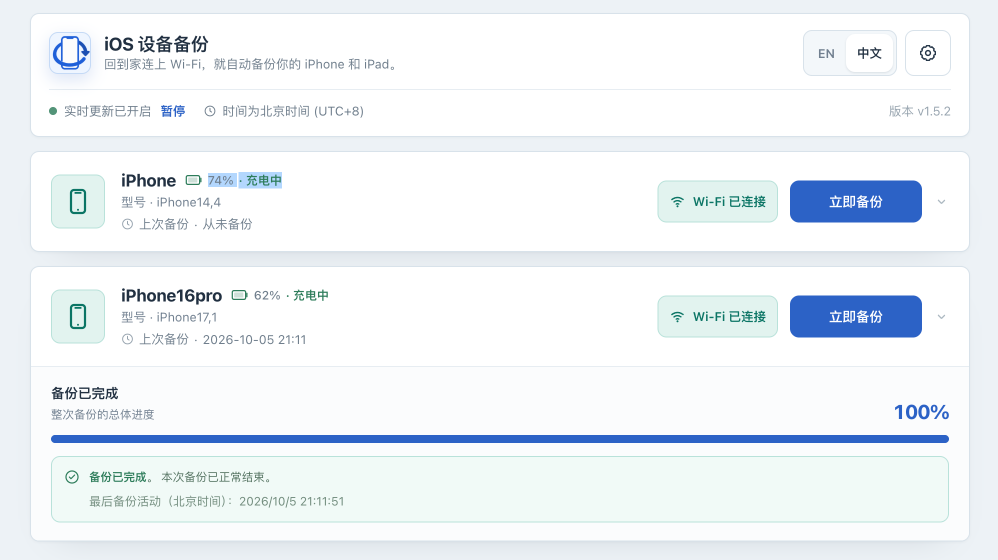
The screenshot is from the maintainer's Synology NAS, where a USB backup completed and its on-disk completion marker was checked. See the illustrated quick start for real setup, progress, and completion screenshots.
Feature status
- Core: USB discovery and pairing, manual and scheduled backups, Wi-Fi backups, and backup encryption enable/disable/change-password workflows.
- Experimental, disabled by default: whole-device restore, local unpack, and local backup deletion. See Feature status before enabling any of them.
The local Web UI has no telemetry or remote frontend assets. Optional Telegram, SMTP, WeCom, Bark, and webhook notifications make outbound requests only after an administrator configures them. Built-in authentication is intended for a single administrator.
The application is distributed as a Linux container for linux/amd64 and linux/arm64. Native device operation on Windows or macOS is not promised. The Go module itself uses only the standard library, but the running application still depends on the libimobiledevice/netmuxd toolchain included in the image.
The container requires --privileged, --network host, /dev/bus/usb:/dev/bus/usb, and /run/udev:/run/udev:ro. Privileged mode grants host-level access. We recommend running it only on a trusted host and trusted network. Do not expose the Web UI directly to the public Internet. Even with authentication enabled, a firewall, VPN, or authenticated HTTPS reverse proxy is still recommended.
Quick start
Requirements: a Linux host or NAS with Docker Engine and Docker Compose, an iPhone/iPad whose passcode you know, and a data directory on a filesystem with enough space for a complete device backup.
Follow the illustrated quick start to download Compose, start the service, retrieve the first-start password, and sign in for pairing. It uses the same separate deployment directory, $HOME/iosbackup-deploy, as the detailed installation guide. For an existing deployment, follow upgrade and rollback instead of repeating initialization.
compose.yaml defaults to the official image ghcr.io/razeencheng/iosbackup:latest, so upgrades do not require changing the version tag.
Data you need to keep includes /backups (device backups), /configs (settings, passwords, default secret_key, and encrypted secrets), and /var/lib/lockdown (pairing records). Back up these before upgrades, plus Compose configuration and external credentials in use. Protect the administrator password and keep the master key used for stored secrets unchanged.
Upgrade and rollback
Back up data/backups, data/configs, data/lockdown, Compose configuration, and external credentials first. With the default latest image, run docker compose pull and docker compose up -d to download and run the new image. If you pinned a version, change Compose's image back to ghcr.io/razeencheng/iosbackup:latest. Verify /healthz, /api/version, logs, pairing, and a complete USB backup on a non-critical device.
Before rollback, follow the rollback steps to confirm that the target version can read the current data and configuration, then change Compose's image and recreate the container. Do not roll back persisted data blindly: restore the volume snapshot only when the release notes say the on-disk format is incompatible. Use the recorded old version tag or digest for rollback; the mutable latest tag cannot identify an old version.
See Operations for the full upgrade, rollback, volume-backup, and log procedures.
Troubleshooting
- No device: reconnect USB, respond to any device passcode prompt or unlock it and tap Trust , verify the USB and udev mounts, then refresh.
mobilebackup2 (-4)or Wi-Fi disconnect: reconnect the device, retry over USB, check for phone authorization prompts, and verify the network connection.- Locked-device/passcode error: when USB is connected or a backup wakes the phone, enter its device passcode if a white passcode screen appears. If a trust prompt appears, unlock the phone and tap Trust . There is no need to keep the phone unlocked or its screen on.
- No space/read-only/permission denied: check free space and host permissions for
data/backups,data/configs, anddata/lockdown. - Container starts but UI is unavailable: check
docker compose logs --tail=200 iosbackupandcurl -fsS --retry 12 --retry-connrefused --retry-delay 5 --retry-max-time 90 http://127.0.0.1:9000/healthz.
See Operations for detailed troubleshooting.
Documentation
- Quick start
- Operations manual
- Linux installation · Synology DSM
- Configuration reference · Development guide
- Feature status
- Notification guide
- Webhook guide
- Privacy
- Security policy
- Support policy
- Changelog
Version history
v1.5.6 fixes history imports with large metadata, adds a configurable plist parsing limit, improves failed-import retry and diagnostics, and preserves complete online CSV records. See the release notes.
v1.5.5 adds backup history, complete exports, offline browsing and checks, with improved backup controls, localization, notifications, and deployment timezone support. See the release notes.
See the Changelog for the latest changes, historical releases, and compatibility notes.
Development and contributions
The program starts in cmd/iosbackup; internal/app coordinates the application, with individual functions implemented in separate packages. A local source build still needs the external device tools at runtime:
go test -count=1 ./...
go vet ./...
CGO_ENABLED=0 go build -trimpath -o iosbackup ./cmd/iosbackup
Contributions are licensed inbound = outbound under AGPL-3.0-only; no CLA, DCO, or Signed-off-by is required. See CONTRIBUTING.md.
License and trademarks
Project source is licensed under GNU AGPL v3.0 only, SPDX AGPL-3.0-only. Container components keep their own licenses; see Licensing and Third-party notices.
Copyright (C) 2025-2026 Razeen Cheng. This project is not affiliated with, sponsored by, or endorsed by Apple Inc. See TRADEMARKS.md.
Ähnliche Projekte entdecken
trimstray/the-book-of-secret-knowledge
Eine Sammlung inspirierender Listen, Handbücher, Spickzettel, Blogs, Tricks, Einzeiler, CLI- und Web-Tools und mehr.
257,548 SterneHack-with-Github/Awesome-Hacking
Eine Sammlung verschiedener Awesome-Listen für Hacker, Pentester und Sicherheitsforscher.
125,103 Sterneswisskyrepo/PayloadsAllTheThings
Eine Liste nützlicher Payloads und Bypass-Methoden für die Sicherheit von Webanwendungen sowie für Pentests/CTF.
82,542 Sternecaddyserver/caddy
Schneller, erweiterbarer und plattformübergreifender HTTP/1-2-3-Webserver mit automatischem HTTPS
78,935 Sterne