
nook-browser/Nook has 2,067 GitHub stars and 104 forks. GitHot measured 0 stars in 24 hours and +12 in 7 days. Last checked 2026-11-15 14:46 UTC. Last push 2026-11-14.
What you can do
- Sidebar-first navigation – vertical tabs that feel natural and uncluttered.
- Performance – optimized with modern macOS APIs for speed and low memory use.
- Minimal, modern UI – focused on content, not chrome.
Gemessener Sternzuwachs
- in 24h
- 0
- in 7 days
- +12
- in 15 days
- Verlauf wird gesammelt
- in 1 month
- Verlauf wird gesammelt
Nettoänderungen in überlappenden Zeiträumen, keine Tagessummen. Fehlende Messwerte bleiben leer. Sterne zeigen Interesse, nicht Qualität.
Über uns
A new browser, not owned by Atlassian.
EntwicklerwerkzeugeREADME.md
Original
Nook
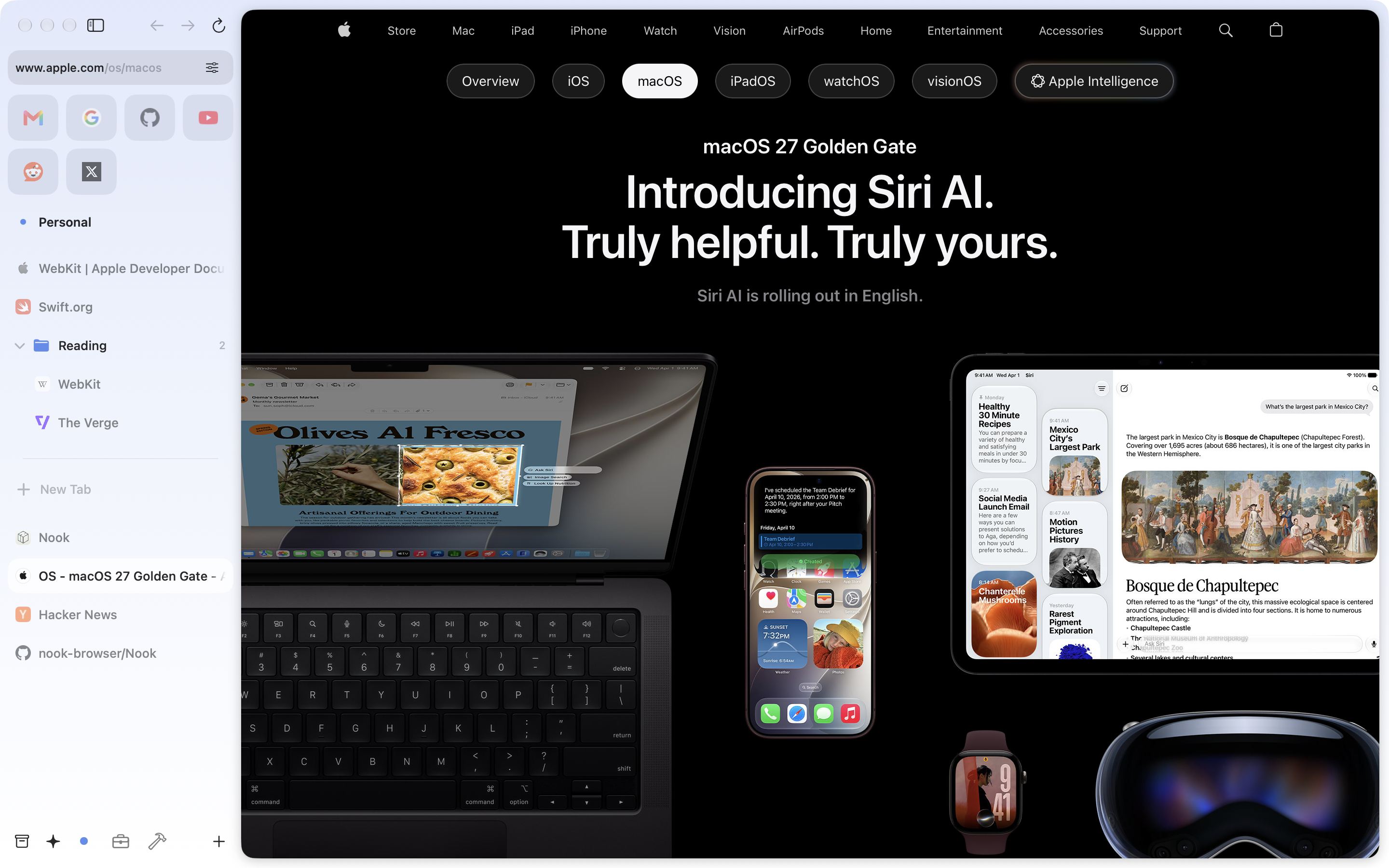
A fast, minimal browser with a sidebar-first design for macOS.





Status: Development started back up in September 2026 under a new maintainer. See Releases for the current download.
Features
- Sidebar-first navigation – vertical tabs that feel natural and uncluttered.
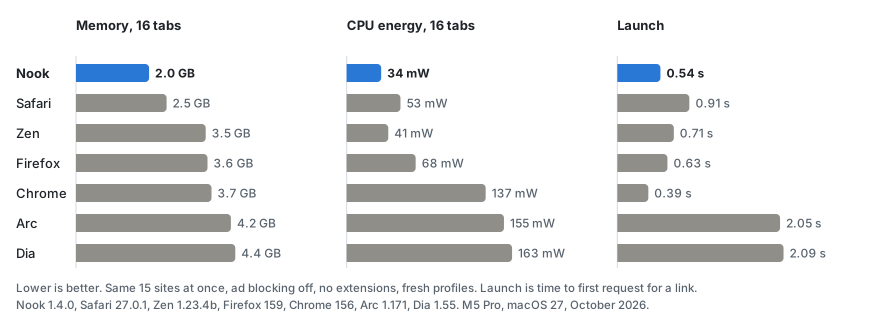
- Performance – optimized with modern macOS APIs for speed and low memory use.
- Minimal, modern UI – focused on content, not chrome.
Performance
Launchers
Raycast, Alfred and scripts can drive Nook with nook:// links. They are off until you turn on Allow nook:// links in Settings > Links.
- Open a page:
open "nook://open?url=https://example.com&space=Work&reuse=1"(spaceandreuseare optional;reuse=1selects a tab that already shows the page) - Search:
open "nook://search?q=swift%20concurrency&space=Work" - Switch space:
open "nook://space?name=Work"
A space is matched by its exact name (any case) or its UUID. Only http and https pages open.
Getting Started
Download
or, Build from Source
Prerequisites
- macOS 15.6 (Sequoia) or later, Apple Silicon. Xcode 26 needs 15.6; the built app runs on 15.5 and later
- On-device AI chat and Tab Organizer require macOS 26 or later with Apple Intelligence enabled
- Xcode 26 or later, with the Metal Toolchain component (Xcode 26 no longer bundles it)
git clone https://github.com/nook-browser/Nook.git
cd Nook
xcodebuild -downloadComponent MetalToolchain
open Nook.xcodeproj
Nook builds for Apple Silicon only: the bundled adblock-rust framework ships an arm64 slice and nothing else. Xcode resolves the Swift packages on open.
You’ll need to set your personal Development Team in Signing to build locally.
Project Structure
Nook/
├── App/                       # Entry point, AppDelegate, window scene, menu commands
├── Packages/                  # Local Swift packages shared with the planned iOS port
│   ├── NookTabsCore/          # Tab tree model: spaces, items, ordering, on-disk store
│   ├── NookSettings/          # Settings service and every persisted value type
│   ├── NookDesign/            # Design tokens: radii, spacing, type, motion, surfaces
│   ├── NookBlocker/           # Content blocker: filter lists, adblock-rust conversion, cosmetic engine
│   ├── NookTweaks/            # Site tweaks: YouTube, Facebook, social downloads, SponsorBlock, routing
│   ├── NookWeb/               # Tabs controller, page sessions, windows, history, favicons, search
│   └── NookUI/                # Shared SwiftUI: rows, context menus, spaces list, toasts, settings tabs
├── Nook/
│   ├── Managers/              # Feature managers (macOS side)
│   │   ├── BrowserManager/    # Central coordinator; conforms to the package seams
│   │   ├── ExtensionManager/  # WKWebExtension support
│   │   ├── AIManager/         # AI chat providers, MCP client, browser tools
│   │   ├── DevMCPServer/      # Local MCP server for driving the app from a coding agent
│   │   ├── TabOrganizerManager/ # On-device tab grouping with Apple Intelligence
│   │   ├── WebViewCoordinator/  # Web view pool for multi-window display
│   │   ├── DownloadManager/   # File downloads
│   │   ├── DialogManager/     # Modal dialogs
│   │   ├── PeekManager/       # Quick preview overlay
│   │   ├── SplitViewManager/  # Split-screen tab viewing
│   │   └── ...
│   ├── Models/                # macOS-only models and SwiftData entities
│   ├── Components/            # SwiftUI views: sidebar, website view, settings, drag and drop, dialogs
│   ├── Browser/               # macOS-only slice of the tab controller
│   ├── Utils/                 # WebKit helpers and utilities
│   └── ThirdParty/            # adblock-rust FFI crate and other embedded dependencies
├── CommandPalette/            # Command palette UI
├── Navigation/                # Sidebar structure: header, bottom bar, spaces list
├── Onboarding/                # First-run flow
├── NookiOS/                   # iOS app target, not released yet
├── UI/                        # Shared buttons and controls
├── docs/                      # Ad blocker architecture notes
├── scripts/                   # Filter list refresh, scriptlet and redirect generators, checks
└── assets/                    # Static assets
Architecture Overview
Nook follows a manager-based architecture where:
- Managers handle business logic and coordinate between different parts of the app
- Models represent data and state using Swift's
@Observablemacro - Components are SwiftUI views that reactively update based on model changes
- BrowserManager acts as the central coordinator, connecting all managers together
- Packages hold the model, blocker, tweak and shared view code that has no AppKit dependency, so it can be reused by an iOS app
LICENSES
With the exception of third-party libraries in Nook/ThirdParty, all code is under the GPL 3.0 License. The relevant third-party code is licensed per-folder under a variety of free, open-source software licenses.