
luanmacea/MultiAlt
luanmacea/MultiAlt has 49 GitHub stars and 1 forks. GitHot measured 0 stars in 24 hours and +3 in 7 days. Last checked 2026-11-25 03:54 UTC. Last push 2026-11-20.
Gemessener Sternzuwachs
- in 24h
- 0
- in 7 days
- +3
- in 15 days
- Verlauf wird gesammelt
- in 1 month
- Verlauf wird gesammelt
Nettoänderungen in überlappenden Zeiträumen, keine Tagessummen. Fehlende Messwerte bleiben leer. Sterne zeigen Interesse, nicht Qualität.
Über uns
MultiAlt: the maintained successor of Roblox Account Manager (RAM). Run multiple Roblox accounts at once (Multi Roblox), keep every alt signed in, join the same server, Auto Rejoin and anti-AFK. Free and open source for Windows, accounts encrypted on your PC. Rust + Tauri.
Web und AppsREADME.md
OriginalEnglish | Português
MultiAlt — Roblox Account Manager

Windows 10/11 · 🌐 website · ▶ YouTube · 💬 Discord


⭐ Like MultiAlt? Star the repo (top right of this page). It's free and made by one person, and every star helps more people find it and keeps the updates coming.
The multi Roblox account manager built for the best user experience. Keep all your Roblox accounts in one place, open as many Roblox clients as you want at the same time and play on your alts without ever logging out — with Auto Rejoin, anti-AFK, server finder, friends join, encrypted storage and much more.
Fast and lightweight: rewritten from scratch in Rust + TypeScript with Tauri. No .NET, no VC++ to install.
MultiAlt was called RAM — Roblox Account Manager until v0.1.8: same app, same data, it updates itself to the new name.
Coming from RAM? Add → Import Old Account Data brings your accounts over.
Found a bug or have an idea? Open an issue or talk to us on Discord.
⚠️ Warning
Never generate an "rbx-player link" because someone asked you to — anyone holding that link can join any game (or even Roblox Studio) as you, spend your Robux or get your account banned.
Download
⬇ Download the installer (.msi) — that's all most people need. It comes out 0/75 on VirusTotal, installs for your user only (no administrator prompt) and updates itself.
Only download from this repository. The zz-…sig files on the releases page are for the auto-updater: you don't need them.
Looking for the portable
.exe? It is not published for now (an antivirus engine flagged it 1/75); the.msidoesn't ask for administrator either.
Installed with the old
-setup.exe? It is no longer published, so it won't update anymore. Uninstall it from Windows Settings → Apps and install the.msionce — your accounts and settings are kept.
Features
Accounts
| Feature | What it does |
|---|---|
| Many ways to add accounts | Browser login, cookie, user:pass, user:pass:cookie, drag & drop a cookie, or import the old RAM AccountData.json |
| Account creator | Creates free accounts in the built-in browser: the app fills in name, password, birthday and gender, you just solve the CAPTCHA. Name prefix for whole batches |
| Encrypted storage | Accounts are always encrypted on disk — with your password, or with a device key if you don't set one. Optional "remember password" |
| Groups & ordering | Drag & drop, groups, manual ordering that survives restarts, aliases up to 240 characters, descriptions, custom fields |
| Live status | See who is online, in game or in Studio, whose session expired and which accounts have been idle for 20+ days |
| Account utilities | Display name, privacy, change password/e-mail, PIN, sign out of other sessions, blocks, outfits, avatar JSON, Quick Login code |
| Make Friends | Friend all your accounts with each other (mesh) or with one account (star), with a configurable delay |
| Streamer mode | Hide usernames in the list to record or stream |
| Backups | Create, list and restore backups of accounts, settings, scripts and themes from inside the app |
Playing
| Feature | What it does |
|---|---|
| Multi Roblox | Run as many Roblox clients as you want at the same time |
| Multi Launch | Launch a whole selection of accounts into the same game or server, one at a time — the next one can start as soon as the previous one is in the game, instead of waiting a fixed time |
| Server finder | Scans the game's servers and picks the best one for your group: Best fit (fullest server where everyone still fits), fullest, emptiest or random. Region filter and "no permission" check |
| Join links | Paste any link — game, private/VIP server, share link, invite, deep link — and everyone joins |
| Friends | See each account's online friends and send the whole group to a friend's server. Follow a player by username |
| Favorites & recent | Save games with several VIP links each; recent games and servers |
| Roblox version manager | Install Roblox builds side by side and choose the one to launch. Finds Bloxstrap, Fishstrap and Voidstrap installs |
| Window grid | Arrange every Roblox window in a grid across the monitors you choose |
| Session panel | Launch queue (cancel anytime), open clients (focus, close), why an account dropped (lost connection, kicked — with Roblox's message —, game closed by itself or server shut down) and a live console explaining every launch, rejoin and watcher action |
| Named windows | Each Roblox window is named after its account ("account - Roblox"), so you can tell them apart in the taskbar |
Automation
| Feature | What it does |
|---|---|
| Auto-reconnect | An account that drops goes back to the same game — and the same private server — on its own. Turn it on for every account or per account |
| Auto Rejoin | Keeps your alts inside a server: every N minutes each alt is closed and relaunched, while your main accounts stay open and are never restarted |
| AFK mode (anti-AFK) | Sends a key or a mouse click to each account's window every few minutes so nobody gets kicked for being idle — no rejoin, no lost progress. Click point set once for all accounts or per account |
| Watcher | Flags a Roblox window that stops responding, and closes a client that lost connection, ran low on memory or changed title (beta detection) |
| Keep the PC awake | The PC doesn't go to sleep while AFK mode, Auto Rejoin or auto-reconnect are running |
| Optimization | FPS cap, graphics, window size, process priority, EcoQoS, CPU/memory limits and FastFlags — one profile for normal play and separate ones for Auto Rejoin mains and alts |
| Pre-launch isolation | Clears cache, registry traces, MachineGuid and MAC before each launch so one account doesn't inherit another's session (Windows, only when no client is open) |
| Scripts | JavaScript automation inside the manager (sandboxed, with per-script permissions) using the ram.* API |
| Local Web API / Nexus | Local HTTP API and a WebSocket server for external tools and Nexus.lua (not in the standard installer) |
App
| Feature | What it does |
|---|---|
| Auto-update | Checks for new versions and updates itself |
| Themes | Built-in theme editor: colors, button style and fonts, with exportable presets |
| Languages | English, Portuguese and Spanish (German partial) |
| Safe video mode | If the window ever opens blank, the app recovers by itself (or hold Shift while opening) |
FAQ
Why is it flagged as a virus?
The app isn't code-signed, and tools that launch game processes are a common false positive for machine-learning antivirus models. Every release is scanned on VirusTotal and Windows Defender, and the .msi comes out clean. The code is public (Rust + Tauri) — you can audit it and build it yourself. Only download from the official GitHub releases.
How do I turn on Multi Roblox?
Settings → General → Multi Roblox (with Roblox closed).
Why is Multi Roblox off by default? Byfron has said multiple clients may be seen as suspicious behavior — turn it on at your own risk.
Can I get banned for using this? It doesn't break Roblox's Terms of Service, but some games forbid alts — check the game's rules first.
How do I back up my accounts?
In the app: Settings → Backups (details). The zip includes AccountData.key — the backup can't be restored without it — so if you have no password in the app, anyone with the zip can open your accounts. If you keep backups in the cloud, set a password first (Settings → Privacy & security → Change Encryption Method → Open → Pass Lock).
The app opened with a blank (or black) window. What now?
The UI is drawn by Microsoft Edge WebView2 Runtime, so reinstalling the app doesn't help. The app tries to recover: if the UI doesn't show up in 25 s it reopens with video acceleration off. To force that mode, hold Shift while the app opens (or add --safe-mode to the shortcut's Target). If it's still blank, repair Microsoft Edge WebView2 Runtime in Windows Settings → Apps → Installed apps → Modify → Repair, restart Windows and update your graphics driver. Details.
How do I leave safe video mode?
A yellow bar at the top of the app has a Back to normal mode button. If it doesn't show up, delete the webview.safemode file next to RAMSettings.ini (by default in %LOCALAPPDATA%\Roblox Account Manager) and open the app again.
Does it work on Mac? Not yet — macOS support is partial.
Roadmap
MultiAlt is actively maintained. What is planned next:
- Groups — find a Roblox group and put many accounts in it at once (in testing).
- FAQ inside the app — quick answers without leaving MultiAlt.
- Your ideas — suggestions with the most votes in Discussions › Ideas are the next candidates.
What MultiAlt will not do: anything that breaks Roblox's rules, like cheats, exploits or buying items with Robux for you.
Community
- Chat, help and ideas: join the Discord server.
- Questions and ideas: Discussions.
- Found a bug? Use Send feedback in the app, or open an issue.
- Security problem? Report it privately — see the security policy.
- Want to help? Read the contributing guide and the code of conduct.
Development
bun install              # frontend dependencies
bun run tauri dev        # run the app in dev mode (hot reload)
bun run tauri build      # production build (installer)
bun run check            # typecheck + cargo check
The first tauri dev/tauri build compiles every Rust crate from scratch and can take a few minutes; later builds are incremental. Developer documentation (in Portuguese) lives in docs/.
Preview
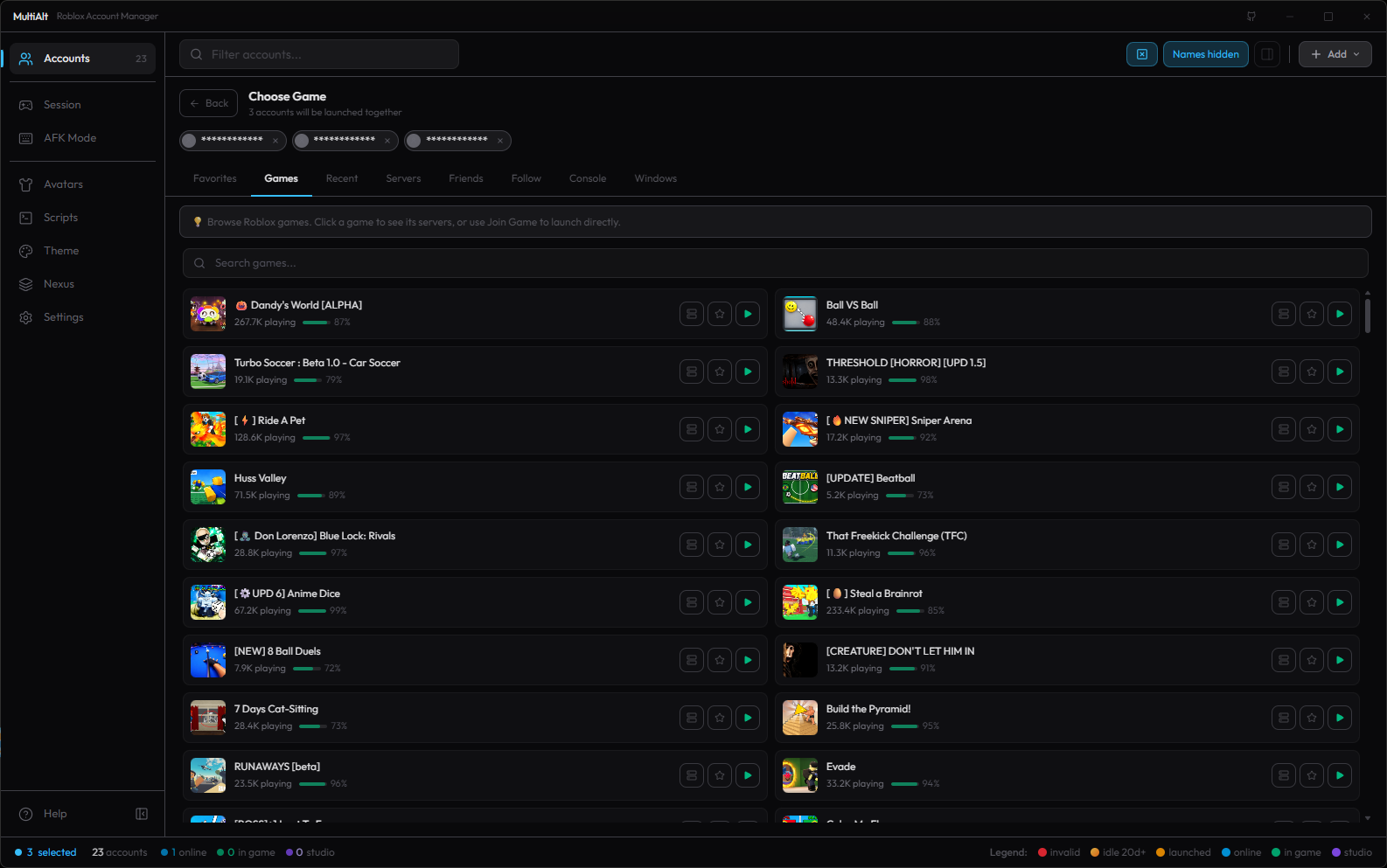
Real screenshots, with account names hidden (the app has a button for that). Click one to see it full size.
 Accounts |  Choose game |
 Session |  AFK clicks |
 Auto Rejoin |  Avatars |
 Theme |  Settings |
Support the project
MultiAlt is free, open source and maintained by one person. The easiest way to help: ⭐ star the repository, tell a friend who plays with alts, and report bugs or ideas in the issues or on Discord.
Ähnliche Projekte entdecken
Wird geladen…