Projekte

lllllllillllllillll/DweebUI has 1,061 GitHub stars and 59 forks. GitHot measured 0 stars in 24 hours, -1 in 7 days, and -2 in 15 days. Last checked 2026-11-25 07:30 UTC. Last push 2025-06-25.
What you can do
- A dynamically updating dashboard that displays server metrics along with container metrics and container controls.
- Multi-user support with permissions system.
- Container actions: Start, Stop, Pause, Restart, View Details, View Logs.
- Windows, Linux, and MacOS compatable.
Gemessener Sternzuwachs
- in 24h
- 0
- in 7 days
- -1
- in 15 days
- -2
- in 1 month
- Verlauf wird gesammelt
Nettoänderungen in überlappenden Zeiträumen, keine Tagessummen. Fehlende Messwerte bleiben leer. Sterne zeigen Interesse, nicht Qualität.
Über uns
DweebUI ist eine Weboberfläche zur Verwaltung von Containern. Sie lässt sich einfach einrichten und bietet ein dynamisch aktualisiertes Dashboard sowie ein Berechtigungssystem für mehrere Benutzer.
Web und AppsREADME.md
Original
DweebUI Beta v0.60 ( :fire: Experimental :fire: )
Free and Open-Source WebUI For Managing Your Containers.







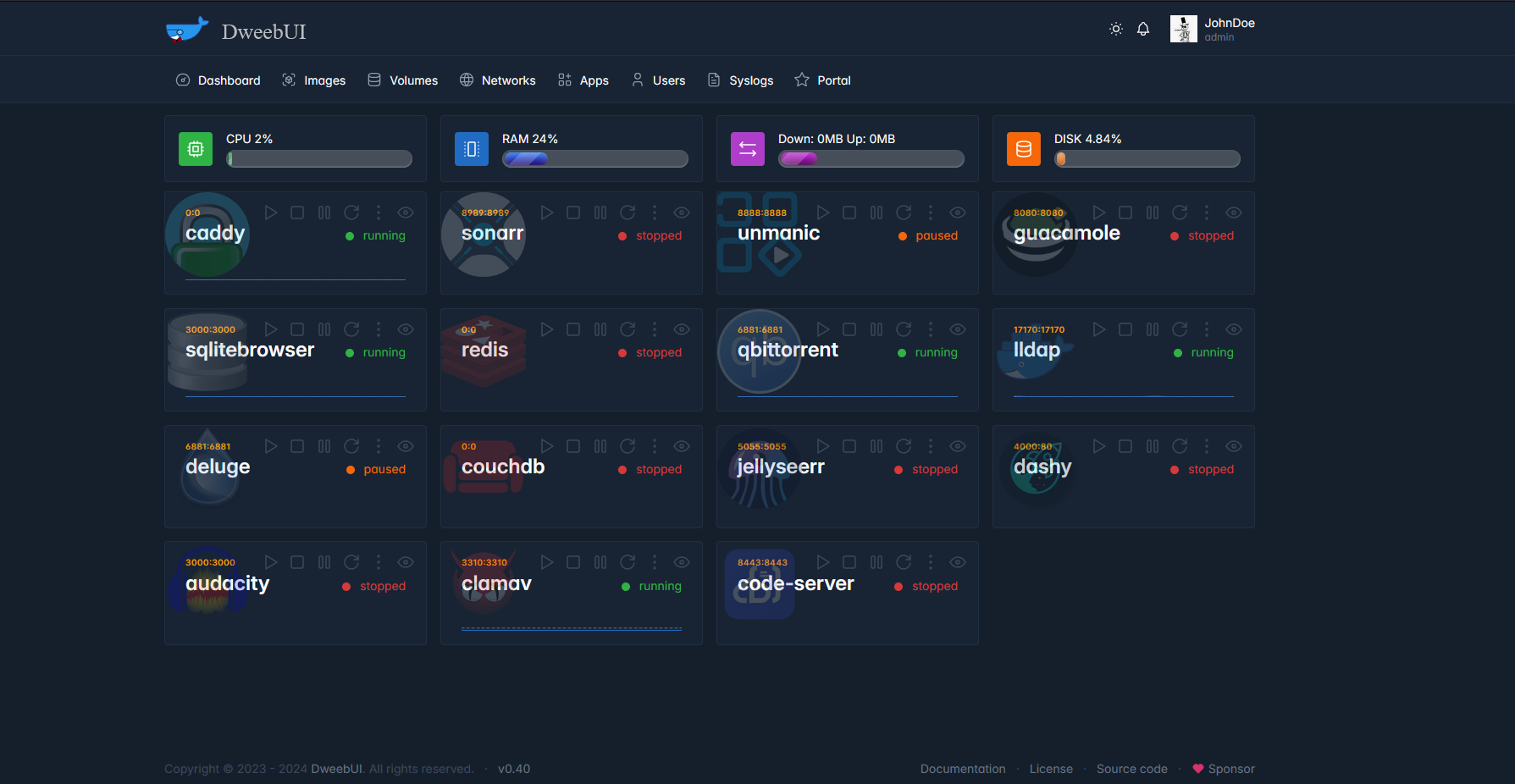
Features
- A dynamically updating dashboard that displays server metrics along with container metrics and container controls.
- Multi-user support with permissions system.
- Container actions: Start, Stop, Pause, Restart, View Details, View Logs.
- Windows, Linux, and MacOS compatable.
- Light/Dark Mode.
- Mobile Friendly.
- Manage your Docker networks, images, and volumes.
- Easy to install app templates.
- Docker Compose Support.
- Update containers (planned).
- Templates.json maintains compatability with Portainer, allowing you to use the template without needing to use DweebUI.
- Preset variables (planned).
- Themes (planned).
About
- I started this as a personal project to get more familiar with Javascript and Node.js, so there may be some rough edges and spaghetti code.
- I'm open to any contributions but you may want to wait until I reach v1.0 first.
- Please post issues and discussions so I know what bugs and features to focus on.
- DweebUI is a management interface and should not be directly exposed to the internet.
Setup
Docker Compose:
version: "3.9"
services:
  dweebui:
    container_name: dweebui
    image: lllllllillllllillll/dweebui
    environment:
      PORT: 8000
      SECRET: MrWiskers
    restart: unless-stopped
    ports:
      - 8000:8000
    volumes:
      - dweebui:/app
      # Docker socket
      - /var/run/docker.sock:/var/run/docker.sock
      # Podman socket
      #- /run/podman/podman.sock:/var/run/docker.sock

    networks:
      - dweebui_net

volumes:
  dweebui:

networks:
  dweebui_net:
    driver: bridge
Compose setup:
- Paste the above content into a file named
docker-compose.ymlthen place it in a folder nameddweebui. - Open a terminal in the
dweebuifolder, then enterdocker compose up -d. - You may need to use
docker-compose up -dor execute the command as root with eithersudo docker compose up -dorsudo docker-compose up -d.
Configuration:
PORT- Specifies which port the service binds to on startup. Default is8000.SECRET- A shared secret used by the registration page.
Credits
- Dockerode and dockerode-compose by Apocas: https://github.com/apocas/dockerode
- UI was built using HTML and CSS elements from https://tabler.io/
- Apps template based on Portainer template provided by Lissy93: https://github.com/Lissy93/portainer-templates
- Icons from Walkxcode with some renames and additions: https://github.com/walkxcode/dashboard-icons
Supporters
- MM (Patreon)
- PD (Buymeacoffee)
Ähnliche Projekte entdecken
Wird geladen…