
igor-alexandrov/tabletist
igor-alexandrov/tabletist has 204 GitHub stars and 17 forks. GitHot measured +5 stars in 24 hours. Last checked 2026-11-12 18:18 UTC. Last push 2026-11-05.
So werden diese Zahlen gemessen
Ein schneller nativer Datenbank-Client für PostgreSQL, MySQL und SQLite. Er ist mit Rust und egui geschrieben und läuft unter Linux, macOS und Windows.
Gemessener Sternzuwachs
- in 24h
- +5
- in 7 days
- Aktualisierung verzögert
- in 15 days
- Aktualisierung verzögert
- in 1 month
- Aktualisierung verzögert
Nettoänderungen in überlappenden Zeiträumen, keine Tagessummen. Fehlende Messwerte bleiben leer. Sterne zeigen Interesse, nicht Qualität.
README.md
Original

Tabletist




A fast, native database client for PostgreSQL, MySQL, SQLite and BigQuery. Written in Rust with egui; runs on Linux (Omarchy and Hyprland first), macOS and Windows. BigQuery connections sign in with a service-account key file or Google Cloud's default credentials, and open read-only (browse, filter and run SELECTs; BigQuery has no transactions to edit rows with).
The guide and the reference are on the website: igor.works/tabletist.
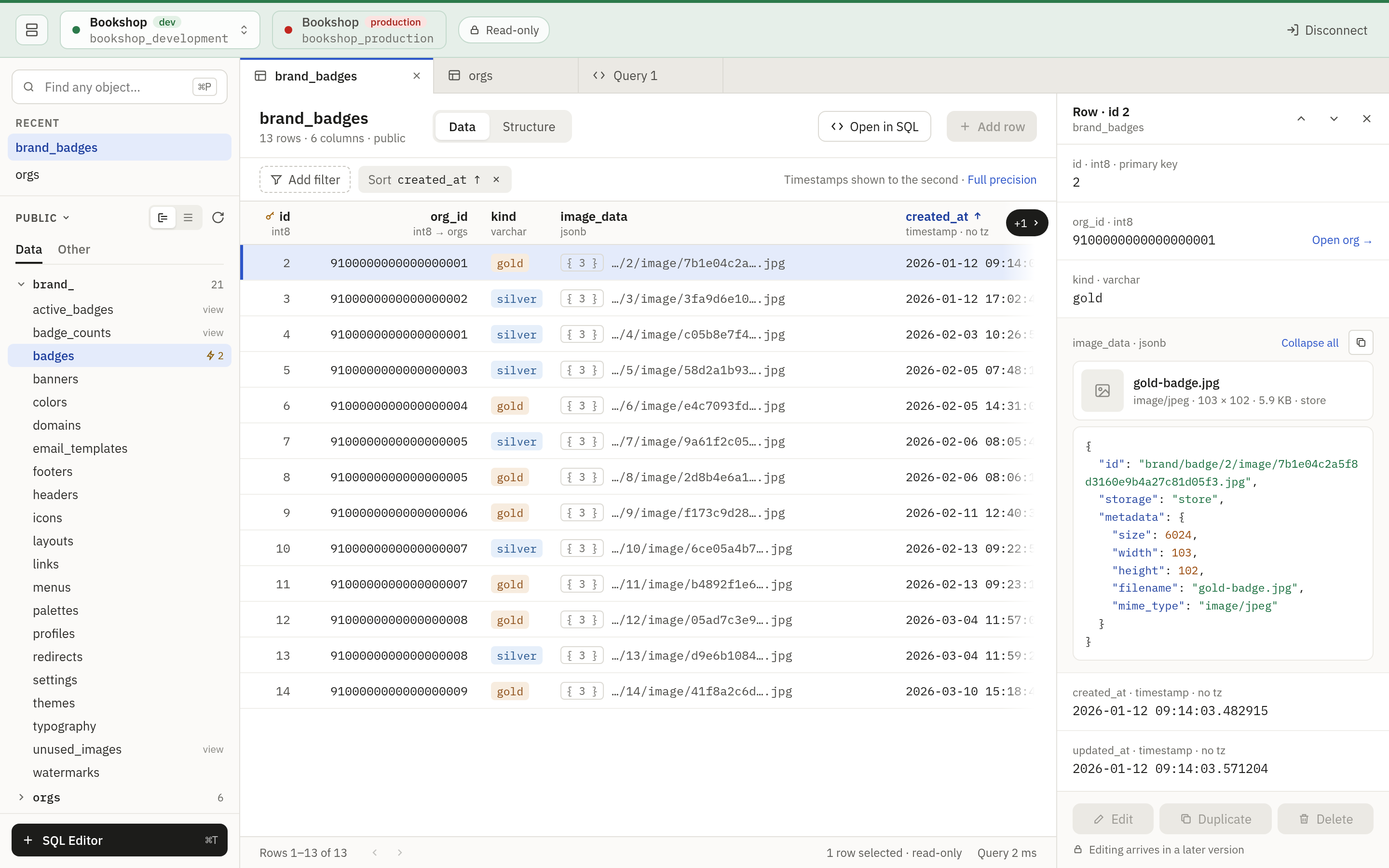
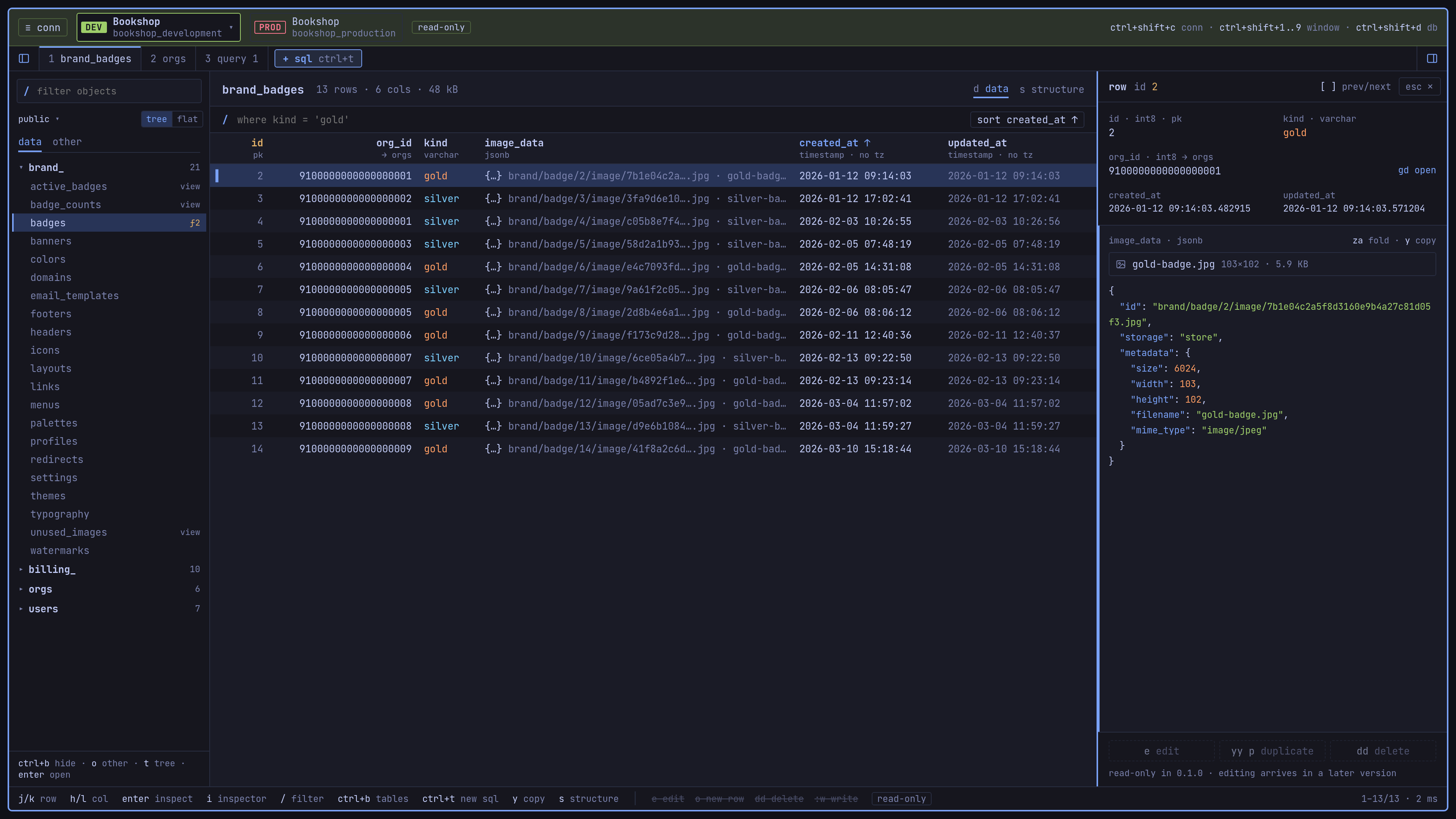
What it does
- Saved connections grouped in a picker, each tagged with its environment (dev, staging, production) and when it was last used. Open more than one and each is a chip in the window's header: click one to switch.
- Direct connections, TLS (libpq's
sslmodevalues, withallowread asprefer;verify-caneeds a CA file, and MySQL has noverify-cayet), and SSH tunnels (password, key file or agent) with host keys trusted on first use. The agent is the one~/.ssh/confignames for the host (IdentityAgent, as for 1Password), elseSSH_AUTH_SOCK. - Passwords live in the system keyring, or are asked for once per connection tab (reconnecting in that tab reuses them).
- A connection opens read-only when its "Open read-only" box says so, which is the default for production. A writable one opens a read-write session, in which browsing, a raw WHERE and a SQL editor switched to Read-only still only read.
- On a writable connection a table's values are edited in its grid: changes
stay pending until Save writes them in one transaction, which never
overwrites a row someone else changed: a save that finds one writes
nothing and asks about each such row, with what was loaded, what the
server holds now and yours side by side (keep mine, use the server's
values, or overwrite). Before saving, Review SQL shows the statements
that will run (Cmd/Ctrl+Shift+D, or
:diffon Omarchy) and copies them, and a save to production asks first, with them on screen. - A sidebar of recent objects and one schema's tables and views, folded into
prefix groups (
book_) or listed flat; each table opens with a data grid (keys, foreign keys, value tags, JSON at a glance), a row panel showing every field in full with a jump along foreign keys, where a value of a writable table is edited in place (a click on it, or Cmd/Ctrl+I, Enter on Omarchy, to reach the row's fields, and Enter or typing to edit one), and a Structure view (columns, indexes, foreign keys). - Server-side sorting and paging, a filter bar with a raw WHERE option, exact
counts on demand, and cancel for any running query. MySQL sessions run in
utf8mb4, with
ANSI_QUOTES, the combination modes that imply it andNO_BACKSLASH_ESCAPESturned off: in a raw WHERE"..."is a string and names take backticks. - A SQL editor per connection (Cmd/Ctrl+T): run the statement at the cursor
(Cmd/Ctrl+Return) or the whole script, with a row limit and a timeout, and
read a result row in full in the row panel.
On a read-only connection, and on production, every run happens in a
read-only transaction that is rolled back, and statements that would
leave it are refused. On a writable connection that is not production's
a tab opens in Read-write: a run that changes data is one transaction,
committed when every statement succeeded and rolled back on the first
error, cancel or timeout, and the Messages say which. A run of reads is
read-only there too, and the toolbar's switch (or Cmd/Ctrl+Shift+M;
:roand:rwon Omarchy) sets the tab to Read-only and back. Format (Cmd/Ctrl+Shift+F;=on Omarchy) lays queries out in river style and uppercases reserved words, in the selection's statements or the whole script. Keywords, schemas, tables, views and the columns of a statement's tables are completed while typing (Ctrl+Space asks for the list anywhere). - Quick open (Cmd/Ctrl+P on macOS and Windows) and a full keyboard map:
press
?in the app. - Looks native on each platform: a macOS look in IBM Plex, and on Linux the Omarchy look (square, keyboard first, vim keys, the desktop's monospace font throughout). It follows the Omarchy theme live on Omarchy, and the system light/dark setting elsewhere.
Install
- Arch Linux / Omarchy: the AUR packages (
tabletist-binandtabletist) are not published yet. Until they are, use the release AppImage or.tar.gz(see Other Linux below). - macOS: download
tabletist-v<version>-macos-universal.dmgfrom the releases and drag Tabletist to Applications. - Windows: run
tabletist-v<version>-x86_64-pc-windows-msvc-setup.exe(or theaarch64one on ARM). No administrator rights needed. - Other Linux: to try it, download
tabletist-<version>-x86_64.AppImage(or theaarch64one), make it executable and run it. It adds nothing to the app launcher. To install it with a launcher entry, take the release.tar.gz, which holds the binary, a.desktopfile and the icon, and follow the steps on the Download page.
The Linux release binaries are built on Ubuntu 24.04 and need glibc 2.39 or newer (Ubuntu 24.04, Debian 13, Fedora 40 or later). On an older system, build from source.
Build from source
Requires the Rust toolchain pinned in rust-toolchain.toml (rustup installs
it on the first build). On Linux you also need the Wayland, xkbcommon and GL
development headers.
cargo build --release
./target/release/tabletist           # or: --demo for a sample database
Omarchy
On Omarchy the app follows the current theme and recolors when you switch
themes. contrib/omarchy/tabletist.json.tpl maps an Omarchy theme onto
Tabletist's palette.
Development
See AGENTS.md for the test suites (including PostgreSQL, MySQL
and SSH integration tests against compose.yaml) and the release process.
License
MIT, see LICENSE.
Ähnliche Projekte entdecken
Asabeneh/30-Days-Of-Python
Die Programmier-Challenge 30 Days of Python ist eine Schritt-für-Schritt-Anleitung, um die Programmiersprache Python in 30 Tagen zu lernen. Diese Challenge kann mehr als 100 Tage dauern. Gehe in deinem eigenen Tempo vor. Diese Videos können ebenfalls helfen: https://www.youtube.com/channel/UC7PNRuno1rzYPb1xLa4yktw
78,673 Sternegrafana/grafana
Offene und kombinierbare Plattform für Observability und Datenvisualisierung. Visualisiert Metriken, Logs und Traces aus mehreren Quellen wie Prometheus, Loki, Elasticsearch, InfluxDB, Postgres und vielen weiteren.
77,876 Sterneredis/redis
Für Entwickler, die echtzeitfähige, datengesteuerte Anwendungen erstellen, ist Redis der bevorzugte, schnellste und funktionsreichste Cache, Datenstrukturserver und die entsprechende Abfrageengine für Dokumente und Vektoren.
77,472 Sterneapache/superset
Apache Superset ist eine Plattform für Datenvisualisierung und Datenexploration.
75,509 Sterne