
hyyyyyyz/dramai
hyyyyyyz/dramai has 42 GitHub stars and 22 forks. Star changes are not measured yet. Last checked 2026-11-12 22:06 UTC. Last push 2026-11-12.
So werden diese Zahlen gemessen
Open-source AI short-drama studio that runs on your own computer: novel or script → episodes, scenes, shots → images and video from the AI providers you choose → a finished cut with narration and subtitles. Web UI + desktop app.
Gemessener Sternzuwachs
- in 24h
- Aktualisierung verzögert
- in 7 days
- Aktualisierung verzögert
- in 15 days
- Aktualisierung verzögert
- in 1 month
- Aktualisierung verzögert
Nettoänderungen in überlappenden Zeiträumen, keine Tagessummen. Fehlende Messwerte bleiben leer. Sterne zeigen Interesse, nicht Qualität.
README.md
Original


dramai is an open-source AI short-drama studio that runs on your own computer. Give it a novel or a script and it plans episodes, scenes and shots, generates images and video through the AI providers you choose, and composes a finished cut with narration and subtitles.
It is for people who make serialised short dramas and want to keep control of the work. Projects are ordinary folders on your disk, API keys stay on your machine, and nothing passes through a service we run.
[!IMPORTANT] This is
0.5.0-beta.1, a beta. It has been verified with automated tests and built-in mock providers only, and has not yet been run against a real AI provider. The desktop app has only been run on macOS. No release is published yet: there are no installers, npm package or Docker image to download. See Status.
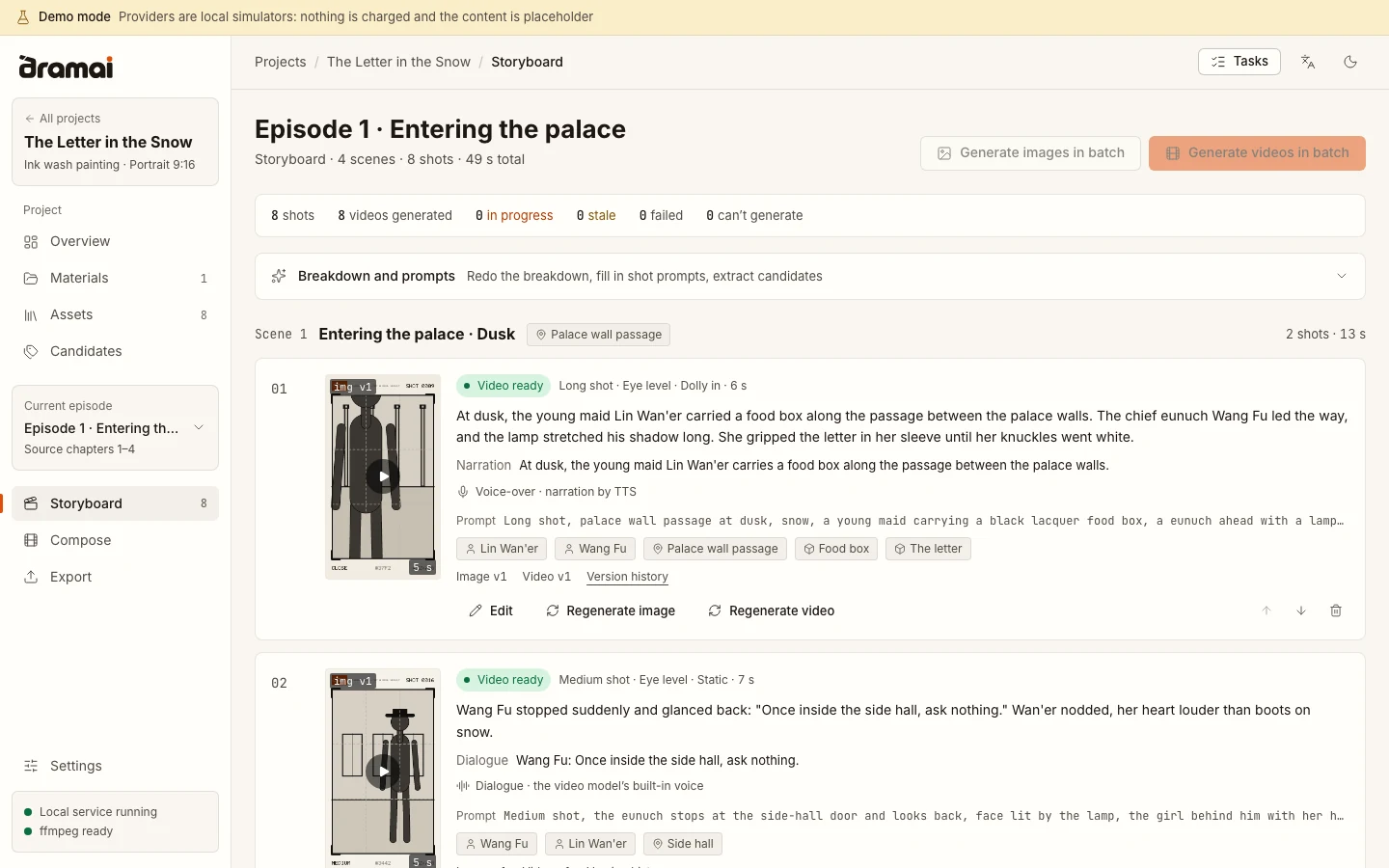
The storyboard of a small demo project. The pictures are placeholder sketches made by demo mode, not generated art.
Try it in a minute, with no API key
Demo mode runs the whole studio against simulated providers on your machine: no account, no key, no cost. What it generates is placeholder content: storyboard-style sketches of a figure in a frame, marked DEMO, and short clips built from them. It shows how the workflow behaves, not what real models produce.
You need Node.js 22.22.2 or newer, pnpm 9 and ffmpeg on your PATH.
git clone https://github.com/hyyyyyyz/dramai.git
cd dramai
pnpm install
pnpm build
pnpm demo
Open http://127.0.0.1:8787. Create a project, upload a short story, plan episodes, break them into shots, confirm the characters and locations, then generate images and video and compose the cut. The simulated language model only understands Chinese text, so use a Chinese story. Demo data lives in ~/.dramai-demo, separate from your real data; add --fresh to start over.
What is different
- Local, with your keys. A server on
127.0.0.1does all the work. Projects are folders of ordinary files plus a SQLite database. Provider requests are made by that server, so there is no CORS limit and no relay in between. - Long texts and serials. A project holds episodes, episodes hold scenes, scenes hold shots. Long texts are split into episodes by chapter.
- A reusable library. Characters, locations, props and costumes are assets that shots refer to. Each asset has one reference sheet that every shot using it is generated from. The visual style is chosen once, when the project is created.
- Checks before paid generation. Shots that refer to an unregistered asset, or one without a reference image, are blocked. A batch runs completely or not at all, a shot has at most one video task in flight, and a cost estimate from the model's price table is shown before you confirm.
- A task queue that survives restarts. Closing the browser does not stop work. After a restart, a video task that has an upstream task id resumes polling. One without it is marked "submission unconfirmed" and is never resubmitted automatically. Cancelling only affects tasks that are still queued.
- Versions kept. Regenerating adds a version and does not overwrite the previous one. When something upstream changes, what depends on it is marked out of date, and nothing is regenerated on its own.
- Native ffmpeg composition. The cut is rendered with the ffmpeg installed on your machine, in 9:16, 16:9 or 1:1, with narration voice, soft or burned-in subtitles, SRT and VTT, and an asset package for editing elsewhere.
The workspace speaks English, Simplified Chinese and Traditional Chinese, in a light and a dark theme.
How a project moves
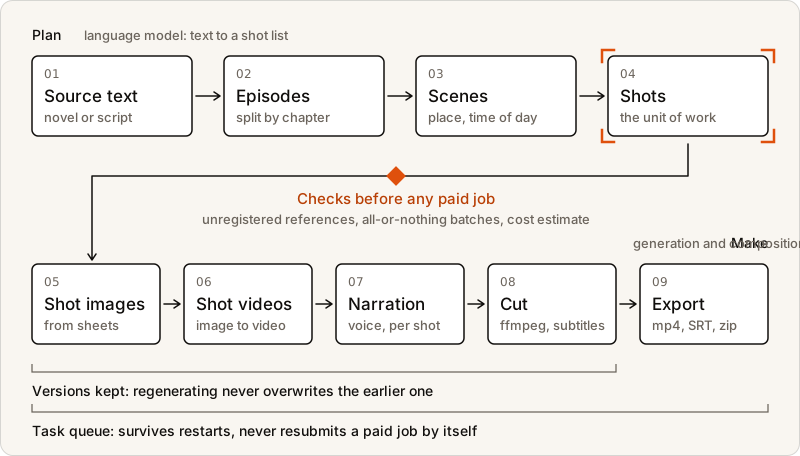
In words: source text → episodes → scenes → shots → shot images → shot videos → narration → composed cut with subtitles → export.
More screens: project overview, asset library, checks before generating, compose timeline, task panel
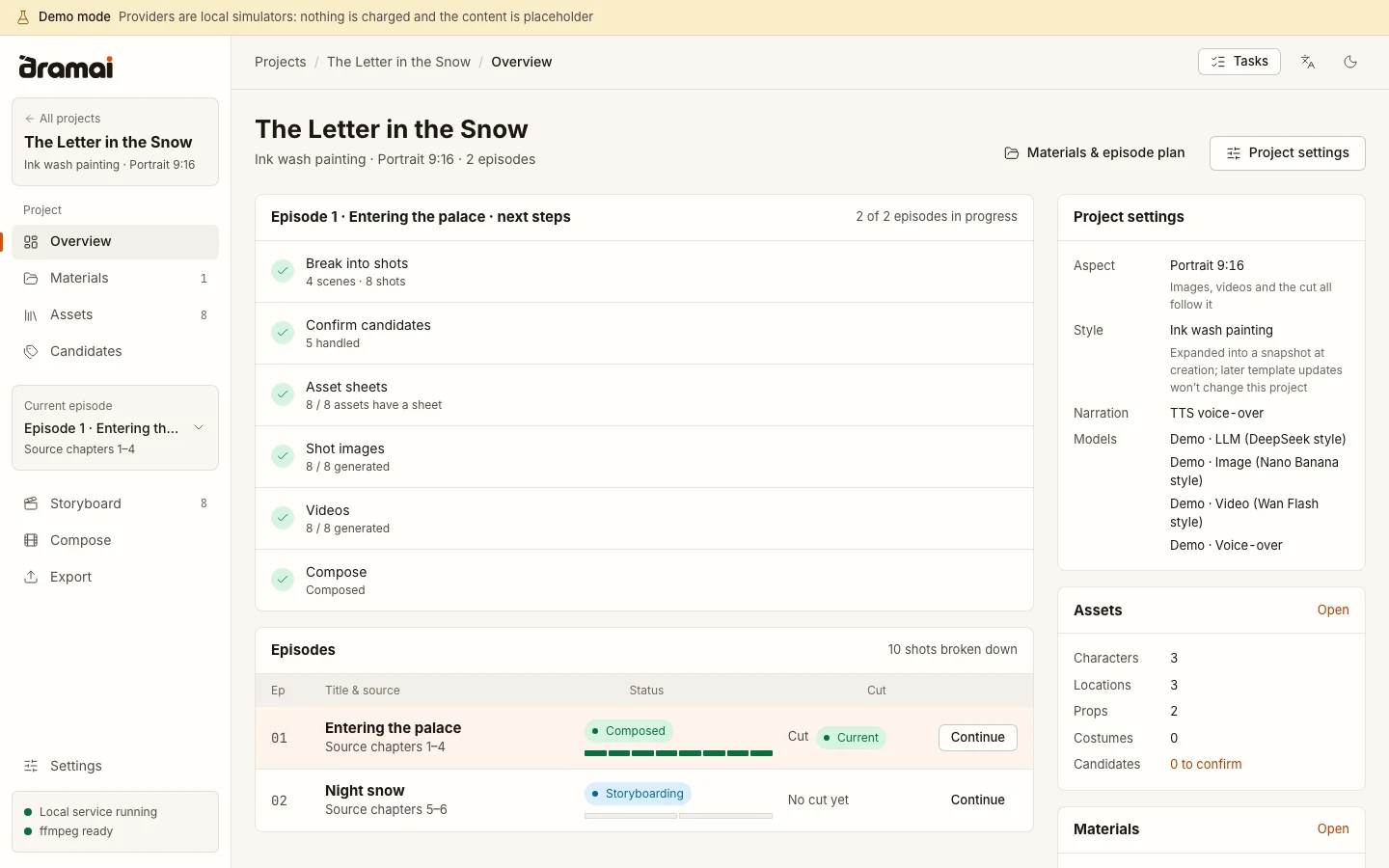
Project overview. The next steps for the current episode, and the state of every episode.
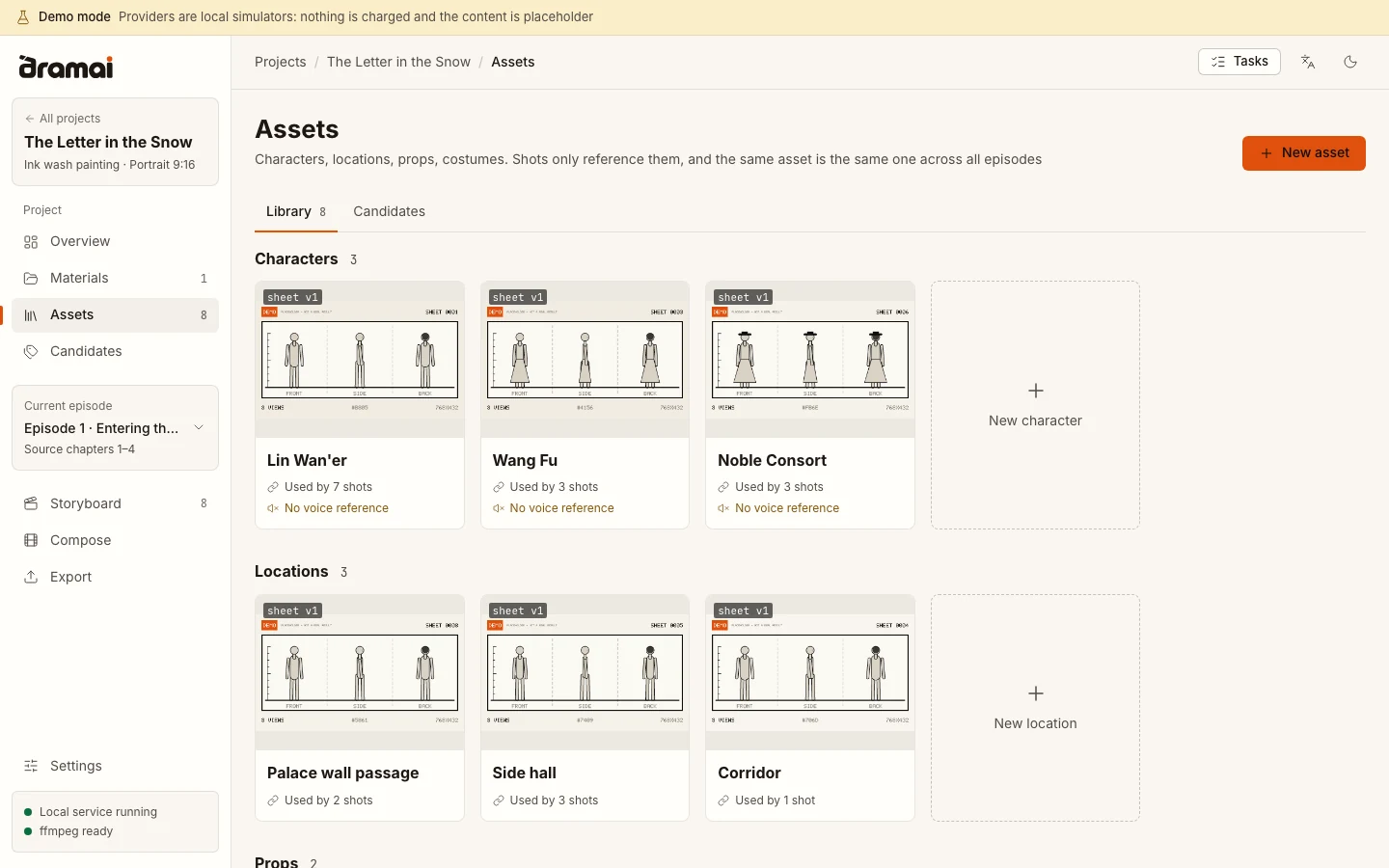
Asset library. Characters, locations, props and costumes. The three-view sheets shown here are placeholder sketches from demo mode.
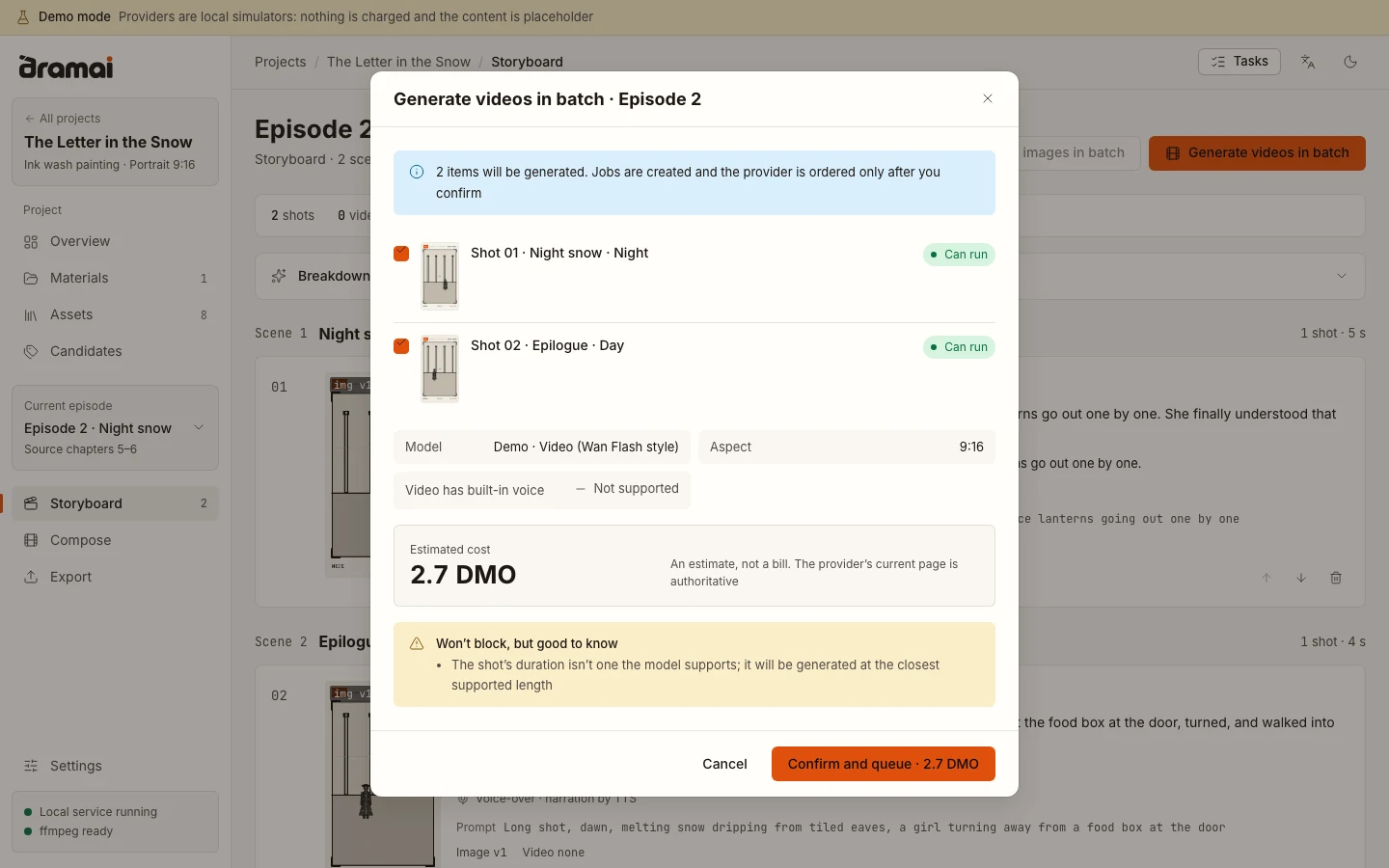
Checks before generating. Nothing is ordered from a provider until you confirm. The amount is in the demo's fictional currency.
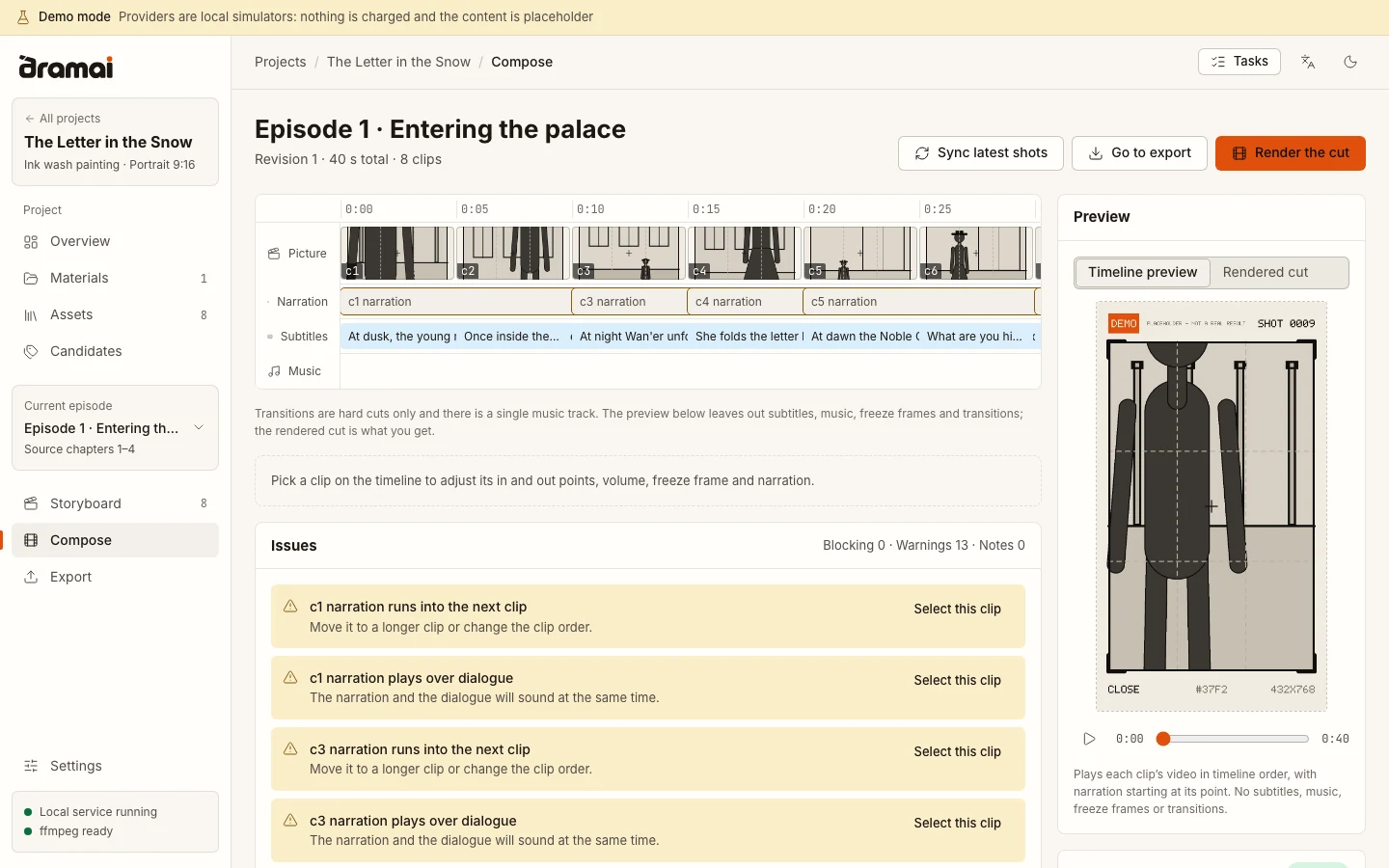
Compose. A timeline of picture, narration, subtitles and music, with a list of issues that would block rendering.
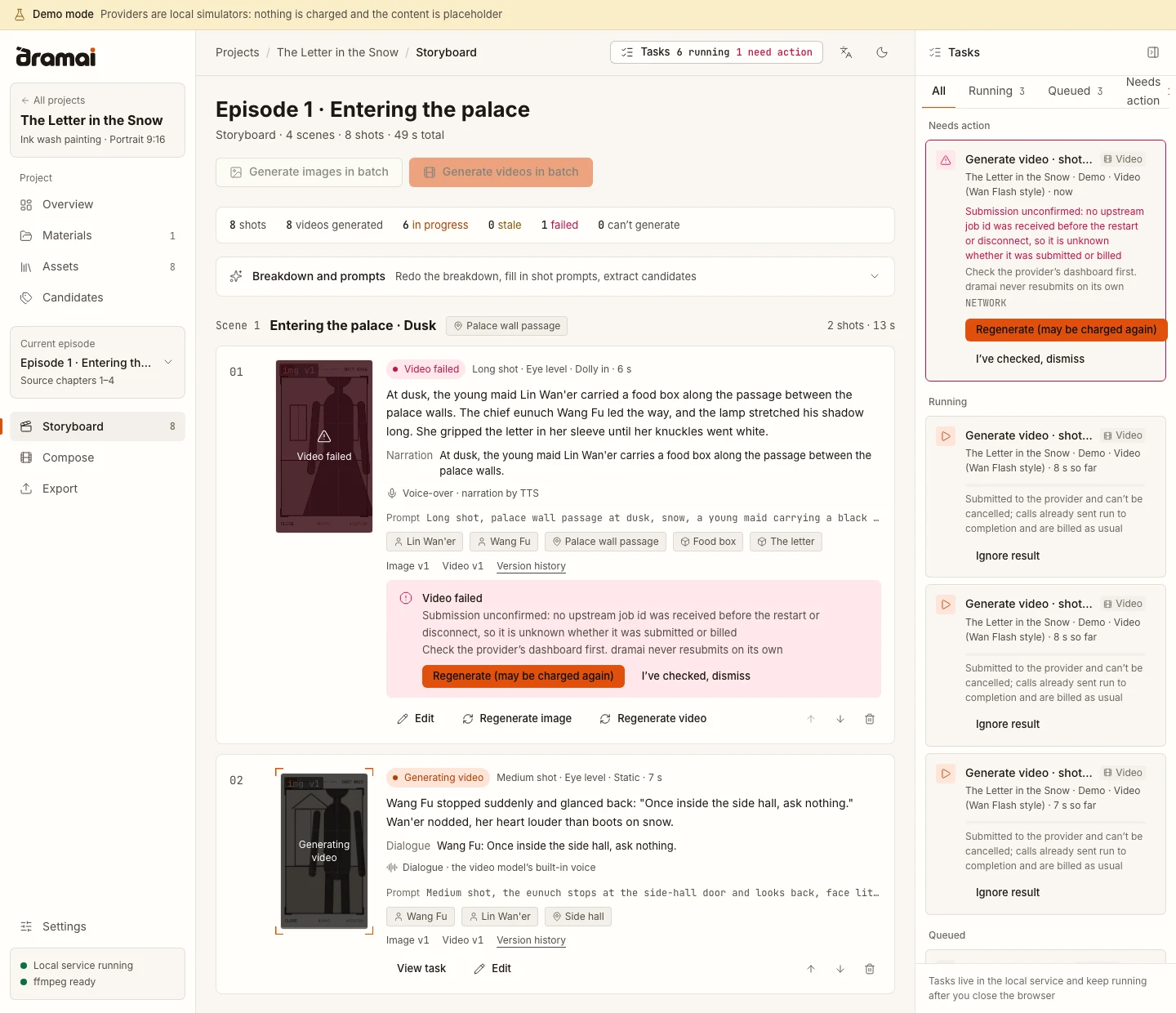
Task panel. Tasks that need action, running tasks and the queue, with the storyboard updating beside it. The task at the top was cut off before the provider confirmed it: dramai says so, asks you to check the provider's dashboard, and never resubmits it on its own. Tasks already submitted to a provider cannot be cancelled and are billed as usual.
Run it
- WebUI:
pnpm webui. Starts the server, serves the workspace and opens your browser. - Desktop, run from source:
pnpm desktop:dev. An Electron window around the same server and workspace. - Desktop, build and install on your machine:
pnpm desktop:install. Builds the app locally and installs it for the current user. No certificate and no download warnings, because the app is made on your machine.pnpm desktop:uninstallremoves it and keeps your data. - Desktop, installer: no installer yet. Installers for macOS, Windows and Linux are built by the release workflow and will be attached to a GitHub release once the first beta is published. They are unsigned.
Everything starts from a checkout, with Node.js 22.22.2+, pnpm 9 and ffmpeg:
git clone https://github.com/hyyyyyyz/dramai.git
cd dramai
pnpm install
pnpm build          # needed for the WebUI
pnpm webui          # or: pnpm desktop:install
ffmpeg is not bundled in any form. Install it with brew install ffmpeg (macOS), winget install Gyan.FFmpeg (Windows) or your package manager (apt install ffmpeg). Burning subtitles into the picture needs a build with libass; Settings → About shows what your ffmpeg can do.
WebUI options and where data lives
pnpm webui --port 9000 --data-dir ~/dramai-data --no-open
The default address is http://127.0.0.1:8787 and the default data directory is ~/.dramai. The server only listens on 127.0.0.1; to reach it from another device you must pass --host together with an access token. In the WebUI, API keys are kept in secrets.json in the data directory, readable only by your operating system user and not encrypted. See apps/webui.
Desktop app details
The desktop app keeps your data in your user folder (for example ~/Library/Application Support/Dramai/data on macOS) and stores API keys with the operating system's key store where one exists. Installers are unsigned, so macOS and Windows will warn the first time you open one; the steps are in apps/desktop, along with the build, install and uninstall details.
Status
Works today
- The whole workflow runs end to end in demo mode: upload a text, plan episodes, break down shots, confirm characters and locations, generate images and video, compose, export.
- Browser tests (Playwright) cover that path, a failed task being resumed, the English interface and keyboard-only use.
- The desktop app has been run on macOS.
Not verified
- Any real AI provider. The four provider presets carry model ids and prices last checked in May 2026.
- The desktop app on Windows and Linux. CI builds it and runs an install self-check on both, but nobody has used it on a real Linux or Windows desktop yet.
- CI runs on Linux, macOS and Windows; it was not yet fully green when this was written.
- API keys are not encrypted in the WebUI.
Not released
- Installers, an npm package, a Docker image and a landing page. GitHub Pages no longer serves a workspace.
Known limits: transitions are hard cuts, there is a single music track, and the in-browser preview leaves out subtitles, music and transitions. Setting up providers (language model, image, video and voice) will be documented separately; until then, Settings → Providers in the app lists the presets and can test a connection. The full list is in the changelog.
Coming from v0.4
v0.4 was a browser-only app and kept its data inside the browser, so the new version cannot see it. Export a JSON backup from the old app while you still can, then import it in Settings → Data & backup. CHANGELOG.md has the upgrade steps. The last browser-only version is v0.4.1.
Documentation
- CHANGELOG.md: What
0.5.0-beta.1contains, incompatible changes and upgrade notes - apps/webui · apps/desktop: Starting the server, and the three desktop forms
- packages/mock-providers: Demo mode and the simulated providers
- packages/server · packages/api · packages/core · packages/workspace: The local server, its typed API, the engine and the workspace
- docs/VERSIONING.md · docs/RELEASING.md · docs/CI.md: Version numbers, releasing, continuous integration
The architecture, provider and deployment guides in docs/ still describe v0.4 and are being rewritten.
Contributing
Issues and pull requests are welcome; see CONTRIBUTING.md. Commits follow Conventional Commits, and pnpm typecheck, pnpm lint, pnpm test and pnpm format:check should pass before you open a pull request.
Versioning
One version number covers every package. While the major version is 0, new features and incompatible changes raise the minor number and fixes raise the patch number; incompatible changes are always called out in the changelog. Pre-release versions such as 0.5.0-beta.1 are marked as pre-releases on GitHub. The rules are in docs/VERSIONING.md.
License
Apache License 2.0 © 2026 hyyyyyyz and dramai contributors.
Acknowledgements
dramai draws on two open-source projects for ideas: xhongc/ai_story for the pipeline and the design of the AI client layer, and freestylefly/director_ai for the character-consistency approach and the documented video workflow. dramai is an independent TypeScript implementation and contains no source code from either.
Ähnliche Projekte entdecken
freeCodeCamp/freeCodeCamp
Die Open-Source-Codebasis und das Curriculum von freeCodeCamp.org. Lerne Mathematik, Programmierung und Informatik kostenlos.
459,072 Sternedonnemartin/system-design-primer
Lerne, Systeme im großen Maßstab zu entwerfen, und bereite dich auf das Systemdesign-Interview vor. Enthält Anki-Karteikarten.
377,747 Sternereact/react
Die Bibliothek für Web- und native Benutzeroberflächen.
252,569 Sternevuejs/vue
Dies ist das Repository für Vue 2. Das Repository für Vue 3 findest du unter https://github.com/vuejs/core
212,526 Sterne