
hollance/MobileNet-CoreML
hollance/MobileNet-CoreML has 708 GitHub stars and 100 forks. GitHot measured 0 stars in 24 hours. Last checked 2026-11-15 12:12 UTC. Last push 2018-09-22.
Gemessener Sternzuwachs
- in 24h
- 0
- in 7 days
- Verlauf wird gesammelt
- in 15 days
- Verlauf wird gesammelt
- in 1 month
- Verlauf wird gesammelt
Nettoänderungen in überlappenden Zeiträumen, keine Tagessummen. Fehlende Messwerte bleiben leer. Sterne zeigen Interesse, nicht Qualität.
Über uns
The MobileNet neural network using Apple's new CoreML framework
Maschinelles LernenREADME.md
OriginalMobileNet with CoreML
This is the MobileNet neural network architecture from the paper MobileNets: Efficient Convolutional Neural Networks for Mobile Vision Applications implemented using Apple's shiny new CoreML framework.
This uses the pretrained weights from shicai/MobileNet-Caffe.
There are two demo apps included:
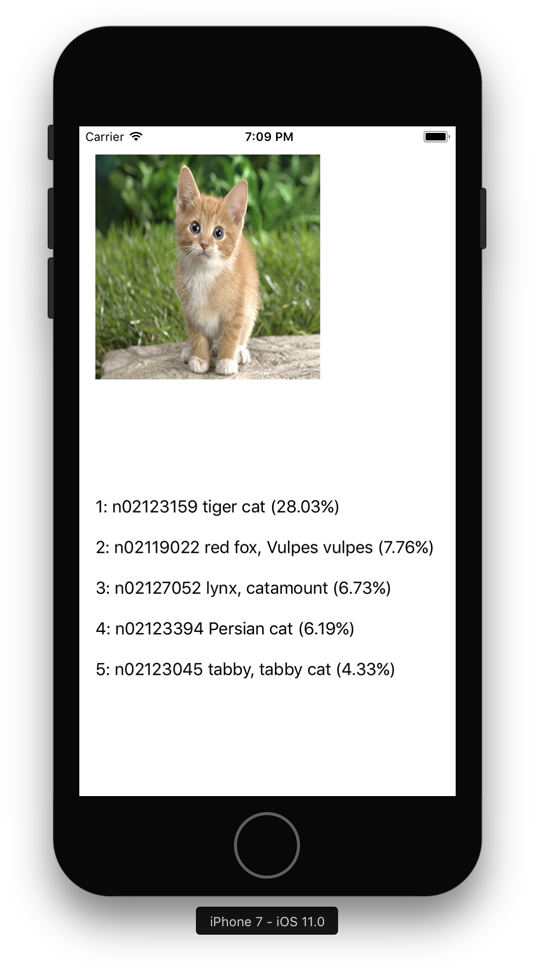
Cat Demo. Shows the prediction for a cat picture. Open the project in Xcode 9 and run it on a device with iOS 11 or on the simulator.
Camera Demo. Runs from a live video feed and performs a prediction as often as it can manage. (You'll need to run this app on a device, it won't work in the simulator.)
Note: Also check out Forge, my neural net library for iOS 10 that comes with a version of MobileNet implemented in Metal.
Converting the weights
The repo already includes a fully-baked MobileNet.mlmodel, so you don't have to follow the steps in this section. However, in case you're curious, here's how I converted the original Caffe model into this .mlmodel file:
- Download the caffemodel file from shicai/MobileNet-Caffe into the top-level folder for this project.
Note: You don't have to download mobilenet_deploy.prototxt. There's already one included in this repo. (I added a Softmax layer at the end, which is missing from the original.)
- From a Terminal, do the following:
$ virtualenv -p /usr/bin/python2.7 env
$ source env/bin/activate
$ pip install tensorflow
$ pip install keras==1.2.2
$ pip install coremltools
It's important that you set up the virtual environment using /usr/bin/python2.7. If you use another version of Python, the conversion script will crash with Fatal Python error: PyThreadState_Get: no current thread. You also need to use Keras 1.2.2 and not the newer 2.0.
- Run the coreml.py script to do the conversion:
$ python coreml.py
This creates the MobileNet.mlmodel file.
- Clean up by deactivating the virtualenv:
$ deactivate
Done!