
guoyongchang/worktree-manager
guoyongchang/worktree-manager has 64 GitHub stars and 7 forks. Star changes are not measured yet. Last checked 2026-11-14 00:52 UTC. Last push 2026-10-12.
Gemessener Sternzuwachs
- in 24h
- Verlauf wird gesammelt
- in 7 days
- Verlauf wird gesammelt
- in 15 days
- Verlauf wird gesammelt
- in 1 month
- Verlauf wird gesammelt
Nettoänderungen in überlappenden Zeiträumen, keine Tagessummen. Fehlende Messwerte bleiben leer. Sterne zeigen Interesse, nicht Qualität.
Über uns
A simple GUI to manage Git Worktrees. Visual Git Worktree manager for parallel branch development. Multi-repo workspaces, smart symlinks, built-in terminal, browser remote access, and AI-ready MCP integration. Built with Tauri 2 + React + Rust.
EntwicklerwerkzeugeREADME.md
Original
Worktree Manager
The missing GUI for Git Worktrees.
Work on multiple branches simultaneously, across multiple repos, without stash, clone, or context-switching pain.




Quick Start • Features • Screenshots • FAQ • 中文
Why Worktree Manager?
You're deep in a feature branch. Fifteen files changed. Dev server running. Then Slack pings: production is down.
Without Worktree Manager — git stash → switch branch → npm install → wait for rebuild → fix → switch back → git stash pop → pray for no conflicts → restart dev server. 15 minutes minimum.
With Worktree Manager — Click "New Worktree", type hotfix-payment, done. Your feature branch keeps running. Dependencies are shared via symlink — instant setup. Fix, push, archive. 30 seconds.
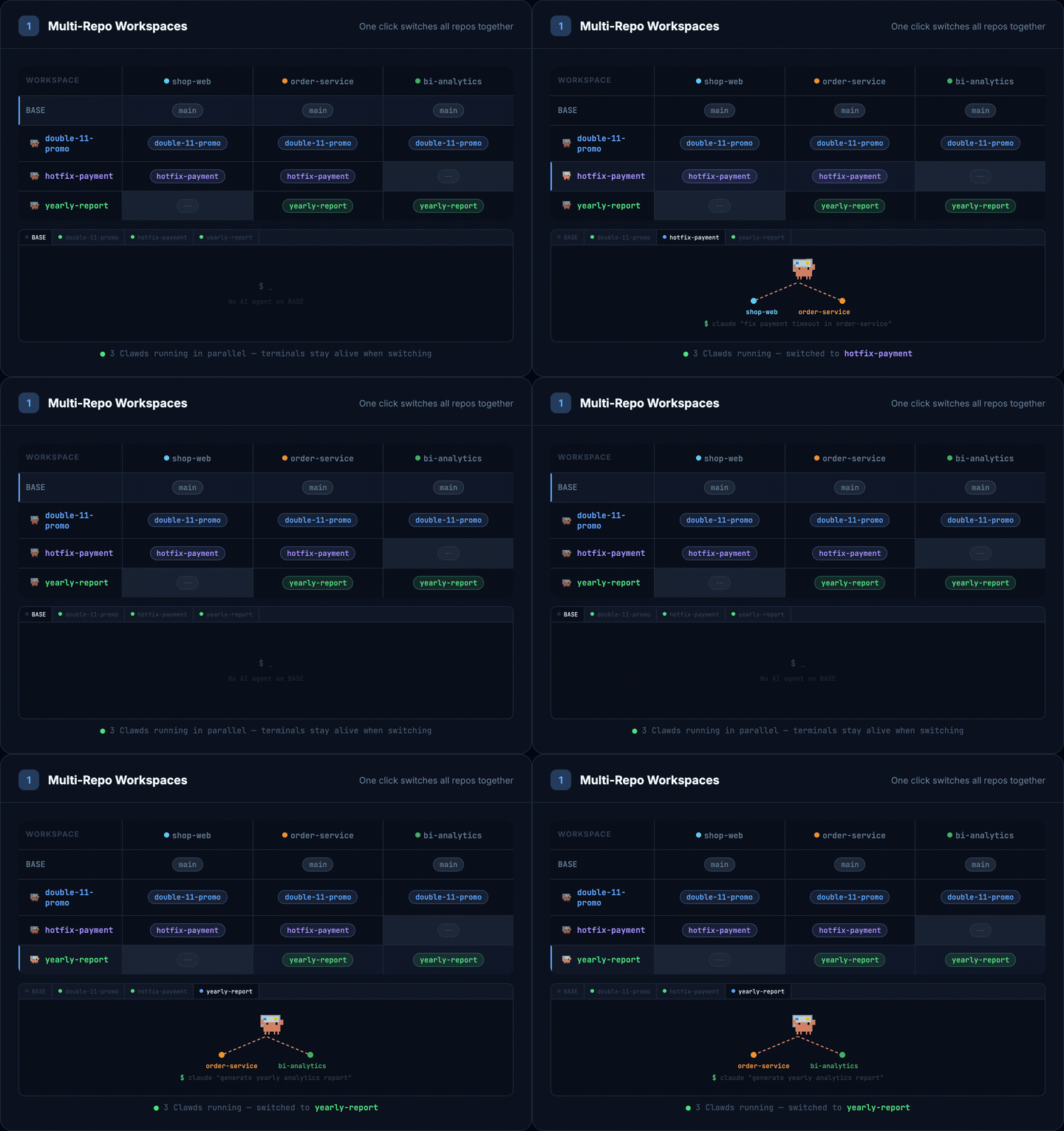
Multi-Repo Workspaces & Parallel AI Development
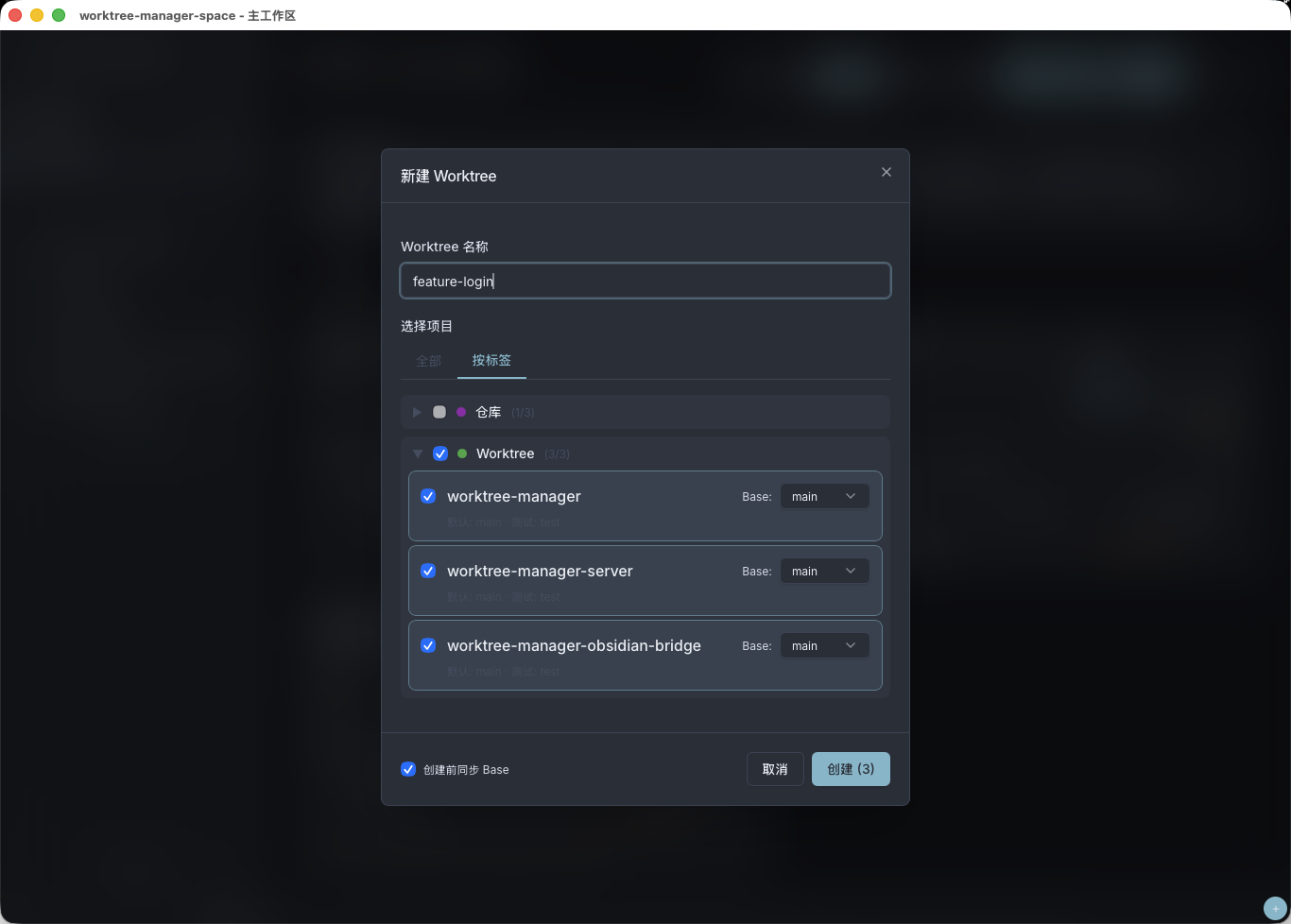
Group related repos into a Workspace. Creating a Worktree creates a git worktree across all linked projects at once. Each Worktree gets its own terminal — run Claude Code, Codex, or Cursor in parallel across different branches without conflicts.
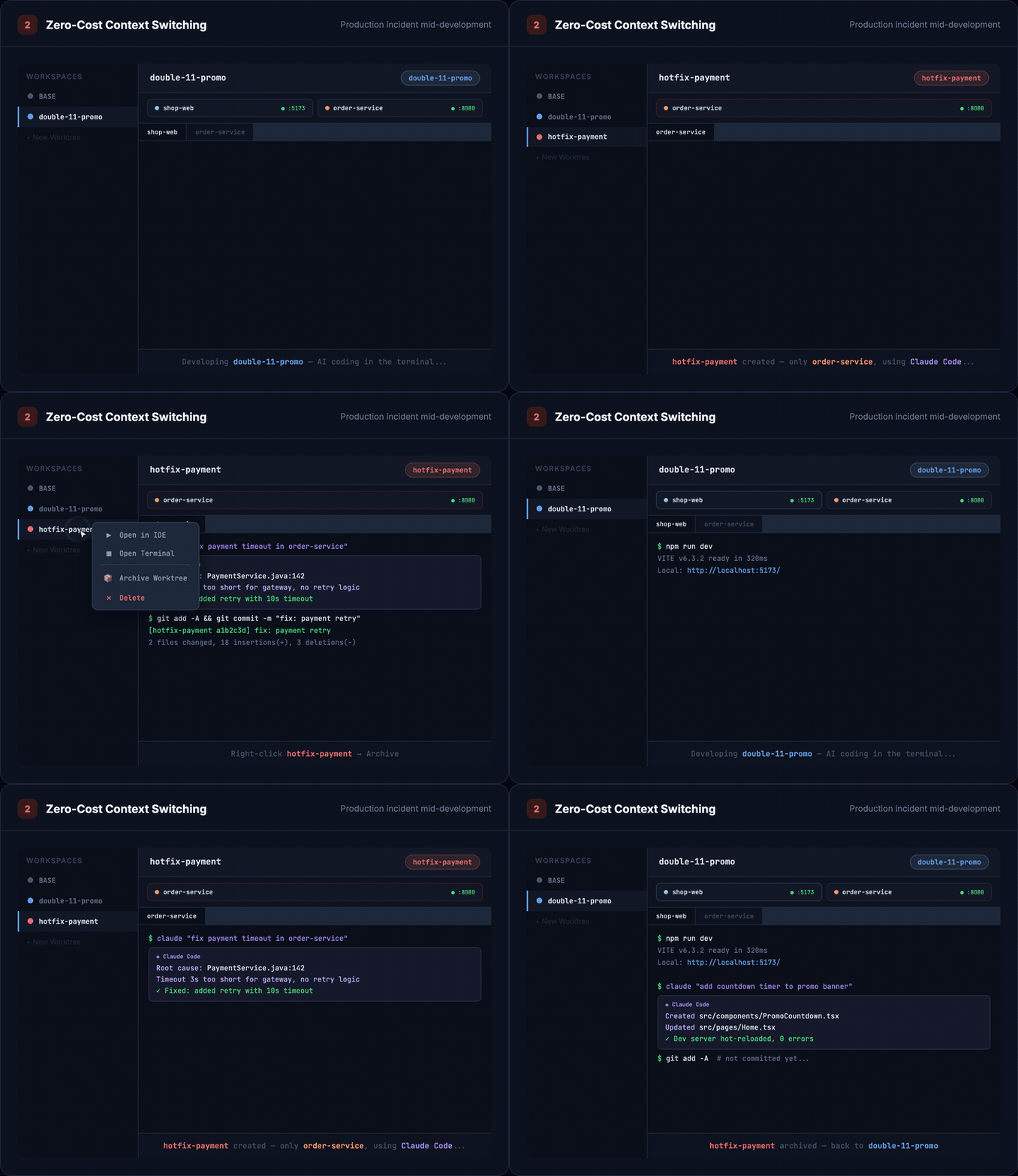
Zero-Cost Context Switching
P0 alert mid-development? Create a hotfix-payment Worktree → AI-assisted fix → merge to main → archive → switch back. Uncommitted code, terminal output, dev servers — everything stays intact.
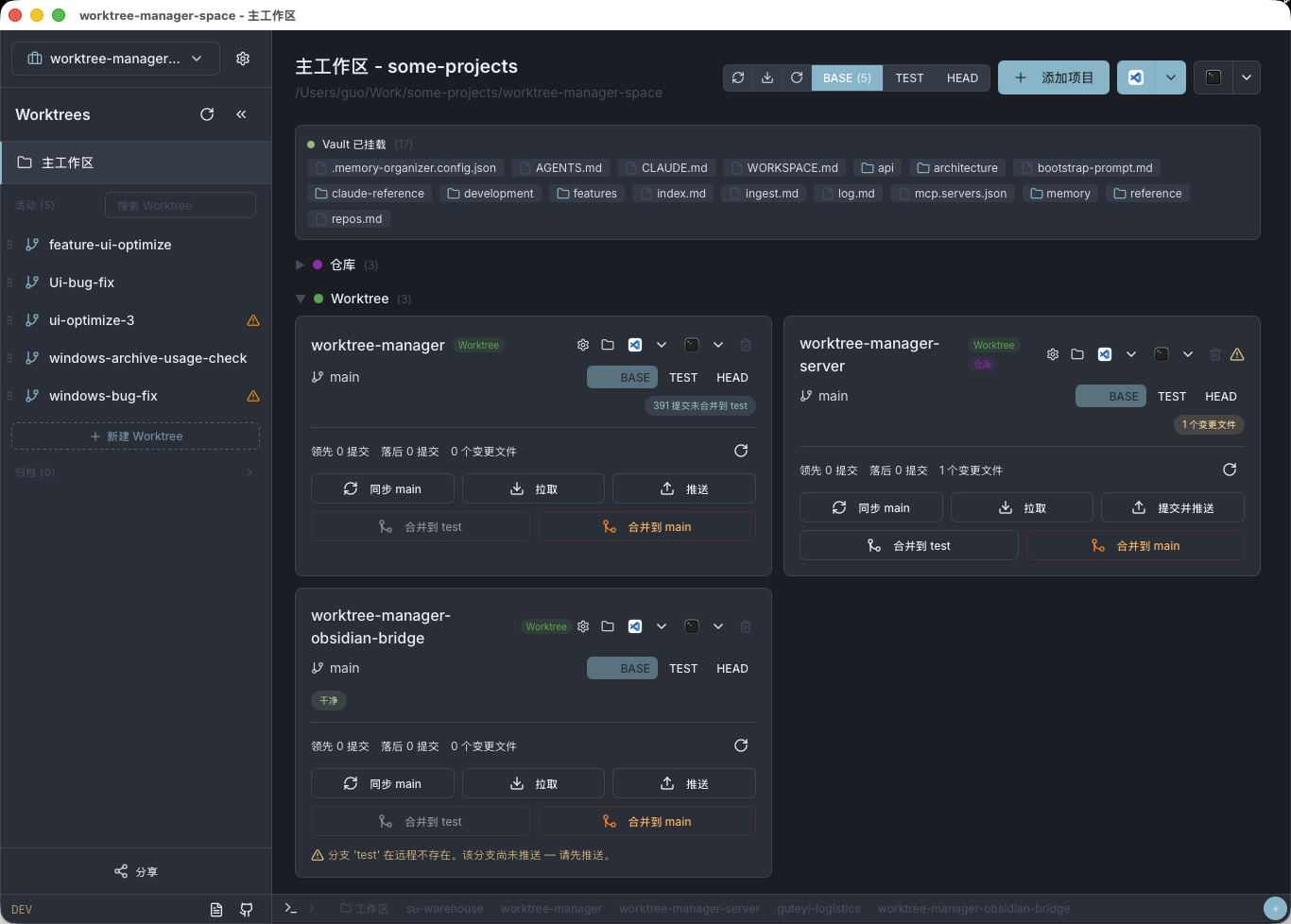
📸 Screenshots
| Main Interface | Create Worktree |
|---|---|
 |
 |
| Terminal & AI Coding | Browser Remote Access |
|---|---|
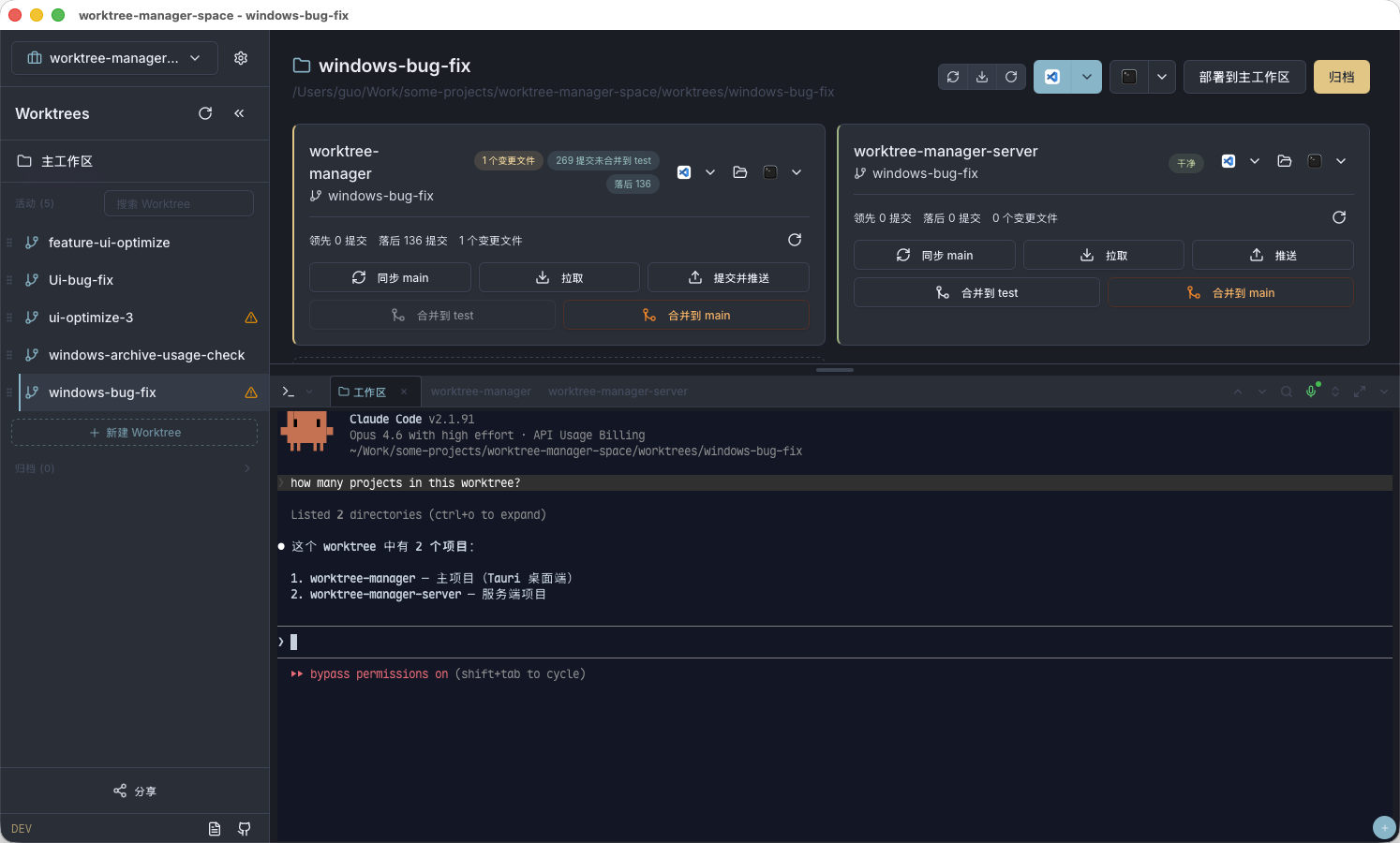 |
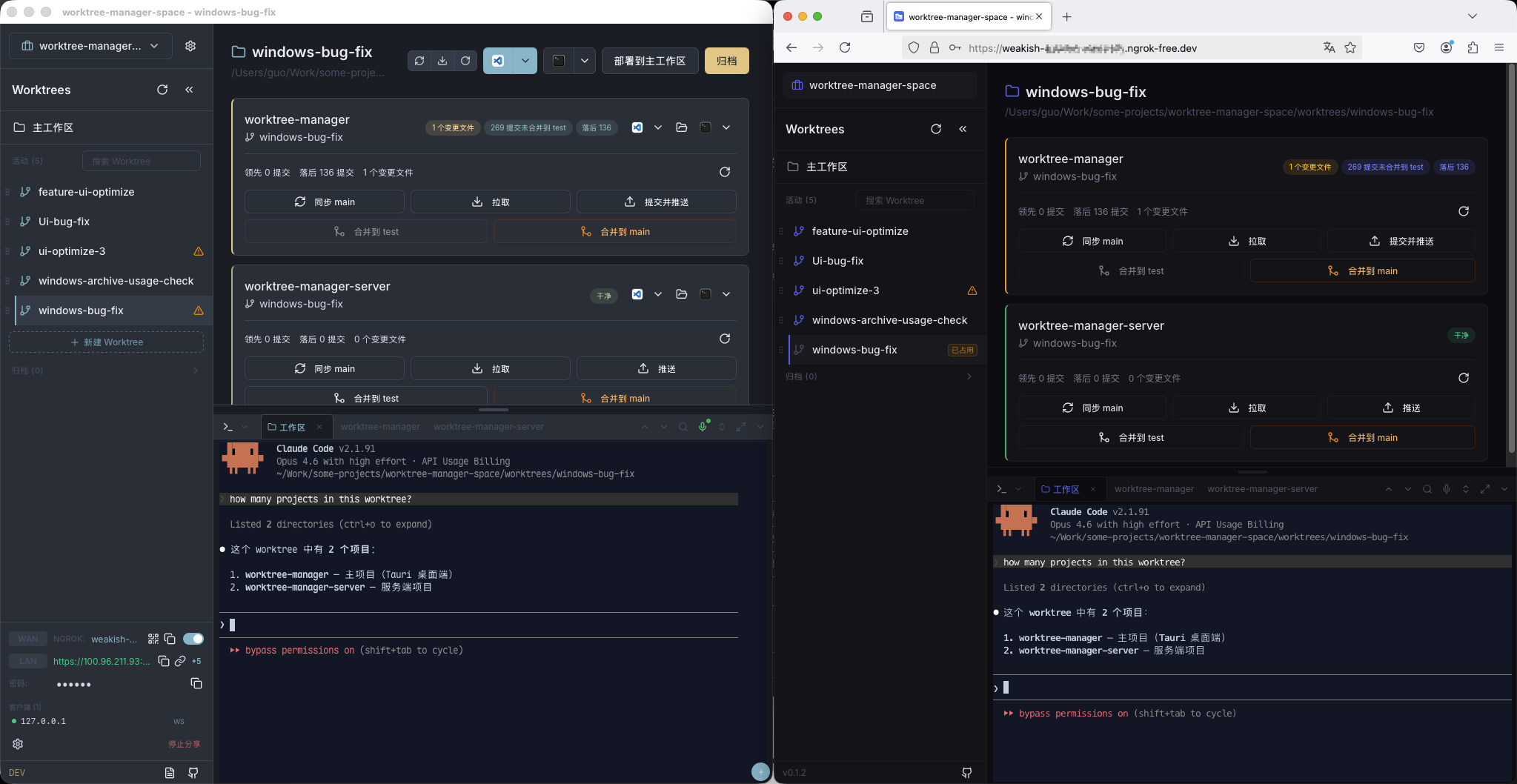 |
| Voice Input & AI Refine |
|---|
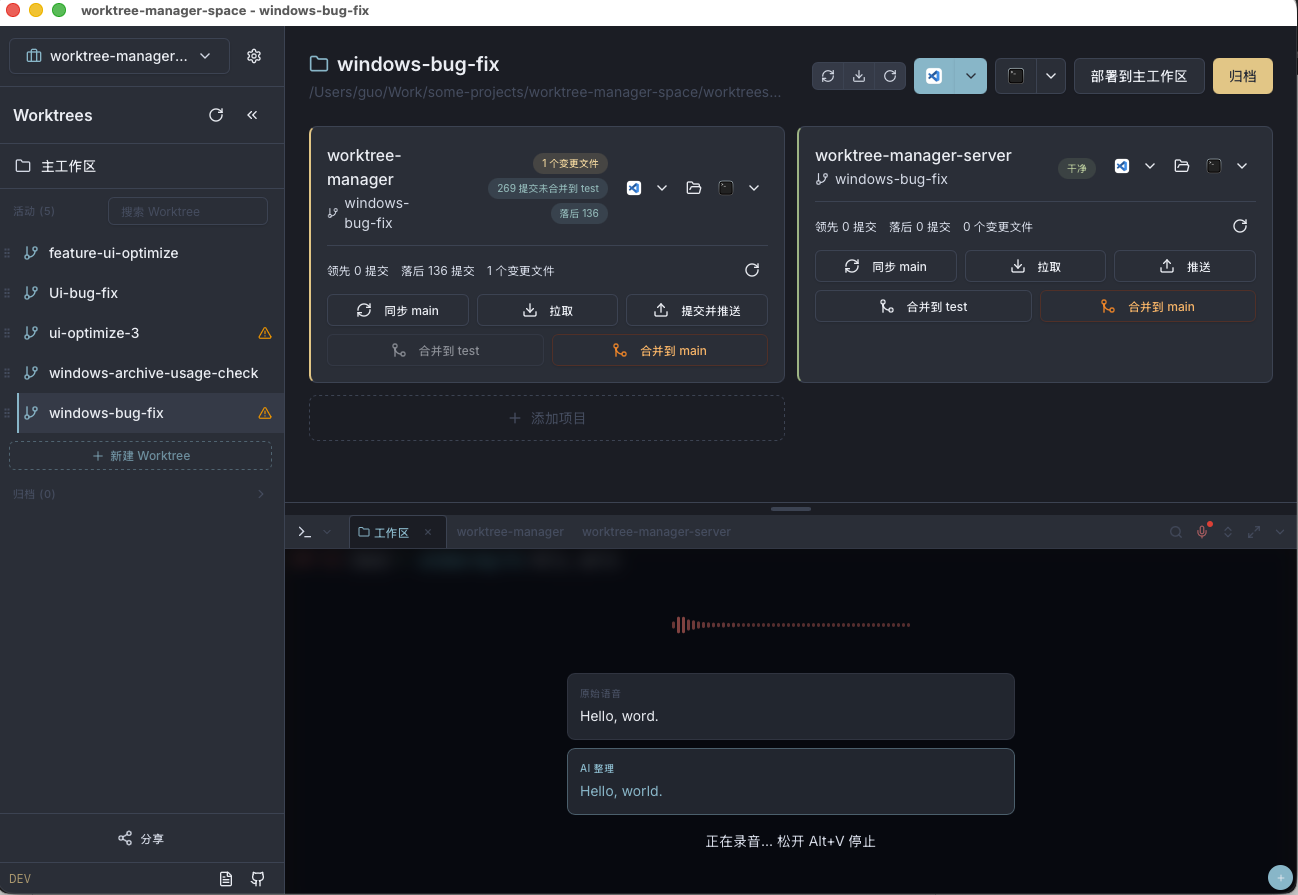 |
🚀 Quick Start
Download
| Platform | Download |
|---|---|
| macOS | .dmg |
| Windows | -setup.exe |
| Linux | .AppImage / .deb |
Only requirement: Git 2.0+. No Node.js or Rust needed at runtime.
Get Started in 3 Steps
- Create a Workspace — Point to your project directory or create a new one
- Add Projects — Import repos via GitHub shorthand (
owner/repo), SSH, or HTTPS - Create Worktrees — Click "+", name your branch, select projects, go
That's it. Your worktree is ready with all dependencies symlinked and terminals pre-configured.
✨ Features
Core
| Feature | Description |
|---|---|
| 🌿 Parallel Branches | Work on multiple branches at the same time in isolated directories, sharing the same .git data |
| 📦 Multi-Repo Workspaces | Group related repos (frontend + backend + shared libs) — create a worktree and all repos switch together |
| 🔗 Smart Symlinks | Auto-link node_modules, .next, vendor, target etc. Zero disk waste, zero reinstall |
| 🏷️ Tag Organization | Tag projects by team, domain, or stack. Filter and batch-select when creating worktrees |
Git Operations
| Feature | Description |
|---|---|
| 🔄 One-Click Operations | Sync, merge to test, pull, push — all from the UI with real-time diff stats |
| 📊 Branch Insights | See how many commits you're ahead/behind at a glance |
| ⚡ Batch Actions | Trigger operations across all projects in a worktree simultaneously |
| 📝 AI Commit Messages | Generate commit messages with Qwen AI (optional) |
Terminal & Remote
| Feature | Description |
|---|---|
| 💻 Built-in Terminal | Full terminal emulator (xterm.js + PTY) with shell integration and search |
| 🎤 Voice Input | Speak to type in terminal — powered by Dashscope ASR with AI text refinement |
| 🌐 Browser Remote | Share your workspace over the network with password protection |
| 🔒 ngrok Tunneling | Optional public access via ngrok — no port forwarding needed |
Integrations
| Feature | Description |
|---|---|
| 🖥️ IDE Integration | One-click open in VS Code, Cursor, or IntelliJ IDEA |
| 🤖 AI-Ready (MCP) | Built-in MCP server — let Claude Code, Cursor, or Codex manage worktrees via natural language |
| 📁 Safe Archiving | Archiving only hides a worktree (files, branches and git state stay untouched); pre-archive checks flag uncommitted or unpushed work. Restore instantly |
❓ FAQ
What is a Git worktree?
A Git worktree lets you check out multiple branches into separate directories while sharing a single .git database. Unlike cloning, worktrees share history, refs, and hooks — no extra disk space for repository data. Learn more
How does the symlink feature work?
When creating a worktree, Worktree Manager automatically creates symlinks for directories you specify (e.g., node_modules, .next, target). These point to the main project's directories, so you never need to reinstall dependencies. You can configure which folders to link per project.
Can I use it with a single repo?
Absolutely. While multi-repo workspaces are a key feature, Worktree Manager works perfectly with a single repository too.
Does browser remote access require installing anything on the remote machine?
No. The remote machine only needs a modern browser. Everything runs through the web interface — terminal, file browsing, git operations, worktree management.
Is my data safe when sharing via browser?
Yes. Browser access is password-protected with challenge-response authentication (no plaintext passwords over the wire). You can also limit access to LAN-only or use ngrok for secure tunneling.
What does the MCP integration do?
The built-in Model Context Protocol server lets AI coding assistants (Claude Code, Cursor, Codex) create worktrees, check status, and run git operations through natural language — without leaving your AI chat. See MCP docs for setup.
📂 How It Works
Workspace directory structure
workspace/
├── .worktree-manager.json        # Workspace config
├── projects/                     # Main repos (base branches)
│   ├── frontend/
│   └── backend/
└── worktrees/                    # Your worktrees
    ├── feature-checkout-v2/
    │   ├── projects/
    │   │   ├── frontend/         # ← git worktree (own branch)
    │   │   │   └── node_modules  # ← symlink to main
    │   │   └── backend/
    │   ├── .claude -> ../../.claude       # Shared files
    │   └── CLAUDE.md -> ../../CLAUDE.md
    └── hotfix-payment/
        └── ...
Shared items (.claude, CLAUDE.md, config files) are automatically symlinked across all worktrees so AI assistants and tooling configs stay in sync.
Workspace config example (.worktree-manager.json)
{
  "name": "My Project",
  "worktrees_dir": "worktrees",
  "linked_workspace_items": [".claude", "CLAUDE.md"],
  "tags": [
    { "id": "fe", "name": "Frontend", "color": "#3B82F6" },
    { "id": "be", "name": "Backend", "color": "#10B981" }
  ],
  "projects": [
    {
      "name": "web-app",
      "base_branch": "main",
      "test_branch": "test",
      "merge_strategy": "merge",
      "linked_folders": ["node_modules", ".next"],
      "tags": ["fe"]
    }
  ]
}
Adding projects — supported formats
| Format | Example |
|---|---|
| GitHub shorthand | facebook/react |
| SSH | [email protected]:facebook/react.git |
| SSH (custom port) | ssh://[email protected]:1022/org/repo.git |
| HTTPS | https://github.com/facebook/react.git |
🔧 Building from Source
For contributors and developers
Prerequisites: Node.js 22+, Rust 1.98 (install rustup; the toolchain is installed automatically via rust-toolchain.toml), Git 2.0+
git clone https://github.com/guoyongchang/worktree-manager.git
cd worktree-manager
npm install

# Development
npm run build && npm run tauri dev

# Production build
npm run tauri build

# Verify command contracts (IPC ↔ HTTP sync)
npm run contracts
Tech Stack: Tauri 2 · React 19 · TypeScript 5 · Tailwind CSS 4 · Rust (axum, git2, tokio) · xterm.js
See TESTING.md for the testing strategy.
Contributing
Contributions are welcome! Please open an issue first to discuss what you'd like to change.
License
If Worktree Manager saves you time, consider giving it a ⭐!
Ähnliche Projekte entdecken
codecrafters-io/build-your-own-x
Meistere das Programmieren, indem du deine Lieblingstechnologien von Grund auf neu erschaffst.
562,349 Sternepublic-apis/public-apis
Eine gemeinschaftliche Liste kostenloser APIs
498,789 Sternemorluto/rea
Mit Agenten alles per Reverse Engineering untersuchen, vom Verhalten der Anwendung bis hin zu nativen Binärdateien.
457,675 Sterneopenclaw/openclaw
Die KI, die wirklich Dinge erledigt. Jedes Betriebssystem, jede Plattform. Auf die Hummer-Art. 🦞
394,399 Sterne