
Über uns
Automated transcoding for your video and music libraries
Kreativität und MedienGemessener Sternzuwachs
- in 24h
- 0
- in 7 days
- -1
- in 15 days
- -1
- in 1 month
- Verlauf wird gesammelt
Nettoänderungen in überlappenden Zeiträumen, keine Tagessummen. Fehlende Messwerte bleiben leer. Sterne zeigen Interesse, nicht Qualität.
README.md
Original
Snacks
Locally hosted. Lightly toasted.
An open-source, self-hosted transcoder for video and music libraries.
Scan, analyze, remux, encode, verify, and automate from one polished interface.





Website · Documentation · Offline guide · Downloads · Discord
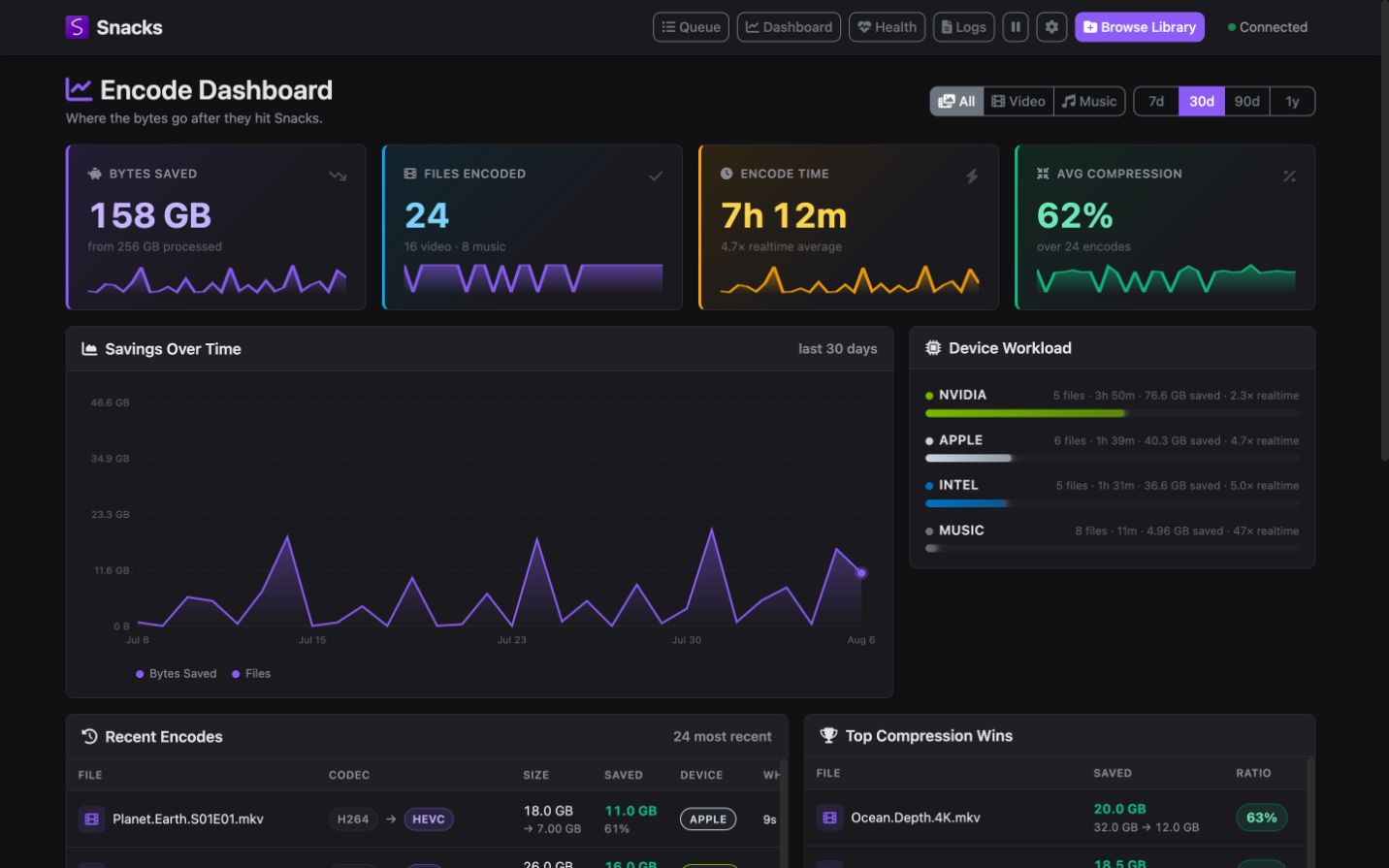
The library handles itself
Point Snacks at a video or music library, choose a preset, and let it do the repetitive work. It evaluates each file against the selected targets, skips media that is already suitable, and remuxes or transcodes everything else using the best available hardware path.
| Automate the library Watch folders, configurable scans, change detection, and transfer-safe processing keep new media moving without babysitting. |
Use the hardware already there NVIDIA, Intel, AMD, Apple VideoToolbox, and software encoders are detected and selected automatically. |
| Choose intent, not FFmpeg flags Start with Space Saver, Balanced, Quality First, Max Compatibility, or a custom preset. |
See the entire pipeline Live progress, queue controls, savings analytics, health checks, and per-file logs stay in one interface. |
| Recover instead of giving up Snacks validates outputs and can retry through progressively safer decode, subtitle, and software fallbacks. |
Scale beyond one machine Run standalone or distribute jobs across an authenticated cluster with automatic node discovery. |
Take a closer look at the interface
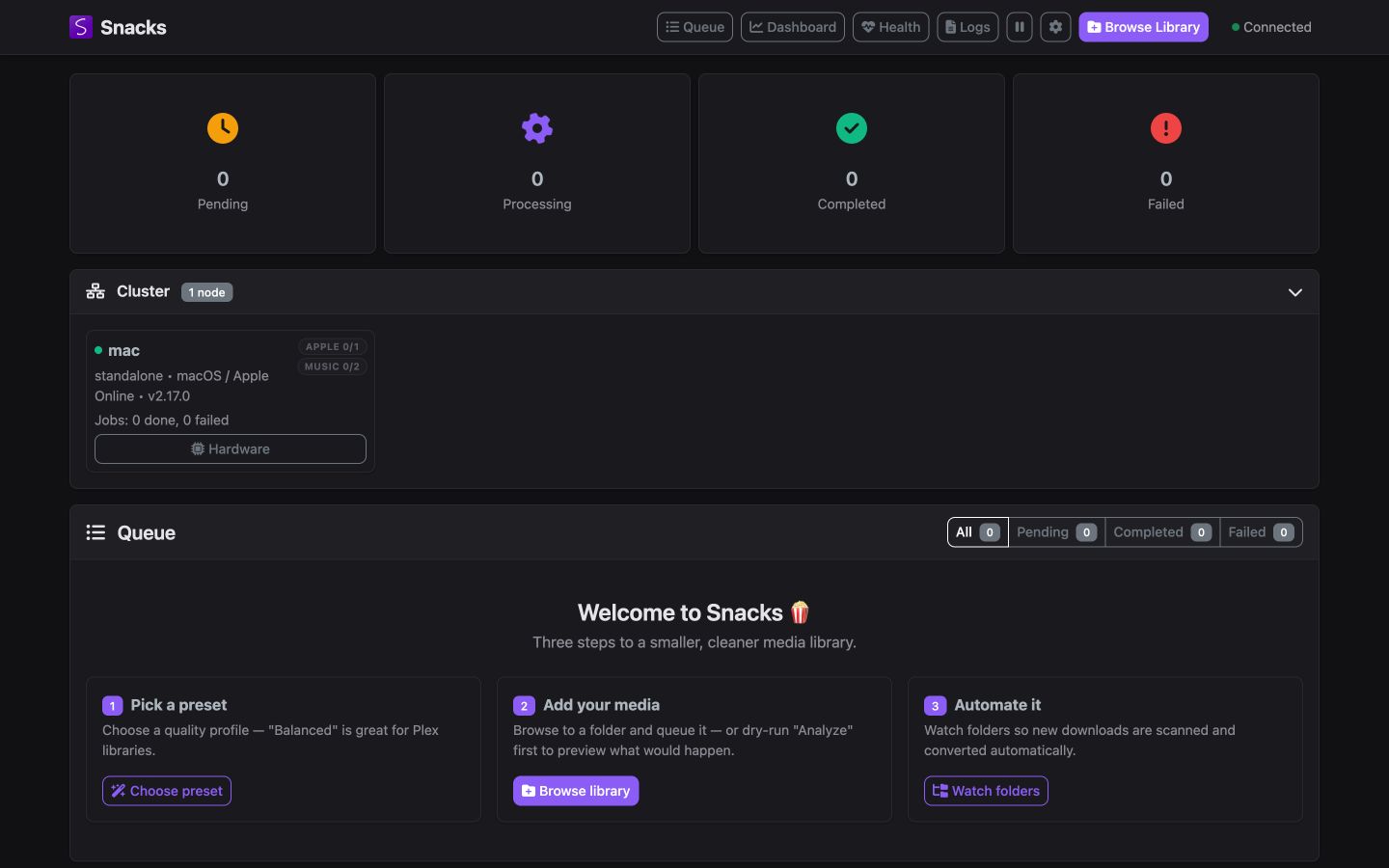 Queue and onboarding. Current work, node status, and the next useful action. |
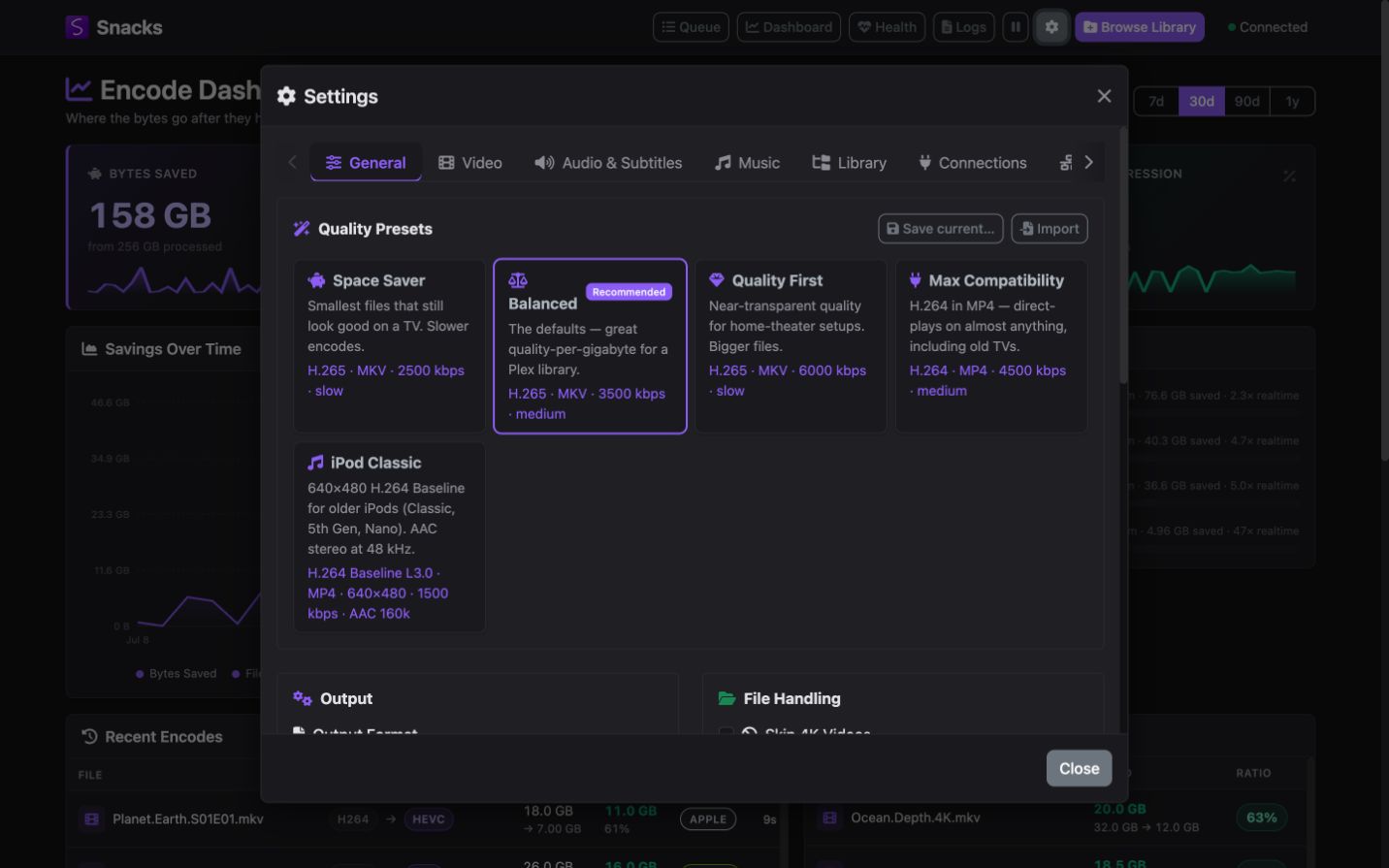 Presets with an escape hatch. Start simple, then tune codecs, audio, subtitles, and file handling. |
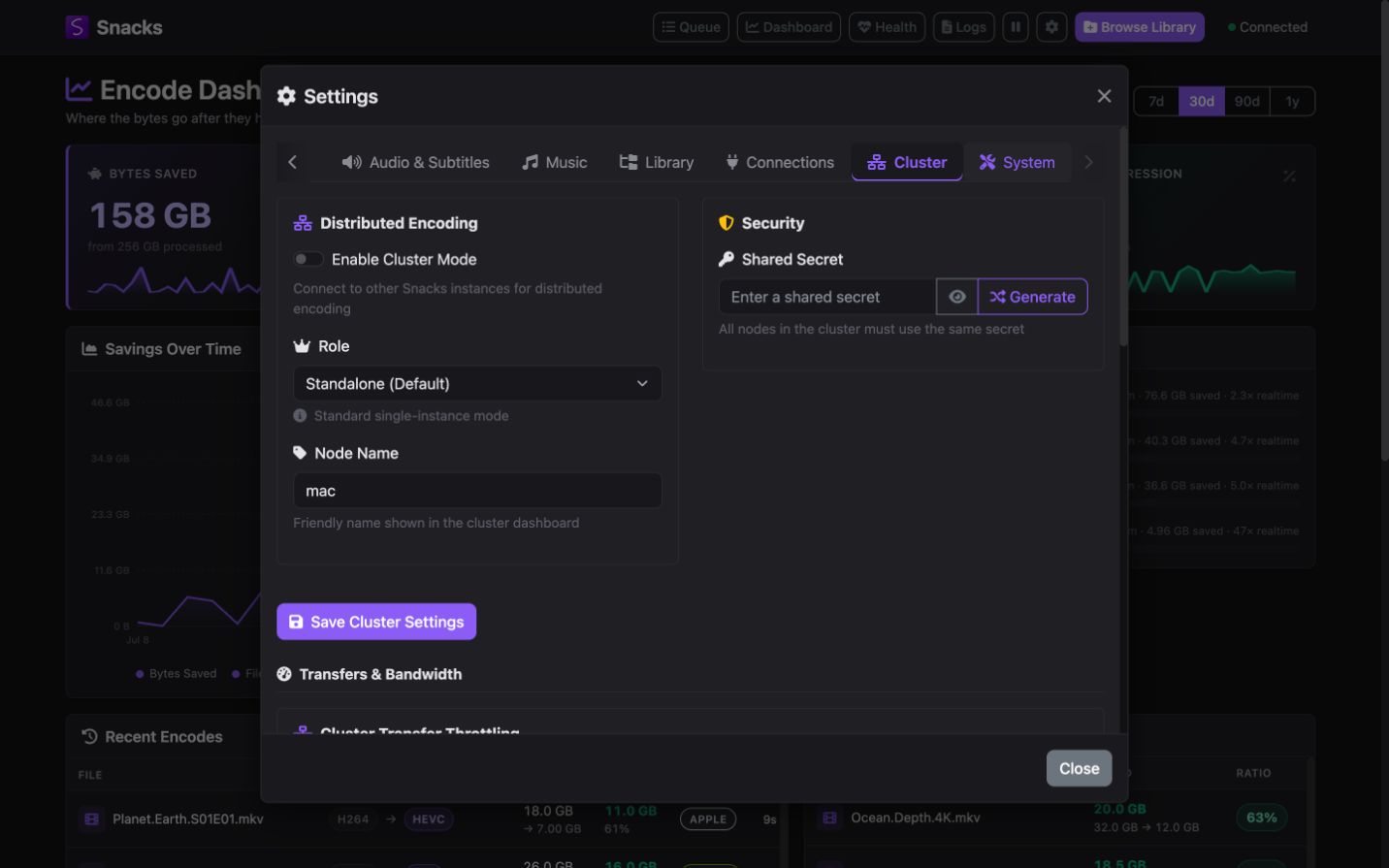 Distributed encoding. Configure standalone, coordinator, and worker nodes from the same interface. |
Install Snacks
| Docker / NAS | Windows | macOS |
|---|---|---|
| QNAP, Synology, Unraid, and Linux hosts | Native installer for Windows 10/11 | Native Apple silicon DMG for macOS 11+ |
| Docker Hub · Setup guide | Download latest | Download latest |
Docker Compose quick start
services:
  snacks:
    image: derekshreds/snacks-docker:latest
    container_name: snacks
    network_mode: host
    volumes:
      - /path/to/media:/app/work/uploads
      - ./snacks/config:/app/work/config
      - ./snacks/logs:/app/work/logs
    environment:
      - ASPNETCORE_ENVIRONMENT=Production
      - SNACKS_WORK_DIR=/app/work
      - FFMPEG_PATH=/usr/lib/jellyfin-ffmpeg/ffmpeg
      - FFPROBE_PATH=/usr/lib/jellyfin-ffmpeg/ffprobe
    devices:
      - /dev/dri:/dev/dri
    restart: unless-stopped
Then open http://YOUR-SERVER-IP:6767.
- Change
/path/to/mediato the library path on the host. - Remove
deviceswhen no Intel or AMD GPU is being passed through. - QNAP commonly requires
privileged: truefor/dev/driaccess. - NVIDIA in Docker requires the NVIDIA Container Toolkit and runtime configuration.
- Host networking allows automatic cluster discovery across the LAN.
- Until sign-in is enabled (Settings → Security), Snacks only answers clients on local-network addresses. Enable it before port-forwarding or reverse-proxying Snacks to the internet.
See the complete Docker/NAS guide or the included deploy-compose.yml. Unraid users can start with unraid/snacks.xml.
How it works
- Scan — FFprobe inventories codec, bitrate, resolution, streams, and duration.
- Decide — the selected preset determines whether each file should be skipped, remuxed, or encoded. The opt-in Advanced Video layer can instead select reusable profiles with ordered source-property rules. Analyze mode previews those decisions without queueing work.
- Process — FFmpeg uses hardware acceleration when available and software when it is not.
- Verify — Snacks checks every result. The default Smaller Only policy rejects larger outputs; an Advanced quality profile can explicitly use Always Keep when predictable quality matters more than final size.
- Repeat — watch folders, integrations, notifications, and the API keep the workflow moving as the library changes.
[!IMPORTANT] Originals are not replaced unless Replace Original Files is explicitly enabled. For a first run, use Analyze, keep replacement disabled, and write to a separate output directory.
What is included
- Video and music pipelines with independent settings
- H.264, HEVC/H.265, and AV1 output
- Opt-in Advanced Video profiles with codec/resolution/bitrate rules, CRF/CQ/QP modes, exact runtime-detected encoders, guarded FFmpeg options, and cluster-aware routing
- MKV and MP4 containers
- Quality presets plus detailed video, audio, subtitle, crop, and file-handling controls
- NVIDIA NVENC, Intel QSV/VAAPI, AMD AMF/VAAPI, and Apple VideoToolbox support
- Automatic scanning, exclusions, change detection, and interrupted-transfer protection
- Persistent SQLite state across scans and restarts
- Live SignalR progress, queue management, encode analytics, diagnostics, and logs
- Dry-run directory analysis before anything is queued
- Distributed encoding with coordinator and worker roles
- Plex and Jellyfin library rescans
- Sonarr, Radarr, Lidarr, TMDb, and TheTVDB connectivity
- Homarr dashboards through either a compact Snacks iFrame tile or the native Media Transcoding widget via a read-only Tdarr adapter
- Webhook, Discord, ntfy, and Apprise notifications
- API-key authentication, environment-variable configuration, OpenAPI, and health endpoints
Advanced Video policies
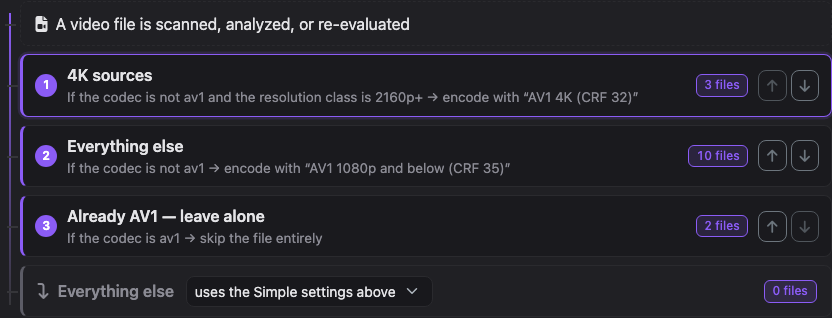
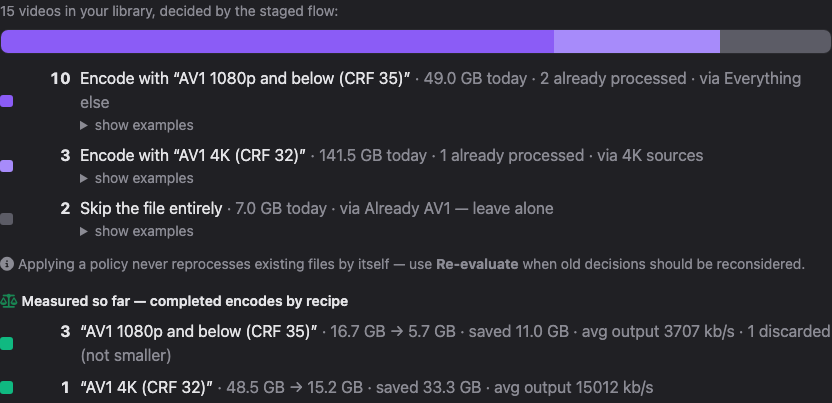
Advanced Video is opt-in and disabled by default — upgrading never changes existing settings or decisions, and the layer does nothing until you enable it. The settings panel shows the decision flow as plain-language cards and previews what a staged policy would do to your entire library — per-rule file counts, disk usage, and measured results from completed encodes included — before you apply anything. Policies export and import as plain JSON files for sharing. See the in-app Advanced Video guide and the AV1 quality-policy example.
Hardware acceleration matrix
| Encoder | Docker / Linux | Windows | macOS |
|---|---|---|---|
| NVIDIA NVENC | CUDA | CUDA | — |
| Intel | VAAPI | QSV | — |
| AMD | VAAPI | AMF | — |
| Apple VideoToolbox | — | — | H.264 / HEVC |
| Software | x264, x265, SVT-AV1 | x264, x265, SVT-AV1 | x264, x265, SVT-AV1 |
Apple silicon can use VideoToolbox for AV1 decoding where supported, but FFmpeg does not currently expose an AV1 VideoToolbox encoder. Snacks therefore pairs hardware decoding with SVT-AV1 software encoding for that path.
For NVIDIA containers, install the NVIDIA Container Toolkit on the host and use the NVIDIA runtime. Intel and AMD hosts can pass /dev/dri into the container.
Automation, integrations, and API
Everything needed for unattended operation is configurable from the UI, environment variables, or HTTP:
- Pin encoder settings with
SNACKS_SET_* - Configure auto-scan with
SNACKS_SCAN_* - Configure integrations with
SNACKS_INTEG_* - Pause and resume the queue, trigger scans, analyze directories, and enqueue media through the API
- Authenticate automation with
X-Api-Keyor a bearer token when sign-in is enabled - Add the compact Snacks tile to Homarr, or point Homarr's Tdarr integration at Snacks for its native transcoding widget
- Subscribe to real-time state through SignalR
Homarr can display Snacks in two ways:
| Option | What it provides | Connection and credential |
|---|---|---|
| Snacks compact tile | A read-only, responsive iFrame with Stats, Queue, and Workers tabs | Each viewer's browser connects to Snacks using a scoped iframe URL generated under Settings → Security → Iframe Access |
| Homarr Media Transcoding widget | Homarr's native transcoding UI backed by Snacks queue, worker, and savings data | The Homarr server connects to Snacks through a Tdarr integration, using a Snacks API key when authentication is enabled |
See the Homarr dashboard guide for complete setup steps, URL options, security notes, limitations, and troubleshooting for both choices.
Use the operations and API guide for examples, or inspect the hosted OpenAPI specification.
Build and contribute
The backend and web interface require the .NET 10 SDK.
dotnet restore Snacks.sln
dotnet test Snacks.sln
dotnet run --project Snacks/Snacks.csproj
Desktop packages use the Electron wrapper in electron-app/:
build-installer.batbuilds the Windows installer.build-mac.shbuilds the Apple silicon DMG.run-electron-dev.batstarts the Windows desktop development environment.
The build scripts package the backend, FFmpeg, and required runtime components into the desktop artifacts. See the repository's complete build and release guide for FFmpeg staging, Windows signing, macOS dylib bundling/notarization, Docker publishing, and release checks. The development and verification handbook contains the shorter day-to-day workflow.
Bug reports and focused pull requests are welcome through GitHub Issues.
Documentation and support
- Product website
- User guide and operations handbook
- Offline HTML guide included in this repository
- Build and release guide
- Unraid installation guide
- Latest release and desktop downloads
- Docker Hub
- Discord community
License
Snacks is available under the MIT License.
Locally hosted. Lightly toasted.
Ähnliche Projekte entdecken
Wird geladen…