
clawsoftware/clawPDF
Über uns
Ein virtueller Open-Source-Netzwerkdrucker für Windows, mit dem sich PDFs erstellen, Texte per OCR erfassen und Bilder drucken lassen. Er bietet außerdem erweiterte Funktionen, die normalerweise nur in Unternehmenslösungen verfügbar sind.
EntwicklerwerkzeugeWhat you can do
- Print to PDF, PDF/A-1b, PDF/A-2b, PDF/A-3b, PDF/X, PDF/Image, OCR, SVG, PNG, JPEG, TIF and TXT
- Print 100% valid PDF/A-1b, PDF/A-2b and PDF/A-3b
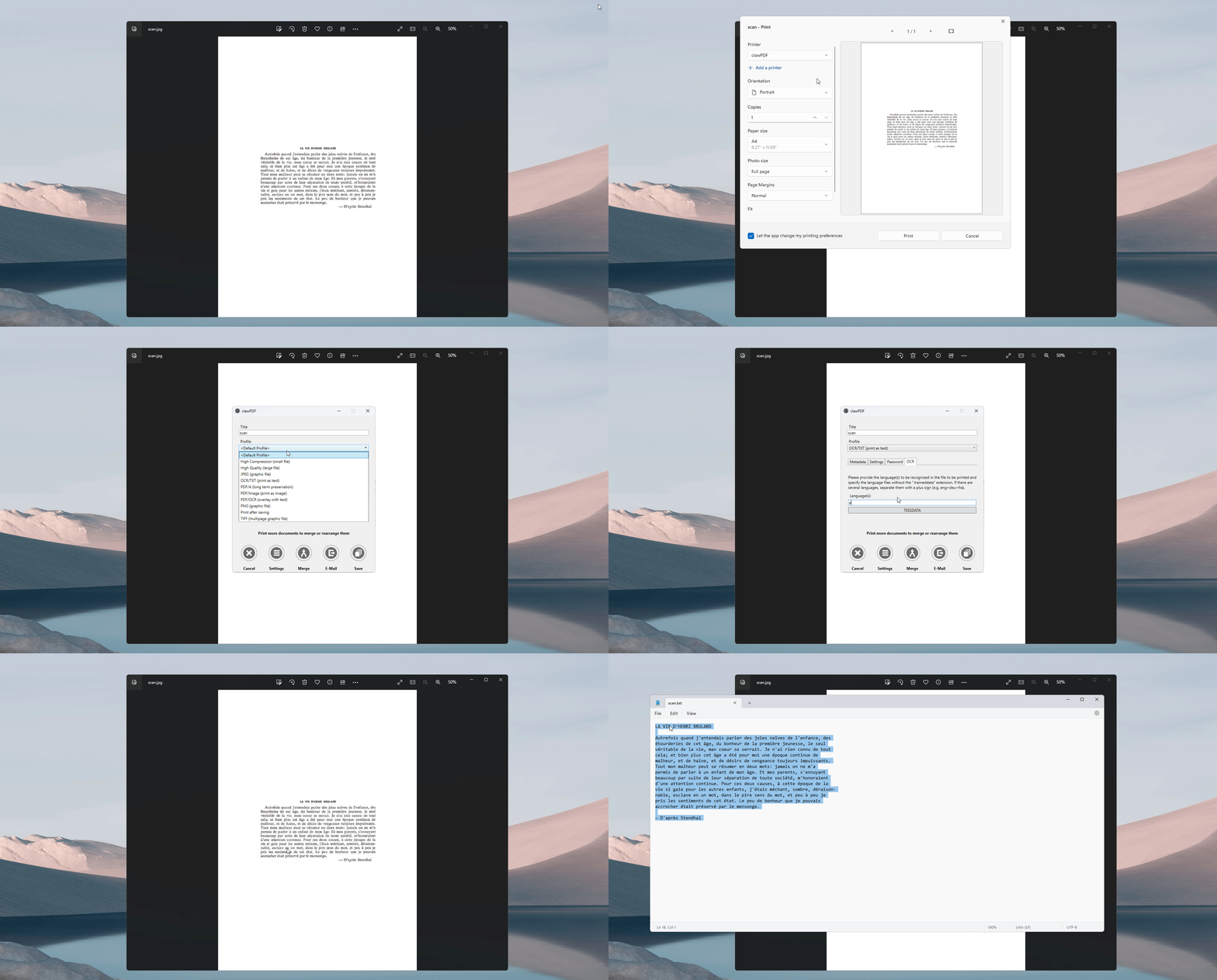
- Optical Character Recognition (OCR)
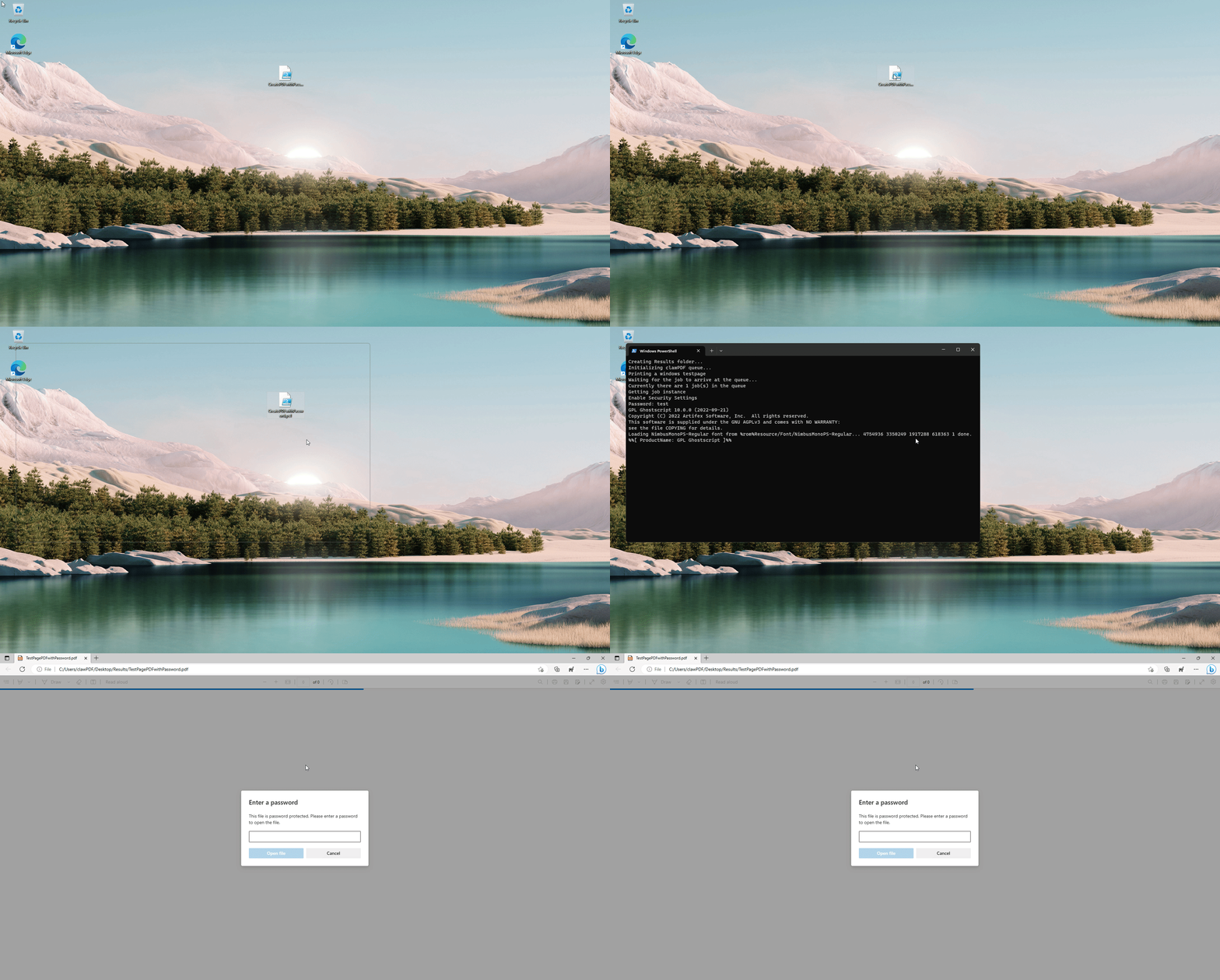
- Scripting Interface (Python, Powershell, VBScript...)
Gemessener Sternzuwachs
- in 24h
- 0
- in 7 days
- 0
- in 15 days
- +2
- in 1 month
- Verlauf wird gesammelt
Nettoänderungen in überlappenden Zeiträumen, keine Tagessummen. Fehlende Messwerte bleiben leer. Sterne zeigen Interesse, nicht Qualität.
README.md
OriginalclawPDF - Virtual PDF/OCR/Image (Network) Printer
ClawPDF may seem like yet another Virtual PDF/OCR/Image Printer, but it actually comes packed with features that are typically found in enterprise solutions. With clawPDF, you can create documents in various formats, including PDF/A-1b, PDF/A-2b, PDF/A-3b, PDF/X, PDF/Image, OCR, SVG, PNG, JPEG, TIF, and TXT. You also have easy access to metadata and can remove it before sharing a document. In addition, you can protect your documents with a password and encrypt them with up to 256-bit AES.
ClawPDF offers a scripting interface that lets you automate processes and integrate it into your application. Moreover, you can install clawPDF on a print server and print documents over the network, not just locally.
ClawPDF is open-source and compatible with all major Windows client and server operating systems (x86/x64/ARM64), and it even supports multi-user environments!
Download
https://github.com/clawsoftware/clawPDF/releases/download/0.9.3/clawPDF_0.9.3_setup.msi
Features
- Print to PDF, PDF/A-1b, PDF/A-2b, PDF/A-3b, PDF/X, PDF/Image, OCR, SVG, PNG, JPEG, TIF and TXT
- Print 100% valid PDF/A-1b, PDF/A-2b and PDF/A-3b
- Optical Character Recognition (OCR)
- Scripting Interface (Python, Powershell, VBScript...)
- Shared Network Printing
- SVG Export
- Drag and Drop Support
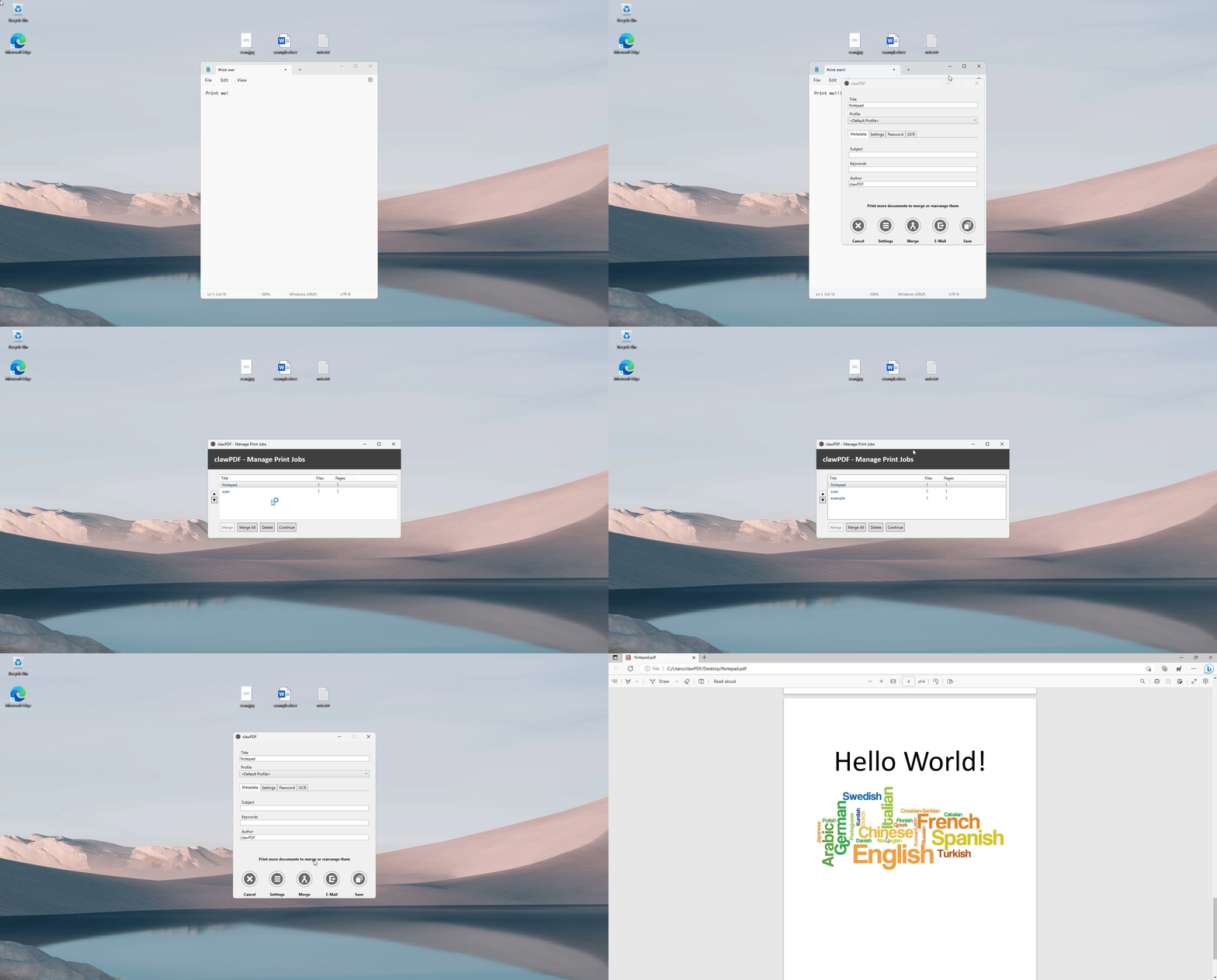
- Merge Files
- Command Line Support
- Silent Printing
- Custom Paper Sizes / Standard Paper Sizes
- 256-bit AES encryption
- Light/Dark Theme
- ARM64 Support
- Full Unicode Support
- Multiple Profiles
- Post Actions
- Create additional printers with assigned profile
- 24 translations. Add yours!
- Easy to deploy (MSI-Installer & Config)
- Many settings
- Easy to use
- No adware, spyware and nagware
Demo
Optical Character Recognition (OCR)
Scripting Interface
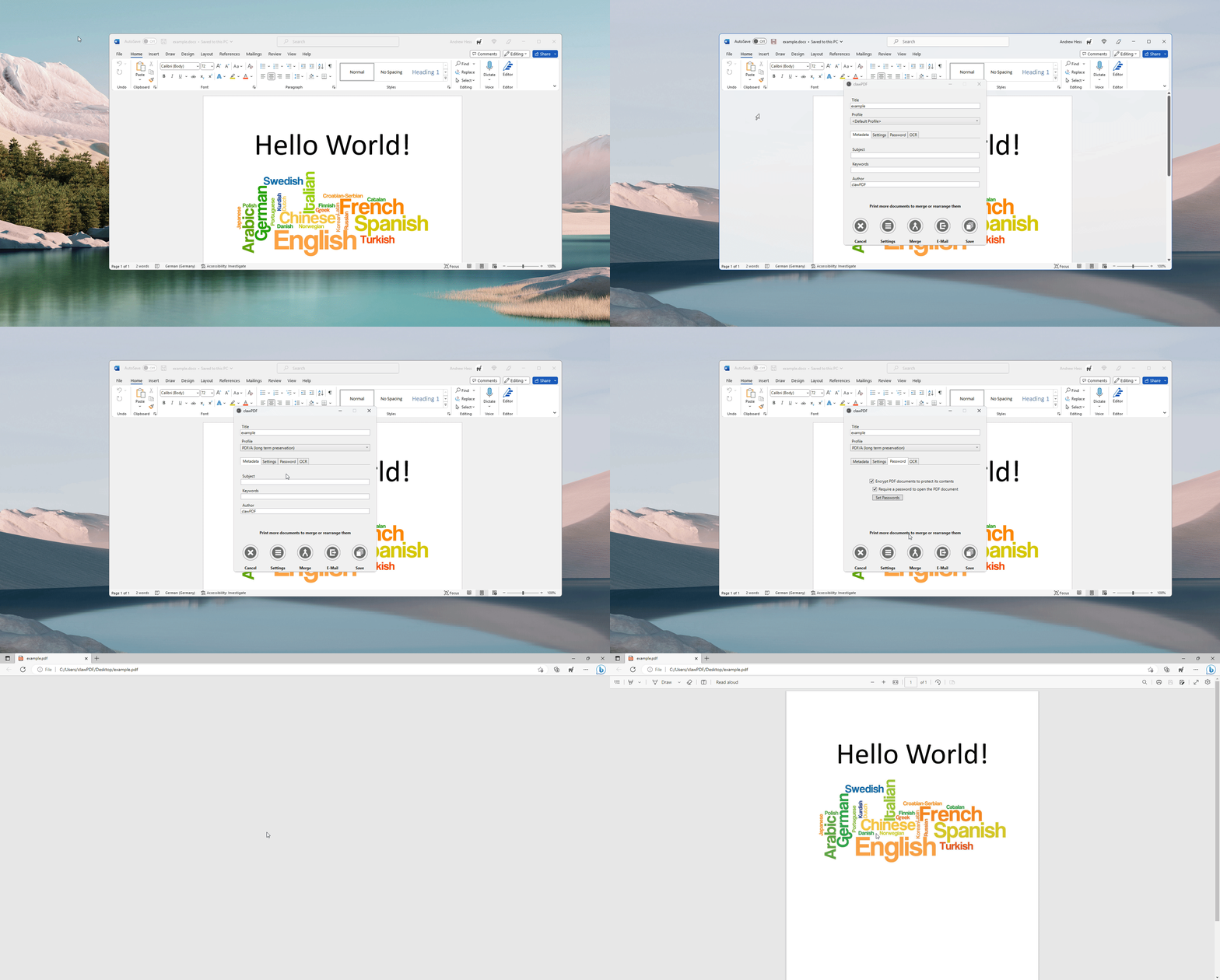
Print a PDF and protect it with a password
Merge multiple documents
Tested under
- Windows Server 2022 RDS
- Windows Server 2019 RDS
- Windows Server 2016 RDS
- Windows 11 x64/ARM64
- Windows 10 x86/x64/ARM64
- Windows 8 x86/x64
- Windows 7 x86/x64
Command Line
Batch Printing
The GUID for the Profile parameter is located under: HKEY_CURRENT_USER\Software\clawSoft\clawPDF\Settings\ConversionProfiles\[id]\Guid

clawPDF.exe /PrintFile=D:\example.docx /profile=f81ea998-3a76-4104-a574-9a66d6f3039b
clawPDF.exe /PrintFile=D:\example.pdf /profile=JpegGuid
clawPDF.exe /PrintFile=D:\example.pdf /profile=JpegGuid /OutputPath=D:\batchjob

clawPDF.exe /PrintFile=D:\example.txt /printerName=clawPDF2
clawPDF.exe /PrintFile=D:\example.docx /printerName=clawJPG
Overwrite Config
- To deploy a default configuration in an enterprise environment.
- To export a configuration select "Application Settings -> Debug -> Save settings to file".

clawPDF.exe /Config=D:\clawPDF.ini
Printer Managment
SetupHelper.exe /Printer=Add /Name=ExamplePrinter
SetupHelper.exe /Printer=Remove /Name=ExamplePrinter
ManagePrintJobs
clawPDF.exe /ManagePrintJobs
Changelog
v0.9.3 (2023.05.16)
- [bugfix] Fixed a bug where in some cases only administrators could use the shared network printer function
- [bugfix] Fixed Windows 7 issues caused since version 0.9.1
Requirements
- .Net Framework 4.6.2+
- Visual C++ Redistributable 14 (Download: x86/x64)
Build
- Visual Studio 2022
Third-party
clawPDF uses the following licensed software or parts of the source code:
- PDFCreator (https://github.com/pdfforge/PDFCreator), licensed under AGPL v3 license.
- Pdftosvg.net (https://github.com/dmester/pdftosvg.net), licensed under MIT license.
- iText7 (https://github.com/itext/itext7-dotnet), licensed under AGPL v3 license.
- Nlog (https://github.com/NLog/NLog), licensed under BSD 3-Clause.
- PdfScribe (https://github.com/stchan/PdfScribe), licensed under AGPL v3 license.
- clawmon (https://github.com/clawsoftware/clawPDF/tree/master/src/clawmon), licensed under GPL v2 license.
- Microsoft Postscript Printer Driver (https://docs.microsoft.com/en-us/windows-hardware/drivers/print/microsoft-postscript-printer-driver), copyright (c) Microsoft Corporation. All rights reserved.
- Ghostscript (https://www.ghostscript.com/download/gsdnld.html), licensed under AGPL v3 license.
- SystemWrapper (https://github.com/jozefizso/SystemWrapper), licensed under Microsoft Public license.
- Ftplib (https://archive.codeplex.com/?p=ftplib), licensed under MIT license.
- DataStorage.dll, licensed under pdfforge Freeware License.
- DynamicTranslator.dll, licensed under pdfforge Freeware License.
- Appbar_save (http://modernuiicons.com/), licensed under Attribution-NoDerivs 3.0 Unported.
- Appbar_cogs (http://modernuiicons.com/), licensed under Attribution-NoDerivs 3.0 Unported.
- Appbar_page_file_pdf (http://modernuiicons.com/), licensed under Attribution-NoDerivs 3.0 Unported.
License
clawPDF is licensed under AGPL v3 license
Copyright (C) 2023 // Andrew Hess // clawSoft
Ähnliche Projekte entdecken
Wird geladen…