
boerdereinar/copyous
boerdereinar/copyous has 663 GitHub stars and 71 forks. GitHot measured +2 stars in 24 hours and +9 in 7 days. Last checked 2026-11-23 21:28 UTC. Last push 2026-11-06.
What you can do
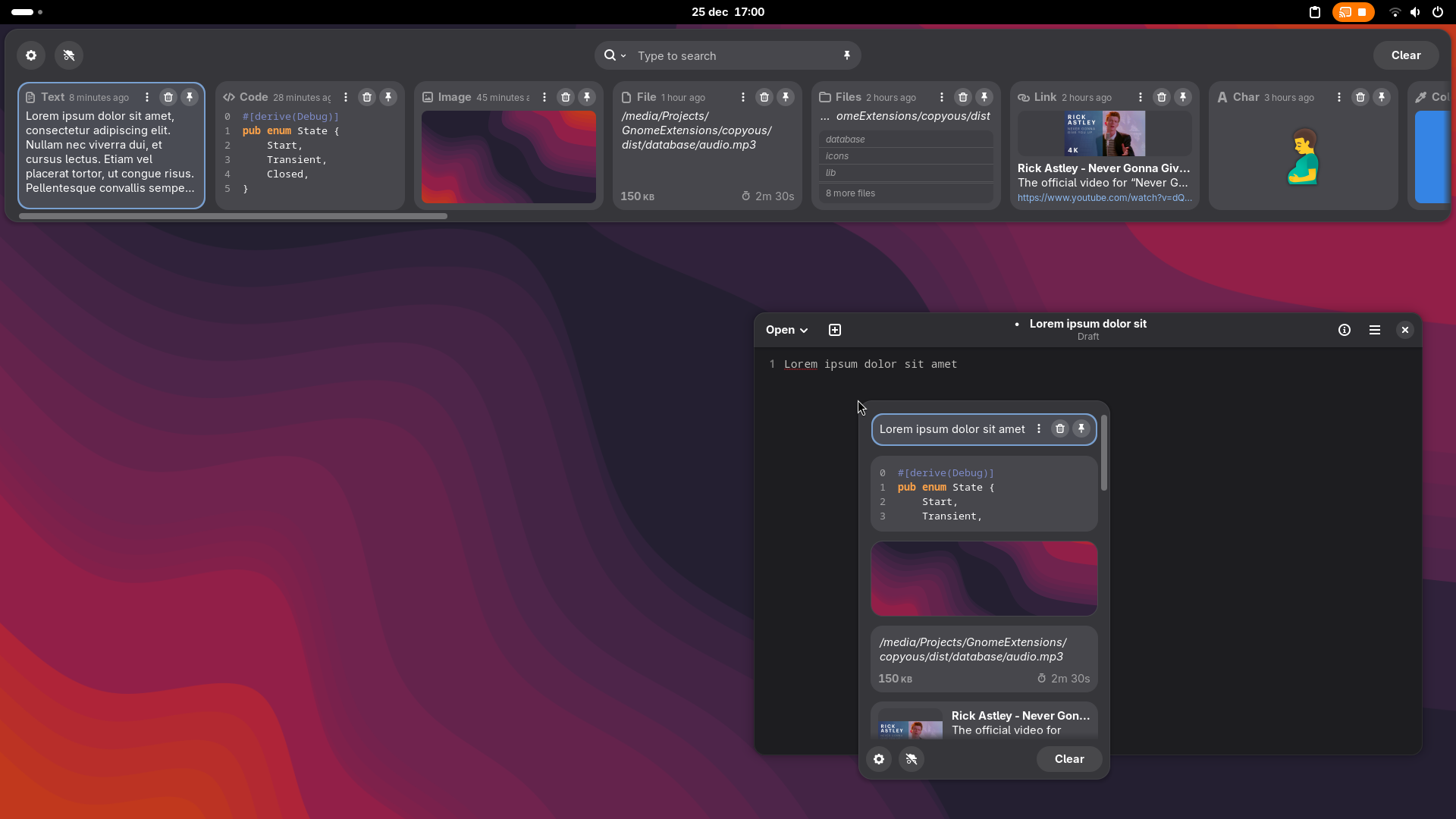
- Supports text, code, images, files, links, characters and colors.
- Can be opened at mouse pointer or text cursor
- Pin favorite items
- Group items with 9 colored tags
Gemessener Sternzuwachs
- in 24h
- +2
- in 7 days
- +9
- in 15 days
- Verlauf wird gesammelt
- in 1 month
- Verlauf wird gesammelt
Nettoänderungen in überlappenden Zeiträumen, keine Tagessummen. Fehlende Messwerte bleiben leer. Sterne zeigen Interesse, nicht Qualität.
Über uns
Modern Clipboard Manager for GNOME
EntwicklerwerkzeugeREADME.md
Original Copyous - Clipboard Manager




Features
- Supports text, code, images, files, links, characters and colors.
- Can be opened at mouse pointer or text cursor
- Pin favorite items
- Group items with 9 colored tags
- Customizable clipboard actions
- Highly customizable
Installation
For the extension to work optimally you need to install the following dependencies:
- Libgda 5.0 or 6.0 with SQLite support
- GSound
Install Libgda and GSound
| Distro | Command |
|---|---|
| Fedora | sudo dnf install libgda libgda-sqlite |
| Arch Linux | sudo pacman -S libgda6 |
| Ubuntu/Debian | sudo apt install gir1.2-gda-5.0 gir1.2-gsound-1.0 |
| openSUSE | sudo zypper install libgda-6_0-sqlite typelib-1_0-Gda-6_0 typelib-1_0-GSound-1_0 |
From Gnome Extensions (Recommended)

From Latest GitHub Release
- Download the latest release from Releases.
- Install extension:
gnome-extensions install -f ~/Downloads/[email protected] - Restart the session by logging out.
- Enable the extension in Extension Manager or by running the following command:
gnome-extensions enable [email protected]
From Source
- Install the following prerequisites:
- Clone the repository:
git clone --recurse-submodules https://github.com/boerdereinar/copyous cd copyous - Build and install the extension:
pnpm install - Restart the session by logging out.
- Enable the extension in Extension Manager or by running the following command:
gnome-extensions enable [email protected]
Configuration
You can open the extension settings either through the panel indicator, Extension Manager or by running the following command:
gnome-extensions prefs [email protected]
Shortcuts
The most common shortcuts are listed below. Some can be customized in the extension settings. You can also find a complete list of all available shortcuts there.
| Description | Shortcut |
|---|---|
| Open Clipboard Dialog | Super Shift V |
| Toggle Incognito Mode | Super Shift Ctrl V |
| Copy Item | Enter / Space |
| Run Default Action | Ctrl Enter / Space |
| Pin Item | Ctrl S |
| Delete Item | Delete (Hold Shift to force delete) |
| Navigation | Tab / ↑ / ↓ / ← / → / Home / End |
| Jump to Item | Ctrl 0...9 |
| Toggle Pinned Search | Alt |
| Cycle Item Type | Ctrl Tab / Shift Ctrl Tab |
| Cycle Item Tag | Ctrl ` / Shift Ctrl ` |
DBus
Name: org.gnome.Shell.Extensions.Copyous
Path: /org/gnome/Shell/Extensions/Copyous
| Method | Arguments | Description |
|---|---|---|
Toggle |
Show or hide the clipboard dialog | |
Show |
Show the clipboard dialog | |
Hide |
Hide the clipboard dialog | |
ClearHistory |
all:if true, clears all history; if false, clears unpinned/untagged items |
Clear clipboard history |
Examples
gdbus call --session \
    --dest org.gnome.Shell.Extensions.Copyous \
    --object-path /org/gnome/Shell/Extensions/Copyous \
    --method org.gnome.Shell.Extensions.Copyous.Toggle
gdbus call --session \
    --dest org.gnome.Shell.Extensions.Copyous \
    --object-path /org/gnome/Shell/Extensions/Copyous \
    --method org.gnome.Shell.Extensions.Copyous.ClearHistory false
Contributing
See CONTRIBUTING.md for more information.
Acknowledgments
Copyous is a full rewrite of Pano.
License
This project is licensed under the GNU General Public License 3 or Later.
Ähnliche Projekte entdecken
Wird geladen…