
bilalyazicioglu/tincan-cli
bilalyazicioglu/tincan-cli has 244 GitHub stars and 14 forks. GitHot measured 0 stars in 24 hours, +4 in 7 days, and +9 in 15 days. Last checked 2026-11-23 02:56 UTC. Last push 2026-11-15.
What you can do
- Finding each other. Addresses are published to and looked up from n0's pkarr relay (dns.iroh.link), over HTTPS. This is what makes a public key enough on its own — whether it arrived as an invite code or was derived from a room name and passphrase. Without it, neither resolves to anywhere you could connect to.
- Getting through the router. n0's relay servers — use1-1, usw1-1, euc1-1 and aps1-1 under relay.n0.iroh.link — are how two machines behind NATs learn each other's external addresses.
- Carrying the traffic when that fails. The same relays forward packets they have no key for, because the QUIC session is established between the two peers rather than with the relay.
Gemessener Sternzuwachs
- in 24h
- 0
- in 7 days
- +4
- in 15 days
- +9
- in 1 month
- Verlauf wird gesammelt
Nettoänderungen in überlappenden Zeiträumen, keine Tagessummen. Fehlende Messwerte bleiben leer. Sterne zeigen Interesse, nicht Qualität.
Über uns
Serverless peer-to-peer voice and text chat for your terminal. No accounts or central server. Peers connect directly over encrypted QUIC.
EntwicklerwerkzeugeREADME.md
Original

tincan
Serverless peer-to-peer voice and text chat for your terminal.








Website · Install · Usage · Shortcuts · How it works · Security · Design notes · Blog (EN) · Blog (TR)
tincan does what Discord does, without needing anyone's server: the first person to open the app creates the room, sends the invite code it prints to their friends, and they connect with that code from anywhere in the world. No VPN, no port forwarding, no accounts.
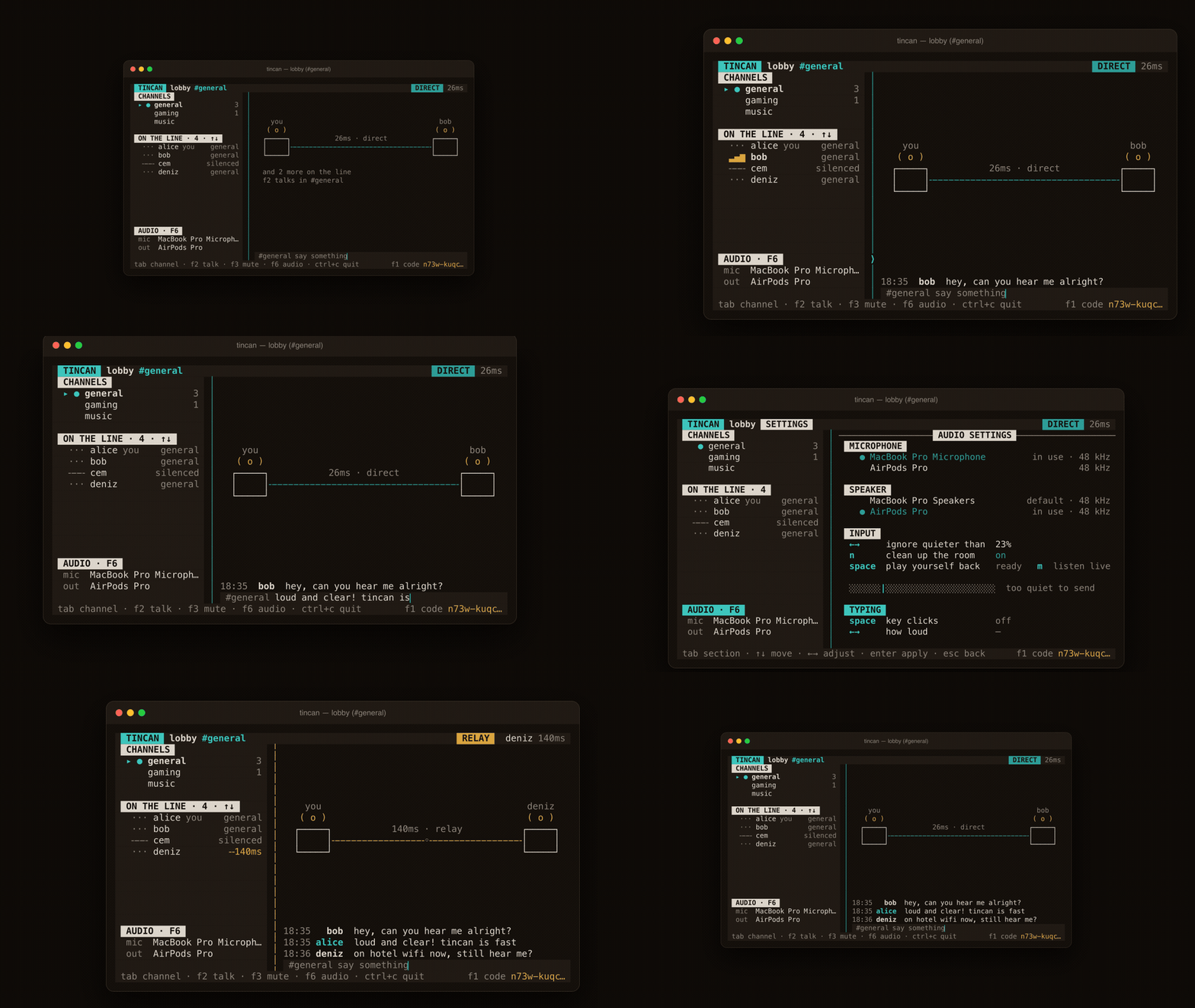
The palette is metal: a brown tin ground, brass for the string and the invite code, and the two greens copper actually turns — bright patina for what is live, deeper verdigris for a link that is holding.
The line down the middle is the connection. It runs taut when everyone is reached
directly, sags into a dashed line when someone is coming through a relay, and frays
when audio starts dropping. While anyone is talking a pulse travels down it, at the
speed of the round trip — so a slow link is something you see rather than read. When
someone calls you with @ and your name, brass runs down it once. The meters beside each
name move with that person's voice.
Before anyone has joined, the chat pane draws the same thing full size: your can, the string, their can, with the latency written on it and your invite code underneath. It stays up there while the conversation is short enough to leave the room for it, so a full-screen terminal is never a wall of nothing.
Everything underneath that — the audio screen and its noise floor, turning one person down without deafening the room, and the sounds the interface makes — is written up in the interface design notes, with the background story in the developer blog (English / Türkçe).
Why tincan
Discord runs on Discord's servers, and TeamSpeak or Mumble need someone to run one. tincan needs neither: whoever opens a room hosts it, and the invite code is its address. There is no account to make, nothing to rent and nothing to keep running.
That is not the same as having no infrastructure. To find each other and get through routers, peers use public relays and a lookup service run by Number Zero, and a network that blocks those can stop new connections. How it works says what they do and what they can see, and Known limits says what happens without them.
Install
One program under a few names, because tincan was already taken on crates.io
and npm: the command is tincan everywhere; it installs as tincan from Homebrew,
tincan-chat from crates.io and tincan-cli from npm; the source is
bilalyazicioglu/tincan-cli, and the site is tincan.rs. It is
unrelated to the Tin Can API (xAPI) used in e-learning.
Homebrew (macOS & Linux):
brew tap bilalyazicioglu/tap && brew install tincan
NPM:
# Run directly without installing:
npx tincan-cli host

# Or install globally:
npm install -g tincan-cli
Shell script (macOS & Linux):
curl -fsSL https://raw.githubusercontent.com/bilalyazicioglu/tincan-cli/main/install.sh | sh
This downloads a prebuilt binary for your platform into ~/.local/bin and verifies its
checksum. Anywhere without one it falls back to building from source. If you would rather
read the script before running it — always a reasonable instinct with curl | sh — it
lives at install.sh in this repo.
Windows: use npx tincan-cli host, or download
tincan-x86_64-pc-windows-msvc.zip from the
latest release and put
tincan.exe somewhere on your PATH. The shell script above is POSIX and will not
install it for you.
Prebuilt binaries are published for these five targets:
| Platform | Target |
|---|---|
| macOS, Apple Silicon | aarch64-apple-darwin |
| macOS, Intel | x86_64-apple-darwin |
| Linux, x86_64 | x86_64-unknown-linux-gnu |
| Linux, arm64 | aarch64-unknown-linux-gnu |
| Windows, x64 | x86_64-pc-windows-msvc |
A word on the last row: the Windows binary compiles and the test suite passes on Windows in CI, which is not the same as the application having been used there. The terminal UI, WASAPI device enumeration and the microphone permission prompt have not been exercised on a real Windows machine. If you try it, say how it went.
Nix flakes:
# Run without installing:
nix shell github:bilalyazicioglu/tincan-cli --command tincan host

# Or install into your user profile:
nix profile install github:bilalyazicioglu/tincan-cli
See flake.nix for the overlay exposing pkgs.tincan-cli.
Cargo, if you have a Rust toolchain:
cargo install tincan-chat # the command it installs is still `tincan`
The crate is tincan-chat because tincan and tincan-cli were both taken on
crates.io by unrelated projects before this one existed. Only the published name
differs; the command it installs is tincan, the same as every other way in.
From git, to build whatever is on main:
cargo install --git https://github.com/bilalyazicioglu/tincan-cli
That needs Rust 1.91+ and a way to get Opus. The easiest is to install it from your
package manager — cargo picks it up through pkg-config and links it in:
brew install opus pkg-config                             # macOS
sudo apt install libopus-dev pkg-config libasound2-dev   # Debian/Ubuntu
Without a system Opus, the build compiles the vendored C source instead, which needs
autotools (autoconf, automake, libtool). Either way it takes a few minutes.
However you install it, you need a microphone and a speaker; any sample rate will do, since tincan resamples to and from the 48 kHz Opus works at. On the first run your operating system will ask for microphone permission — on macOS the prompt comes from the terminal app running tincan (Terminal, iTerm, VS Code…), not from tincan itself.
Usage
Open a room:
tincan host lobby --name alice
room:        lobby
passphrase:  chestnut-ferry-lens-moss
The room's address is derived from its name and passphrase, so that is all your friends
need — two things you can say down the phone or write on a whiteboard. The passphrase is
generated for you: it is what stops strangers from guessing their way into the room, so
bring your own with -p only if it is as strong (tincan warns when it is not).
Open a room behind an invite code instead:
tincan host --name alice --password secret
Without a room name tincan prints an invite code, puts it on your clipboard, and waits for you to press Enter before taking over the screen. Send it to your friends — copy and paste, 64 characters. The code is the host's public key, so this is the way in whose security does not rest on the passphrase.
Once the interface is up the footer only has room for the first group of the code. Press
F1 to print the whole thing into the chat pane and copy it again, so you can invite
someone without restarting the room. For a room opened by name or on a relay, F1 gives
the join command with the passphrase under it, and that is what goes on the clipboard
when the room opens; the passphrase is never drawn in the footer, which stays on screen
for anyone watching a shared one.
Open a room on your own relay:
tincan host --relay relay.example.com --name alice
passphrase:  chestnut-ferry-lens-moss
they run:    tincan join relay.example.com
The room lives on a relay you run and touches nothing of n0's: nothing is published to
n0's lookup service, nothing is looked up there, and n0's relays are not used as a
fallback. Your friends type the relay's address and the passphrase; there is no invite
code. Give the room a name (tincan host lobby --relay relay.example.com) when more than
one room shares a relay, and they join it with tincan join [email protected].
Running the relay is one program:
cargo install iroh-relay --features server
iroh-relay --dev                                  # http://localhost:3340, for trying it out
--dev is plain HTTP on one machine. For a relay your friends reach over the internet,
give it a domain and a certificate (it can fetch one from Let's Encrypt itself); the
iroh-relay README has the
config file. Everyone joining needs tincan 0.4.0 or newer, and an older one only says it
could not reach the room.
To check the claim rather than take it: while a room on your relay is running,
lsof -i -P | grep tincan lists the relay and the peers, and no iroh.link address.
Join a room:
tincan join lobby --name bob                            # asks for the passphrase
tincan join n73w-kuqc-uog2-... --name bob --password secret
join takes a room name, an invite code, or a relay address (relay.example.com,
[email protected], http://localhost:3340). Joining by name without -p asks for
the passphrase, which keeps it out of the process list. Case, spaces, dashes and
underscores are forgiven in both room names and passphrases: Chestnut Ferry Lens Moss
works.
A join makes one attempt. When the host may not be up yet — a script that starts both,
or a host restarting under the same name — --retry keeps trying for that many seconds:
tincan join lobby --name bob --retry 60
See your audio devices:
tincan devices          # what the device picker offers
tincan devices --all    # on Linux, ALSA's plugins and each card's raw PCMs too
Shell auto-completions:
tincan completions zsh > ~/.zfunc/_tincan        # zsh
source <(tincan completions bash)               # bash
tincan completions fish > ~/.config/fish/completions/tincan.fish # fish
Options
| Option | Description |
|---|---|
--name, -n |
Your nickname in the room (default: your system username) |
ROOM |
host: room name (optional). join: room name, invite code or relay address |
--password, -p |
Passphrase. Generated for a named room when left out |
--channels |
Comma-separated channel list (default: general,gaming,music) |
--relay |
host: open the room on a relay you run instead of n0's |
--no-voice |
Skip audio entirely; text chat only |
--input |
Microphone to use (a distinctive part of the name is enough) |
--output |
Speaker to use |
--ptt |
Push-to-talk: the microphone only opens with F4 |
--retry |
join: keep trying to reach the room for this many seconds |
Shortcuts
| Key | Action |
|---|---|
Tab / Shift+Tab |
Move between channels; after an @, walk the names it could be |
F2 (or Ctrl+G) |
Join / leave the voice of the channel you see |
F3 (or Ctrl+T) |
Mute / unmute your microphone |
F4 |
Push-to-talk (only in --ptt mode) |
F5 |
Deafen: hear nobody (also closes your mic) |
F6 (or Ctrl+,) |
Open audio settings |
n (on that screen) |
Noise suppression on / off |
F1 |
Show the invite and its passphrase (and copy them) |
↑ / ↓ |
Pick someone out of the roster |
← / → |
Turn that person down or up |
Ctrl+K |
Silence selected person (or Vim scroll up) |
Ctrl+J / Ctrl+K |
Vim scroll down / up (also Alt+J / Alt+K) |
PageUp / PageDn |
Scroll chat history up or down (15 lines) |
Shift+↑ / ↓ |
Scroll chat history smoothly (also Ctrl+↑/↓) |
| Scroll wheel / Trackpad | Scroll chat history smoothly (3 lines) |
End |
Jump to latest message |
Esc |
Close the @ list, let go of the roster, or jump to latest chat |
Enter |
Send the message (with the @ list open, take the name instead) |
Ctrl+C |
Quit |
To pick a device, list them with tincan devices first, then pass part of a name:
tincan join <code> --input "MacBook Pro Mic" --output "AirPods"
On macOS, tincan follows changes to the system's default microphone and speaker
while running, including when a headset is connected or disconnected. A device
named with --input / --output, remembered in config.toml, or picked in audio
settings stays selected instead. Choose System default (follow changes) in
F6 settings to follow again; this also clears that side's remembered device.
On macOS, the device lists also update while settings are open, so a reconnected
headset appears without pressing refresh. The highlighted choice stays on the same
device while you browse; if it disappears, the picker focuses the active replacement.
If a selected device disappears, tincan tries the system default to keep audio
working, but does not enable following or automatically return when it reconnects.
On Linux, routing through the default device is handled by PipeWire/PulseAudio
when those sound servers are in use.
The channel you are looking at and the channel you are connected to by voice are
independent: you can read the chat in "general" while talking in "gaming". In the channel
list, ▸ marks the one you are viewing and ● the one you are in; a channel turns brass
when something was said there, and carries an @ when someone called you in it.
The audio shortcuts are F-keys on purpose: in a terminal Ctrl+M (0x0D) and Ctrl+J
(0x0A) are Enter and cannot be told apart from it — had those been used, the "mute" key
would have quietly sent a message.
The header names the link in one word — DIRECT, RELAY when someone is coming through
a relay, CHOPPY when audio is dropping — with the worst latency beside it, and who it is
when it is one person's link that is the problem. The footer keeps the shortcuts and the
start of your invite.
Environment
Set NO_COLOR for a colourless interface, TINCAN_ASCII=1 if your terminal has no
box-drawing, TINCAN_NO_MOTION=1 to hold the string still, and TINCAN_THEME=light
for the same palette on a light background.
How it works
Two planes, kept apart:
Control plane (star). Whoever opens the room is the coordinator: the roster, the channels and the chat flow through them. The traffic is tiny, a few hundred bytes per second.
Voice plane (mesh). Peers in the same channel connect directly to each other and send Opus packets as QUIC datagrams. Voice never passes through the coordinator — the host's connection is not a bottleneck, and a six-person room needs about 160 kbps of upload each.
        [alice: coordinator]
         /      |      \          ── control (reliable stream)
      bob     carol    dave
         \______|______/          ── voice (mesh, direct datagrams)
Connectivity comes from iroh: the invite code is the peer's public key. Most of the time a direct P2P connection is established; if hole punching fails, traffic flows through a relay — which cannot decrypt anything, it only forwards. QUIC encrypts every connection end to end and verifies the other side's identity by public key.
What tincan depends on
Serverless here means there is no tincan server: no account, no room registry, nothing
this project runs, and no copy of your conversation anywhere but on the machines having
it. It does not mean no infrastructure at all. tincan uses iroh's N0 preset, which
brings in three services operated by Number Zero, the company
behind iroh:
- Finding each other. Addresses are published to and looked up from n0's pkarr relay
(
dns.iroh.link), over HTTPS. This is what makes a public key enough on its own — whether it arrived as an invite code or was derived from a room name and passphrase. Without it, neither resolves to anywhere you could connect to. - Getting through the router. n0's relay servers —
use1-1,usw1-1,euc1-1andaps1-1underrelay.n0.iroh.link— are how two machines behind NATs learn each other's external addresses. - Carrying the traffic when that fails. The same relays forward packets they have no key for, because the QUIC session is established between the two peers rather than with the relay.
So, put plainly: no server holds your room and no server can hear it, but by default two people find each other through n0's. If those services went away, new connections to such rooms would stop working.
A room opened with --relay needs none of them. Everyone in it is on the one relay you
named, so its address is all anyone needs: there is nothing to publish and nothing to look
up, and the only server involved is yours. Peers still try for a direct path between
them once they meet there. The relay is given on the command line each time for now;
remembering it in the config is #179,
and rooms on a local network with no internet at all are
#176.
What the microphone sends
Before anything leaves the machine, the frame goes through RNNoise — a small recurrent network trained to tell speech from everything else. It takes out what a noise gate cannot: a fan, an air conditioner, the rain, the person typing while they talk. The gate decides whether you are speaking; this decides what you sound like when you are.
It is on unless you turn it off, because a feature nobody finds is a feature nobody has.
The switch is n on the audio settings screen (F6), and the choice is remembered.
The cost is honest and worth stating: RNNoise is an overlap-add design, so it hands back the frame before the one just given to it. That is 10 ms of added latency on the capture path, always, whether or not there is any noise to remove. Against tincan's 20 ms frames and three-frame jitter buffer it is a small share of the total, and it buys a call where the other person can hear you over your own keyboard. Turn it off and the 10 ms goes away along with the suppression.
Only your own microphone is cleaned. Voices arriving from other people are played as they were sent, so the work is one stream no matter how many people are in the room.
Security
The password never travels over the wire. Both sides stretch it once with Argon2id into an admission key; the coordinator sends a random nonce and the client returns a keyed BLAKE2b MAC of it. Because the nonce is fresh on every connection, a captured proof cannot be replayed, and the coordinator spends no Argon2 work on connection attempts.
The password is not for encryption but for admission control — QUIC already handles the encryption.
What a relay can see is worth being exact about. It cannot read anything: the QUIC session runs between the two peers and the relay holds no key to it. It does see the shape of the traffic — which two public keys are talking, when, and how much — which is more than nothing if that pattern is the part you were hoping to keep to yourself.
Your address is published, not only your key. For a public key to be enough to find you, iroh announces the endpoint's reachable addresses — its IP addresses and its relay URL — as a record signed under that key, and those records are public. Anyone holding the invite code can resolve it to an address, and so can anyone who derives the same key from a room name and passphrase. Peers then connect to each other directly whenever hole punching works, so everyone in a room learns everyone else's IP address.
This is the part of the two-cans-and-a-string picture that is true in a way you might not want: on a real string, the other end knows where you are. A service with servers in the middle can stand between you and hide it. tincan has no such middle, and that cuts both ways — nobody is keeping your conversation, and nobody is keeping your address out of it either.
A room on your own relay publishes no record. Its address is the relay and the room's key, so it is found only by someone who knows the relay, the room name and the passphrase, and what the relay sees about who talks to whom is seen by whoever runs it rather than by n0.
A room opened by name goes further: its coordinator key is Argon2id(passphrase, room name), so the passphrase is the room's address as well as its lock. That is what makes
the invite speakable, and it has costs, listed under Known limits.
--passwordis visible on the command line, so other users on the same machine can read it withps.tincan join <room>without-pasks for the passphrase instead, andtincan host <room>without-pgenerates one.
Development
cargo test              # unit, control plane, voice mesh and own-relay tests
cargo clippy --all-targets
RUST_LOG=tincan=debug cargo run -- host 2>tincan.log   # logs to a file, so they don't scramble the UI
The tests never touch the internet: the control-plane and voice-mesh tests use two real
iroh endpoints over a real QUIC connection, but with relays and discovery disabled and
addresses introduced by hand, and the own-relay tests run a real iroh relay on localhost.
The two that need n0's servers are #[ignore]d; cargo test -- --ignored runs them. The audio tests use no audio hardware either — they attach
directly to the ends of the mesh.
Source layout
src/
  proto.rs        On-the-wire types (control messages + voice packet header)
  room.rs         The room's authoritative state — the coordinator's single source
                  of truth, pure and tested
  auth.rs         Admission (Argon2id-stretched key, MAC over a nonce) and the
                  identity of a room opened by name
  passphrase.rs   Generated four-word passphrases, weak-password warning
  invite.rs       The invite code: base32, grouped, tolerant of pasting; reading what
                  follows `join` (code, room name, relay address)
  upgrade.rs      "This needs a newer tincan", with the update command for the install
  config.rs       config.toml: remembered devices and settings
  net/
    endpoint.rs   iroh endpoint setup (n0, or one relay of your own), identity conversions
    control.rs    Coordinator server + joining client
    voice.rs      Voice mesh: connection management, datagram transport, channel filter
  audio/
    device.rs     cpal ↔ lock-free ring buffer bridge
    codec.rs      Opus encode/decode + loss concealment
    jitter.rs     Per-peer jitter buffer
    mixer.rs      Multi-source mixing + limiter
    vad.rs        Voice activity detection (indicator + DTX)
    denoise.rs    RNNoise noise suppression on the capture path
    resample.rs   To and from Opus's 48 kHz
    blip.rs       The interface's sounds
  ui/
    state.rs      Interface state (independent of network and terminal, tested)
    mention.rs    Telling whether a message calls you
    theme.rs      Palette and glyphs, colour and plain
    view/         Screen layout: the rail, the string, the chat, the settings
examples/         Phase 0 probes — throwaway measurement tools
examples/ping.rs measures connectivity and latency between two machines;
examples/loopback.rs measures the audio chain. Both were written to validate design
decisions and are not used in the product.
Known limits
The coordinator is a single point of failure. If the host leaves, the room dissolves. Leader handover was deliberately left out of the MVP.
A device that reports no format cannot be opened. Any sample rate works — capture and playback are resampled to and from Opus's 48 kHz with cubic interpolation, 16 kHz Bluetooth headsets included — but a device that will not say what format it runs at is refused rather than guessed at, and tincan says so and falls back to text chat.
Everyone in a room can see everyone's IP address, and so can anyone who has the invite code, because addresses are published under the public key for the key to be enough to find you. Set out under Security. There is no middle to hide behind; that is the same property that keeps your conversation off anyone's server.
The coordinator keeps the last 200 lines of chat and hands them to whoever joins next, so someone arriving late reads what was said before they got there. It is held in memory, never written to disk, and gone when the room closes.
Noise suppression costs 10 ms. It is a fixed price on the capture path, paid whether or not there is any noise to remove, and it is the reason the switch exists.
non the settings screen gives the 10 ms back.The invite code is 64 characters. It cannot be shortened, because it is the public key itself — fine for copy and paste, not for reading down the phone. Open the room by name for an invite you can say out loud.
A room opened by name belongs to whoever knows the passphrase. Its key no longer identifies a machine, which has three consequences:
- Impersonation from inside. Anyone with the passphrase can open a rival room under the same name and greet the people who join it.
- Silent takeover. Address records are signed by the room's key, so someone with the passphrase can publish their own addresses under it while the real host is running. The freshest record wins, and the host never notices.
- Existence is guessable. Anyone can compute the key for ("lobby", "123456") and look it up. Argon2id's cost is the only defence — which is why the passphrase is generated unless you bring your own.
(1) and (2) are insider attacks, tolerable for a room of friends. If they are not for yours, open the room without a name and share the invite code.
A wrong room name or passphrase looks like a closed room. It derives a different address, where nobody is listening, so tincan cannot tell you which of the two was wrong.
A room that has just closed can take a moment to say so. Leaving a room you host takes its address record down, and someone who joins after that is told the room is gone in about a second. tincan asks n0 directly rather than through your DNS resolver, because public resolvers keep the old record for its 30 s lifetime and send a joiner to the old address, where they would wait out iroh's 30 s connection timeout. A join in the very instant the host leaves can still meet the old record. A host that stops any other way — killed, crashed, cut off — leaves the record up, with the same 30 s wait. A host restarted under the same name and passphrase is reached as soon as it is up, since its new record replaces the old one;
--retrycovers the gap before that.Scale is 2–6 people. In a mesh everyone sends to everyone; past 8 you would need the coordinator to mix the audio (an SFU).
Push-to-talk is not hold-to-talk. Terminals generally do not report key-release events, so in
--pttmode F4 works as a toggle: press once to open the microphone, press again to close it.Finding each other depends on n0's public infrastructure, unless the room is on a relay you run (
--relay). Discovery and hole punching both go through servers run by Number Zero, set out under What tincan depends on. This holds even for two machines on the same network: a room does not form without an internet connection or a relay both can reach (#176 tracks local discovery).A room name with a dot in it is read as a relay address.
tincan join ev.odasilooks for a relay atev.odasi, which is what letstincan join relay.example.comwork.tincan hostrefuses a room name thatjoinwould misread this way (a dot, an@, a:port, or a leadinghttp://ortincan:), so pick one without.A room on a relay needs tincan 0.4.0 or newer to join. Older versions read
[email protected]as a room name, look for it on n0's network and report that the room could not be reached; they cannot be told to update, because they never get as far as the room. From 0.4.0 on, a room or invite that needs a newer version says so and prints the update command.The first second of a connection flows through a relay before switching to a direct link. You may notice the latency in the first moments after joining.
Contributing
Bug reports and feature requests are welcome! Please use the issue templates when opening an issue, and review the pull request checklist before submitting a PR.
If tincan is useful to you, you can sponsor its development.
License
MIT — see LICENSE.
Ähnliche Projekte entdecken
Wird geladen…