
betterebirforms/ebirforms
betterebirforms/ebirforms has 15 GitHub stars and 2 forks. Star changes are not measured yet. Last checked 2026-11-13 08:07 UTC. Last push 2026-11-12.
So werden diese Zahlen gemessen
Offline eBIRForms for Mac, Windows and Linux: all 84 BIR tax forms, offline, savefile-compatible with BIR's app. Unofficial.
Gemessener Sternzuwachs
- in 24h
- Verlauf wird gesammelt
- in 7 days
- Verlauf wird gesammelt
- in 15 days
- Verlauf wird gesammelt
- in 1 month
- Verlauf wird gesammelt
Nettoänderungen in überlappenden Zeiträumen, keine Tagessummen. Fehlende Messwerte bleiben leer. Sterne zeigen Interesse, nicht Qualität.
README.md
Original

eBIRForms
BIR's Offline eBIRForms Package, rebuilt to run natively on macOS, Windows and Linux.
All 84 BIR tax forms, offline, with savefiles that open in BIR's own app.





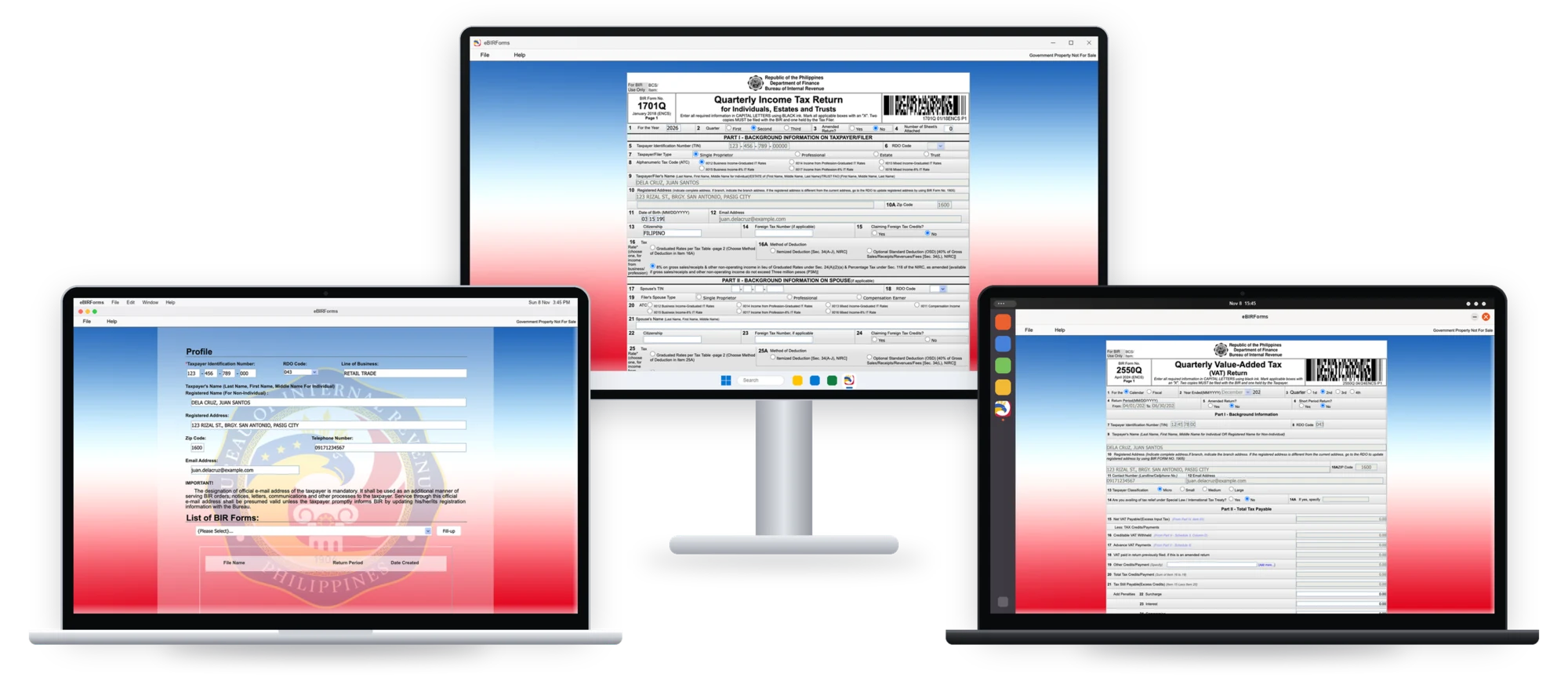
Unofficial. Not affiliated with or endorsed by the Bureau of Internal Revenue (BIR).
Download
Get the file for your computer from the latest release.
| Your computer | File |
|---|---|
| Mac (Apple Silicon or Intel) | Offline_eBIRForms_Package_v7.9.6.2.1_macOS_universal.dmg |
| Windows 10 or 11 (64-bit) | Offline_eBIRForms_Package_v7.9.6.2.1_Windows_x64_setup.exe |
| Linux (64-bit) | ..._Linux_x86_64.AppImage or ..._Linux_amd64.deb |
Compatibility
| Item | Supported |
|---|---|
| BIR package | v7.9.6.2.1 (BIR Revenue Memorandum Circular No. 104-2026): all 84 forms, including the new 0605 codes for micro taxpayers |
| macOS | 12 Monterey or later |
| Windows | 10 or 11, 64-bit |
| Linux | Ubuntu 22.04 or later, or equivalent |
| Savefiles | Same format as BIR's Windows app, so a file opens in either |
| Online Submit (sending the return to BIR from inside the app) | Not in the download build. Submit only locks the return and saves it on your computer. Nothing is sent to BIR. To file: print it and file on paper, or copy it (Go > Show Saved Returns) to BIR's own eBIRForms app on Windows and submit it there |
| Updates | The app checks for a new version when it opens (from v0.1.2), and Updates > Check for Updates checks now. Each update is signed |
| Status | Beta |
Install
- Mac: open the
.dmgand drag eBIRForms to Applications. The first time you open it, macOS blocks it because the app is not notarized. Click Done, then go to System Settings > Privacy & Security and click Open Anyway, then the grey Open Anyway button (not the blue one) and your Mac password. On macOS 12 to 14, right-click the app and choose Open instead. - Windows: run the setup
.exe. If SmartScreen appears, click More info, then Run anyway. - Linux: make the
.AppImageexecutable (chmod +x) and run it, or install the.debwithsudo apt install ./..._amd64.deb.
Step-by-step pictures for each system are on the download page.
Then fill in your profile, pick a form, click Fill-up, and Save, the same as in BIR's app.
Links
- Problems or questions: Issues
- What changed: CHANGELOG.md
- Help build it: CONTRIBUTING.md (setup, how the repo is laid out, the rules)
- Change how a form behaves, or switch our fixes off: mods, or Go > Mods in the app
- Let an AI agent (Claude, Codex) fill and save draft returns: docs/agent.md
- Web version (no install; our own forms, works offline, returns stay in your browser): https://betterebirforms.github.io/ebirforms/
- What's planned, including mobile and web: ROADMAP.md
- How it works: docs/architecture.md
BIR's forms are works of the Philippine Government (the Intellectual Property Code, RA 8293 §176.1). The logo is adapted from BIR's seal.
Code: MIT License. BIR's forms and artwork are not covered by it; see NOTICE.md.
Ähnliche Projekte entdecken
freeCodeCamp/freeCodeCamp
Die Open-Source-Codebasis und das Curriculum von freeCodeCamp.org. Lerne Mathematik, Programmierung und Informatik kostenlos.
459,068 Sternedonnemartin/system-design-primer
Lerne, Systeme im großen Maßstab zu entwerfen, und bereite dich auf das Systemdesign-Interview vor. Enthält Anki-Karteikarten.
377,733 Sternereact/react
Die Bibliothek für Web- und native Benutzeroberflächen.
252,565 Sternevuejs/vue
Dies ist das Repository für Vue 2. Das Repository für Vue 3 findest du unter https://github.com/vuejs/core
212,527 Sterne