
attevon-llc/OpenTranscribe
attevon-llc/OpenTranscribe has 109 GitHub stars and 27 forks. GitHot measured +3 stars in 24 hours and +3 in 7 days. Last checked 2026-11-09 00:09 UTC. Last push 2026-11-04.
So werden diese Zahlen gemessen
Self-hosted AI-powered transcription platform with speaker diarization, search, and collaboration features. Built with Svelte, FastAPI, and Docker for easy deployment.
What you can do
- Time-Stamped Comments: Add annotations at specific moments
- User Management: Role-based access control (user / admin / super admin) with personalized settings
- User Groups: Organize users into groups for streamlined permission management
- Collection Sharing: Share collections with viewer or editor permissions per user or group
Gemessener Sternzuwachs
- in 24h
- +3
- in 7 days
- +3
- in 15 days
- Aktualisierung verzögert
- in 1 month
- Aktualisierung verzögert
Nettoänderungen in überlappenden Zeiträumen, keine Tagessummen. Fehlende Messwerte bleiben leer. Sterne zeigen Interesse, nicht Qualität.
README.md
Original
AI-Powered Transcription and Media Analysis Platform
Project status — active development. The default branch tracks ongoing work and may contain unreleased or in-progress features. For a stable deployment, install a published release — the one-line installer below resolves the latest release automatically and pins your deployment to it.
OpenTranscribe is a powerful, containerized web application for transcribing and analyzing audio/video files using state-of-the-art AI models. Built with modern technologies and designed for scalability, it provides an end-to-end solution for speech-to-text conversion, speaker identification, and content analysis.
Note: This application is 99.9% written by AI using frontier models from commercial providers, demonstrating the power of AI-assisted development.
📸 Quick Look
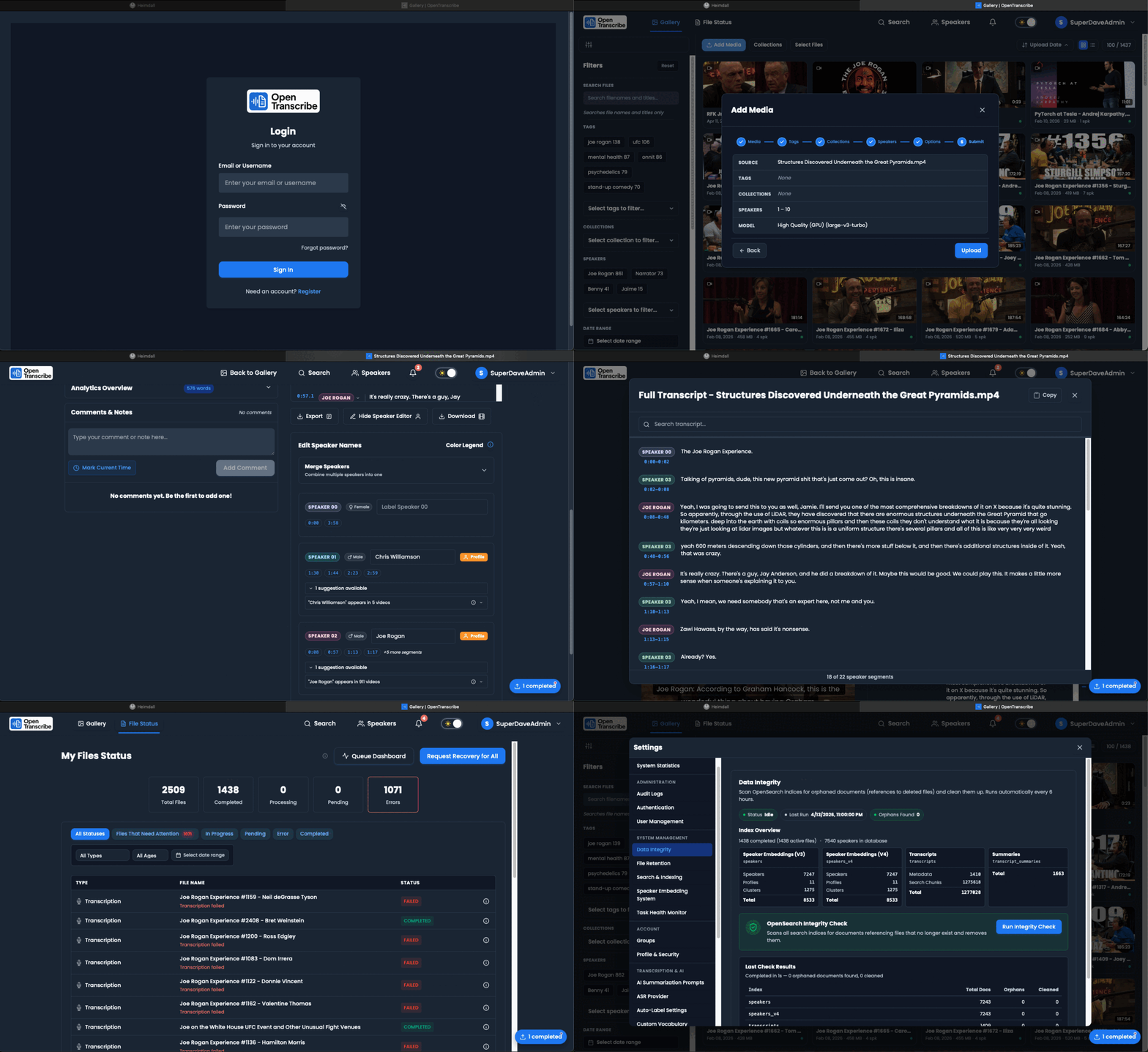
Complete workflow: Login → Upload → Process → Transcribe → Speaker Identification → AI Tags & Collections
📚 For detailed screenshots and visual guides, see the Complete Documentation
🗺️ Where this is going: the Roadmap shows what is in each release and how far along it is, generated from the issue tracker. Release Themes explains what each version is for and the exit criteria it has to meet.
✨ Key Features
🎧 Advanced Transcription
- High-Accuracy Speech Recognition: Powered by WhisperX with faster-whisper backend
- Fast Default Model: large-v3-turbo, a much faster variant of large-v3 with excellent English accuracy (it cannot translate; pick large-v3 for translation)
- Word-Level Timestamps: Native word-level timing for all 100+ languages via batched inference
- 100+ Language Support: Transcribe in 100+ languages with optional English translation
- Configurable Source Language: Auto-detect or specify source language for improved accuracy
- Translation Toggle: Choose to keep original language or translate non-English audio to English
- Batch Processing: ~40x realtime for the full pipeline including diarization, measured on an RTX A6000 with the large-v3-turbo default (see
docs/TRANSCRIPTION_OPTIMIZATION.md); your speed depends on hardware - Pagination for Large Transcripts: Efficient display of long transcripts without browser hanging
- Audio Waveform Visualization: Interactive waveform player with precise timing and click-to-seek
- Browser Recording: Built-in microphone recording with real-time audio level monitoring
- Recording Controls: Pause/resume recording with duration tracking and quality settings
👥 Smart Speaker Management
- Automatic Speaker Diarization: Identify different speakers with the native diarization engine (the diar-native sidecar, built on the
pyannote/speaker-diarization-community-1weights) by default, with the in-process PyAnnote v4 pipeline as automatic failover; or detect speakers with a cloud provider - Speaker Overlap Detection: Detect and handle multiple simultaneous speakers with advanced PyAnnote v4 capabilities
- Diarization Boundary Correction: Word-boundary smoothing (default on; on the one hand-labeled podcast clip it was measured on, word speaker error rate fell 77% with the native engine and 33% with PyAnnote, see Boundary Correction) collapses short wrong-speaker islands at turn boundaries, plus an opt-in acoustic backchannel re-check that re-embeds disputed words by voiceprint — both tuned live by a super admin under Settings → Speaker Identification → Speaker Engine (no restart)
- Cross-Video Speaker Recognition: AI-powered voice fingerprinting to identify speakers across different media files
- Speaker Profile System: Create and manage global speaker profiles that persist across all transcriptions
- Intelligent Speaker Suggestions: Consolidated speaker identification with confidence scoring and automatic profile matching
- LLM-Enhanced Speaker Recognition: Content-based speaker-name suggestions from conversational context. A suggestion is shown with its confidence and only becomes the speaker's name when you accept it; a name otherwise comes from a person or a voiceprint match
- Profile Embedding Service: Advanced voice similarity matching using vector embeddings for cross-video speaker linking
- Smart Speaker Status Tracking: Comprehensive speaker verification status with computed fields for UI optimization
- Auto-Profile Creation: Automatic speaker profile creation and assignment when speakers are labeled
- Retroactive Speaker Matching: Cross-video speaker matching with automatic label propagation for high-confidence matches
- Custom Speaker Labels: Edit and manage speaker names and information with intelligent suggestions
- Speaker Analytics: View speaking time distribution, cross-media appearances, and interaction patterns
- Speaker Merge UI: Combine duplicate speakers into single profiles with segment reassignment
- Per-File Speaker Settings: Configure min/max speaker count per upload or reprocess operation
- User-Level Speaker Preferences: Save default speaker detection settings (always prompt, use defaults, use custom values)
- GPU-Accelerated Clustering: Fast speaker clustering using GPU-accelerated embeddings
- Gender Detection: Automatic speaker gender detection for improved labeling suggestions, on by default and labeled in the interface as inferred from voice. Each user can switch Predict gender from voice off in Settings → Speaker Identification, and the instance and organization policies below can switch it off for everyone they cover
- Profile Avatars: Visual speaker profile avatars for easy identification across the media library
- Voice-Match Provenance: A speaker's name in search, chat, summaries and exports comes only from a person (typed or verified) or from a voice match at 75% similarity or more. An AI name suggestion is shown with its confidence and source but never becomes the name until you accept it
- Corrections That Stick: Unassigning a speaker from a cluster means "this voice is not that person" — with Prevent from rejoining this cluster ticked (the default), no automatic path puts it back, and the correction survives re-processing the file. You can name a speaker inline from the transcript's speaker menu, and removing a speaker removes every stored copy of its voice
🎬 Rich Media Support
- Universal Format Support: Audio (MP3, WAV, FLAC, M4A) and Video (MP4, MOV, AVI, MKV), and more. Formats browsers cannot play (AIFF, WMA, AVI and similar) get a playable copy for the player
- Universal Media URL Support: Process videos from the many sites yt-dlp supports (well over a thousand extractors; YouTube, Dailymotion, Twitter/X, TikTok, and more)
- Smart Platform Handling: User-friendly error messages with platform-specific guidance for authentication-required videos
- YouTube Playlist Processing: Extract and queue all videos from playlists for batch transcription
- Large File Support: Upload files up to 15 GB by default (
MAX_UPLOAD_BYTES) for GoPro and high-quality video content - Interactive Media Player: Click transcript to navigate playback
- Custom File Titles: Edit display names for media files with real-time search index updates
- Advanced Upload Manager: Floating, draggable upload manager with real-time progress tracking
- Concurrent Upload Processing: Multiple file uploads with queue management and retry logic
- Intelligent Upload System: Duplicate detection, hash verification, and automatic recovery
- Metadata Extraction: Comprehensive file information using ExifTool
- Subtitle Export: Generate SRT/VTT files for accessibility; captions are cut by one server-side segmenter (broadcast line rules, per-script line breaking) shared by the player, subtitle downloads and burned-in video
- Transcript Documents: Export Word (.docx) and PDF with numbered lines you can cite by page and line, with right-to-left and CJK support, plus Markdown (.md) with YAML front matter for note-taking tools. Redaction policy is applied server-side
- File Reprocessing: Re-run AI analysis while preserving user comments and annotations
- Auto-Recovery System: Intelligent detection and recovery of stuck or failed file processing
📁 Watch Sources (Auto-Import)
- Watch Local Folders, S3 & SMB: Point OpenTranscribe at a mounted folder, an S3-compatible bucket (AWS S3, MinIO, Backblaze B2, Wasabi), or an SMB/CIFS network share — new media is imported and transcribed automatically
- Scheduled Polling: Each source scans on its own interval (Celery Beat); a "Scan Now" button triggers an immediate pass. No restart to add, edit, or disable sources
- Three-Layer Deduplication: Content fingerprint (imohash) dedup within a source, across sources, and against everything already in your library — duplicates are recorded and linked, never re-imported
- Age Filter: "Skip files older than N days" so adding a folder with years of recordings can process just the last 30/90 days
- Multi-Part Stitching: Auto-detects split recordings (e.g.
meeting_P001.mp4,meeting_P002.mp4) from dropped connections and rejoins them into one file with ffmpeg before transcription - Auto-Organize: Apply tags and collections to every imported file (pick existing or create new)
- Guided Setup Wizard: A stepper UI for connection → processing → stitching → organize, with inline connection testing and a folder picker; originals on remote sources are never moved or deleted
- Email Notifications (experimental): Optional SMTP / Microsoft 365 / Exchange scan-summary emails, with in-app setup guidance for modern providers
🔍 Powerful Search & Discovery
- Hybrid Search: Combine keyword and semantic search capabilities
- OpenSearch Neural Search: Native neural search engine for advanced vector-based semantic search
- Full-Text Indexing: Fast content search with OpenSearch 3.4.0 (Apache Lucene 10); summaries are indexed and searched as their own source alongside title, transcript and speaker
- Advanced Filtering: Filter by speaker, date, tags, duration, and more with searchable dropdowns
- Tag Management: A full tag surface beside Collections — create, rename, merge and delete with an impact preview, search and sort a large library, and see every file a tag touches. Names resolve normalized-exact (
Q3 Review=q3-review), so one word never becomes three near-duplicates - Tag Sharing: Give a tag to specific people or groups so they use your word instead of coining their own, or publish it to the whole deployment — which folds identically-named tags into it. Tags also travel with shared media automatically, computed from the file rather than copied
- Bulk Organizing: Apply tags and collections across a gallery selection; one selected file gets the full chip editor, several get add-only with per-tag coverage counts
- Collections System: Group related media files into organized collections for better project management
- Speaker Usage Counts: See which speakers appear most frequently across your media library
💬 AI Chat (RAG) over your transcripts
- Ask questions across your recordings: answers grounded in what was actually said, streamed token by token, with numbered citations that deep-link to the exact moment in the player
- Scope a conversation by recordings, collections, or tags — collections and tags resolve at query time, so a recording added later is automatically in scope
- Ask about one person: a Speakers filter that is exact rather than approximate. Transcripts are indexed as speaker turns, so selecting a speaker retrieves only their own words — "what did Dana commit to?" can never be answered from someone else's sentence about Dana
- Familiar chat interactions: edit a question and re-answer from that point, regenerate, stop mid-stream, copy, export to Markdown or JSON, archive, and a searchable conversation history
- Projects: group conversations by client, meeting or case. A project pins the recordings its chats search and standing instructions they all inherit, so you stop re-picking context and re-typing background. Deleting a project keeps its conversations
- Per-conversation model choice, creativity, answer length and focus — or turn transcript context off entirely to use the model as a plain assistant
- Instructions stack rather than replace: built-in rules → your default → the project → this chat, and the built-in rules always win
- Redaction is honoured — retrieved excerpts are re-masked before they reach a provider, and masking fails closed
- Usage visibility:
GET /usage/meshows tokens and estimated cost per model, so you can see what you are spending - Test it without a model:
./opentr.sh start dev --with-mock-llmruns an OpenAI-compatible mock so chat works with no GPU, API key, or internet — including scenario models that exercise the real error paths - Chat needs a provider, and so do the other features that write prose (summaries, topic suggestions, speaker-name hints) — search (including semantic search), transcription, diarization and redaction all run on local models. See Working Without an AI Model
- How it works, and how we know it works: the retrieval stack is standard components named explicitly — BM25 + kNN fused by Reciprocal Rank Fusion (all OpenSearch-native), a parent-document digest tier, query routing, and two-stage reranking. What we wrote ourselves is what respects speaker boundaries. See RAG design and RAG evaluation, which records the measured numbers and the ways a retrieval benchmark can quietly mislead you
🚫 No AI Provider? Most of It Still Works
- A first-class deployment, not a degraded one: leave
LLM_PROVIDERempty and transcription, diarization, cross-recording speaker matching, redaction, tags, collections, exports, watch sources and analytics all work normally - Semantic search included: the embedding model runs inside your own OpenSearch container — an embedding model is not a language model, so meaning-based and hybrid search need no provider and no internet. Six models are offered and each is verified end to end (register → deploy → a real prediction); the two multilingual ones are additionally checked for cross-lingual behaviour and score 0.85–0.98 cosine on translations across Spanish, German, Chinese, Arabic and Russian. OpenSearch defaults to a 4 GB heap, which is claimed at startup and pinned in RAM; a 2 GB heap is verified to run every English model and 1 GB the default one — see Performance Tuning
- What does need one: summaries, topic/tag suggestions, LLM speaker-ID hints, and AI Chat
- Retroactive: add a provider later and every existing recording becomes summarizable and chattable immediately — no re-processing
📊 Analytics & Insights
- Advanced Content Analysis: Comprehensive speaker analytics including talk time, interruption detection, and turn-taking patterns
- Speaker Performance Metrics: Speaking pace (WPM), question frequency, and conversation flow analysis
- Meeting Efficiency Analytics: Silence ratio analysis and participation balance tracking
- Real-Time Analytics Computation: Server-side analytics computation with automatic refresh capabilities
- Cross-Video Speaker Analytics: Track speaker patterns and participation across multiple recordings
- AI-Powered Summarization: Generate summaries with flexible JSON schemas from custom prompts
- BLUF Format Support: Default Bottom Line Up Front structured summaries with action items
- Custom Summary Formats: Create unlimited AI prompts with ANY JSON structure
- Flexible Schema Storage: JSONB storage supporting multiple prompt types simultaneously
- Multi-Provider LLM Support: Use local vLLM or Ollama, or OpenAI, Anthropic, OpenRouter, or Amazon Bedrock (AWS-native, no API key needed — credentials come from the IAM chain)
- Intelligent Section Processing: Automatically handles transcripts of any length using section-by-section analysis
- Custom AI Prompts: Create and manage custom summarization prompts for different content types
- LLM Configuration Management: User-specific LLM settings with encrypted API key storage
- Provider Testing: Test LLM connections and validate configurations before use
- Real-Time Topic Extraction: AI-powered topic extraction with granular progress notifications
- LLM Output Language: Generate AI summaries in 12 different languages (English, Spanish, French, German, etc.)
- Model Discovery: Automatic discovery of available models for vLLM, Ollama, and Anthropic providers
- Auto-Cleanup Garbage Segments: Automatic detection and cleanup of erroneous transcription segments
💬 Collaboration Features
- Time-Stamped Comments: Add annotations at specific moments
- User Management: Role-based access control (user / admin / super admin) with personalized settings
- User Groups: Organize users into groups for streamlined permission management
- Collection Sharing: Share collections with viewer or editor permissions per user or group
- Cross-User Prompt Sharing: Share custom AI prompts across users and teams
- Recording Settings Management: User-specific audio recording preferences with quality controls
- Export Options: Download transcripts as TXT, JSON, CSV, SRT, VTT, Markdown (.md), Word (.docx) or PDF; redaction policy is applied on the server
- Real-Time Updates: Live progress tracking with detailed WebSocket notifications
- Enhanced Progress Tracking: Per-stage progress with descriptive messages, grouped as Main processing, Finishing and AI enrichment
- Smart Notification System: Persistent notifications with unread count badges and progress updates; each file's card shows its stages in three tiers (Main processing, Finishing, AI enrichment), downloads get one row that moves from preparing to done, and finished jobs show how long processing took
- Notification Retention: Routine read notifications clear themselves on a retention policy you choose in the panel (Keep notifications for: 24 hours after reading, 7 days after reading, or never); errors and anything needing action are kept
- WebSocket Integration: Real-time updates for transcription, summarization, and upload progress
- Collection Management: Create, organize, and share collections of related media files
- Smart Error Recovery: User-friendly error messages with specific guidance and auto-recovery options
- Full-Screen Transcript View: Dedicated modal for reading and searching long transcripts
- Auto-Refresh Systems: Background updates for file status without manual refreshing
- File Retention Policies: Admin-configurable auto-deletion rules for GDPR/compliance requirements
🎙️ Recording & Audio Features
- Browser-Based Recording: Direct microphone recording with no plugins required
- Real-Time Audio Level Monitoring: Visual audio level feedback during recording
- Multi-Device Support: Choose from available microphone devices
- Recording Quality Control: Configurable bitrate and format settings
- Pause/Resume Recording: Full recording session control with duration tracking
- Background Upload Processing: Seamless integration with upload queue system
- Recording Session Management: Persistent recording state with navigation warnings
🤖 AI-Powered Features
- Comprehensive LLM Integration: Seven provider types (OpenAI, Anthropic Claude, vLLM, Ollama, OpenRouter, Amazon Bedrock, and any custom OpenAI-compatible endpoint)
- Custom Prompt Management: Create and manage AI prompts for different content types
- Encrypted Configuration Storage: Secure API key storage with user-specific settings
- Provider Connection Testing: Validate LLM configurations before use
- Intelligent Content Processing: Context-aware summarization with section-by-section analysis
- BLUF Format Summaries: Bottom Line Up Front structured summaries with action items
- Bring Your Own Model: You choose the model for each provider; the docs show setups from a small Ollama model to a 70B model on vLLM, and long transcripts are handled section by section so a small context window is not a hard limit
- Local & Cloud Processing: Support for both local (privacy-first) and cloud AI providers
- Cloud ASR Providers: 9 cloud speech-to-text providers (Deepgram, AssemblyAI, OpenAI Whisper API, Google, AWS Transcribe, Azure, Speechmatics, Gladia, pyannote.ai) as alternatives to local GPU processing. Six are marked
testedagainst live APIs in the provider catalog (Deepgram, AssemblyAI, Gladia, AWS Transcribe, Speechmatics, pyannote.ai); OpenAI, Google and Azure are marked experimental and not fully tested with real API keys - API-Lite Deployment:
DEPLOYMENT_MODE=litefor cloud-only deployments without requiring a local GPU; lite is cloud-only for both transcription and speaker detection - Composable Processing Pipeline: Transcription and speaker detection are chosen independently (Settings → Transcription, Settings → Speaker Identification → Speaker Detection). Mix local Whisper or a cloud ASR provider for the words with this server's engine, the same provider's own speakers, the pyannote.ai cloud service, or another saved provider's speaker detection for the speakers. Settings → Processing pipeline shows, before the next upload, where each step runs and which providers receive your audio, and each file records which provider and model did each step. See Speaker Diarization
- Local Model Library: A super admin can download any listed local Whisper model and switch the active one under Settings → Transcription → Provider & Model → Local models (disk-space check, live progress, cancel; only the Whisper workers restart, after running jobs finish)
- Cloud Provider Allow-List: A super admin can limit which cloud transcription providers plain users may choose and forbid users from adding their own keys
- Selective Reprocessing: Re-run only specific pipeline stages (transcription, diarization, summarization) without full reprocessing
- Per-Upload Toggles: Turn AI summarization off per file with the wizard's Generate AI summary switch; skipping speaker detection for a single file is available through the API (
disable_diarization), and a user can choose Off for speaker detection in Settings → Speaker Identification
🔐 Enterprise Authentication & Security
- Enterprise Authentication System: Support for 6 authentication methods, running simultaneously, with hybrid (DB > env > default) configuration
- Local Authentication: Username/password with bcrypt hashing
- LDAP/Active Directory: Enterprise directory integration for corporate deployments
- OpenID Connect (OIDC): OAuth 2.0 with PKCE for single sign-on (SSO) against any conforming provider (Keycloak, Authentik, Okta, Entra ID, Authelia, Auth0, Zitadel)
- SAML 2.0: Service-provider role for IdPs that only speak SAML (ADFS, Shibboleth, Okta-classic)
- PKI/X.509 Certificates: CAC/PIV smart card support for government and high-security deployments
- Trusted-header (reverse proxy): Delegate authentication to oauth2-proxy, Authelia, Cloudflare Access or a similar SSO gateway
- SCIM 2.0 Provisioning:
/scim/v2for IdP-driven account creation/deactivation, alongside per-method JIT provisioning - Multi-Factor Authentication (MFA): TOTP-based authentication (Google Authenticator, Authy) with backup codes for account recovery
- Comprehensive Audit Logging: All authentication events logged for compliance and security monitoring
- FedRAMP Compliance Features: Password complexity policies (IA-5), account lockout after failed attempts, classification banners (AC-8)
- Enterprise Session Management: JWT with refresh token rotation, session timeout controls, secure token storage
- Password Security: Password history tracking to prevent reuse, configurable complexity requirements
- Rate Limiting: Protection against brute-force attacks on authentication endpoints; a rate-limited response says how long to wait (
Retry-After) and the UI counts it down - Password Security Levels: Settings → Authentication → Local offers Basic, Standard (NIST SP 800-63B-4), Hardened and Custom levels with a preview of the exact rules; a breached-password list (built from Have I Been Pwned) is an on-demand download (
./opentranscribe.sh download-models password-blocklist) - Admin MFA Requirement:
MFA_REQUIRED_FOR_ADMINS(off by default) can require administrators to set up MFA
🛡️ Content Moderation & Privacy
- Read-Time Redaction: Mask PII, profanity, and toxicity at every display/export surface with
[CATEGORY]placeholders — the full original transcript is always kept in the database, masking is a read-time transform (no destructive edits) - Per-User, On by Default: Each user controls categories, masking style, custom words, and allowlist (Settings → Privacy & Redaction → Content Redaction) with no recompute on change
- Admin Enforcement Floor: Super admins can force PII/toxicity/profanity masking and mandate censored exports for all users (Settings → Privacy & Redaction → Redaction Policy)
- Detect-Once, Cache-Forever: Detection runs once per transcript in a dedicated
celery-redactionCPU service; spans cache on the transcript so enable/disable and category changes are instant - Multiple Detectors: Presidio + spaCy/GLiNER (PII), toxic-bert / multilingual XLM-R (toxicity), wordlist (profanity), plus an optional LLM detector
- Audit Log: A super admin can review and export (CSV or JSON) security and authentication events under Settings → Administration → Audit Logs, and can switch on content-access auditing (who opened a recording, requested its media or exported a transcript; off by default)
- Voiceprint and Gender Privacy Controls: One restrict-only policy decides whether voiceprints may be created and matched and whether gender may be inferred. A super admin sets the instance switch (Settings → Privacy & Redaction → Redaction Policy), each person sets their own (Settings → Speaker Identification), and any layer that is off turns the feature off; an error reading the policy counts as off. Turning a switch off hides existing data and stops new data without deleting anything. Deleting is a separate, typed-confirmation purge that is audited, reports how many items it removed in each store, and checks afterwards that nothing from the deletion remains. Speakers are still told apart within a recording when voiceprints are off. Both switches default on, so an upgrade deletes nothing (anyone who had already turned inferred gender off keeps it off, and stored inferred genders are hidden for them). Full reference: Privacy controls.
- Quarantine & Takedown Review: Admins can quarantine a file and review it under Settings → Administration → Quarantine; each takedown is recorded with the notice it acts on, owners see why in My takedown notices, and a held file cannot be reprocessed or retried
- Organization Features (managed edition only): Organizations, team and member management, the organization audit log (
org.audit_logs; filter by member, event, outcome, dates or a file/collection id, export up to 10,000 rows as CSV or JSON), organization legal holds (org.legal_hold; a held file cannot be deleted, purged or reprocessed), the organization takedown queue (org.takedown) and the organization-level voiceprint and gender privacy policy are available in the managed edition only; the open-source build ships the capability gates with these off. Collections themselves, collection sharing and the platform audit log are community features. Where an install does use organizations, tags and collections belong to one organization (collections can be restricted to their creator, the organization's admins and the people they are shared with), andTENANCY_MODE(defaultauto) makes administrators use audited, time-boxed support-access grants instead of opening tenant content directly; see Support access
⚙️ Speech Processing (Super Admin)
- Runtime-Tunable Engine Settings: Super admins adjust runtime-safe transcription/diarization engine settings — boundary-correction toggles and knobs, transcriber/diarizer backend selection — via Settings → Speaker Identification → Speaker Engine with no container restart
⚡ Performance & Scaling
- Multi-GPU Worker Scaling: Optional parallel processing on dedicated GPUs for high-throughput systems, including an optional ASR/diarization GPU split (
--with-gpu-split) that runs transcription and diarization on separate GPUs - Hybrid Mode: Automatic CPU transcription + GPU diarization for small-VRAM GPUs (Linux/WSL2 with an NVIDIA GPU only — a containerized deployment on Apple Silicon has no Docker Metal passthrough and runs CPU-only via the
--liteimage, not MPS) - Combined Transcription Engine: Unified, backend-pluggable engine with admin-tunable runtime settings and per-worker metrics
- Fast Uploads: Presigned direct-to-MinIO uploads (the default path; the API-proxied route is a fallback that
API_MEDIATED_UPLOAD_ENABLED=falseremoves) with content-hash (imohash) deduplication, and a shared-volume WAV handoff that removes redundant downloads from the processing pipeline - Pipeline Timing Instrumentation: Opt-in end-to-end wall-clock timing (
ENABLE_BENCHMARK_TIMING) with admin timing endpoints - Specialized Worker Queues: dedicated queues per workload — gpu (transcription), cloud-asr, cpu (waveform), download (YouTube), nlp (AI features), embedding, utility, redaction — plus gpu-transcribe / gpu-diarize for the GPU split and cpu-transcribe for CPU transcription
- Parallel Waveform Processing: CPU-based waveform generation runs simultaneously with GPU transcription
- Non-Blocking Architecture: LLM tasks run on their own queue and don't delay the next transcription
- Configurable Concurrency: Per-queue worker concurrency (defaults: GPU 1 via
GPU_CONCURRENT_REQUESTS, CPU 8, Download 5, NLP 4, Cloud-ASR 16, Redaction 2) for optimal resource utilization - Enhanced Speaker Detection: Support for 20+ speakers (can scale to 50+ for large conferences)
- Accurate GPU Monitoring: nvidia-smi integration for real-time system-wide memory tracking
- VRAM-Aware GPU Admission: Each GPU stage reserves its estimated VRAM and waits when it does not fit, GPU concurrency is capped by host memory, and a CUDA out-of-memory error retries with a smaller batch; files held by a worker that died are recovered rather than stranded
- Data Integrity Tools: Settings → Data & Storage → Data Integrity finds and removes orphaned search documents and stored files, and a delete leaves nothing behind in any store
- Blackwell GPU Support: NVIDIA GB10x/GB20x (DGX Spark) detected automatically (compute capability 12.x) and run on the dedicated
:blackwellimage; build it withscripts/docker-build-push.sh --blackwell backend
📱 Enhanced User Experience
- Installable Web App: Add to home screen via the web app manifest. OpenTranscribe needs the server for every screen, so there is no offline mode and it ships no service worker
- Mobile-Responsive Overhaul: Full mobile-first redesign optimized for phones, tablets, and desktop
- UI Internationalization: Interface available in 12 languages (English, Spanish, French, German, Italian, Portuguese, Dutch, Chinese, Japanese, Korean, Russian, Arabic)
- Interactive Waveform Player: Click-to-seek audio visualization with precise timing
- Floating Upload Manager: Draggable upload interface with real-time progress
- Smart Modal System: Consistent modal design with improved accessibility
- Enhanced Data Formatting: Server-side formatting service for consistent display of dates, durations, and file sizes
- Error Categorization: Intelligent error classification with user-friendly suggestions and retry guidance
- Smart Status Management: Comprehensive file and task status tracking with formatted display text
- Auto-Refresh Systems: Background data updates without manual page refreshing
- Theme Support: Seamless dark/light mode switching
- Keyboard Shortcuts: Efficient navigation and control via hotkeys
- System Statistics: CPU, memory, disk, and GPU usage visible to all users, plus the thread count the chat reranker uses (
CHAT_RERANKER_TORCH_THREADS, automatic by default) - Searchable, Regrouped Settings: Settings is a searchable set of sections (Account, Transcription & Speakers, AI & Chat, Media & Output, Administration, System) that load on demand; entries a user's role cannot open are shown disabled rather than hidden
- About Dialog: Shows the app build next to the server version (and tells you to reload when a stale tab no longer matches the server), plus the AGPL-3.0 licence, a source-code link and the third-party NOTICE
- Server-Driven Capabilities:
GET /api/system/capabilitiesreports the edition and which feature surfaces exist; the UI renders only those, and deployment-locked controls (for example model choice or URL import) are enforced on the server - First-Run Setup Wizard: The first super admin gets a guided one-time setup (password change, SSO/LDAP, security defaults)
- Admin Password Reset: Secure password reset functionality with validation
🛠️ Technology Stack
Frontend
- Svelte - Reactive UI framework with excellent performance
- TypeScript - Type-safe development with modern JavaScript and comprehensive ESLint integration
- Installable web app - Web app manifest for add-to-home-screen (no service worker, no offline mode)
- Internationalization (i18n) - Multi-language UI support with 12 languages
- Responsive Design - Seamless experience across all devices
- Advanced UI Components - Draggable upload manager, modal consistency, and real-time status updates
- Code Quality Tooling - ESLint, TypeScript strict mode, and automated formatting
Backend
- FastAPI - High-performance async Python web framework
- SQLAlchemy 2.0 - Modern ORM with type safety
- Celery + Redis - Multi-queue distributed task processing for AI workloads (dedicated queue per workload)
- GPU Queue (concurrency=
GPU_CONCURRENT_REQUESTS, default 1): GPU-intensive transcription and diarization - Cloud-ASR Queue (concurrency=16): Cloud speech-to-text provider jobs
- CPU Queue (concurrency=8): Waveform generation and audio processing
- Download Queue (concurrency=5): Parallel YouTube video/playlist downloads
- NLP Queue (concurrency=4): LLM API calls and AI features
- Embedding Queue (concurrency=1): Speaker voice embedding extraction and matching
- Utility Queue: Health checks and maintenance tasks (served by the CPU worker)
- Redaction Queue (concurrency=2): PII/profanity/toxicity detection (detect-once, cache-forever)
- GPU Queue (concurrency=
- WebSocket - Real-time communication for live updates
AI/ML Stack
- WhisperX - Advanced speech recognition with 100+ language support
- large-v3-turbo Model - Default fast transcription model, much faster than large-v3
- Native Word-Level Timestamps - Always-on via faster-whisper cross-attention DTW (no separate alignment model needed)
- Native diarization engine (diar-native) - Default speaker diarization sidecar, with PyAnnote v4 as the in-process failover
- Faster-Whisper - Optimized inference engine
- Multi-Provider LLM Integration - Support for vLLM, OpenAI, Ollama, Anthropic Claude, OpenRouter, and Amazon Bedrock
- Local LLM Support - Privacy-focused processing with vLLM and Ollama
- Intelligent Context Processing - Section-by-section analysis handles unlimited transcript lengths
- Model-Agnostic LLM Layer - You pick the model; any model your provider serves can be used, and quality scales with the model you choose
- Multilingual AI Output - Generate summaries in 12 different languages
- Model Auto-Discovery - Automatic detection of available models from vLLM, Ollama, and Anthropic
Infrastructure
- PostgreSQL - Reliable relational database with JSONB support for flexible schemas
- MinIO - S3-compatible object storage (default, self-hosted)
- Native AWS S3 Backend - Optional
STORAGE_BACKEND=s3targets a real S3 (or S3-compatible) endpoint directly, with SigV4 signing and IAM-role credentials (no static keys required) for AWS-native deployments - OpenSearch 3.4.0 - Full-text and neural search engine with Apache Lucene 10
- Native neural search for advanced semantic capabilities
- Upstream's 3.x release notes report large vector-search, query and aggregation latency gains (OpenSearch's figures, not measured by this project)
- Docker - Containerized deployment with multi-stage builds
- NGINX - Production web server
- Complete Offline Support - Full airgapped/offline deployment capability
🚀 Quick Start
Prerequisites
# Required
- Docker and Docker Compose
- 8GB+ RAM (16GB+ recommended)

# Recommended for optimal performance
- NVIDIA GPU with CUDA support
Quick Installation (Using Docker Hub Images)
Run this one-liner to download and set up OpenTranscribe using our pre-built Docker Hub images:
curl -fsSL https://raw.githubusercontent.com/attevon-llc/OpenTranscribe/master/setup-opentranscribe.sh | bash
Then follow the on-screen instructions. The setup script will:
- Detect your hardware (NVIDIA GPU, Apple Silicon, or CPU)
- Download the production Docker Compose file
- Configure environment variables with optimal settings for your hardware
- Prompt for your HuggingFace token (required for speaker diarization)
- Automatically download and cache AI models (several GB; the size depends on your Whisper and neural-search model choices) if a token is provided
- Set up the management script (
opentranscribe.sh)
💻 CPU-only install: If you don't have an NVIDIA GPU, or you're on WSL2 with the NVIDIA Container Toolkit installed but GPU passthrough disabled, pass --cpu to skip GPU detection and avoid the nvidia-container-cli adapter error at container start:
# Piped install
curl -fsSL https://raw.githubusercontent.com/attevon-llc/OpenTranscribe/master/setup-opentranscribe.sh | bash -s -- --cpu

# Unattended / CI equivalent
OPENTRANSCRIBE_FORCE_CPU=1 curl -fsSL https://raw.githubusercontent.com/attevon-llc/OpenTranscribe/master/setup-opentranscribe.sh | bash
The CPU-only choice is persisted to .env as FORCE_CPU_MODE=true so subsequent ./opentranscribe.sh start/restart calls continue to skip the GPU overlay automatically.
🪶 Lite install (--lite): --cpu still runs the full CUDA image, just without a GPU. --lite
is different — it installs the much smaller CPU-only opentranscribe-backend-lite image, which
carries no CUDA runtime and no local ASR model, and transcribes via a cloud ASR provider you
configure after install. Implies --cpu, and persists DEPLOYMENT_MODE=lite:
curl -fsSL https://raw.githubusercontent.com/attevon-llc/OpenTranscribe/master/setup-opentranscribe.sh | bash -s -- --lite

# Unattended / CI equivalent
OPENTRANSCRIBE_LITE=1 curl -fsSL https://raw.githubusercontent.com/attevon-llc/OpenTranscribe/master/setup-opentranscribe.sh | bash
This is the only supported shape on a host with no NVIDIA GPU at all, and it is what arm64 hosts select automatically — the full CUDA image publishes no arm64 leg, so on Apple Silicon and other aarch64 machines the lite image is the only backend available.
⚠️ IMPORTANT - HuggingFace Setup: The script will prompt you for your HuggingFace token during setup. BEFORE running the installer:
- Get a FREE token: Visit https://huggingface.co/settings/tokens
- Accept the gated model agreement (required for speaker diarization): pyannote/speaker-diarization-community-1 - Click "Agree and access repository" (this is the only repo OpenTranscribe actually gates on; it's auto-approved)
- Enter your token when prompted by the installer
If you provide a valid token with the model agreement accepted, AI models will be downloaded and cached before Docker starts, ensuring the app is ready to use immediately. If you skip this step, models will download on first use (10-30 minute delay).
Once setup is complete, start OpenTranscribe with:
cd opentranscribe
./opentranscribe.sh start
The Docker images are available on Docker Hub as separate repositories:
davidamacey/opentranscribe-backend: CUDA backend image (also used for the API, every Celery worker, beat, flower and the diar-native sidecar)davidamacey/opentranscribe-backend-lite: CPU-only backend image used by--liteinstalls (cloud ASR)davidamacey/opentranscribe-frontend: Frontend servicedavidamacey/opentranscribe-docs: Bundled documentation site
Access the web interface at http://localhost:5173
Manual Installation (From Source)
Clone the Repository
git clone https://github.com/attevon-llc/OpenTranscribe.git
cd OpenTranscribe

# Make utility script executable
chmod +x opentr.sh
Environment Configuration
# Copy environment template
cp .env.example .env

# Edit .env file with your settings (optional for development)
# Key variables:
# - HUGGINGFACE_TOKEN (required for speaker diarization)
# - GPU settings for optimal performance
Start OpenTranscribe
# Start in development mode (with hot reload)
./opentr.sh start dev

# Or start in production mode
./opentr.sh start prod
Access the Application
- 🌐 Web Interface: http://localhost:5173
- 📚 API Documentation: http://localhost:5174/api/docs (disabled on hardened deployments unless
ENABLE_API_DOCS=true) - 🌺 Task Monitor: http://localhost:5175/flower (basic auth:
FLOWER_USER/FLOWER_PASSWORD) - 🔍 Search Engine: http://localhost:5180 (OpenSearch, loopback-only)
- 📁 File Storage: http://localhost:5179 (MinIO console, loopback-only)
- 📖 Documentation: http://localhost:5183/docs/
- 📈 Prometheus: http://localhost:5186 (with
--with-monitoring) - 📊 Grafana: http://localhost:5185 (with
--with-monitoring)
📋 OpenTranscribe Utility Commands
The opentr.sh script provides comprehensive management for all application operations:
Basic Operations
# Start the application
./opentr.sh start [dev|prod]     # Start in development or production mode
./opentr.sh start dev --gpu-scale # Start with multi-GPU scaling (optional)
./opentr.sh stop                 # Stop all services
./opentr.sh status               # Show container status
./opentr.sh logs [service]       # View logs (all or specific service)
Multi-GPU Options (Optional)
Two independent scaling modes are available — choose based on your hardware and workload:
Option A — GPU Scale (multiple parallel pipelines on one GPU):
# The --gpu-scale flag is what enables scaling — GPU_SCALE_ENABLED in .env does
# NOT turn it on (it only affects which GPU the system-stats display queries).
GPU_SCALE_DEVICE_ID=2       # Which GPU to use (default: 2)
GPU_SCALE_WORKERS=4         # Number of parallel workers (unset = derived from DIAR_NATIVE_MAX_INFLIGHT, which falls back to 2)

# Start with GPU scaling
./opentr.sh start dev --gpu-scale
./opentr.sh reset dev --gpu-scale

# Example: GPU 2 (A6000) runs 4 parallel workers; GPU 0/1 handle other tasks
Best for: High file throughput — processes GPU_SCALE_WORKERS videos simultaneously on one GPU. Keep it at or below the diar-native sidecar's DIAR_NATIVE_MAX_INFLIGHT, or the extra jobs just queue on the sidecar.
Option B — GPU Split (transcription and diarization on separate GPUs):
# Configure in .env
GPU_TRANSCRIBE_DEVICE_ID=0   # GPU for WhisperX (transcription)
GPU_DIARIZE_DEVICE_ID=1      # GPU for PyAnnote (diarization)
ENGINE_SHARED_VOLUME_PATH=/scratch/opentranscribe/engine  # per-task handoff dir on the pipeline_scratch volume

# Start with GPU split
./opentr.sh start dev --with-gpu-split
./opentr.sh reset dev --with-gpu-split
Best for: Two-GPU setups where you want dedicated VRAM per model — one GPU purely for Whisper, one purely for PyAnnote.
📖 Deployment reference: For a full table of every deployment type and its exact
./opentr.shcommand — plus the first-init healthcheck model, the cross-worker scratch-volume contract, all three GPU modes, the security posture (loopback infra ports,no-new-privileges, secret generation), and the NAS/NVMe storage overlay — see the Deployment Configuration operations guide.
Watch Sources (Auto-Import)
# Mount a host folder to watch for new media (the only watch env var),
# then start with the watch overlay:
WATCH_HOST_PATH=/path/to/your/media ./opentr.sh start dev --with-watch

# Optional: a local Samba share to test an SMB watch source
./opentr.sh start dev --with-watch --with-smb-test

# Seed sample media (multi-part group, duplicate, old file, mixed types)
bash scripts/setup-watch-source-test-data.sh ./watch
Then configure sources in Settings → Watch Sources (local folder, S3, or SMB). Without --with-watch, the local-folder type is hidden and only S3/SMB are available. All connection, schedule, and credential settings are managed in the UI — no restart required.
Fresh Deployments (Isolated, Guard-Railed)
# Brand-new isolated stack: own compose project + named volumes, NAS overlay
# NEVER loaded, real data untouched. Runs on the standard dev ports by default
# (refuses to start if the main stack already holds them).
./opentr.sh start dev --fresh test1

# Run side-by-side with the main stack by offsetting every published port:
./opentr.sh start dev --fresh test1 --port-offset 100   # backend :5274, frontend :5273, ...

# Upload a couple of small sample files once the stack is healthy:
./opentr.sh start dev --fresh test1 --seed-benchmark

# Manage fresh deployments:
./opentr.sh stop --fresh test1        # stop (keep volumes)
./opentr.sh status --fresh test1      # status
./opentr.sh fresh-list                # list all fresh deployments + volumes
./opentr.sh fresh-destroy test1       # remove containers + volumes (confirmed)

# See exactly where your live data lives before deleting anything:
./opentr.sh data-paths
Fresh deployments are the safe way to spin up throwaway stacks. They use an
isolated otfresh-<name> compose project (separate containers and named
volumes), and the NAS/bind-mount overlay is never attached — so the production
dataset can never be touched. The non-fresh start auto-loads the NAS overlay
when storage paths are set in .env (with a prominent banner); pass --no-nas
to suppress it. Add --dry-run to any start to print the exact compose files
and command without launching anything.
Monitoring (Prometheus + Grafana)
# Start the optional observability stack alongside the app
./opentr.sh start dev --with-monitoring
Prometheus scrapes the backend's /metrics endpoint; Grafana (:5185, default login admin / $GRAFANA_PASSWORD) ships with pre-provisioned ops and product dashboards. The overlay is fully optional — omit the flag and the stack runs unchanged. See Monitoring & Logging for the dashboard tour, JSON access-log analysis, and AWS notes.
Scheduled backups & storage recovery
# Mount a backup destination, then configure schedule/destination in the admin UI
./opentr.sh start dev --with-backup
Built-in scheduled database backups run on the existing celery-beat service — no host cron. Configure everything in Settings → Data & Storage → Database Backups: cron schedule, GFS retention, optional gpg encryption, and a destination that is either a mounted folder or an S3-compatible bucket (AWS S3 / MinIO / Backblaze — keeps backups off the host machine). See Backup & Restore.
If the database is ever lost but the MinIO media survives, Storage Recovery rebuilds the catalog in place (python -m app.scripts.reingest_minio) — no re-download, no duplication.
Development Workflow
# Service management
./opentr.sh restart-backend      # Restart API and workers without database reset
./opentr.sh restart-frontend     # Restart frontend only
./opentr.sh restart-all          # Restart all services without data loss

# Container rebuilding (after code changes)
./opentr.sh rebuild-backend      # Rebuild backend with new code
./opentr.sh rebuild-frontend     # Rebuild frontend with new code
./opentr.sh build                # Rebuild all containers
Database Management
# Data operations (⚠️ DESTRUCTIVE)
./opentr.sh reset [dev|prod]     # Complete reset - deletes ALL data!
# Alembic migrations run automatically on dev backend startup — no separate init command needed.

# Backup and restore
./opentr.sh backup               # Create timestamped database backup
./opentr.sh backup --encrypt     # GPG-encrypted backup (AES-256, no plaintext on disk)
./opentr.sh restore [--yes] [--no-safety-dump] [--from-s3] <file>  # REPLACE the database from a backup
                                                         # (.sql, .dump, .sql.gpg, .dump.gpg; --from-s3 fetches by name first) — destructive

# Production installs (no repo clone, no opentr.sh) use the identical commands via the
# shipped management script instead: ./opentranscribe.sh backup / restore — same flags,
# same behavior. See docs-site/docs/operations/backup-restore.md.
System Administration
# Maintenance
./opentr.sh health               # Check service health status
./opentr.sh shell [service]      # Open shell in container

# Available services: backend, frontend, postgres, redis, minio, opensearch, celery-worker
# `shell` only opens a shell; run commands inside it, e.g.:
#   ./opentr.sh shell postgres    then    psql -U postgres -l
Monitoring and Debugging
# View specific service logs
./opentr.sh logs backend         # API server logs
./opentr.sh logs celery-worker   # AI processing logs
./opentr.sh logs frontend        # Frontend development logs
./opentr.sh logs postgres        # Database logs

# Follow logs in real-time
./opentr.sh logs backend -f
🎯 Usage Guide
Getting Started
User Registration
- Navigate to http://localhost:5173
- Create an account, or sign in as the bootstrap admin: on a production install
INITIAL_ADMIN_EMAIL(default[email protected]) withINITIAL_ADMIN_PASSWORD, or a generated password logged once at first startup; a dev stack seeds[email protected]/password - Set up your profile and preferences
Upload or Record Content
- File Upload: Click Add Media (Upload File tab) or drag-and-drop media files (up to 15 GB by default,
MAX_UPLOAD_BYTES) - Direct Recording: Use the Record Audio tab in Add Media for browser-based recording
- URL Processing: Paste video URLs on the Media URL tab (yt-dlp, which supports a very large list of sites: YouTube, Dailymotion, Twitter/X, TikTok, etc.)
- Playlist Support: Import entire YouTube playlists with one URL
- Supported formats: MP3, WAV, MP4, MOV, and more
- Files are automatically queued for concurrent processing
- File Upload: Click Add Media (Upload File tab) or drag-and-drop media files (up to 15 GB by default,
Monitor Processing
- Watch detailed real-time progress, grouped as Main processing, Finishing and AI enrichment
- Use the floating upload manager for multi-file progress tracking
- View task status in Flower monitor or notifications panel
- Receive live WebSocket notifications for all status changes
Explore Your Content
- Interactive Transcript: Click on transcript text to navigate media playback
- Waveform Player: Click on audio waveform for precise seeking
- Custom Titles: Edit file display names for better organization and searchability
- Speaker Management: Edit speaker names and add custom labels
- AI Summaries: Generate BLUF format summaries with custom prompts
- Comments: Add time-stamped comments and annotations
- Collections: Organize files into themed collections
- Full-Screen View: Use transcript modal for detailed reading and searching
Configure AI Features (Optional)
- Set up LLM providers in User Settings for AI summarization
- Create custom prompts for different content types
- Test provider connections before processing
Advanced Features
Recording Workflow
🎙️ Device Selection → 📊 Level Monitoring → ⏸️ Session Control → ⬆️ Background Upload
- Choose from available microphone devices
- Monitor real-time audio levels during recording
- Pause/resume recording sessions with duration tracking
- Seamless integration with background upload processing
AI-Powered Processing
🤖 LLM Configuration → 📝 Custom Prompts → 🔍 Content Analysis → 📊 BLUF Summaries
- Configure multiple LLM providers (OpenAI, Claude, vLLM, Ollama, OpenRouter, Amazon Bedrock, etc.)
- Create custom prompts for different content types (meetings, interviews, podcasts)
- Test provider connections and validate configurations
- Generate structured summaries with action items and key decisions
Speaker Management
👥 Automatic Detection → 🤖 AI Recognition → 🏷️ Profile Management → 🔍 Cross-Media Tracking
- Speakers are automatically detected and assigned labels using advanced AI diarization
- AI suggests speaker identities based on voice fingerprinting across your media library
- Create global speaker profiles that persist across all your transcriptions
- Accept or reject AI suggestions with confidence scores to improve accuracy over time
- Track speaker appearances across multiple media files with detailed analytics
Advanced Upload Management
⬆️ Concurrent Uploads → 📊 Progress Tracking → 🔄 Retry Logic → 📋 Queue Management
- Floating, draggable upload manager with real-time progress
- Multiple file uploads with intelligent queue processing
- Automatic retry logic for failed uploads with exponential backoff
- Duplicate detection with hash verification
Search and Discovery
🔍 Keyword Search → 🧠 Semantic Search → 🏷️ Smart Filtering → 🎯 Waveform Navigation
- Search transcript content with advanced filters
- Use semantic search to find related concepts
- Click-to-seek navigation via interactive waveform visualization
- Organize content with custom tags and categories
Collections Management
📁 Create Collections → 📂 Organize Files → 🏷️ Bulk Operations → 🎯 Inline Editing
- Group related media files into named collections
- Inline collection editing with tag-style interface
- Filter library view by specific collections
- Bulk add/remove files from collections with drag-and-drop support
Real-Time Notifications
🔔 Progress Updates → 📊 Status Tracking → 🔄 WebSocket Integration → ✅ Completion Alerts
- Persistent notification panel with unread count badges; routine notifications clear themselves (a read one after 24 hours by default, unread after 14 days, capped at 100 — change it with Keep notifications for in the panel, per browser), while errors and anything needing action stay
- Real-time updates for transcription, summarization, and upload progress
- WebSocket integration for instant status updates
- Smart notification grouping and auto-refresh systems
Export and Integration
📄 Multiple Formats → 📺 Subtitle Files → 🔗 API Access → 🎬 Media Downloads
- Export transcripts as TXT, JSON, CSV, Markdown, Word (.docx) or PDF
- Generate SRT/VTT subtitle files with embedded timing
- Access data programmatically via comprehensive REST API
- Media downloads use short-lived presigned MinIO URLs with live SSE progress — the download button is a dropdown offering video-with-subtitles, original video, and audio (MP3/WAV/original)
- Bulk subtitle export is async: a prepare endpoint kicks off the job, progress streams over SSE, and the resulting ZIP is delivered via a presigned URL (no synchronous streamed download)
📁 Project Structure
OpenTranscribe/
├── 📁 backend/                 # Python FastAPI backend
│   ├── 📁 app/                # Application modules
│   │   ├── 📁 api/            # REST API endpoints
│   │   ├── 📁 models/         # Database models
│   │   ├── 📁 services/       # Business logic
│   │   ├── 📁 tasks/          # Background AI processing
│   │   ├── transcription/     # Transcription and diarization engine
│   │   ├── auth/              # Authentication methods, MFA
│   │   ├── core/              # Configuration, constants, Celery wiring
│   │   ├── 📁 utils/          # Common utilities
│   │   └── 📁 db/             # Database configuration and migration runner
│   ├── 📁 scripts/            # Admin and maintenance scripts
│   ├── 📁 tests/              # Comprehensive test suite
│   └── 📄 README.md           # Backend documentation
├── 📁 frontend/               # Svelte frontend application
│   ├── 📁 src/                # Source code
│   │   ├── 📁 components/     # Reusable UI components
│   │   ├── lib/               # API clients, i18n locales, services
│   │   ├── 📁 routes/         # Page components
│   │   ├── 📁 stores/         # State management
│   │   └── 📁 styles/         # CSS and themes
│   └── 📄 README.md           # Frontend documentation
├── 📁 database/               # Database initialization
├── docs/                      # Guides and design notes
├── docs-site/                 # Docusaurus documentation site
├── 📁 models/                 # AI model cache (runtime, created by the installer; MODEL_CACHE_DIR)
├── 📁 scripts/                # Utility scripts
├── 📄 docker-compose.yml      # Container orchestration (plus docker-compose.*.yml overlays)
├── 📄 opentr.sh               # Main utility script
└── 📄 README.md               # This file
🔧 Configuration
Environment Variables
Core Application
# Database (the connection string is assembled from these;
# DATABASE_URL is only an optional full-string override, e.g. for a managed Postgres)
POSTGRES_USER=postgres
POSTGRES_PASSWORD=your-database-password
POSTGRES_DB=opentranscribe

# Security (the installer and ./opentr.sh replace the CHANGE_ME placeholders in .env.example)
JWT_SECRET_KEY=your-jwt-secret-key
ENCRYPTION_KEY=your-encryption-key   # decrypts every DB-stored secret — never change after first use

# Object Storage
MINIO_ROOT_USER=minioadmin
MINIO_ROOT_PASSWORD=your-minio-password
MEDIA_BUCKET_NAME=opentranscribe
Authentication
There is no single AUTH_TYPE switch — every method is enabled independently, and all of them
can run at once (each account records which one owns it). These .env values are only a
bootstrap seed / fallback: Settings → Authentication in the admin UI is DB-backed and takes
precedence over .env, with no restart required.
# LDAP/Active Directory
LDAP_ENABLED=false
LDAP_SERVER=ldap://your-ldap-server:389
LDAP_SEARCH_BASE=dc=example,dc=com
LDAP_BIND_DN=cn=admin,dc=example,dc=com
LDAP_BIND_PASSWORD=your-bind-password

# OpenID Connect (any conforming provider, including Keycloak — the surface used to
# be Keycloak-specific; the legacy KEYCLOAK_* names still work as a permanent alias
# for OIDC_*, and win if both are set)
OIDC_ENABLED=false
OIDC_SERVER_URL=https://your-idp-server
OIDC_REALM=your-realm
OIDC_CLIENT_ID=opentranscribe
OIDC_CLIENT_SECRET=your-client-secret

# SAML 2.0
SAML_ENABLED=false

# PKI/X.509
PKI_ENABLED=false
PKI_CA_CERT_PATH=/path/to/ca-cert.pem
PKI_TRUSTED_PROXIES=127.0.0.1,10.0.0.0/8   # required whenever PKI is enabled

# Trusted-header (reverse proxy)
PROXY_ENABLED=false
PROXY_TRUSTED_PROXIES=127.0.0.1,10.0.0.0/8 # required whenever proxy auth is enabled

# MFA (optional, works with any auth type)
MFA_ENABLED=false
MFA_ISSUER_NAME=OpenTranscribe
See detailed setup guides: LDAP | OIDC | PKI | SAML | Trusted-header proxy
AI Processing
# Required for speaker diarization - see setup instructions below
HUGGINGFACE_TOKEN=your_huggingface_token_here

# Model configuration
WHISPER_MODEL=large-v3-turbo        # large-v3-turbo (default), large-v3, large-v2, medium, small, base
COMPUTE_TYPE=auto                   # auto (default), float16, int8
BATCH_SIZE=auto                     # auto (default) or an integer; reduce if GPU memory limited

# Speaker detection
MIN_SPEAKERS=1                      # Minimum speakers to detect
MAX_SPEAKERS=20                     # Maximum speakers to detect (can be increased to 50+ for large conferences)

# Model caching (recommended)
MODEL_CACHE_DIR=./models            # Directory to store downloaded AI models
LLM Configuration (AI Features)
OpenTranscribe offers flexible AI deployment options. Choose the approach that best fits your infrastructure:
🔧 Quick Setup Options:
Cloud-Only (Recommended for Most Users)
# Configure for OpenAI in .env
LLM_PROVIDER=openai
OPENAI_API_KEY=your_openai_key
OPENAI_MODEL_NAME=gpt-4o-mini

# Start without local LLM
./opentr.sh start dev
Local vLLM (Self-Hosted)
# Deploy vLLM server separately, then configure in .env
LLM_PROVIDER=vllm
VLLM_BASE_URL=http://your-vllm-server:8000/v1
VLLM_MODEL_NAME=gpt-oss-20b

# Start OpenTranscribe
./opentr.sh start dev
Local Ollama (Self-Hosted)
# Deploy Ollama server separately, then configure in .env
LLM_PROVIDER=ollama
OLLAMA_BASE_URL=http://your-ollama-server:11434
OLLAMA_MODEL_NAME=llama3.2:3b-instruct-q4_K_M

# Start OpenTranscribe
./opentr.sh start dev
📋 Complete Provider Configuration:
# Cloud Providers (configure in .env)
LLM_PROVIDER=openai                  # openai, anthropic, openrouter, bedrock, custom (any OpenAI-compatible endpoint)
OPENAI_API_KEY=your_openai_key       # OpenAI GPT models
ANTHROPIC_API_KEY=your_claude_key    # Anthropic Claude models
OPENROUTER_API_KEY=your_or_key       # OpenRouter (multi-provider)

# Local Providers (requires additional Docker services)
LLM_PROVIDER=vllm                    # Local vLLM server
LLM_PROVIDER=ollama                  # Local Ollama server
🎯 Deployment Scenarios:
- 💰 Cost-Effective: OpenRouter with Claude Haiku (~$0.25/1M tokens)
- 🔒 Privacy-First: Local vLLM or Ollama (no data leaves your server)
- ⚡ Performance: OpenAI GPT-4o-mini (fastest cloud option)
- 📱 Small Models: Long transcripts are summarized section by section, so a small local model does not need a huge context window (output quality still depends on the model)
- 🚫 No LLM: Leave
LLM_PROVIDERempty. Transcription, diarization, redaction and full hybrid search (keyword + semantic) all still work — only summaries, topic suggestions, speaker-ID hints and AI Chat need a provider
See LLM Integration for detailed setup instructions.
🗂️ Model Caching
OpenTranscribe automatically downloads and caches AI models for optimal performance. Models are saved locally and reused across container restarts.
Default Setup:
- All models are cached to
./models/directory in your project folder - Models persist between Docker container restarts
- No re-downloading required after initial setup
Directory Structure:
./models/
├── huggingface/          # Whisper transcription models and other HuggingFace downloads
├── torch/                # PyTorch cache (PyAnnote diarization models)
├── nltk_data/
├── sentence-transformers/
├── opensearch-ml/        # neural-search embedding models (also mounted read-only into OpenSearch)
└── diar-native/          # native diarization engine artifacts
Custom Cache Location:
# Set custom directory in your .env file
MODEL_CACHE_DIR=/path/to/your/models

# Examples:
MODEL_CACHE_DIR=~/ai-models          # Home directory
MODEL_CACHE_DIR=/mnt/storage/models  # Network storage
MODEL_CACHE_DIR=./cache              # Project subdirectory
Storage Requirements (approximate; the installer's model prompts show the exact choices):
- Whisper models: roughly 1.5GB for the default
large-v3-turbo; varies with the model you pick - Diarization models: roughly 500MB
- Neural-search embedding models: 80MB for the default, up to about 2.6GB if you download all six
- Total: several GB for a complete setup
🔑 HuggingFace Token Setup
OpenTranscribe requires a HuggingFace token for speaker diarization and voice fingerprinting features. Follow these steps:
1. Generate HuggingFace Token
- Visit HuggingFace Settings > Access Tokens
- Click "New token" and select "Read" access
- Copy the generated token
2. Accept Model User Agreement ⚠️ CRITICAL
You MUST accept the user agreement for the PyAnnote diarization model or speaker diarization will fail:
- Speaker Diarization Model (Required):
- Visit: pyannote/speaker-diarization-community-1 — this is the only repo OpenTranscribe actually gates on (auto-approved, CC-BY-4.0)
- Click: "Agree and access repository"
⚠️ Common Issue: If the agreement isn't accepted, downloads will fail with
'NoneType' object has no attribute 'eval'or an HTTP 403/PermissionError. Older docs mentionedpyannote/segmentation-3.0andpyannote/speaker-diarization-3.1— that pair is optional and only helps the in-process PyAnnote engine's internal last-resort fallback; it is never a substitute for acceptingcommunity-1.
3. Configure Token
Add your token to the environment configuration:
For Production Installation:
# The setup script will prompt you for your token
curl -fsSL https://raw.githubusercontent.com/attevon-llc/OpenTranscribe/master/setup-opentranscribe.sh | bash
For Manual Installation:
# Add to .env file
echo "HUGGINGFACE_TOKEN=hf_xxxxxxxxxxxxxxxxxxxxxxxxxxxxxxxxxxxx" >> .env
A super admin can also save the token in the UI, under Settings → Speaker Identification → Speaker Engine (a token saved there takes precedence over .env).
Note: Without a valid HuggingFace token, local speaker diarization cannot download its models, so speakers will not be detected on this server (a cloud provider can still detect them) or matched across media files.
Performance Tuning
# GPU settings (GPU use is auto-detected; FORCE_CPU_MODE=true forces CPU-only)
GPU_DEVICE_ID=0                     # Physical GPU index (nvidia-smi numbering). Don't also set CUDA_VISIBLE_DEVICES
GPU_CONCURRENT_REQUESTS=1           # Transcriptions one GPU worker runs at once

# Resource limits
MAX_UPLOAD_BYTES=16106127360        # Maximum upload size in bytes (default 15 GB; 0 disables the limit)
Production Deployment
For production use, ensure you:
Security Configuration
# Generate strong secrets
openssl rand -hex 32  # For JWT_SECRET_KEY
openssl rand -hex 32  # For ENCRYPTION_KEY (never change it after first use)

# Set strong database passwords
# Configure proper firewall rules
# Set up SSL/TLS certificates
Performance Optimization
# Use the production stack (its compose overlay sets NODE_ENV=production; the backend
# is fail-closed hardened unless ENVIRONMENT names a relaxed environment)
./opentr.sh start prod

# Configure resource limits
# Set up monitoring and logging
# Configure backup strategies
HTTPS/SSL Setup (Required for microphone recording from other devices)
OpenTranscribe includes built-in NGINX reverse proxy support with SSL/TLS:
# Quick setup for homelab/local network
./scripts/generate-ssl-cert.sh opentranscribe.local --auto-ip

# Add to .env
NGINX_SERVER_NAME=opentranscribe.local

# Start with HTTPS enabled (the NGINX overlay is production-only; `start dev` skips it)
./opentr.sh start prod
For the step-by-step small-office guide, see Install for a small business. For Let's Encrypt and the full reference, see NGINX & HTTPS Setup.
Note: Modern browsers require HTTPS for microphone access. Without NGINX/SSL setup, microphone recording will only work when accessing via
localhost.
🧪 Development
Development Environment
# Start development with hot reload
./opentr.sh start dev

# Backend development (host venv at backend/venv; the two-step install mirrors Dockerfile.prod)
cd backend/
python3 -m venv venv && source venv/bin/activate
pip install -r requirements.txt
pip install --no-deps -r requirements-nodeps.txt   # whisperx / faster-whisper / gliner
pip install -r requirements-dev.txt
pytest tests/                    # Run tests
ruff format app/                 # Format code
ruff check app/                  # Lint code

# Frontend development
cd frontend/
npm install
npm run dev                      # Development server
npm run test                     # Run tests
npm run lint                     # Lint code
Cutting a release
Releases run through one script — don't hand-run git tag, docker push, or
gh release:
./scripts/release.sh status            # where am I?
./scripts/release.sh reset 0.6.0       # clear rehearsal history before a real run
./scripts/release.sh preflight 0.6.0   # seconds — fails fast on the usual suspects
./scripts/release.sh run 0.6.0         # the whole sequence
./scripts/release.sh run 0.6.0 --dry-run   # print every command, execute nothing
Twelve stages, each independently runnable, skippable (--skip) and resumable
(--from):
preflight → bump → verify → test → build → scan → rehearse
          → tag → publish → smoke → promote → finish
The last four are the only ones that reach Docker Hub or GitHub, and each needs
an explicit --yes. Before they run, three rehearsal scenarios prove the release
end to end on real data: a fresh install via the documented one-liner, an
in-place upgrade from the previous published release — including a file
uploaded after the upgrade, to prove the upgraded stack still does its job — and the
lite (CPU-only, cloud-ASR) deployment.
📖 Full guide: Developer Guide → Releasing
Testing
Testing is local-first: GitHub Actions runs the unit/API suite as a safety net, but the complete suite (S3/OpenSearch integration, browser E2E) needs the live dev stack and runs locally.
# The pre-merge gate — runs EVERYTHING against the live stack
# (ungated suite, security-gated suites in both FIPS modes, integration tests)
./scripts/run-integration-tests.sh              # add --coverage / --e2e-smoke

# Backend tests (host venv; MinIO/OpenSearch tests auto-enable when the stack is up)
source backend/venv/bin/activate
cd backend/
pytest tests/                    # All tests
pytest tests/api/                # API tests only
pytest --cov=app tests/          # With coverage (ENFORCED: backend/pyproject.toml's
                                  # `fail_under = 37` is a hard gate, not report-only)

# Frontend tests
cd frontend/
npm run test                     # Vitest unit + component tests (jsdom)
npm run test:coverage            # …with coverage
npm run check                    # svelte-check (type-checking; a11y issues print as warnings but don't fail it — #785)
npm run lint                     # ESLint (flat config)
npm run check:i18n               # locale key-parity across all 12 languages

# Browser end-to-end (Playwright via pytest, against the live stack)
./scripts/e2e/run-e2e.sh                     # full e2e suite, headless
./scripts/e2e/run-e2e-smoke.sh               # quick read-mostly subset
./scripts/e2e/run-e2e.sh -m upload           # one marker, e.g. upload/search/settings/
                                             # transcription/gallery/auth/visual
                                             # (full list: backend/tests/e2e/pytest.ini)
pytest backend/tests/e2e/test_a11y.py -v     # axe-core accessibility
pytest backend/tests/e2e/test_visual_regression.py -v   # screenshot baselines
Tools that keep the suite honest. A test that cannot fail is worse than no test — it buys false confidence and hides the defect it was written to catch. These four exist because this repo had shipped every one of those failure modes: an assertion that passed against an empty index, a marker that selected no tests, 240 security tests gated off behind stale environment variables, and an endpoint returning a hardcoded value that no test referenced.
python3 scripts/audit-tests.py backend/tests   # 21 AST detectors, exits 1 on new offenders
cd frontend && npm run test:audit              # the vitest sibling, 10 detectors
npm run test:audit:selftest                    #   ...and ITS self-test — not optional
python3 scripts/analyze-test-timing.py <junit.xml> [--baseline baseline.xml]
./scripts/run-mutation-tests.sh --module spans # opt-in; never in the gate or CI
- The auditors' allowlists require a written reason, keyed by
file::test::category— keyed by test alone, one entry once exempted a test from every detector at once. - Run the self-test after touching any detector. It caught two detectors in each auditor that matched nothing: they reported zero findings, which is indistinguishable from a clean suite.
analyze-test-timing.pyfinds barriers, not just slow tests. Unrelated tests from many files sharing a sub-second duration band is a released lock queue, not a coincidence — that is how one worker was found owning 81% of the wall clock.- Coverage says a line ran; mutation testing says the suite would notice if it were wrong. A surviving mutant is a finding: add the missing assertion, or conclude the line is dead and delete it. Never loosen a test to kill one.
- Profile before theorising about test speed.
python -m cProfile -o out.prof -m pytest <test>settled in one pass what two plausible hypotheses had cost two full measurement cycles.
Test counts and timings drift quickly, so none are printed here. Re-derive them:
./scripts/run-backend-tests.sh --summary and cd frontend && npm run test answer in
seconds, and ./scripts/run-integration-tests.sh reports the full gate.
Contributing
We welcome contributions! Please see CONTRIBUTING.md for detailed guidelines.
🔍 Troubleshooting
Common Issues
GPU Not Detected
# Check GPU availability
nvidia-smi

# Verify Docker GPU support
docker run --rm --gpus all nvidia/cuda:12.2.0-base-ubuntu22.04 nvidia-smi

# Set CPU-only mode if needed
echo "FORCE_CPU_MODE=true" >> .env
Permission Errors (Model Cache / yt-dlp)
Symptoms:
- Error:
Permission denied: '/home/appuser/.cache/huggingface/hub' - Error:
Permission denied: '/home/appuser/.cache/yt-dlp' - YouTube downloads fail with permission errors
- Models fail to download or save
Cause: Docker creates model cache directories with root ownership, but containers run as the non-root appuser (UID 1000, GID 999) for security.
Solution:
# Option 1: Run the automated permission fix script (recommended)
cd opentranscribe  # Or your installation directory
./scripts/fix-model-permissions.sh

# Option 2: Manual fix using Docker
docker run --rm -v ./models:/models busybox chown -R 1000:999 /models

# Option 3: Manual fix using sudo (if available)
sudo chown -R 1000:999 ./models
sudo chmod -R 755 ./models
Prevention for New Installations:
- The latest setup script automatically creates directories with correct permissions
- Re-run the one-line installer for new deployments:
curl -fsSL https://raw.githubusercontent.com/attevon-llc/OpenTranscribe/master/setup-opentranscribe.sh | bash
Why This Happens:
- Different Linux users have different UIDs (e.g., 1001, 1002)
- Running setup as root creates root-owned directories
- Docker version differences affect directory creation behavior
- The containers run as UID 1000 / GID 999 (the non-root
appuser) for security
Verification:
# Check directory ownership (should show UID 1000, GID 999, or your user)
ls -la models/

# Test write permissions
touch models/huggingface/test.txt && rm models/huggingface/test.txt
Memory Issues
# Reduce model size
echo "WHISPER_MODEL=medium" >> .env
echo "BATCH_SIZE=8" >> .env
echo "COMPUTE_TYPE=int8" >> .env

# Monitor memory usage
docker stats
Slow Transcription
- Use GPU acceleration (auto-detected; make sure
FORCE_CPU_MODEis nottrue) - Reduce model size (
WHISPER_MODEL=medium) - Increase batch size if you have GPU memory
- Split large files into smaller segments
Database Connection Issues
# Reset database
./opentr.sh reset dev

# Check database logs
./opentr.sh logs postgres

# Verify database is running (opens a shell in the postgres container, then list databases)
./opentr.sh shell postgres
psql -U postgres -l
Container Issues
# Check service status
./opentr.sh status

# Full reset (⚠️ deletes all data)
./opentr.sh reset dev
Getting Help
- 📚 Documentation: Check README files in each component directory
- 🐛 Issues: Report bugs on GitHub Issues
- 💬 Discussions: Ask questions in GitHub Discussions
- 📊 Monitoring: Use Flower dashboard for task debugging
📈 Performance & Scalability
Hardware Recommendations
Minimum Requirements
- 8GB RAM
- 4 CPU cores
- 50GB disk space
- Any modern GPU (optional but recommended)
Recommended Configuration
- 16GB+ RAM
- 8+ CPU cores
- 100GB+ SSD storage
- NVIDIA GPU with 8GB+ VRAM (RTX 3070 or better)
- High-speed internet for model downloads
Production Scale
- 32GB+ RAM
- 16+ CPU cores
- Multiple GPUs for parallel processing (see Multi-GPU Options below)
- Fast NVMe storage
⚠️ A single
backendinstance is the supported topology. There is no leader election around scheduled maintenance tasks (e.g.search_index_maintenance), so running multiple backend replicas behind a load balancer is not currently safe (#894).
Low-VRAM Deployments — Hybrid Mode
For systems where the GPU cannot fit the full transcription model, OpenTranscribe automatically activates hybrid mode: transcription runs on CPU while diarization stays on GPU. This requires only ~1.3 GB VRAM for PyAnnote and delivers speaker-diarized transcripts without a dedicated GPU. This is a Linux/WSL2-with-NVIDIA-GPU feature — there is no GPU/MPS path available on macOS (Docker Desktop has no Metal passthrough), so macOS deployments use the --lite (CPU-only) image instead and run both stages on CPU.
| Scenario | Transcription | Diarization | Trigger |
|---|---|---|---|
| GPU with enough VRAM for large-v3-turbo (8 GB+ recommended) | GPU | GPU | Normal mode |
| GPU under ~5 GB VRAM + large-v3-turbo (its minimum peak, ~3.9 GB, exceeds 80% of VRAM) | CPU (small model) | GPU | Auto hybrid |
| macOS (any Apple Silicon) | CPU (small model) | CPU (--lite image) |
Always CPU-only — no MPS in Docker |
WHISPER_HYBRID_MODE=true |
CPU (small model) | GPU | Manual override (Linux/WSL2 + NVIDIA GPU only) |
The CPU model defaults to small (int8); CPU transcription is slower than GPU transcription. Override with WHISPER_HYBRID_CPU_MODEL=medium for better accuracy at the cost of speed.
# Force hybrid mode on (useful for testing or shared-GPU deployments)
WHISPER_HYBRID_MODE=true
WHISPER_HYBRID_CPU_MODEL=small   # small | medium | base

# Force hybrid mode off (never auto-activate)
WHISPER_HYBRID_MODE=false

# Auto-detect (default — recommended)
WHISPER_HYBRID_MODE=auto
Performance Tuning
# GPU optimization (≥ 8 GB VRAM)
COMPUTE_TYPE=float16              # Use half precision
BATCH_SIZE=auto                   # Default: auto-tuned per model and available VRAM
WHISPER_MODEL=large-v3-turbo      # Default: fast and accurate; use large-v3 for translation or max accuracy

# Hybrid mode (low-VRAM GPU or macOS — CPU transcription + GPU diarization)
WHISPER_HYBRID_MODE=auto          # Auto-activates when GPU VRAM is insufficient; always on for macOS
WHISPER_HYBRID_CPU_MODEL=small    # Transcription model used in hybrid mode (small | medium | base)

# CPU-only (no GPU)
WHISPER_HYBRID_MODE=true          # Force CPU transcription
WHISPER_HYBRID_CPU_MODEL=small    # small (good accuracy) or base (faster, lower accuracy)
🔐 Security Considerations
Authentication Options
OpenTranscribe supports multiple authentication methods for enterprise and government deployments:
- Local Authentication: Username/password with bcrypt hashing
- LDAP/Active Directory: Enterprise directory integration - see LDAP Authentication Guide
- OIDC: OAuth 2.0 / OpenID Connect with PKCE for SSO against any conforming provider (Keycloak, Authentik, Authelia, Okta, Entra ID, Auth0, Zitadel) - see OIDC Setup Guide
- SAML 2.0: Service-provider role for IdPs that only speak SAML (ADFS, Shibboleth, Okta-classic) - see SAML setup
- PKI/X.509 Certificates: CAC/PIV smart card support - see PKI Setup Guide
- Trusted-header (reverse proxy): Delegate authentication to oauth2-proxy, Authelia, Cloudflare Access or a similar SSO gateway - see Trusted-header setup
- SCIM 2.0: IdP-driven account provisioning at
/scim/v2(RFC 7643/7644)
Multi-Factor Authentication
- TOTP-based MFA with authenticator apps (Google Authenticator, Authy, etc.)
- Backup codes for account recovery
- Optional or enforced per deployment configuration
FedRAMP Compliance
For government deployments, OpenTranscribe includes features aligned with FedRAMP controls:
- Password complexity and history policies (IA-5)
- Account lockout after failed login attempts
- Classification banners for system use notifications (AC-8)
- Comprehensive audit logging (AU-2/AU-3)
- Session management with configurable timeouts (AC-12)
Data Privacy
- Local by default: with the built-in models, transcription, speaker detection, search and redaction run on your own hardware. Audio leaves it only if you choose a cloud transcription provider or pyannote.ai, and transcript text only if you configure a cloud LLM provider
- Optional: Disable external model downloads for air-gapped environments
- Media files in MinIO are encrypted at rest (AES-256-GCM server-side encryption, enabled by the installer); API keys and other stored secrets are encrypted at the application layer. Transcript text in PostgreSQL and OpenSearch is not application-layer encrypted, so use full-disk or volume encryption (see Security Hardening);
backup --encryptproduces GPG-encrypted dumps - Configurable data retention policies
Access Control
- Role-based permissions (user / admin / super admin)
- File ownership validation
- API rate limiting on authentication endpoints
- Secure session management with JWT refresh token rotation
Network Security
- All services run in isolated Docker network
- Configurable firewall rules
- Optional SSL/TLS termination
- Secure default configurations
📄 License
This project is licensed under the GNU Affero General Public License v3.0 (AGPL-3.0) - see the LICENSE file for details.
The AGPL-3.0 license ensures that:
- The source code remains open and accessible to everyone
- Any modifications to the software must be made available to users
- Network use (SaaS) requires source code availability
- Protects the open source community and prevents proprietary forks
🙏 Acknowledgments
- OpenAI Whisper - Foundation speech recognition model
- WhisperX / faster-whisper - Batched transcription with native word timestamps
- PyAnnote.audio - Speaker diarization capabilities
- FastAPI - Modern Python web framework
- Svelte - Reactive frontend framework
- Docker - Containerization platform
🔗 Useful Links
- 📚 Documentation:
- Database Schema & Architecture - ERD diagrams and system architecture
- Backend Documentation
- Prompt Engineering Guide - Best practices for LLM prompts
- Scripts Documentation - Docker build and deployment guide
- 🔐 Authentication Guides:
- LDAP/Active Directory Setup - Enterprise directory integration
- OpenID Connect Setup - OAuth 2.0 / OIDC SSO configuration
- PKI/X.509 Setup - Certificate-based authentication (CAC/PIV)
- 🛠️ API Reference: http://localhost:5174/api/docs (when running; see Quick Start for hardened deployments)
- 🌺 Task Monitor: http://localhost:5175/flower (when running)
- 🤝 Contributing: Contribution guidelines
- 🐛 Issues: GitHub Issues
- 💬 Discussions: GitHub Discussions
Built with ❤️ using AI assistance and modern open-source technologies.
OpenTranscribe demonstrates the power of AI-assisted development while maintaining full local control over your data and processing.
Ähnliche Projekte entdecken
tensorflow/tensorflow
Ein Open-Source-Framework für maschinelles Lernen für alle
201,400 Sternehuggingface/transformers
🤗 Transformers: das Framework zur Modelldefinition für State-of-the-Art-Modelle des maschinellen Lernens in Text, Vision, Audio und multimodal, für Inferenz und Training.
168,668 SterneAUTOMATIC1111/stable-diffusion-webui
Web-UI für Stable Diffusion
165,261 SterneComfy-Org/ComfyUI
Die leistungsstärkste und modularste GUI, API und das Backend für Diffusionsmodelle mit einer Oberfläche aus Graphen und Knoten. Die schnellste lokale Inferenz-Engine der Welt.
145,835 Sterne