
TarekAwwad/checkyouragent
TarekAwwad/checkyouragent has 26 GitHub stars and 4 forks. Star changes are not measured yet. Last checked 2026-11-14 02:46 UTC. Last push 2026-11-05.
Gemessener Sternzuwachs
- in 24h
- Verlauf wird gesammelt
- in 7 days
- Verlauf wird gesammelt
- in 15 days
- Verlauf wird gesammelt
- in 1 month
- Verlauf wird gesammelt
Nettoänderungen in überlappenden Zeiträumen, keine Tagessummen. Fehlende Messwerte bleiben leer. Sterne zeigen Interesse, nicht Qualität.
Über uns
An analytics tool to explore Claude code usage patterns, errors, and token costs
EntwicklerwerkzeugeREADME.md
OriginalCheck Your Agent




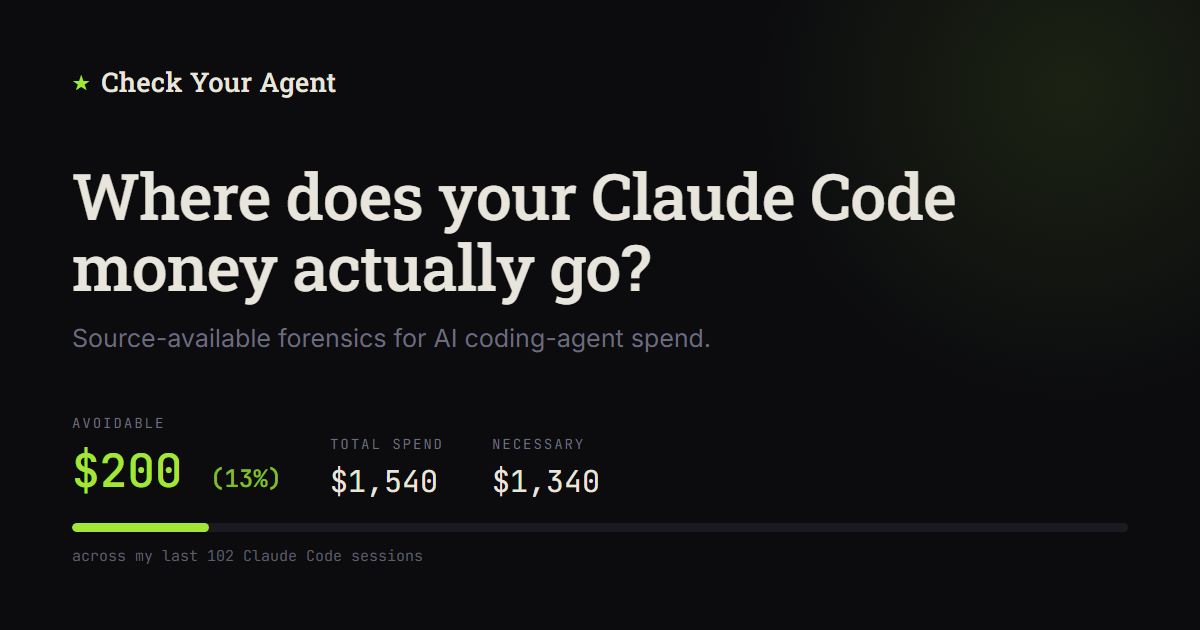
Claude Code writes a detailed record of every session to ~/.claude/projects.
Check Your Agent turns that record into estimated API-equivalent cost, observed
activity, and supported findings with evidence receipts. The app runs locally:
no accounts, no telemetry, no external calls, and the raw logs are never
modified. Tools like ccusage tell you what you used; Check Your Agent helps
you investigate why a session was expensive or unusual.
Quick start
With uv (or pipx) installed:
uvx checkyouragent # or: pipx run checkyouragent
This serves the app on http://127.0.0.1:8000, opens your browser, and uses
~/.claude/projects as the import root when it exists, otherwise ./Data. No
exports handy? Add --demo to explore a bundled, fully synthetic dataset that
exercises every screen (Sources & sync also offers Load demo data when
the cache is empty).
uvx checkyouragent --demo
uvx checkyouragent --import-root /path/to/exports
uvx checkyouragent --port 8123 --no-browser
The examples use uvx; replace uvx with pipx run if you prefer pipx. For a
persistent command, run uv tool install checkyouragent (or
pipx install checkyouragent). A persistent install also provides the shorter
cya alias, which behaves identically to checkyouragent.
On first use, choose Sync new and updated, then View costs for an overview of the imported history. Returning visits restore the last analytical page for the active data scope, defaulting to Cost. Cost initially uses All time, so older imported sessions are included. Use Sessions to find sessions worth investigating and Explore for aggregate findings.
The sidebar puts Cost, Sessions, and Explore first. The lower Data group contains Sources & sync and Share team bundle. In team scope, the analytical pages are Cost and Overview, with Manage bundles under Data.
Opening a session and returning with Back preserves the Cost filters or Sessions search, filters, and sorting used to find it for the current workspace visit.
What it does
- Sources & sync synchronizes Claude Code project folders from a read-only export root into a rebuildable SQLite index. Re-importing a changed project rebuilds it from source.
- Sessions is an investigation board: supported findings, observed errors, subagent fanout, event volume, duration, and estimated cost, with search, filters, and sorting.
- The session workspace shows an event timeline with trace lanes, tool activity, a subagent heatmap, in-session search, supported findings with evidence receipts, and a raw event inspector.
- Cost breaks estimated API-equivalent cost down by project, model, and token category, with a cost-over-time chart, spike detection, turn distribution, and session outliers. Historical pricing is optional and date-aware. Spend increases show their comparison baseline, and long model legends wrap while the model list scrolls within its panel.
- Explore covers limit hits, context economics, and usage drivers, plus an experimental section with the Usage Mindmap and subgroup discovery.
- Team bundles export allowlisted aggregates (no raw conversation content) that teammates can import for team Overview and Cost views. A privacy mode reduces visible sensitive text.
[!NOTE] This is early-stage software. Costs are estimates computed from recorded tokens and bundled pricing tables, not invoice amounts, and the UI distinguishes values that are observed, estimated, inferred, or associated. Experimental views report classified activity and statistical associations, not causes. Privacy mode reduces visible sensitive text but is not data sanitization; review screenshots before sharing them.
Product tour: explore the investigation and analytics screens
Investigate one session
Follow the event timeline, compare trace lanes, inspect subagents, and open the recorded evidence behind supported findings.

Understand cost
Break estimated API-equivalent cost down by project, model, token category, and time, then drill into unusual sessions and turns.

Explore context economics
Review estimated context opportunity, the assumptions behind it, and the sessions and receipts that support each signal.

More screens - including import, subgroup discovery, and cost-outlier
drilldown - are in docs/screenshots/.
How it compares
Check Your Agent is not the only way to look at Claude Code usage.
| Tool | Best for | Trade-off vs Check Your Agent |
|---|---|---|
| ccusage | Fast daily, monthly, and session usage/cost reports across coding-agent CLIs | Descriptive accounting rather than evidence-backed session investigation |
| token-dashboard | Per-prompt cost analytics, tool/file heatmaps, cache analytics, and rule-based tips | Focuses on prompt-level hotspots and tips rather than supported findings with evidence receipts and context-carry attribution |
| Sniffly | Usage patterns, error breakdowns, message history, and optional sharing | Less focused on API-equivalent cost drivers and evidence-backed session investigation |
| Anthropic native analytics | Organization usage, spend, and adoption for Team/Enterprise and Console customers | Aggregate service-side reporting rather than local raw-session investigation |
| Check Your Agent | Deep local forensics: which sessions merit investigation, with observed activity, estimated cost, and receipts | Claude Code only; runs a local web app rather than printing a terminal report |
Reach for ccusage when you want a number in ten seconds; reach for Check Your
Agent when you want to know why the number is what it is and what to change.
Other ways to run
Docker
Prerequisite: Docker with Compose.
git clone https://github.com/TarekAwwad/checkyouragent
cd checkyouragent
docker compose up --build
Before starting, copy the project folders from ~/.claude/projects into
./Data, or edit the ./Data:/imports:ro Compose mount to point directly at
your Claude Code projects directory. The same commands work unchanged in
Windows PowerShell.
The frontend is at http://localhost:5173 and backend API docs at
http://localhost:8000/docs, both bound to host loopback. Compose mounts the
configured import directory read-only, ./TeamBundles for bundle exchange, and
the pricing files, and keeps the SQLite cache in a named ccfr-data volume, so
avoid docker compose down -v unless you mean to delete that cache.
From source
Prerequisites: Python 3.11 or newer, uv, Node.js 20 or newer.
Run the backend and frontend in separate terminals, starting each one from the repository root.
Backend:
cd backend
uv run uvicorn ccfr.main:app --reload --host 127.0.0.1 --port 8000
To run the backend tests, use uv run --extra dev pytest from backend/.
Frontend:
cd frontend
npm ci
npm run dev
Open http://localhost:5174. The dev server proxies /api to
http://localhost:8000, so leave VITE_API_BASE unset during development. To
serve the built UI from the Python package instead, build it first with
python scripts/build_webui.py.
Configuration
Source-checkout defaults resolve from the repository root. Installed
(uvx/pipx) runs keep writable state under ~/.checkyouragent/ and read the
baseline price table bundled with the package.
| Variable | Source checkout | Installed run | Meaning |
|---|---|---|---|
CCFR_DATA_DIR |
<repo>/.ccfr-data |
~/.checkyouragent |
SQLite cache, settings, team bundles |
CCFR_DB_PATH |
<repo>/.ccfr-data/ccfr.sqlite3 |
~/.checkyouragent/ccfr.sqlite3 |
SQLite database file |
CCFR_IMPORT_ROOT |
<repo>/Data |
~/.claude/projects when present, otherwise ./Data |
Root scanned for Claude Code project folders |
CCFR_TEAM_BUNDLE_ROOT |
<repo>/.ccfr-data/team-bundles |
~/.checkyouragent/team-bundles |
Team bundle export/import root |
CCFR_PRICING_PATH |
<repo>/pricing.csv |
Bundled pricing.csv |
Complete current price table |
CCFR_PRICING_DIR |
<repo>/pricing |
~/.checkyouragent/pricing |
Optional dated pricing snapshots |
The import root should look like Claude Code's ~/.claude/projects: one folder
per project containing <session-id>.jsonl files, with optional per-session
subagent logs and tool results. The UI path field can select the configured
import root or a descendant; requests outside it are rejected. Reset local
data in Sources & sync clears imported sessions while keeping settings and
imported team bundles.
pricing.csv holds the complete current price list in US dollars per million
tokens, and pricing/ holds dated snapshots (pricing-YYYY-MM-DD.csv). Historical
mode applies snapshots through each event's date; current mode applies all of
them. Update the current CSV and add a new dated snapshot when rates change;
retain earlier snapshots. The current table and dated history both ship with
installed packages, which also read optional overrides from
~/.checkyouragent/pricing (or
CCFR_PRICING_DIR). Same-date local rows override bundled rows per model.
See pricing history and sources.
Models without a price row are labeled as
partially priced rather than silently counted as zero.
The bundled pricing history was checked against Anthropic's published pricing on 29 October 2026. It contains standard global API rates; fast mode, regional premiums, and batch discounts are not applied. The Haiku 5.5 row covers prompts up to 100,000 input tokens, including cache reads and writes. Anthropic charges five times these rates for longer prompts; the current flat table does not apply that tier, so those costs are underestimated.
The full configuration reference, data layout, and import behavior are in
docs/architecture.md.
Limitations
- Ingestion is Claude Code
.claude/projectsJSONL only. It does not read Codex, OpenAI, or other agent histories. - It is not a live integration. It reads the import root when you run an import, and it keeps no durable archive of sessions that disappear from the source export.
- Team views are aggregate-only by design. Bundles omit raw session detail, so team scope has no per-session drilldown.
- The backend is unauthenticated and intended for loopback use only. Do not expose it to a network; see SECURITY.md.
Documentation
License
Check Your Agent is source-available under the
Business Source License 1.1. It is free for personal and internal
use, including internal use inside a company. Offering it to third parties as a
hosted, managed, or embedded service requires a separate commercial license. On
the Change Date (2030-06-04) the code converts to Apache-2.0. The license text
in LICENSE governs.
Ähnliche Projekte entdecken
codecrafters-io/build-your-own-x
Meistere das Programmieren, indem du deine Lieblingstechnologien von Grund auf neu erschaffst.
562,357 Sternepublic-apis/public-apis
Eine gemeinschaftliche Liste kostenloser APIs
498,808 Sternemorluto/rea
Mit Agenten alles per Reverse Engineering untersuchen, vom Verhalten der Anwendung bis hin zu nativen Binärdateien.
457,843 Sterneopenclaw/openclaw
Die KI, die wirklich Dinge erledigt. Jedes Betriebssystem, jede Plattform. Auf die Hummer-Art. 🦞
394,403 Sterne