
TaKO8Ki/gobang
TaKO8Ki/gobang has 3,328 GitHub stars and 100 forks. GitHot measured +1 stars in 24 hours, +1 in 7 days, and +2 in 15 days. Last checked 2026-11-09 20:52 UTC. Last push 2023-11-10.
So werden diese Zahlen gemessen
Eine plattformübergreifende TUI zur Datenbankverwaltung, geschrieben in Rust
What you can do
- Cross-platform support (macOS, Windows, Linux)
- Multiple Database support (MySQL, PostgreSQL, SQLite)
- Intuitive keyboard only control
Gemessener Sternzuwachs
- in 24h
- +1
- in 7 days
- +1
- in 15 days
- +2
- in 1 month
- Aktualisierung verzögert
Nettoänderungen in überlappenden Zeiträumen, keine Tagessummen. Fehlende Messwerte bleiben leer. Sterne zeigen Interesse, nicht Qualität.
README.md
Original
gobang is currently in alpha
A cross-platform TUI database management tool written in Rust


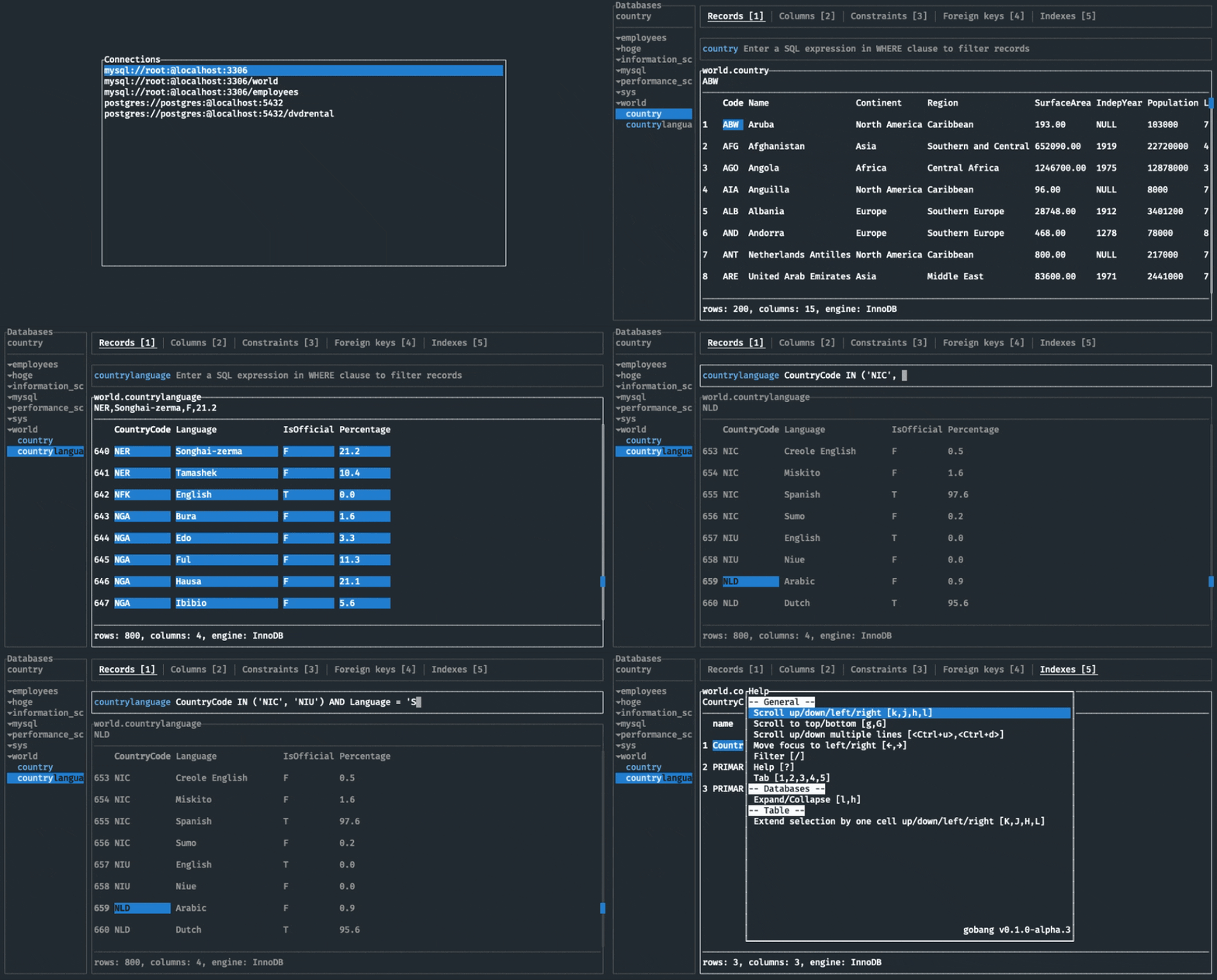
Features
- Cross-platform support (macOS, Windows, Linux)
- Multiple Database support (MySQL, PostgreSQL, SQLite)
- Intuitive keyboard only control
TODOs
- SQL editor
- Custom key bindings
- Custom theme settings
- Support the other databases
What does "gobang" come from?
gobang means a Japanese game played on goban, a go board. The appearance of goban looks like table structure. And I live in Kyoto, Japan. In Kyoto city, streets are laid out on a grid (We call it “goban no me no youna (碁盤の目のような)”). They are why I named this project "gobang".
Installation
With Homebrew (Linux, macOS)
If you’re using Homebrew or Linuxbrew, install the gobang formula:
brew install tako8ki/tap/gobang
On Windows
If you're a Windows Scoop user, then you can install gobang from the official bucket:
scoop install gobang
On NixOS
If you're a Nix user, you can install gobang from nixpkgs:
$ nix-env --install gobang
On Archlinux
If you're an Archlinux user, you can install gobang from AUR:
paru -S gobang-bin
On NetBSD
If you're a NetBSD user, then you can install gobang from pkgsrc:
pkgin install gobang
With Cargo (Linux, macOS, Windows)
If you already have a Rust environment set up, you can use the cargo install command:
cargo install --version 0.1.0-alpha.5 gobang
From binaries (Linux, macOS, Windows)
- Download the latest release binary for your system
- Set the
PATHenvironment variable
Usage
$ gobang
$ gobang -h
USAGE:
    gobang [OPTIONS]

FLAGS:
    -h, --help       Prints help information
    -V, --version    Prints version information

OPTIONS:
    -c, --config-path <config-path>    Set the config file
If you want to add connections, you need to edit your config file. For more information, please see Configuration.
Keymap
| Key | Description |
|---|---|
| h, j, k, l | Scroll left/down/up/right |
| Ctrl + u, Ctrl + d | Scroll up/down multiple lines |
| g , G | Scroll to top/bottom |
| H, J, K, L | Extend selection by one cell left/down/up/right |
| y | Copy a cell value |
| ←, → | Move focus to left/right |
| c | Move focus to connections |
| / | Filter |
| ? | Help |
| 1, 2, 3, 4, 5 | Switch to records/columns/constraints/foreign keys/indexes tab |
| Esc | Hide pop up |
Configuration
The location of the file depends on your OS:
- macOS:
$HOME/.config/gobang/config.toml - Linux:
$HOME/.config/gobang/config.toml - Windows:
%APPDATA%/gobang/config.toml
The following is a sample config.toml file:
[[conn]]
type = "mysql"
user = "root"
host = "localhost"
port = 3306

[[conn]]
type = "mysql"
user = "root"
host = "localhost"
port = 3306
password = "password"
database = "foo"
name = "mysql Foo DB"

[[conn]]
type = "postgres"
user = "root"
host = "localhost"
port = 5432
database = "bar"
name = "postgres Bar DB"

[[conn]]
type = "sqlite"
path = "/path/to/baz.db"
Contribution
Contributions, issues and pull requests are welcome!
Ähnliche Projekte entdecken
Asabeneh/30-Days-Of-Python
Die Programmier-Challenge 30 Days of Python ist eine Schritt-für-Schritt-Anleitung, um die Programmiersprache Python in 30 Tagen zu lernen. Diese Challenge kann mehr als 100 Tage dauern. Gehe in deinem eigenen Tempo vor. Diese Videos können ebenfalls helfen: https://www.youtube.com/channel/UC7PNRuno1rzYPb1xLa4yktw
78,486 Sternegrafana/grafana
Offene und kombinierbare Plattform für Observability und Datenvisualisierung. Visualisiert Metriken, Logs und Traces aus mehreren Quellen wie Prometheus, Loki, Elasticsearch, InfluxDB, Postgres und vielen weiteren.
77,790 Sterneredis/redis
Für Entwickler, die echtzeitfähige, datengesteuerte Anwendungen erstellen, ist Redis der bevorzugte, schnellste und funktionsreichste Cache, Datenstrukturserver und die entsprechende Abfrageengine für Dokumente und Vektoren.
77,332 Sterneapache/superset
Apache Superset ist eine Plattform für Datenvisualisierung und Datenexploration.
75,455 Sterne