
SSWConsulting/SSW.Rules
SSWConsulting/SSW.Rules has 28 GitHub stars and 16 forks. Star changes are not measured yet. Last checked 2026-11-13 08:07 UTC. Last push 2026-11-13.
So werden diese Zahlen gemessen
Generator for ssw.com.au/rules
Gemessener Sternzuwachs
- in 24h
- Verlauf wird gesammelt
- in 7 days
- Verlauf wird gesammelt
- in 15 days
- Verlauf wird gesammelt
- in 1 month
- Verlauf wird gesammelt
Nettoänderungen in überlappenden Zeiträumen, keine Tagessummen. Fehlende Messwerte bleiben leer. Sterne zeigen Interesse, nicht Qualität.
README.md
OriginalSSW.Rules


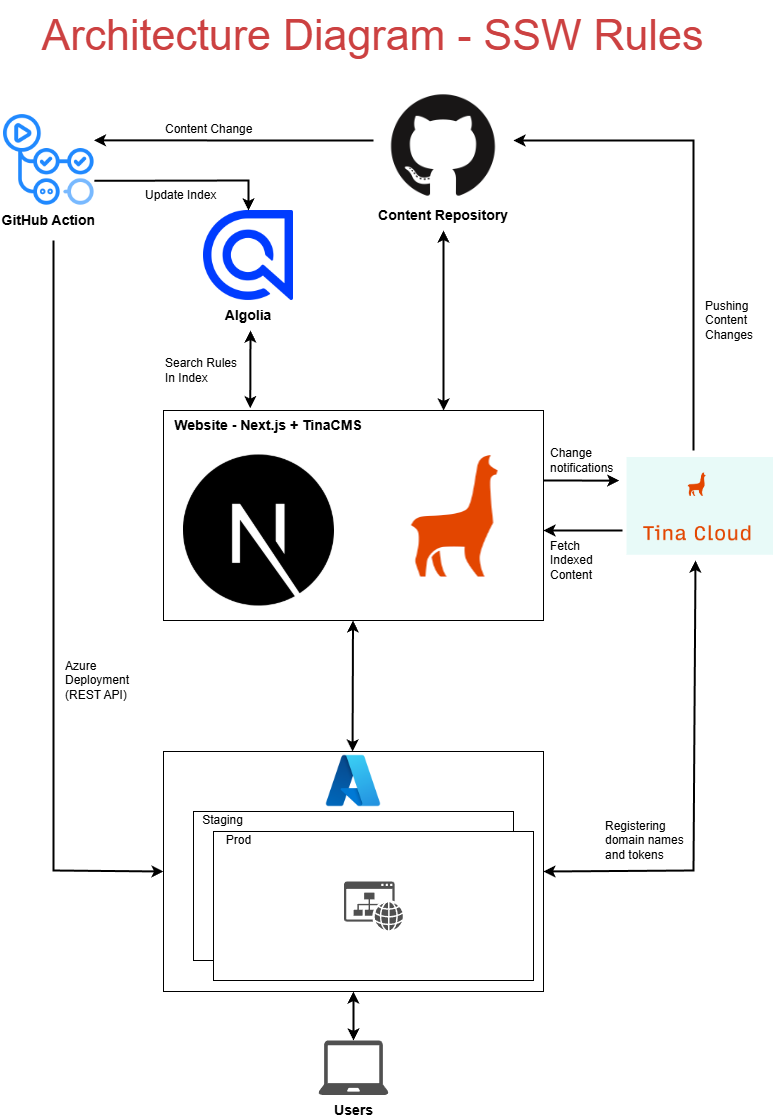
This is a Next.js + TinaCMS website pulling data from:
Architecture Diagram
Getting Started
Required Tools
- Node.js (version defined in .nvmrc) – recommended to use nvm
- corepack (run corepack enable to manage correct pnpm version)
- pnpm package manager
- python
F5 experience
Clone this repo
Clone SSW.Rules.Content
Place both repos in the same parent directory e.g.
📁 SSW-dev/
├── 📁 SSW.Rules.Content/
└── 📁 SSW.Rules/ <--- This repo
Create a
.envfile based off.env.examplein the root of this repo - get the values from Keeper (SSW.Rules Environment Variables)Run
pnpm installto install packagesInstall
pyyamlpython package:py -3 -m pip install pyyamlRun
pnpm prepare:contentto generate required mapping JSON files (they are gitignored)Run
pnpm devto start the development server
Syncing and Updating Content
To test changes to MDX rules:
Go to your branch in SSW.Rules.Content
Modify the rule MDX as needed
If there are any changes to categories, re-run
pnpm prepare:contentRun
pnpm devin this project to start SSW.Rules locallyNavigate to http://localhost:3000/rules/ to see your changes
Note:
pnpm devdoes not track changes in SSW.Rules.Content, therefore, you will need to re-run the command after you make changes
Branches
- Always create a new branch for your PBIs
- Always delete your branch once your PR has been merged
- To create a new content branch (in
SSW.Rules.Content), follow the setup steps in the Wiki
Builds & Deployment
Content Changes (SSW.Rules.Content)
Changes made in SSW.Rules.Content (e.g. rule MDX, categories, images) will go live after the PR is merged.
🎥 Watch the video: TinaCMS for GitHub - The SSW Rules Migration | Jake Bayliss | SSW Consulting
Code Changes (SSW.Rules)
Code changes made to SSW.Rules are deployed as follows:
- main deploys to staging: https://app-sswrules-staging.azurewebsites.net/rules
- To deploy to production:
- Create a
release/xxbranch from the currentmaincommit you want to ship - Manually run the production deployment workflow in GitHub Actions
- production: https://www.ssw.com.au/rules
- Create a
PR Preview Deploy
To deploy a PR preview, add a comment to the PR: /deploy. This creates/updates a preview deployment (slot pr-<number>) and posts a comment with the preview URL.
Using a custom tina-lock.json in a PR preview
The build process checks whether a branch with the same name as the PR branch exists in SSW.Rules.Content. If found, that branch is used to source content (including tina-lock.json); otherwise it falls back to main.
This means if your PR requires a new tina-lock.json (e.g. you added or changed a TinaCMS collection), you can test it in the PR preview without touching main in the content repo:
- Create a branch in
SSWConsulting/SSW.Rules.Contentwith the exact same name as your PR branch. - Push the updated
tina-lock.json(and any other content changes) to that branch. - Comment
/deployon the PR - the preview build will automatically pick up the matching content branch.
Python Scripts
In this Repository (Website)
build-rule-category-map.py
Generates two JSON files:rule-to-categories.json(maps rules to categories)category-uri-title-map.json(maps category URIs to titles)orphaned_rules.json(maps category URIs to titles)
Reads rule data from theSSW.Rules.Contentrepo and runs during the build process (via GitHub Actions) or manually fromscripts/tina-migration.
prepare-content.js
A Node.js script that runsbuild-rule-category-map.pyand moves the JSON files to the correct location for use by the website.
Uses theLOCAL_CONTENT_RELATIVE_PATHenvironment variable to locate the content repo.validate-rule-categories.js
Fails when a non-archived rule has no category, or when a rule'scategoriesfrontmatter points at a category file that doesn't exist (e.g. after a category was moved), naming every offending rule.
Runs inprepare-content.jsand in the build workflow before the Docker build, so the build fails in seconds instead of as a/archivedprerender error.
When the check passes, it also writesrule-folders.json, the rule list thatgenerateStaticParamsreads.
Run it manually withpnpm validate:rule-categories, which usesLOCAL_CONTENT_RELATIVE_PATH, or pass the content repo path as an argument.
In the Content Repository
build-rule-category-map.py
Similar logic to the version in PoC. It processes thecategories/folder and.mdxfiles to create the same JSON maps.convert-rule-md-to-mdx.py
Converts.mdrule files to MDX format compatible with TinaCMS.
Replaces custom markdown patterns (e.g.,Figure,good/bad/okboxes) with structured MDX components like<asideEmbed>and escapes special characters for valid formatting.modify-sub-categories-frontmatter.py
Updates frontmatter in sub-category files (excludingindex.md) to ensure consistency.modify-top-categories-frontmatter.py
Targetsindex.mdfiles in sub-category folders and updates frontmatter to match the expected format.modify-main-category-frontmatter
Updatesindex.mdfile at the root of the categories folder.
📁 Public Content Folder
All rule content (including .mdx files and images) live into the public/ folder.
🎥 The 3 options for storing markdown in GitHub for TinaCMS
public/
└── uploads/
    └── rules/
        ├── rule-a/
        │   ├── rule.mdx
        │   └── img.png
        └── rule-b/
            ├── rule.mdx
            └── img.png
📝 Adding Editorial Workflow
We've integrated TinaCMS with an editorial workflow to support content editing in a more structured way. If you're unfamiliar with how editorial workflows work in Tina, please refer to the official documentation:
👉 TinaCMS Editorial Workflow Documentation
This workflow allows for content changes to be reviewed before being published, improving collaboration and content quality.
🔖 Bookmarks (via SSW.Rules.Functions)
The Bookmark feature uses the SSW.Rules.Functions API.
Local debugging setup
- Clone the
SSW.Rules.Functionsrepository. - In the repo root, create a
local.settings.jsonfile and copy the values from Keeper (environment variables for the Functions app). - Start the Functions app in dev mode.
Local endpoint
By default, the API is available at:
http://localhost:7248.Bookmark data is persisted to the staging database.
Install nodejs version specified in
.nvmrc(Ideally usenvmto use the right version)Ensure corepack is enabled -
corepack enable(this allows auto-install of the correctyarnversion)
Getting ready for development
Clone the repo from https://github.com/SSWConsulting/SSW.Rules
Run
yarn installto install packagesCreate environment files
.env.developmentbased off.env.template- get the values from Keeper (SSW.Rules Environment Variables)For GitHub App authentication, set the following environment variables:
GH_APP_ID: Your GitHub App IDGH_APP_PRIVATE_KEY: Your GitHub App private key (PEM format, can be base64 encoded)GITHUB_APP_INSTALLATION_ID: (Optional) The installation ID. If not provided, the first installation will be used.
See GitHub App authentication documentation for more details.
Ähnliche Projekte entdecken
freeCodeCamp/freeCodeCamp
Die Open-Source-Codebasis und das Curriculum von freeCodeCamp.org. Lerne Mathematik, Programmierung und Informatik kostenlos.
459,068 Sternedonnemartin/system-design-primer
Lerne, Systeme im großen Maßstab zu entwerfen, und bereite dich auf das Systemdesign-Interview vor. Enthält Anki-Karteikarten.
377,734 Sternereact/react
Die Bibliothek für Web- und native Benutzeroberflächen.
252,565 Sternevuejs/vue
Dies ist das Repository für Vue 2. Das Repository für Vue 3 findest du unter https://github.com/vuejs/core
212,527 Sterne