
LF3551/human-risk-graph
LF3551/human-risk-graph has 66 GitHub stars and 0 forks. GitHot measured 0 stars in 24 hours. Last checked 2026-11-15 01:49 UTC. Last push 2026-11-13.
Gemessener Sternzuwachs
- in 24h
- 0
- in 7 days
- Verlauf wird gesammelt
- in 15 days
- Verlauf wird gesammelt
- in 1 month
- Verlauf wird gesammelt
Nettoänderungen in überlappenden Zeiträumen, keine Tagessummen. Fehlende Messwerte bleiben leer. Sterne zeigen Interesse, nicht Qualität.
Über uns
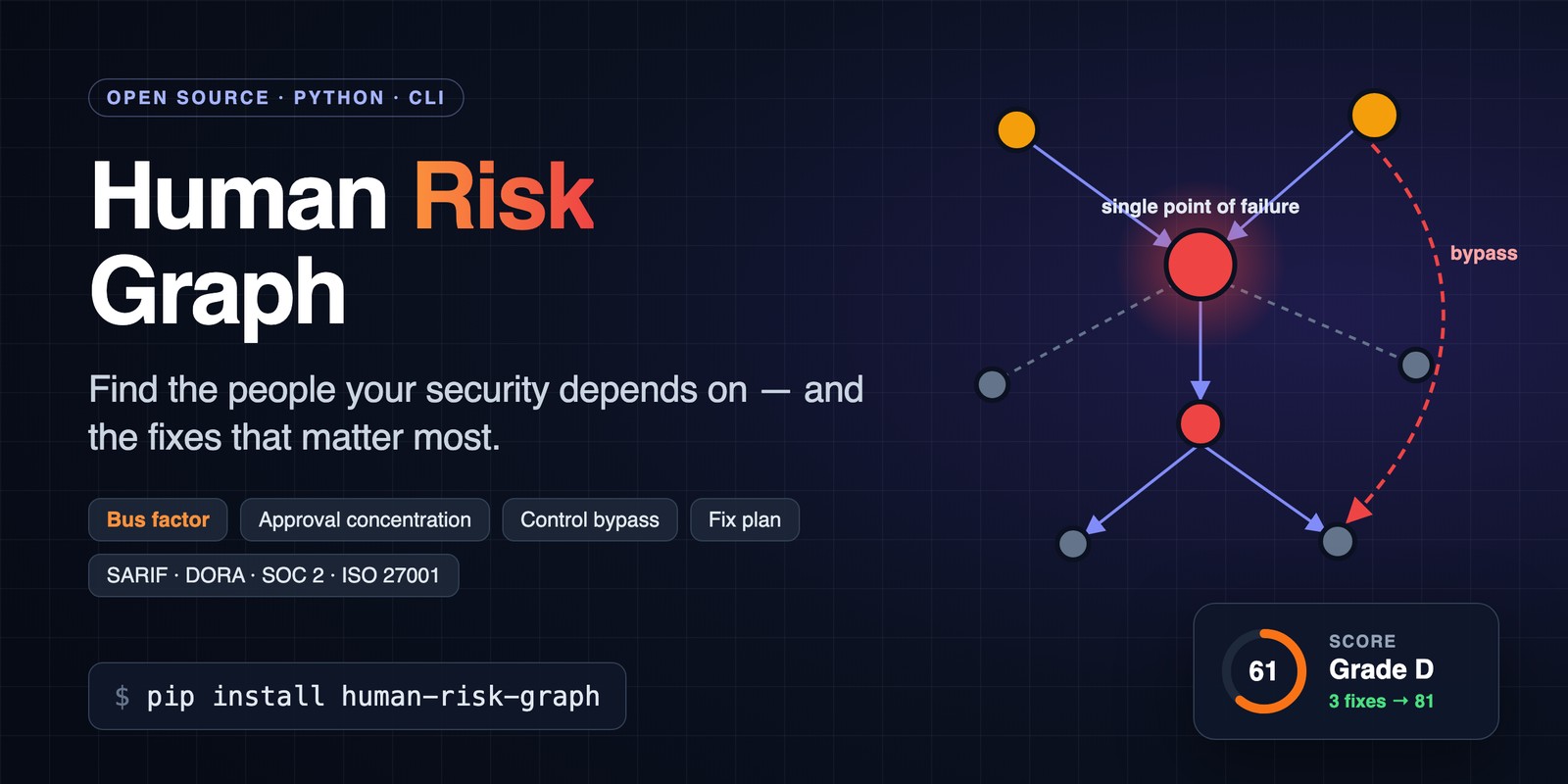
Find the people your security depends on: bus factor, approval concentration and control-bypass risk, with a fix plan, SARIF and ISO 27001 / SOC 2 / DORA mapping.
SicherheitREADME.md
Original








Live demo · Quick start · HTML report · GitHub Action · ISO 27001 · SOC 2 · DORA · Privacy · GDPR · Validation · Model · Paper
Human Risk Graph
Your controls are only as strong as the people behind them. Human Risk Graph maps who approves, escalates to and can bypass whom, finds the people your organization cannot afford to lose, and tells you which three changes raise your score the most.
- One score, 0-100 and A-F, from three metrics you can explain to a board: bus factor, effective number of approvers, and how many critical approvals can be bypassed.
- A fix plan, not just a diagnosis: deputies and second-person checks simulated on your data and ranked by score gain.
- No YAML to start:
hrg scan githubdrafts the organization from one repository or a whole GitHub organization (who reviews, merges, releases and can bypass). - Built for pipelines and audits: SARIF for GitHub code scanning, JUnit, a
--min-scoregate,hrg diffbetween snapshots, findings mapped to ISO/IEC 27001, SOC 2 and DORA. - Privacy by design:
--pseudonymizereplaces people by keyed pseudonyms in every report, for GDPR and works-council requirements; nothing leaves your machine. - Tested against outcomes: in a pre-registered study, a single releaser predicted which popular PyPI projects stopped releasing (4.8 times the rate).
- A report you can hand over: one offline HTML file with an interactive dependency map, readable on a phone and printable as PDF.
Why
Simple ratios hide the worst cases. HRG is designed so that they cannot:
| Situation | Naive metric | Human Risk Graph |
|---|---|---|
| One person approves everything | "inequality 0" (nothing to compare) | 1.0 effective approvers, grade F |
| 99 people depend on one critical lead | 0.009 (diluted by headcount) | bus factor 1, same risk at any size |
| A critical approver can be bypassed | averaged away by good metrics | counted as an independent way to fail |
The model, its properties and its tests are in docs/model.md.
Quick start
See it first: live example reports of three fictional organizations, nothing to install.
Try it on the example organization, nothing to set up (needs uv):
curl -sO https://raw.githubusercontent.com/LF3551/human-risk-graph/main/examples/organization.yaml
uvx --from human-risk-graph hrg analyze organization.yaml
open organization_report.html   # xdg-open on Linux
Or install it:
pip install human-risk-graph
hrg analyze my-org.yaml
Human Risk Graph 0.15.2 · organization.yaml · 5 people · 5 dependencies

  Score  25/100  ██░░░░░░░░  F · Critical risk  model hrg-2

  Key people  bus factor 1 · losing Alice cuts off 2 people (67% of connections)
  Approvals   1.5 effective approvers of 2 · Alice holds 77%
  Overrides   2 of 3 critical approvals can be overridden

  Top fixes
  1  Require a second person for Bob's bypass of Alice  25 → 45  +20
  2  Add a deputy for Alice                             45 → 71  +26
  3  Add a deputy for Bob                               71 → 76   +5

  Findings  3 errors · 2 warnings
   ▲ HRG001 Alice (alice) is a single point of failure (criticality 0.90): losing them cuts off 2 people
            and 67% of the connections between the others.
   ▲ HRG001 Bob (bob) is a single point of failure (criticality 0.70): losing them cuts off 1 person and
            50% of the connections between the others.
   ...
Scan a GitHub repository
No YAML to write by hand: draft the organization from who actually reviews and merges code.
hrg scan github my-org/payments-api        # uses GITHUB_TOKEN, GH_TOKEN or `gh auth token`
hrg analyze payments-api-org.yaml
The scan reads the most recent merged pull requests (--max-prs, default 100) and turns
evidence into dependencies:
| Evidence | Dependency |
|---|---|
| Approving reviews by someone other than the author | approval reviewer → author |
| CODEOWNERS of the files a pull request changed (teams expanded when visible) | approval owner → author |
| A pull request merged without an approving review, on a branch that requires reviews | bypass merger → approvers |
| Ruleset bypass actors and branch protection allowances (when the token can see them) | bypass actor → approvers |
Permissions and history do not prove real authority, so the draft is for a person to
review: every dependency carries source, evidence and confirmed: false, and reports
show how many are still unconfirmed. Set confirmed: true as you check them and adjust
criticality; running the scan again keeps your confirmations, criticality and the
dependencies you added by hand (approvals in Slack, escalations, on-call).
What the token cannot see (protection settings and bypass actors need admin access, team
members need org membership) is listed under coverage.gaps and shown in every report: a
bypass the scan did not find is not proof that none exists.
How well does this work? On 8 public CNCF repositories, 82% of approving reviews the scan finds come from the approvers the projects declare in MAINTAINERS or OWNERS, and the most active approver is a declared one in every repository; see the reproducible benchmark and its limits.
Does the score predict anything? In a pre-registered study of 284 popular PyPI projects, those whose releases were published by a single person before November 2024 stopped releasing in the following year 4.8 times as often (95% CI 1.5–15.3) as those with two or more release authors; a commit-based truck factor gave 1.9 (0.9–4.3). Adjusted for release activity the ratio is 2.7 with an interval that includes 1, so part of the effect is project activity.
- from: lead
  to: dev
  type: bypass
  weight: 1.0
  source: merge-history+pr-reviews
  evidence: merged 3 PR(s) without an approving review (#812, #815, #820); also approved 4 of 9 merged PRs by dev
  confirmed: false
A whole organization
One repository rarely shows the risk: the person who is the only releaser of one service is often the only releaser of ten. Scan the most recently pushed repositories of an organization into one draft:
hrg scan github --org my-org --max-repos 50     # archived repositories and forks are skipped
hrg analyze my-org-org.yaml --model hrg-3
People appear once, with the highest criticality any repository gave them. Dependencies
between the same two people are merged (a bypass in any repository outranks approvals; the
weight is the highest seen). The merge, release and admin functions stay per
repository (payments-api/release), so hrg-3 shows everything one person's absence stops
across the organization. Repositories that cannot be read are listed under
coverage.gaps; --max-prs (default 30 with --org) bounds the API calls per repository.
Privacy: pseudonymized reports
HRG analyses identifiable people, so in the EU it processes personal data, and in Germany
it is typically a matter for the works council. --pseudonymize (or
pseudonymize = true in hrg.toml) replaces everyone by a keyed pseudonym in every
report and drops names, roles and evidence:
export HRG_PSEUDONYM_KEY=...      # secret, at least 16 characters; keeps pseudonyms stable
hrg analyze org.yaml --pseudonymize
hrg pseudonyms org.yaml           # pseudonym,id,name table for whoever holds the key
Pseudonyms are HMAC-SHA256 of the id with your key, so they cannot be reversed by trying likely logins. HRG sends nothing anywhere and has no telemetry. What it processes, the re-identification process and a deployment checklist (purpose, works council, DPIA) are in docs/privacy.md.
HTML report
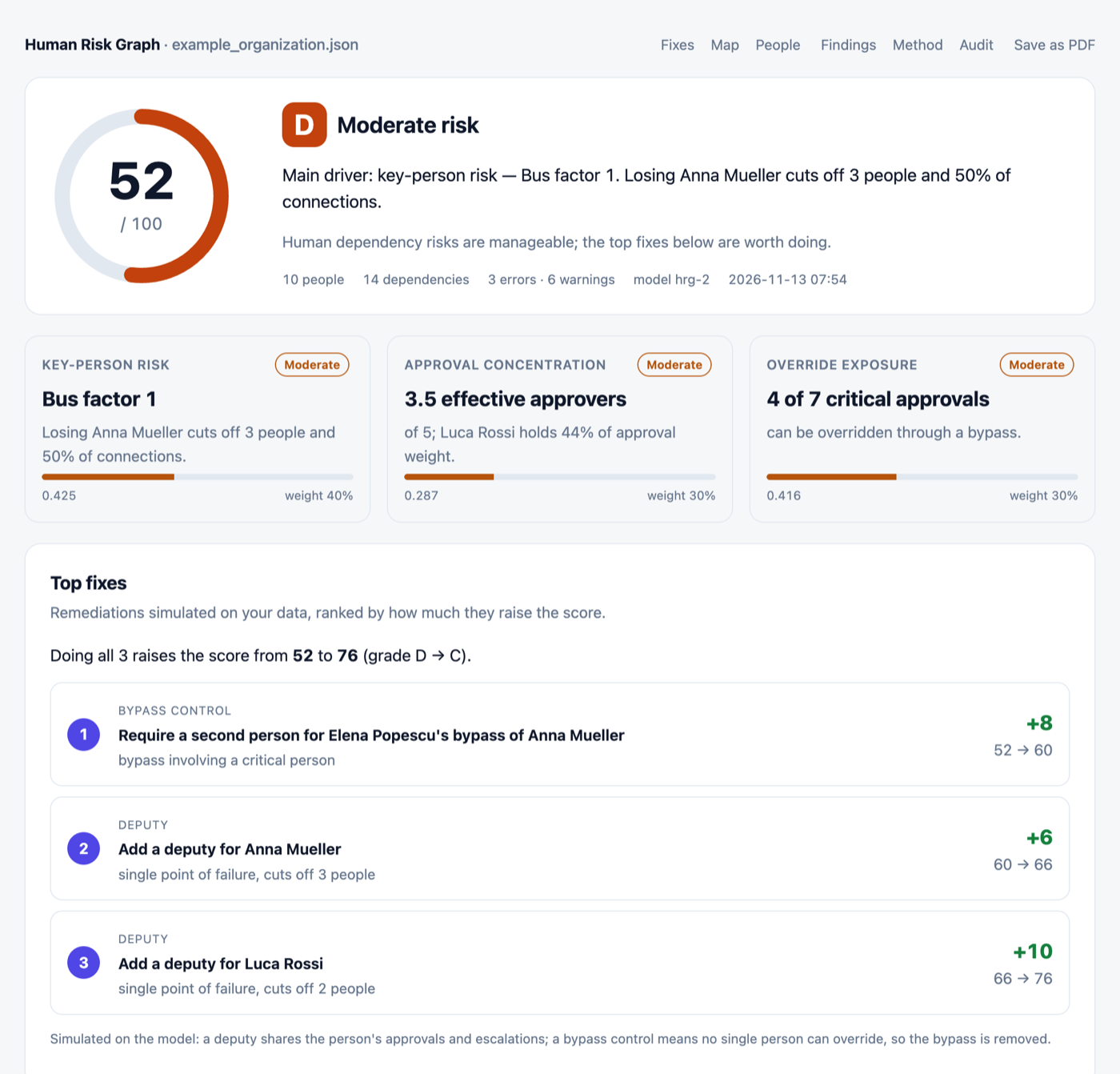
One self-contained file that works offline, in light and dark mode, on a phone and as a PDF: score and verdict, fix plan, interactive dependency map, people, findings with related controls, the exact formula, and an audit trail with the input file's SHA-256. Open a live example.
What HRG measures
The score is built from three metrics (model hrg-2, see docs/model.md):
- Key-person risk — how much of the organization depends on one person: losing them cuts off N people and X% of the connections between the others. Also reported as the classic bus factor.
- Approval concentration — the effective number of approvers (Herfindahl-Hirschman index): one person approving everything is as concentrated as it gets.
- Override exposure — the share of critical approvals someone can override through a bypass.
On top of the score, HRG simulates remediations (a deputy for a key person, a second-person check on a bypass) and lists the three that raise the score most.
The original model from the paper is still available as --model hrg-1.
Critical functions and the two-person rule (hrg-3, experimental)
Connections do not tell you who can replace someone. Model hrg-3 works on the things
the organization must be able to do, such as merging to main, publishing a release,
changing repository settings or restoring the database. For each function it asks:
- who can perform it, and what stops if one of them is unavailable (function loss, availability sub-score);
- can one person complete it alone (solo control, integrity sub-score), the SLSA Source Level 4 two-party question.
functions:
  - id: release
    criticality: 0.9
    requires: 1                 # 2 for a two-person rule
    performers: [alice, bob]
  - id: merge
    criticality: 0.8
    requires: 2
    performers: [alice, bob, carol]
    alone: [alice]              # can bypass the second person
  - id: restore-db
    criticality: 0.9
    separation: not-required    # one person restoring is the intended policy
    performers: [bob]
Not every critical operation needs two people. separation: not-required leaves a function
out of solo control and HRG006; it still counts as a single point of failure.
hrg analyze examples/functions.yaml --model hrg-3
hrg scan github drafts the merge, release and admin functions of a repository. A
single-maintainer repository with no reviewers scores 100 under hrg-2 (there are no
dependencies to break) and 0 under hrg-3, because one person merges, releases and
administers alone. Definitions and properties: docs/model-hrg3.md.
What HRG is not
HRG models authority: who approves, who escalates to whom, and who can override a control. It does not measure who knows the code. Tools that mine Git history, such as CodeScene or Busfactor, are better at knowledge islands and code ownership; the two questions are complementary, since an expert may not be allowed to approve a production change and an approver may not know the system. HRG is also not an employee-behaviour or phishing-risk platform, and it is not meant for judging how well people work: share pseudonymized reports beyond those who act on the findings (docs/privacy.md).
The score is a structural index, not the probability of an incident, and the fix plan shows changes that improve the structure; whether a deputy can really do the job is for you to judge. See what the score means.
Usage
Installation
# Install from PyPI (recommended)
pip install human-risk-graph

# Or install from source
git clone https://github.com/LF3551/human-risk-graph.git
cd human-risk-graph
pip install -e .

# With development tools
pip install -e ".[dev]"
Data Format
Describe your organization in a JSON or YAML file:
{
  "$schema": "https://raw.githubusercontent.com/LF3551/human-risk-graph/main/src/human_risk_graph/organization.schema.json",
  "people": [
    { "id": "A", "role": "SRE", "criticality": 0.9 },
    { "id": "B", "role": "Security Engineer", "criticality": 0.8 },
    { "id": "C", "role": "Manager", "criticality": 0.7 },
    { "id": "D", "role": "Developer", "criticality": 0.4 }
  ],
  "dependencies": [
    { "from": "A", "to": "B", "type": "approval", "weight": 0.8 },
    { "from": "C", "to": "A", "type": "bypass", "weight": 0.9 }
  ]
}
Fields:
people.id— unique identifierpeople.role— job title (optional)people.criticality— importance level (0.0-1.0)dependencies.from/to— person IDsdependencies.type— relationship type (approval, bypass, etc.)dependencies.weight— dependency strength (0.0-1.0)dependencies.review— for bypasses:afterif every use is reviewed afterwards (break-glass). It still counts as an override, at half weight, and is labelled as such.dependencies.confirmed—falsefor dependencies nobody has checked yet (set byhrg scan). Reports then also show the score on confirmed dependencies only, so you can see how much the result depends on unverified data.
Invalid input (duplicate or unknown IDs, values outside 0.0-1.0) is rejected with an error that points to the offending entry.
YAML and editor support: files ending in .yaml or .yml are read as YAML
(see examples/organization.yaml). The
JSON Schema gives completion and
validation in editors: reference it with "$schema" in JSON, or with
# yaml-language-server: $schema=<url> at the top of a YAML file.
hrg schema prints the schema.
CLI Usage
The easiest way to use HRG is through the command-line interface:
# Analyze an organization (generates JSON, Markdown, and HTML reports)
hrg analyze data/example_organization.json

# Generate only HTML report
hrg analyze data/example_organization.json --format html

# Specify output file
hrg analyze data/example_organization.json --format html --output my_report.html

# CI: SARIF and JUnit reports, fail if the score is below 70
hrg analyze examples/organization.yaml --format sarif --format junit --no-visualize --min-score 70

# Compare two snapshots (text, markdown or json)
hrg diff org-q1.yaml org-q2.yaml --format markdown

# Reports with keyed pseudonyms instead of people (docs/privacy.md)
HRG_PSEUDONYM_KEY=... hrg analyze org.yaml --pseudonymize

# Original model from the paper, no fix plan, only errors
hrg analyze data/example_organization.json --model hrg-1 --fixes 0 --quiet

# Generate interactive graph visualization only
hrg visualize data/example_organization.json
Exit codes: 0 success, 1 invalid input or error, 2 usage error,
3 score below --min-score, composite risk above --fail-above, or risk increased with
hrg diff --fail-on-increase.
Each run writes the reports next to the input file: JSON (all results, findings and the fix
plan), Markdown, the HTML report, and with --visualize (default) a standalone interactive
graph.
Configuration and risk acceptance
Put the settings your team agreed on in hrg.toml (or [tool.hrg] in pyproject.toml)
next to where you run hrg; options on the command line win. When a finding is a
conscious decision, record it as an accepted risk with a reason, a ticket and an
expiry date instead of lowering the bar for everyone:
min-score = 70
pseudonymize = true  # optional: keyed pseudonyms in every report (key in HRG_PSEUDONYM_KEY)

[weights]            # optional, must add up to 1
key-person = 0.4
concentration = 0.3
override = 0.3

[[accept]]
rule = "HRG003"
target = "bob->alice"          # a person ID, "from->to" for bypasses, or omit for the whole rule
reason = "Break-glass access for incidents; every use is reviewed by the CISO"
ticket = "SEC-123"
expires = 2027-06-30
Accepted findings stay visible but do not fail CI: they are listed under Accepted risks
in the reports, marked as suppressed (with the justification) in SARIF, and reported as
passed in JUnit. When expires passes, the finding counts again and hrg says so. An
acceptance that no longer matches anything is reported as safe to remove. See
examples/hrg.toml.
Findings and Compliance Mapping
Every finding has a rule ID (HRG001 single point of failure, HRG002 concentrated
approval authority, HRG003 bypass involving a critical person, HRG004 risk above
threshold; with --model hrg-3 also HRG005 function depends on too few people and
HRG006 critical function one person can complete alone) and related controls in
ISO/IEC 27001:2022, SOC 2 and DORA. The mapping is informative, not a compliance
assessment. See docs/compliance.md.
CI integration
GitHub Action
Analyze an organization file on every pull request that changes it: findings appear as
code scanning alerts on the file, the job summary shows the score, metrics, findings and
top fixes, the HTML report is attached as an artifact, and the job fails below 70.
Accepted risks in hrg.toml are honoured.
name: Human risk
on:
  pull_request:
    paths: [org/organization.yaml, hrg.toml]
permissions:
  contents: read
  security-events: write   # for the code scanning upload
jobs:
  hrg:
    runs-on: ubuntu-latest
    steps:
      - uses: actions/checkout@v7
      - uses: LF3551/[email protected]
        with:
          file: org/organization.yaml
          min-score: 70
Or draft the organization from the repository itself (approvals, CODEOWNERS, branch rules) and report on it, for example on a schedule:
      - uses: LF3551/[email protected]
        with:
          scan: ${{ github.repository }}
Or the whole organization, with pseudonymized reports (the draft with real logins is then not uploaded):
      - uses: LF3551/[email protected]
        env:
          HRG_PSEUDONYM_KEY: ${{ secrets.HRG_PSEUDONYM_KEY }}
        with:
          scan-org: my-org
          token: ${{ secrets.HRG_ORG_TOKEN }}   # read access to the organization's repositories
          pseudonymize: true
| Input | Default | Description |
|---|---|---|
file |
Organization file to analyze (set one of file, scan, scan-org) |
|
scan |
OWNER/REPO to draft with hrg scan github first |
|
scan-org |
Organization (or user) to draft with hrg scan github --org first |
|
max-repos |
30 |
With scan-org: repositories to scan |
max-prs |
100 (30 with scan-org) |
Merged pull requests to read per repository |
pseudonymize |
false |
Keyed pseudonyms instead of people (key in HRG_PSEUDONYM_KEY) |
token |
github.token |
Token for scan and scan-org |
config |
auto | hrg.toml, .hrg.toml or [tool.hrg] in pyproject.toml |
min-score / fail-above |
Fail below this score (0-100) / above this risk (0-1) | |
upload-sarif |
true |
Upload findings to code scanning (with file) |
upload-artifact |
true |
Upload the HTML, Markdown, JSON and SARIF reports |
output-dir |
hrg-report |
Where the reports are written |
python-version / version |
3.12 / this action's |
Python and human-risk-graph versions |
Outputs: score, grade, risk-level, errors, warnings, report-dir, sarif-file.
When a threshold is broken, the reports are still published and the last step fails.
Other CI systems
pip install human-risk-graph
hrg analyze org/organization.yaml --format sarif --format junit --no-visualize --min-score 70
The JUnit report (org/organization_report.junit.xml) has one test case per rule and
works with any CI system that shows test results. To show what a change does to the
scores, compare against the base branch:
git show origin/main:org/organization.yaml > /tmp/base.yaml
hrg diff /tmp/base.yaml org/organization.yaml --format markdown >> "$GITHUB_STEP_SUMMARY"
Python API Usage
from human_risk_graph import HumanRiskGraph

# Load your organization data
people = [...]
dependencies = [...]

# Create and analyze
hrg = HumanRiskGraph(people, dependencies)
results = hrg.calculate()  # model="hrg-1" for the original model

print(f"Score: {results['score']}/100 ({results['grade']}, {results['risk_level']} risk)")
print(f"Bus factor: {results['bus_factor_people']}")
print(f"Effective approvers: {results['effective_approvers']:.1f}")

for fix in hrg.fix_plan():
    print(f"{fix['title']}: {fix['score_before']} -> {fix['score_after']}")
Development
src/human_risk_graph/— the package (model, CLI, reports)tests/— unit, property and CLI testsdocs/— formal model, compliance mapping, privacy, benchmark and validation studybenchmark/— scanner benchmark and the validation study (code, data, results)examples/,data/— example organizations and generated reportsexperiments/— synthetic data and benchmarks from the paperpaper/— LaTeX source of the paper
# Run tests
pytest tests/ -v

# Run tests with coverage
pytest tests/ --cov=human_risk_graph --cov-report=html

# Code formatting
black src/ tests/ --line-length 100

# Linting
flake8 src/ tests/

# Run experiments (needs: pip install "human-risk-graph[experiments]")
python experiments/generate_data.py
python experiments/run_experiments.py
python experiments/visualize.py
Use Cases
Best suited for: Organizations with 50+ employees, formal security processes, or compliance requirements.
- Security architecture analysis
- Business continuity planning (SOC 2, ISO/IEC 27001 audits)
- Insider threat assessment
- M&A due diligence (key person risk)
- Organizational risk modeling
Note: For small teams (<20 people), managers typically have direct visibility into dependencies. HRG provides the most value when organizational complexity exceeds intuitive understanding.
Status
HRG is in beta (0.x): the metrics and the input format may still change between minor releases. Scores support risk discussions and audits; they do not replace a full risk assessment.
Citation
If you use this software in your research or work, please cite:
@software{aleinikov_2026_hrg,
  author       = {Aleinikov, Aleksei},
  title        = {Human Risk Graph: A Quantitative Model for Organizational Security Risk},
  year         = 2026,
  publisher    = {Zenodo},
  doi          = {10.5281/zenodo.18288055},
  url          = {https://doi.org/10.5281/zenodo.18288055}
}
Or use this text citation:
Aleinikov, A. (2026). Human Risk Graph: A Quantitative Model for Organizational Security Risk. Zenodo. https://doi.org/10.5281/zenodo.18288055
The DOI above always resolves to the latest release; each release also gets its own version DOI on Zenodo.
To cite the model itself, use the paper:
@article{aleinikov_2026_hrg_paper,
  author       = {Aleinikov, Aleksei},
  title        = {Human Risk Graph: A Quantitative Model for Organizational Security Risk},
  year         = 2026,
  publisher    = {Zenodo},
  doi          = {10.5281/zenodo.20260930},
  url          = {https://doi.org/10.5281/zenodo.20260930}
}
License
Licensed under the Apache License, Version 2.0. See the LICENSE file for details.