
Hironsan/bertsearch
Hironsan/bertsearch has 898 GitHub stars and 198 forks. GitHot measured 0 stars in 24 hours. Last checked 2026-11-15 19:58 UTC. Last push 2023-05-01.
Gemessener Sternzuwachs
- in 24h
- 0
- in 7 days
- Verlauf wird gesammelt
- in 15 days
- Verlauf wird gesammelt
- in 1 month
- Verlauf wird gesammelt
Nettoänderungen in überlappenden Zeiträumen, keine Tagessummen. Fehlende Messwerte bleiben leer. Sterne zeigen Interesse, nicht Qualität.
Über uns
Elasticsearch with BERT for advanced document search.
Maschinelles LernenREADME.md
OriginalElasticsearch meets BERT
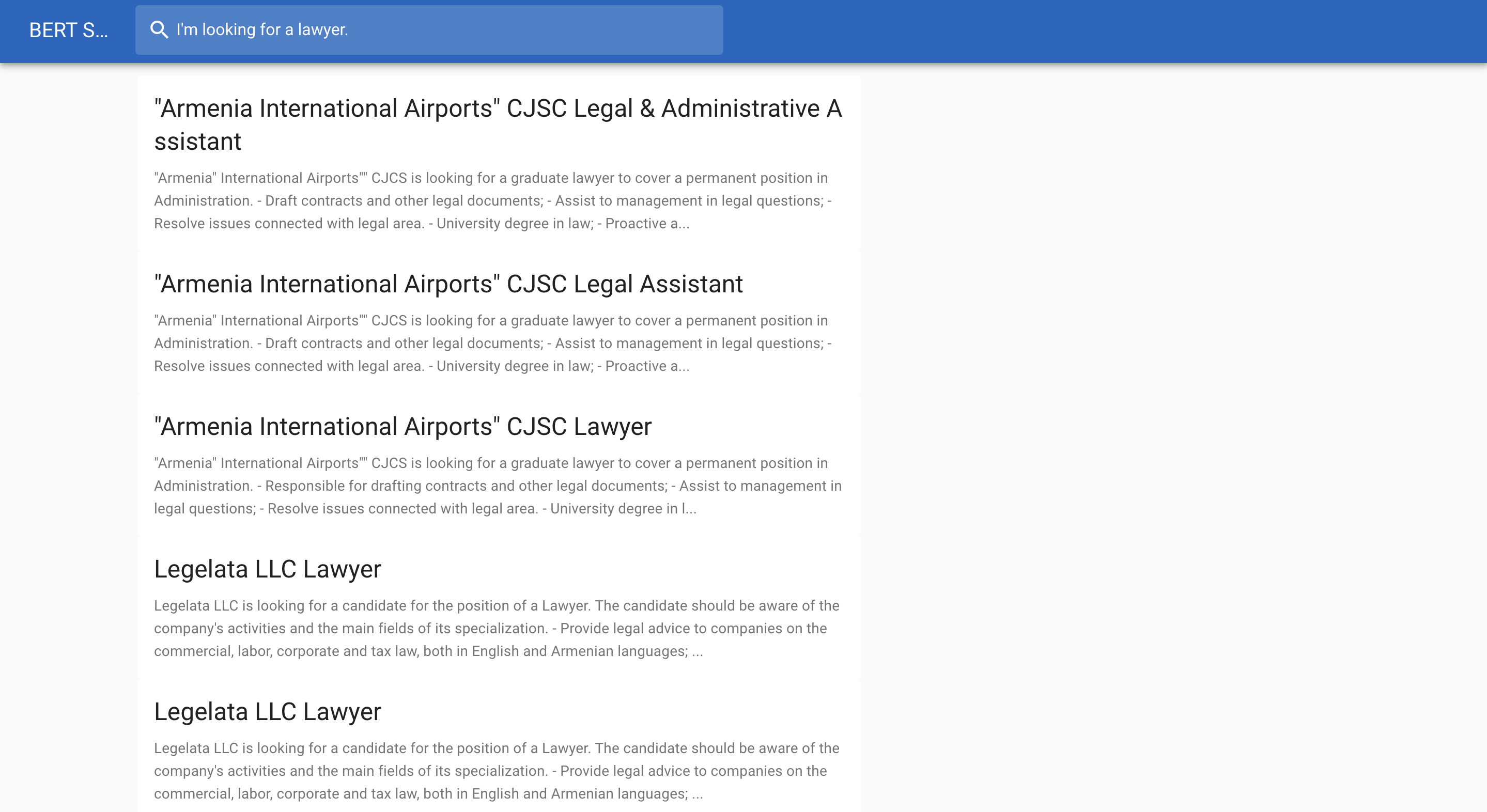
Below is a job search example:
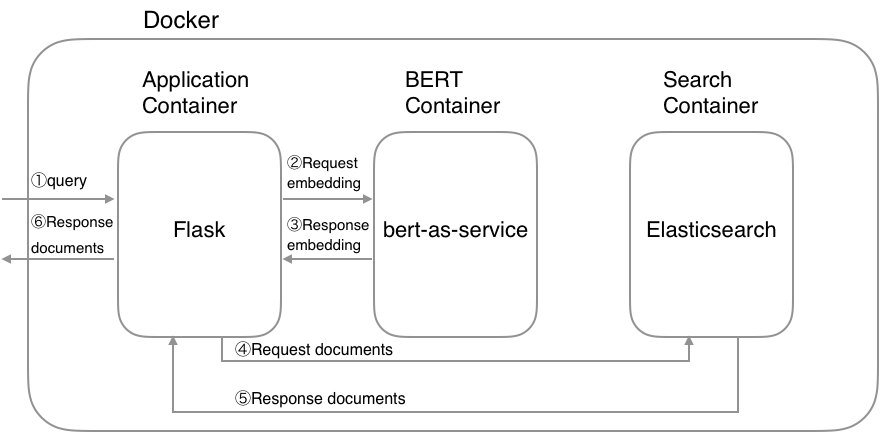
System architecture
Requirements
- Docker
- Docker Compose >= 1.22.0
Getting Started
1. Download a pretrained BERT model
List of released pretrained BERT models (click to expand...)
| BERT-Base, Uncased | 12-layer, 768-hidden, 12-heads, 110M parameters |
| BERT-Large, Uncased | 24-layer, 1024-hidden, 16-heads, 340M parameters |
| BERT-Base, Cased | 12-layer, 768-hidden, 12-heads , 110M parameters |
| BERT-Large, Cased | 24-layer, 1024-hidden, 16-heads, 340M parameters |
| BERT-Base, Multilingual Cased (New) | 104 languages, 12-layer, 768-hidden, 12-heads, 110M parameters |
| BERT-Base, Multilingual Cased (Old) | 102 languages, 12-layer, 768-hidden, 12-heads, 110M parameters |
| BERT-Base, Chinese | Chinese Simplified and Traditional, 12-layer, 768-hidden, 12-heads, 110M parameters |
$ wget https://storage.googleapis.com/bert_models/2018_10_18/cased_L-12_H-768_A-12.zip
$ unzip cased_L-12_H-768_A-12.zip
2. Set environment variables
You need to set a pretrained BERT model and Elasticsearch's index name as environment variables:
$ export PATH_MODEL=./cased_L-12_H-768_A-12
$ export INDEX_NAME=jobsearch
3. Run Docker containers
$ docker-compose up
CAUTION: If possible, assign high memory(more than 8GB) to Docker's memory configuration because BERT container needs high memory.
4. Create index
You can use the create index API to add a new index to an Elasticsearch cluster. When creating an index, you can specify the following:
- Settings for the index
- Mappings for fields in the index
- Index aliases
For example, if you want to create jobsearch index with title, text and text_vector fields, you can create the index by the following command:
$ python example/create_index.py --index_file=example/index.json --index_name=jobsearch
# index.json
{
  "settings": {
    "number_of_shards": 2,
    "number_of_replicas": 1
  },
  "mappings": {
    "dynamic": "true",
    "_source": {
      "enabled": "true"
    },
    "properties": {
      "title": {
        "type": "text"
      },
      "text": {
        "type": "text"
      },
      "text_vector": {
        "type": "dense_vector",
        "dims": 768
      }
    }
  }
}
CAUTION: The dims value of text_vector must need to match the dims of a pretrained BERT model.
5. Create documents
Once you created an index, you’re ready to index some document. The point here is to convert your document into a vector using BERT. The resulting vector is stored in the text_vector field. Let`s convert your data into a JSON document:
$ python example/create_documents.py --data=example/example.csv --index_name=jobsearch
# example/example.csv
"Title","Description"
"Saleswoman","lorem ipsum"
"Software Developer","lorem ipsum"
"Chief Financial Officer","lorem ipsum"
"General Manager","lorem ipsum"
"Network Administrator","lorem ipsum"
After finishing the script, you can get a JSON document like follows:
# documents.jsonl
{"_op_type": "index", "_index": "jobsearch", "text": "lorem ipsum", "title": "Saleswoman", "text_vector": [...]}
{"_op_type": "index", "_index": "jobsearch", "text": "lorem ipsum", "title": "Software Developer", "text_vector": [...]}
{"_op_type": "index", "_index": "jobsearch", "text": "lorem ipsum", "title": "Chief Financial Officer", "text_vector": [...]}
...
6. Index documents
After converting your data into a JSON, you can adds a JSON document to the specified index and makes it searchable.
$ python example/index_documents.py
7. Open browser
Go to http://127.0.0.1:5000.